


For a small form factor build, the right graphics card depends on the space your case allows and the jobs you expect it to handle. Low-profile cards such as the maxsun GeForce RTX 3050 6GB Low Profile suit slim PCs, while the ZOTAC Gaming GeForce RTX 4060 8GB Solo Graphics is a compact, two-slot option for a small gaming system. The older low-power cards in this comparison are more appropriate for display expansion and basic desktop use than demanding gaming.
Compare at a glance
| Product | Brand | Size | Weight | Stands out for | Price |
|---|---|---|---|---|---|
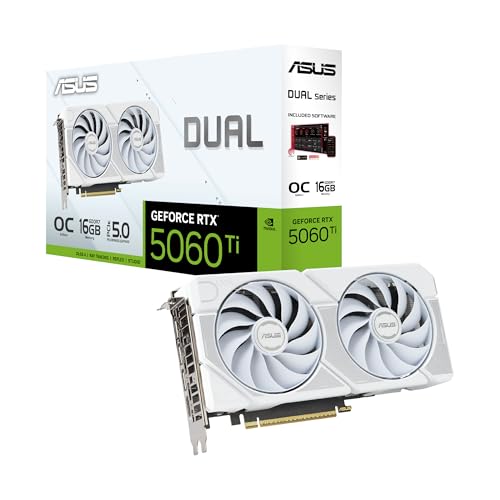
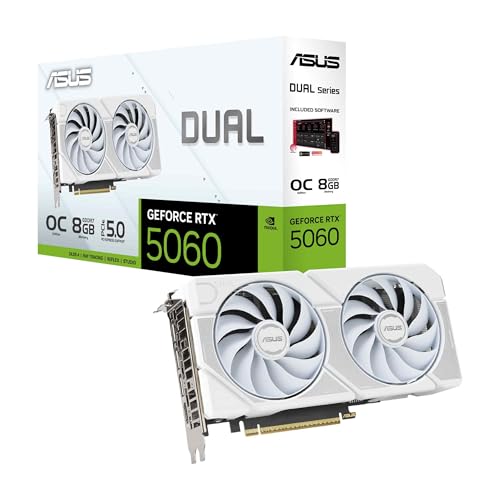
| 1 ASUS Dual RTX 5060 Ti 16GB White OC | ASUS | 9 × 4.7 × 0.1 in | 1.4 lb | 16GB GDDR7 memory | Check price |
| 2 maxsun GeForce RTX 3050 6GB Low Profile | maxsun | 6.65 × 2.71 × 0.04 in | 0.5 lb | Compact low-profile dimensions | Check price |
| 3 51RISC Radeon RX 550 4GB Low Profile | 51RISC | 6.61 × 2.71 × 0.7 in | Not listed | Low-profile form factor | Check price |
| 4 Glorto GeForce GT 210 1GB DDR3 | Glorto | 6.15 × 4.73 × 0.1 in | Not listed | Low-profile bracket included | Check price |
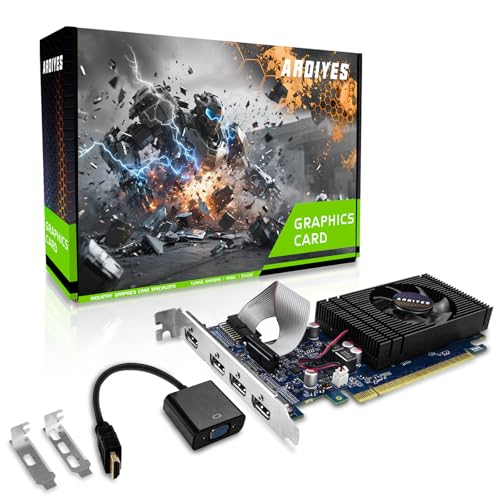
| 5 ARDIYES GT 740 4GB Graphics Card | ARDIYES | Not listed | Not listed | Four built-in HDMI ports | Check price |
| 6 maxsun GeForce GTX 1050 Ti 4GB | maxsun | 6.57 × 0.71 × 0.04 in | 0.5 lb | Low-profile design for small-form-factor systems | Check price |
| 7 MAXSUN Radeon RX 550 4GB Low Profile | maxsun | 6.61 × 2.71 × 0.04 in | 1.8 lb | Low-profile, single-slot design | Check price |
| 8 Glorto GeForce GT 730 4GB Low-Profile | Glorto | 6.03 × 4.73 × 0.1 in | Not listed | Low-profile design with half-height bracket | Check price |
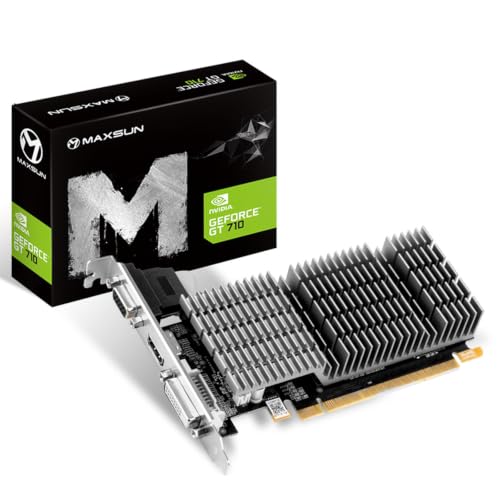
| 9 maxsun GeForce GT 710 2GB Low Profile | maxsun | 5.71 × 2.72 × 0.91 in | 0.3 lb | Low-profile form factor | Check price |
| 10 ZOTAC RTX 4060 Solo 8GB (Renewed) | ZOTAC | 6.4 × 4.6 × 0.1 in | Not listed | Compact 6.4-inch, two-slot design | Check price |
Sizes and weights as listed by the manufacturer on Amazon. Check the retailer for current price and availability.
Pros
- 16GB GDDR7 memory
- Dual BIOS profiles
- 0dB technology for light gaming
Cons
- Who should skip it: builders needing a single-slot graphics card
Pros
- Compact low-profile dimensions
- HDMI 2.1 and DisplayPort 1.4a
- DLSS support
Cons
- Who should skip it: builders needing more than 6GB of graphics memory
Pros
- Low-profile form factor
- No external power connector required
- DisplayPort and HDMI outputs
Cons
- Who should skip it: users needing more than 4GB of VRAM

Pros
- Low-profile bracket included
- HDMI and VGA outputs
- Supports two-screen output
Cons
- 1GB DDR3 memory with a 64-bit bus
- Who should skip it: users needing newer graphics APIs
Pros
- Four built-in HDMI ports
- 4GB GDDR5 memory
- Low-profile design with two bracket options
Cons
- Listed display outputs are HDMI
- Who should skip it: users whose monitors lack HDMI

Pros
- Low-profile design for small-form-factor systems
- HDMI and DisplayPort outputs
- Solid capacitors and silver-plated PCB
Cons
- Who should skip it: users who need more than 4GB of graphics memory

Pros
- Low-profile, single-slot design
- 4GB GDDR5 memory
- HDMI and DisplayPort outputs
Cons
- Who should skip it: buyers needing more than 4GB graphics memory

Pros
- Low-profile design with half-height bracket
- HDMI, DisplayPort, and VGA outputs
- Compatible with Windows 11
Cons
- Who should skip it: users needing demanding gaming or graphics performance
Pros
- Low-profile form factor
- Passive fanless cooling
- HDMI, VGA, and DVI-D outputs
Cons
- 2GB graphics memory
- Who should skip it: users needing more than 2GB of graphics memory

Pros
- Compact 6.4-inch, two-slot design
- Single 8-pin PCIe power connector
- DLSS 3 support
Cons
- 8GB of graphics memory
- Who should skip it: buyers who require a new graphics card
Key Numbers at a Glance
- The maxsun GeForce RTX 3050 6GB Low Profile measures 6.65 × 2.71 inches, while the maxsun GeForce GTX 1050 Ti 4GB measures 6.5 × 2.71 inches.
- The 51RISC Radeon RX 550 4GB Low Profile specifies a 35 W TDP and no external power connector.
- The ZOTAC Gaming GeForce RTX 4060 8GB Solo Graphics measures 6.4 inches long and uses a two-slot design.
- The ASUS Dual RTX 5060 Ti 16GB White OC has a 2.5-slot design, so it is thicker than the ZOTAC Gaming GeForce RTX 4060 8GB Solo Graphics.
Best Low-Profile Gaming Graphics Card: maxsun GeForce RTX 3050 6GB Low Profile
maxsun GeForce RTX 3050 6GB Low Profile stands out for a slim build with its 6.65 × 2.71-inch low-profile design, 6GB of GDDR6 memory, and DLSS support. Its product page lists HDMI 2.1 and DisplayPort 1.4a, useful when checking a monitor connection. The listing does not state power draw or a required power connector, so confirm those details before buying. Skip it if you need a card with published power requirements or more memory than 6GB.
Related guides: Best AMD Graphics Cards for GTA 6, Best Budget Graphics Cards for GTA 6 and Best Graphics Cards for GTA 6.
Best Compact Two-Slot Gaming Card: ZOTAC Gaming GeForce RTX 4060 8GB Solo Graphics
ZOTAC Gaming GeForce RTX 4060 8GB Solo Graphics is listed at 6.4 inches long and two slots thick, with 8GB GDDR6 memory and DLSS 3. The product page specifies a 500 W power supply and one standard 8-pin PCIe power connector, making those checks straightforward against your existing system. This card is marked renewed, which buyers should factor into their purchase decision. Skip it if your case cannot accommodate a two-slot card or your PSU does not meet the stated requirements.
Best Low-Power Display Upgrade: 51RISC Radeon RX 550 4GB Low Profile
51RISC Radeon RX 550 4GB Low Profile specifies a 35 W TDP and draws power from the PCIe slot without an external power connector. Its 4GB GDDR5 memory and HDMI and DisplayPort outputs suit a modest desktop or display upgrade. The older RX 550 is not the pick here for demanding modern games. Skip it if you want newer gaming features or need a stronger graphics card for intensive workloads.
Best Multi-Monitor Office Card: ARDIYES GT 740 4GB Graphics Card
ARDIYES GT 740 4GB Graphics Card has four HDMI ports and includes both low-profile and full-height brackets, features that can help with a multi-display office setup. Its product page describes it for everyday applications and 1080p video playback, not demanding gaming. Check your monitor inputs and case bracket height before ordering. Skip it if you need a modern gaming GPU or displays that do not accept HDMI.
Best Passive Low-Profile Card for Basic Display: maxsun GEFORCE GT 710 2GB Low Profile Ready Small
maxsun GEFORCE GT 710 2GB Low Profile Ready Small combines a low-profile design with passive, fanless cooling and HDMI, VGA, and DVI-D outputs. That makes it a possible fit for a basic display or media PC where the listed connections match existing equipment. Its 2GB memory and GT 710 graphics are not aimed at modern gaming. Skip it if you need a gaming upgrade or newer display connections.
How to Choose the Best Graphics Cards for Small Form Factor Builds
Check case length, height, and slot clearance
Bottom line: Match the card’s length, bracket height, and thickness to your exact case before considering performance. The maxsun GeForce RTX 3050 6GB Low Profile measures 6.65 × 2.71 inches, and the maxsun GeForce GTX 1050 Ti 4GB measures 6.5 × 2.71 inches. The ZOTAC Gaming GeForce RTX 4060 8GB Solo Graphics is 6.4 inches long and two slots thick, while the ASUS Dual RTX 5060 Ti 16GB White OC is 2.5 slots thick. Confirm the usable clearance in your case manual, including any nearby cables or drive cages.
“Low profile” and “small form factor” do not guarantee that every card fits every compact PC. Check whether your case needs a half-height bracket and whether the card’s cooler blocks an adjacent slot. For more component context, browse our graphics cards category.
Match power needs to your PSU
Bottom line: Verify both the PSU’s capacity and the exact PCIe power connector the card requires. The 51RISC Radeon RX 550 4GB Low Profile lists a 35 W TDP and no external power connector. The ZOTAC Gaming GeForce RTX 4060 8GB Solo Graphics specifies a 500 W power supply and one 8-pin PCIe connector. The maxsun GeForce RTX 3050 6GB Low Profile listing does not state its power requirements, so check the manufacturer’s specifications before ordering.
A wattage figure alone does not establish PSU quality or confirm that the right cable is available. Check the PSU label and manual, and compare its connectors with the graphics card requirement. Our guide to power supplies for gaming PCs covers PSU selection in more detail.
Choose a performance class for your actual workload
Bottom line: Choose a gaming-oriented card for games, and do not mistake memory capacity alone for gaming performance. The ASUS Dual RTX 5060 Ti 16GB White OC lists 16GB GDDR7 and NVIDIA Blackwell features, while the ZOTAC Gaming GeForce RTX 4060 8GB Solo Graphics lists 8GB GDDR6 and DLSS 3. Low-profile options include the RTX 3050 with 6GB GDDR6 and the GTX 1050 Ti with 4GB GDDR5. These specifications identify different product classes, but do not establish frame rates for a particular game or resolution.
For office use, extra displays, or basic video playback, older cards such as the GT 710 or GT 730 may offer relevant outputs without being gaming recommendations. If you are planning a compact gaming system, compare your game requirements and monitor resolution with independent performance information for the exact card model.
Compare display outputs with your monitors
Bottom line: Count your screens and match each monitor’s input to the card’s available outputs. The ARDIYES GT 740 4GB Graphics Card lists four HDMI ports, while the Glorto GeForce GT 730 4GB Low-Profile lists two HDMI ports plus DisplayPort and VGA. The maxsun GEFORCE GT 710 2GB Low Profile Ready Small has HDMI, VGA, and DVI-D. Port count and connector type matter more than a broad claim of multi-monitor support if your screens use different inputs.
Also check the supported resolution and output details for the exact card and monitor combination. A connector being present does not guarantee it matches every desired display mode. If your main priority is more display connections rather than gaming, compare outputs first.
Weigh cooling design and thickness
Bottom line: In a cramped case, treat cooler design and slot thickness as fit requirements, not cosmetic details. The ASUS Dual RTX 5060 Ti 16GB White OC uses a 2.5-slot design and lists 0dB technology for light gaming, while the maxsun GEFORCE GT 710 2GB Low Profile Ready Small uses passive fanless cooling. Those features describe different approaches, but the product data does not establish operating temperatures or noise under load.
A thicker cooler can conflict with neighboring cards or case panels, while a passive design still needs suitable airflow around its heatsink. Check your case layout and the card dimensions, then consider how the PC will be used. For broader component planning, see our PC components category.
How We Compared These Products
This guide is based on product research, comparing the listed graphics memory, dimensions, slot design, power information, cooling features, and display outputs. Customer rating information in the product data is not treated as proof of performance, and no firsthand evaluation is claimed. Where an important detail, such as power requirements, is absent from a listing, we recommend checking the manufacturer’s specifications before purchase.
Which Option Fits Your Build?
For a slim gaming PC, start with the maxsun GeForce RTX 3050 6GB Low Profile and verify its missing power details against your PSU and case. Skip it if you need published power requirements before you can confirm compatibility.
For a compact gaming system with room for a two-slot card and the listed power connection, the ZOTAC Gaming GeForce RTX 4060 8GB Solo Graphics offers a 6.4-inch length and 8GB GDDR6. Skip it if your case cannot fit two slots or your PSU does not meet its stated 500 W requirement.
For a basic low-power display upgrade, the 51RISC Radeon RX 550 4GB Low Profile lists a 35 W TDP and no external power connector. Skip it if your priority is demanding modern games rather than modest desktop use.
Mistakes to Avoid When Choosing a Small Form Factor Graphics Card
- Buying by card length alone. Check height, bracket type, and slot thickness as well as length; a short card can still be too thick for a compact case.
- Assuming every low-profile card fits. Confirm the case’s usable space and bracket requirements, since compact desktops vary in layout.
- Ignoring PSU connections. Compare the card’s required connector and stated PSU capacity with your power supply. If the product page omits these details, verify them before purchase.
- Choosing by memory amount alone. Match the GPU class and supported features to your games or workload; memory capacity by itself does not establish gaming performance.
Frequently Asked Questions
Will any low-profile graphics card fit a small form factor PC?
No. Check the case’s card length, bracket height, slot clearance, and available space around the cooler. The maxsun GeForce RTX 3050 6GB Low Profile is listed at 6.65 × 2.71 inches, but your case’s specifications determine whether it fits.
Which cards in this comparison do not need an external power connector?
The 51RISC Radeon RX 550 4GB Low Profile explicitly lists no external power connector and a 35 W TDP. Do not assume other models share that design; check each card’s power requirements and connector before buying.
Can these cards run a multi-monitor setup?
Several list multiple display outputs. The ARDIYES GT 740 4GB Graphics Card lists four HDMI ports, while the Glorto GeForce GT 730 4GB Low-Profile lists two HDMI ports, DisplayPort, and VGA. Confirm your monitors’ inputs and the card’s supported display configurations.
Is a low-profile card suitable for modern gaming?
Some low-profile cards in this comparison are gaming-oriented, including the maxsun GeForce RTX 3050 6GB Low Profile. Other listed cards, such as the GT 710 and GT 730, are better suited to basic display or desktop tasks; check game requirements and performance information for the exact model.
What should I check before replacing a graphics card in an office PC?
Confirm the case clearance, bracket type, motherboard slot, power requirements, and monitor connections. Older office PCs may also have system-specific restrictions, so check the PC manufacturer’s documentation rather than relying on the graphics card’s general compatibility description.



Write Your Review
No reviews yet. Be the first to share your experience!