We compare products using manufacturer specifications and product listings. When you buy through our links, we may earn a commission. As an Amazon Associate we earn from qualifying purchases.
Today’s PC & Computer Deals
Current Amazon price drops on PC & Computer picks we have already reviewed and recommended, grouped by category. Prices are re-checked twice a day.
This downloadable expansion adds vampire character creation, supernatural powers, Forgotten Hollow, and immortal-life gameplay to The Sims 4. It suits players looking for a supernatural theme, but requires the base game and all game updates, plus a PC that meets the pack's minimum system requirements.
Pros & Cons
Pros
Vampire character creation
Includes supernatural powers and a new setting
Cons
Requires The Sims 4 and all game updates
Who should skip it: players uninterested in supernatural gameplay
This HP tower pairs a 20-core Core i7-14700F with 32GB of RAM and a 1TB NVMe SSD, supporting multitasking and creative workloads with room for games and files. The GTX 1660 SUPER is aimed at 1080p gaming; skip it if you need a higher-tier graphics card for more demanding gaming or graphics work.
Pros & Cons
Pros
20-core Intel Core i7-14700F
32GB DDR4 memory
1TB PCIe NVMe SSD
Multiple display outputs
Cons
Who should skip it: buyers needing a higher-tier graphics card
The HP mini desktop combines a 12-core Intel Core i7-12700T, 32GB of memory, and a 1TB NVMe SSD in a compact design for office work and multitasking. Its three 4K display outputs and included keyboard and mouse suit multi-screen setups, but graphics details are not provided.
Pros & Cons
Pros
12-core processor
32GB memory and 1TB NVMe SSD
Three 4K display outputs
Keyboard and mouse included
Cons
Graphics specifications are not provided
Who should skip it: buyers needing specified graphics performance
This 5.9-foot Govee RGBIC backlight matches colors from a PC screen and offers four-sided coverage for 27–34-inch monitors, including curved models. Screen matching requires the Govee Home app and Govee Desktop software, and some copyright-protected content cannot be selected.
Pros & Cons
Pros
Fits 27–34-inch monitors, including curved models
Four-sided color-matching coverage
123 preset scenes and 11 music modes
Compatible with Razer Chroma
Cons
Screen matching requires the Govee Home app and Govee Desktop software
Some copyright-protected content cannot be selected for screen matching
Who should skip it: users who need screen matching with protected content
The HP OMEN 25L pairs a 20-core Core i7-14700F with a GTX 1660 SUPER for the 1080p gaming focus described in its listing, plus Windows 11 and a wired keyboard and mouse. Its 8GB of RAM and 256GB SSD are modest, so skip it if you need ample memory or room for a large game library right away.
The Olialia desktop pairs a six-core Ryzen 5 5600GT with 16GB of RAM, a 512GB SSD, and Windows 11 Home for everyday computing and a straightforward desktop setup. Its listed graphics are integrated Radeon, so buyers should not assume the gaming performance of a system with a dedicated graphics card.
Pros & Cons
Pros
16GB RAM
512GB SSD
Wi-Fi 6 and Ethernet
HDMI and VGA outputs
Cons
Who should skip it: players needing a dedicated graphics card
These LENRUE desktop speakers use USB or USB-C for power and an AUX connection for audio, with a USB-C-to-USB adapter included. They suit desk setups that need a headphone jack and touch-controlled lights; skip them if you need wireless audio.
Pros & Cons
Pros
USB-C-to-USB adapter included
Headphone output jack
Long connection cables
Cons
Who should skip it: listeners who need wireless audio
This renewed Dell Chromebook 11 3100 pairs an 11.6-inch, 1366 x 768 display with a Celeron N4020, 4GB of RAM, and Chrome OS. Its compact 2.85-pound design suits basic, portable computing, while 16GB of flash storage leaves limited room for locally saved files.
Pros & Cons
Pros
Compact 11.6-inch form factor
Weighs 2.85 pounds
Chrome OS included
Cons
16GB of flash storage
Who should skip it: users needing substantial local storage
This renewed 16-inch MacBook Pro pairs Apple’s M1 Pro chip with 16GB of memory and a 1TB SSD, a configuration suited to demanding creative and professional workflows. Apple claims up to 17 hours of battery life, but this is a renewed unit rather than a new one.
This HP laptop pairs an Intel N150 processor with a 14-inch HD anti-glare display and a slim profile, making it a portable option for everyday tasks. Its 4GB of RAM is a constraint for heavier multitasking, so skip it if you need more demanding performance.
Pros & Cons
Pros
Slim 0.71-inch profile
HD anti-glare display
USB-C and HDMI ports
Cons
4GB RAM limits heavier multitasking
Who should skip it: users needing more demanding performance
This NIMO pairs an 8-core Ryzen 7 7735HS with Radeon 680M graphics for everyday multitasking, coursework, and light creative work. Its 8GB of RAM and 256GB SSD are modest for demanding workloads, so consider those limits before choosing it for heavier gaming or large projects.
The HP 15.6-inch laptop pairs an Intel N150 processor with a numeric keypad, privacy shutter, and a bundled one-year Microsoft 365 Personal subscription with 1TB of cloud storage. Its 4GB of memory and 1366 x 768 display make it a better fit for light everyday tasks than demanding workloads.
Pros & Cons
Pros
Numeric keypad
Camera privacy shutter and microphone mute key
One-year Microsoft 365 Personal subscription
Wi-Fi 6 and Bluetooth 5.4
Cons
4GB of memory limits headroom for demanding multitasking
1366 x 768 resolution is modest for a 15.6-inch display
Who should skip it: users needing demanding-workload performance
This HP 14-inch laptop pairs an Intel N150 processor with 128GB of UFS storage, Wi-Fi 6, and a portable 3.24-pound design for everyday browsing, documents, video calls, and online learning. Skip it if you need more than 4GB of memory for demanding multitasking or a higher-resolution screen.
Pros & Cons
Pros
Portable 3.24-pound design
Wi-Fi 6 and Bluetooth 5.4
HDMI and USB-C connectivity
One-year Microsoft 365 Personal included
Cons
4GB of RAM
14-inch HD display
Who should skip it: users needing demanding multitasking or a higher-resolution screen
The DRKAKO pairs a 15.6-inch FHD IPS display with 12GB of RAM, a 256GB SSD, and a 180-degree hinge for schoolwork, browsing, and streaming. Its J4105 processor and stated battery life of up to six hours are better suited to everyday tasks than demanding workloads; skip it if you need a laptop for intensive computing.
Pros & Cons
Pros
Full HD IPS display
12GB RAM and 256GB SSD
180-degree lay-flat hinge
Multiple connection options
Cons
Office 365 included for one year
Who should skip it: users needing intensive computing
The KAIGERR laptop combines a Ryzen 7430U, 16GB of memory, and a 512GB SSD with a 16-inch FHD display and a broad selection of ports. It may suit students and everyday users who want upgrade options, but skip it if gaming performance is a priority, since graphics details are not specified.
Pros & Cons
Pros
16GB memory and 512GB NVMe SSD
Two M.2 slots for upgrades
Wi-Fi 6 and Bluetooth 5.2
Windows 11 Pro included
Cons
Gaming graphics capability is not specified
Who should skip it: players seeking specified graphics performance
The LG 32GX850A-B pairs a 32-inch glossy 4K OLED panel with 165Hz refresh, 0.03ms response time, and G-SYNC and FreeSync Premium Pro support. It suits players who want detailed visuals or can switch to Full HD for up to 330Hz; that faster mode uses lower resolution.
Pros & Cons
Pros
4K OLED resolution with deep stated contrast
Two refresh-rate and resolution modes
G-SYNC Compatible and FreeSync Premium Pro
Four-way stand adjustment
Cons
330Hz mode runs at Full HD
Who should skip it: buyers needing typical brightness above 275 nits
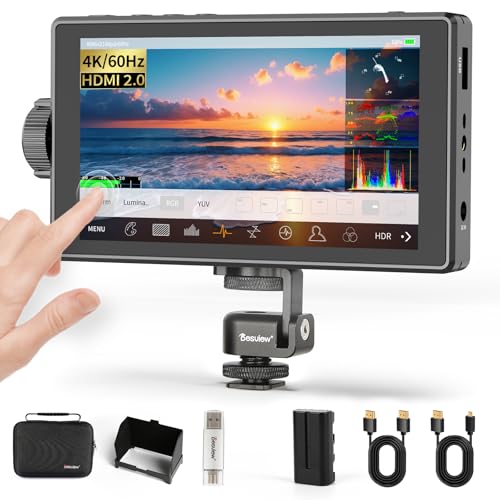
The Desview A5 is a 5.5-inch 1080p camera monitor with 4K/60Hz HDMI input and loop-out, monitoring tools, and touch and scroll-knob controls. It suits DSLR or mirrorless setups that benefit from on-camera focus and exposure aids, but the included NP-F550 battery is rated for approximately 2 to 3 hours.
Pros & Cons
Pros
Includes an NP-F550 battery and carry case
Three stated power options
Built-in waveform and focus peaking
HDMI loop-out for another screen
Cons
Included battery runtime is approximately 2 to 3 hours
Who should skip it: users needing longer runtime from the included battery
The Samsung ViewFinity S50GC is a 34-inch Ultra-WQHD monitor with a 21:9 screen, 100Hz refresh rate, and picture-by-picture and picture-in-picture modes. Its wide workspace and dual-source features suit multitasking and mixed work and entertainment, while 100Hz may not suit players seeking higher refresh rates.
Pros & Cons
Pros
34-inch Ultra-WQHD 21:9 workspace
100Hz refresh rate with FreeSync
Picture-by-picture and picture-in-picture modes
Two HDMI inputs and one DisplayPort input
Cons
Who should skip it: competitive gamers seeking refresh rates above 100Hz
The Samsung Odyssey G5 G50F pairs a 27-inch QHD IPS panel with a 180Hz refresh rate and 1ms GtG response time, making it suited to fast-paced gaming. HDR10 and an adjustable stand add flexibility, though the listed features do not specify brightness or connectivity details.
Pros & Cons
Pros
27-inch QHD IPS panel
180Hz refresh rate
G-Sync compatibility and AMD FreeSync
Height-adjustable, pivoting, tilting, swiveling stand
Cons
Who should skip it: buyers seeking refresh rates above 180Hz
The Samsung Odyssey OLED G6 pairs a 27-inch QHD QD-OLED panel with a 240Hz refresh rate and 0.03ms response time, making it a strong fit for fast-paced gaming. HDR10, FreeSync Premium, and an adjustable stand add flexibility, while its OLED panel may not suit buyers who prefer another panel type.
Pros & Cons
Pros
QHD QD-OLED display
240Hz refresh rate
Height-adjustable, pivoting stand
Glare Free technology
Cons
Who should skip it: buyers who prefer a non-OLED panel
The Samsung Odyssey OLED G7 pairs a 32-inch glossy OLED panel with 4K at 165Hz and a Full HD 330Hz mode, giving players a choice between sharper detail and higher refresh rates. Its adjustable stand and adaptive sync suit gaming setups, but the faster mode runs at lower resolution.
Pros & Cons
Pros
Glossy 4K OLED panel
Two resolution and refresh-rate modes
G-Sync compatibility and AMD FreeSync
Height-adjustable, pivoting stand
Cons
Who should skip it: 4K-only gamers avoiding FHD mode
The Samsung Odyssey G9 G91F pairs a 49-inch, 32:9 DQHD curved screen with a 144Hz refresh rate, making it suited to immersive gaming and side-by-side multitasking. Its size and 1000R curve call for ample desk space, and the supplied specifications do not identify ports or panel type.
Pros & Cons
Pros
49-inch DQHD 32:9 display
144Hz refresh rate and stated 1ms response time
AMD FreeSync Premium Pro and VRR
Picture-in-Picture and split-screen features
Cons
The large display requires substantial desk space
Who should skip it: shoppers seeking a compact monitor
The 27-inch Samsung Odyssey OLED G7 combines 4K resolution and QD-OLED with a 165Hz refresh rate, making it suited to detailed, fast-paced gaming. Skip it if you prefer a larger screen; its 27-inch size may feel limiting for that setup.
Pros & Cons
Pros
4K QD-OLED panel
165Hz refresh rate
AMD FreeSync Premium
3-year warranty
Cons
Who should skip it: shoppers who prefer a larger screen
This 5.1 x 1.5 x 1.5-inch stainless steel pencil holder has multiple slots for pens, pencils, markers, or small design tools, plus a printed message for graphic designers. It suits a compact desk or a design-themed gift; skip it if you need a larger organizer.
Pros & Cons
Pros
Multiple slots for everyday writing tools
Compact dimensions for small workspaces
Designer-focused printed message
Cons
Who should skip it: users needing a larger organizer
These novelty gaming socks are made from 95% cotton and 5% polyester, with a “Do Not Disturb, I'm Gaming” theme suited to gamers who enjoy playful gifts. The one-size design is stated to fit US sizes 6 to 12, so it may not suit people outside that range.
Pros & Cons
Pros
Gaming-themed novelty design
Stated US size range
Cotton-polyester blend
Cons
Who should skip it: anyone outside US sizes 6 to 12
This illustrated hardcover explores the twentieth century through the lens of color, making it a fit for readers interested in design and visual history. Its 9.5-by-11.375-inch format and roughly 3.05-pound weight suit a coffee table better than a lightweight, portable read.
Pros & Cons
Pros
Illustrated hardcover format
Large coffee-table dimensions
Focused on color history
Cons
Weighs about 3.05 pounds
Who should skip it: readers seeking PC hardware guidance
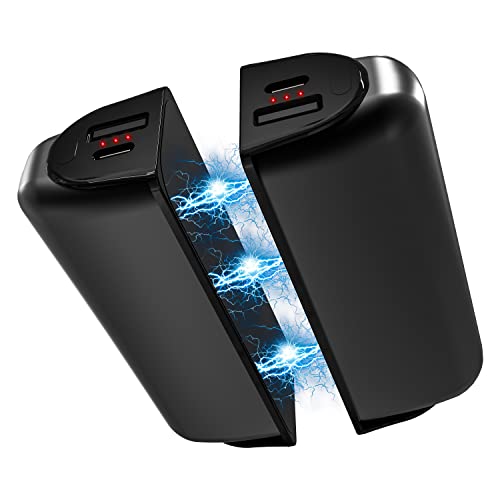
This two-piece rechargeable set combines three heat settings with a magnetic design, so the warmers can be separated for two pockets or joined for double-sided heating. It also functions as a power bank, but the listing does not state runtime or charging speed, making it harder to assess for extended outings.
Pros & Cons
Pros
Two warmers in one set
Three selectable heat settings
Can charge other electronic devices
Cons
Runtime and charging speed are not stated
Who should skip it: buyers needing a stated runtime
The APC BX1500M is a 1500VA/900W UPS with five battery-backed outlets, five surge-only outlets, and AVR for correcting voltage fluctuations. Its LCD shows charge, estimated runtime, load, and input voltage; skip it if you need battery backup for more than five connected devices.
Pros & Cons
Pros
1500VA/900W capacity
AVR voltage regulation
LCD status display
User-replaceable battery
UL certified
Cons
Only five outlets provide battery backup
Who should skip it: users needing battery backup for more than five devices
This compact, double-sided rechargeable hand warmer is designed to reach 108°F in under two minutes and provide 3 to 4 hours of warmth per charge. Its small 2.4-inch-square size suits people who want a hand-sized warmer, but the stated runtime may not cover longer outings.
Pros & Cons
Pros
Double-sided warming
Compact, lightweight design
Rechargeable operation
Cons
Who should skip it: anyone needing warmth beyond the stated 3 to 4 hours per charge
This two-pack of rechargeable hand warmers has three heat settings and a flat design that can fit in pockets, gloves, or hat brims. Lerat states they heat up to 131°F and provide up to six hours of warmth, so they suit outdoor activities but may not cover longer outings.
This Deepsoon heating pad measures 24 x 12 inches and offers six heat levels, four timer settings, and a 75-inch power cord for flexible placement. Its compact size suits targeted warmth for areas such as the back or shoulders, but it may not cover larger areas at once.
Pros & Cons
Pros
Six adjustable heat levels
Four timer settings
75-inch power cord
Cons
Frequent machine washing is discouraged
Who should skip it: users needing coverage beyond 24 x 12 inches
The GIGABYTE B550M K is a Micro-ATX AM4 motherboard for Ryzen 5000, 4000, and 3000 Series processors, with DDR4 support and two M.2 slots. Its PCIe 4.0 x16 slot and mix of PCIe 4.0 and 3.0 M.2 connectivity suit compatible builds; skip it if your processor uses a different socket.
Pros & Cons
Pros
Two M.2 slots
Four DDR4 DIMM slots
Micro-ATX form factor
Cons
Who should skip it: builders using non-AM4 processors
The GIGABYTE B650 Eagle AX is an ATX AM5 motherboard supporting Ryzen 7000, 8000, and 9000 processors, with four DDR5 DIMM slots and three M.2 slots, including one PCIe 5.0 slot. It suits builds needing Wi-Fi 6E and multiple SSD connections; skip it if you need a smaller-than-ATX motherboard.
Pros & Cons
Pros
Supports three Ryzen processor series
Three M.2 slots, including PCIe 5.0
Wi-Fi 6E and GbE LAN
Cons
Who should skip it: builders needing a smaller-than-ATX motherboard
The NZXT H5 Flow is a compact ATX mid-tower with mesh panels and two included 120mm fans, giving builders an airflow-focused starting point. It supports radiators up to 360mm in front and 240mm up top, but the two optional PSU-shroud intake fans are not included.
Pros & Cons
Pros
Two 120mm fans included
Supports front radiators up to 360mm
Mesh panels support airflow
Cable routing channels, hooks, and straps
Cons
Who should skip it: builders needing every intake fan included
The Corsair RM850e is a fully modular 850W power supply with ATX 3.1 support and a native 12V-2x6 cable, which can simplify cabling for compatible builds. Its 120mm fan and Modern Standby support suit builders prioritizing low-noise operation and fast wake-from-sleep; skip it if your system needs more than 850W.
Pros & Cons
Pros
Fully modular cabling
Native 12V-2x6 cable included
ATX 3.1 compliant
Modern Standby compatible
Cons
Who should skip it: builders whose systems need more than 850W
The AMD Ryzen 9 9900X combines 12 Zen 5 cores and 24 threads with a maximum boost clock of 5.6 GHz, giving desktop builders substantial processing capacity for demanding workloads. It uses the AM5 socket and supports DDR5-5600 memory, so check motherboard and memory compatibility before planning a build.
Pros & Cons
Pros
12 cores and 24 threads
Unlocked for overclocking
76 MB cache
DDR5-5600 support
Cons
Who should skip it: builders needing a bundled cooler
The UAG Monarch is a screw-closed hardshell case for Apple AirTag, with a locking carabiner, key ring attachment, and built-in bottle opener. Its rugged construction and stated dust and water protection suit travel and everyday carry, but opening the enclosure requires the included tool.
Pros & Cons
Pros
Locking carabiner and key ring attachment
Built-in bottle opener
Tool and spare screws included
Cons
Who should skip it: users who need quick, tool-free AirTag access
The ASUS ROG Strix B850-A is an ATX AM5 motherboard for Ryzen 9000, 8000, and 7000 series processors, with four M.2 slots, Wi-Fi 7, and 2.5G LAN. Its ATX form factor makes it a better fit for compatible larger cases than compact builds.
Pros & Cons
Pros
Four M.2 slots
Wi-Fi 7 and 2.5G LAN
Supports three Ryzen desktop processor series
Cons
Who should skip it: builders needing a smaller-than-ATX motherboard
The Thermaltake Toughpower GT is an 850W, 80 PLUS Gold power supply with ATX 3.1 support and a native PCIe 12V-2x6 connector for compatible modern graphics cards. Its fully modular cables can simplify cable routing, while Smart Zero Fan adjusts fan speed based on load.
Pros & Cons
Pros
Native PCIe 12V-2x6 connector
Fully modular flat cables
80 PLUS Gold efficiency
Smart Zero Fan technology
Cons
Who should skip it: builders needing more than 850W
Trapped in a Video Game: The Complete Series is a paperback book, not a computer or PC component. Its complete-series format may suit readers looking for the story collected in one product, while its 9.4-inch height and 3-pound weight are worth considering for carrying or shelf space.
Pros & Cons
Pros
Complete series in one product
Paperback binding
Cons
Who should skip it: readers shopping for computer hardware
The Logitech G502 X combines LIGHTFORCE switches, a HERO 25K sensor, and a customizable scroll wheel with free-spin and ratcheting modes. Its 13 buttons and adjustable DPI-shift button suit players who want configurable controls, while the wired connection is a trade-off for anyone seeking cable-free use.
Pros & Cons
Pros
13 buttons for configurable controls
Free-spin and ratcheting scroll modes
Reversible, removable DPI-shift button
89-gram listed weight
Cons
Who should skip it: users who need a wireless mouse
The renewed Plantronics EncorePro HW510 is an over-the-head headset with padded earcups and a headband for extended office or call-center use. Its noise cancellation and wideband audio are intended to support clearer calls, but skip it if you specifically want a new headset.
Pros & Cons
Pros
Padded over-the-head design
Noise cancellation for calls
Wideband audio
Plug-and-play setup
Cons
Who should skip it: shoppers seeking a new headset
The Razer Basilisk V3 is a wired ergonomic gaming mouse with 11 programmable buttons, a 26K DPI optical sensor, and a scroll wheel that switches between free-spin and tactile modes. Its thumb rest and customizable RGB zones suit players who want extra controls and lighting, but its wired connection is not for cable-free setups.
The Logitech G432 is a wired gaming headset with 50 mm drivers, USB and 3.5 mm connections, and a flip-to-mute boom mic. It suits players who want flexible connection options and virtual surround sound, though DTS Headphone:X 2.0 requires Logitech G HUB software.
Pros & Cons
Pros
USB and 3.5 mm connections
Flip-up mute microphone
Rotating ear cups
Cons
Who should skip it: users avoiding G HUB for surround
The Razer DeathAdder Essential is a wired gaming mouse with a 6,400 DPI optical sensor, five programmable buttons, and rubber side grips. Its reprogrammable controls suit players who want adjustable sensitivity and button mapping, but skip it if you need a wireless mouse.
Pros & Cons
Pros
Adjustable 6,400 DPI optical sensor
Five programmable buttons
Rubberized side grips
Mechanical switches rated for up to 10 million clicks
The Krysenix wireless gaming headset combines 2.4GHz USB connectivity, 50mm drivers, and up to 60 hours of battery life with RGB lighting off. It suits PC and PlayStation players who want wireless audio, but Bluetooth does not work with PS4 or PS5 and neither connection mode supports Xbox.
Pros & Cons
Pros
Up to 60 hours of stated battery life
2.4GHz USB and Bluetooth connections
50mm titanium-coated drivers
Cons
Not compatible with Xbox
Bluetooth does not support PS4 or PS5
Who should skip it: players needing Bluetooth console audio
The GLORIOUS Model I 2 Wired combines a 66-gram design, ergonomic thumb rest, and nine programmable buttons for players who want customizable controls in a lightweight mouse. Its wired connection may not suit users who prefer a wireless setup.
Pros & Cons
Pros
Lightweight 66-gram design
Nine programmable buttons
Swappable thumb-button shapes
Dedicated thumb rest
Cons
Wired connection
Who should skip it: users who prefer wireless mice
The WD Elements is a 20TB desktop external hard drive with USB 3.0 connectivity, offering substantial add-on storage for Windows PCs with plug-and-play setup. It suits users who need room for large files; macOS use requires reformatting.
Pros & Cons
Pros
20TB of stated storage capacity
Plug-and-play ready for Windows PCs
Cons
Who should skip it: Mac users who need use without reformatting
The Samsung T9 is a 4TB external SSD with USB 3.2 Gen 2x2 and manufacturer-rated read and write speeds of up to 2,000 MB/s. Its capacity and thermal management may suit creators, students, and professionals handling large files, but the stated top speeds depend on a compatible connection.
Pros & Cons
Pros
Large 4TB capacity
Up to 2,000 MB/s stated speeds
Thermal management for heavy use
Firmware updates and drive health monitoring
Cons
Top speeds depend on a compatible USB 3.2 Gen 2x2 connection
Who should skip it: buyers who do not need 4TB capacity
This 1TB portable SSD combines a pocket-sized design with IP65 water and dust resistance and up to 3-meter drop protection. SanDisk states speeds of up to 2,000MB/s, making it a fit for moving large files, but actual performance may vary from that maximum.
The Western Digital Elements is an 8TB desktop external hard drive with USB 3.0 for adding storage to a computer. Its plug-and-play setup is specified for Windows PCs, while its desktop format and 2.09-pound weight make it better suited to a stationary setup than frequent travel.
Pros & Cons
Pros
Generous 8TB capacity
Windows plug-and-play setup
USB 3.0 interface
Cons
Who should skip it: buyers needing pocket-sized storage
This 1TB portable hard drive offers extra space for backups, media, and last-generation console games, with a lightweight 0.3 lb body and plug-and-play compatibility across listed systems. Skip it if you need to run or store PS5 or Xbox Series X|S games directly from external storage.
Pros & Cons
Pros
1TB of portable storage
Lightweight, compact design
Broad listed system compatibility
Silicone outer casing
Cons
Who should skip it: players needing direct PS5 or Xbox Series X|S game storage
The Samsung T7 is a compact 4TB external SSD with stated read and write speeds up to 1,050/1,000 MB/s, useful for moving large files and keeping games or creative projects on portable storage. It suits PC users and compatible mobile-device workflows, but the stated peak speeds do not guarantee sustained transfer rates.
Pros & Cons
Pros
Large 4TB capacity
Compact, lightweight design
Stated high-speed transfers
Aluminum body with stated fall protection
Cons
Peak speeds do not guarantee sustained transfer rates
Who should skip it: buyers needing guaranteed sustained speeds
This pocket-sized 2TB external SSD combines USB-C 3.2 Gen 2 connectivity with manufacturer-stated transfer speeds of up to 2000MB/s. It suits portable file storage and transfers, though actual speeds can vary, and its IP65 rating and drop protection are useful for travel.
The SanDisk Optimus GX PRO 850P is a 4TB PCIe 4.0 M.2 2280 SSD with a heatsink, licensed for PS5 and PS5 Pro consoles. SanDisk states sequential read speeds up to 7,300 MB/s; it suits console owners who want more built-in game storage, but its console-specific positioning may not fit other needs.
Pros & Cons
Pros
4TB capacity for game storage
Included console-focused heatsink
Officially licensed for PS5 and PS5 Pro
Cons
Who should skip it: buyers seeking an SSD for other uses
The eero Outdoor 7 is a dual-band Wi-Fi 7 mesh router rated for up to 15,000 square feet of outdoor coverage and 100-plus devices. It suits eero households extending Wi-Fi to patios or yards, with AC or PoE+ power options; the coverage figure is a manufacturer claim.
Pros & Cons
Pros
Wi-Fi 7 support
IP66 weatherproof rating
AC or PoE+ power options
Compatible with previous eero generations
Cons
Who should skip it: shoppers who only need indoor Wi-Fi
The eero 7 three-pack is a dual-band Wi-Fi 7 mesh system rated to cover up to 6,000 square feet and support internet plans up to 2.5 Gbps. It suits homes with many connected devices, but skip it if your internet plan exceeds 2.5 Gbps.
Pros & Cons
Pros
Three-router mesh package
Up to 6,000 square feet of stated coverage
Two 2.5 GbE ports per router
Supports more than 120 devices
Cons
Who should skip it: users with internet plans over 2.5 Gbps
The TP-Link Deco BE25 3-pack is a dual-band Wi-Fi 7 mesh system with two 2.5G Ethernet ports per unit and coverage rated up to 6,600 square feet. It suits larger homes with many connected devices; a separate modem is required, and actual coverage varies with layout and obstacles.
Pros & Cons
Pros
Three-unit mesh system
Two 2.5G Ethernet ports per unit
Supports wired and wireless backhaul
Works with other Deco routers
Cons
Requires a separate modem
Who should skip it: shoppers requiring tri-band Wi-Fi
The ASUS RT-AX1800S is a dual-band Wi-Fi 6 router with four Gigabit LAN ports, AiMesh compatibility, and network security and parental control features. It suits homes looking to connect multiple devices, but its actual coverage and throughput depend on the home environment and network conditions.
Pros & Cons
Pros
Four Gigabit LAN ports
Wi-Fi 6 with OFDMA and MU-MIMO
AiMesh compatible
Built-in parental control features
Cons
Coverage and throughput vary with network and building conditions
Who should skip it: buyers needing a stated coverage range
Prices and availability are accurate as of the date/time indicated on each product and are subject to change. Any price and availability information displayed on Amazon at the time of purchase will apply to the purchase of the product. As an Amazon Associate we earn from qualifying purchases.