


If you are choosing a graphics card for a 1440p or 4K gaming build, the main trade-off is between the RTX 5070’s NVIDIA feature set and the RX 9070 XT models’ 16GB of memory. The listed RTX 5070 cards have 12GB GDDR7, while the RX 9070 XT cards have 16GB GDDR6; your case clearance, power supply, games, and software can matter as much as the GPU name.
Compare at a glance
| Product | Brand | Size | Weight | Stands out for | Price |
|---|---|---|---|---|---|
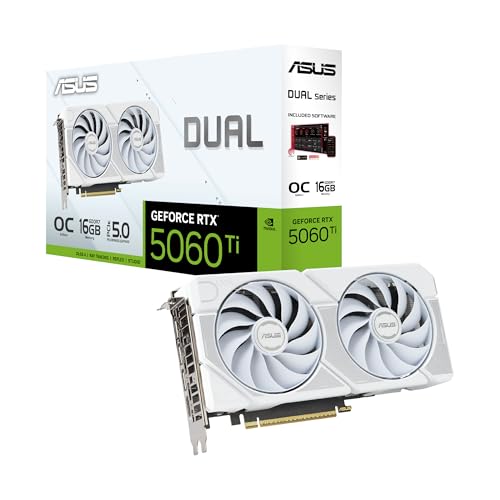
| 1 ASUS Dual RTX 5060 Ti 16GB White OC | ASUS | 9 × 4.7 × 0.1 in | 1.4 lb | 16GB GDDR7 memory | Check price |
| 2 ASRock Radeon RX 9070 XT Challenger 16GB | ASRock | 11.42 × 4.84 × 0.04 in | 2.3 lb | 16GB GDDR6 memory | Check price |
| 3 PowerColor Reaper RX 9070 XT 16GB | PowerColor | 11.97 × 5 × 0.1 in | 0.5 lb | 16GB of GDDR6 | Check price |
| 4 ASUS TUF Gaming RTX 5070 Ti 16GB OC | ASUS | 13 × 5.5 × 2.5 in | 3.6 lb | 16GB of GDDR7 memory | Check price |
| 5 MSI RTX 5070 Shadow 2X OC 12GB | msi | 9.1 × 5 × 0.1 in | 2.5 lb | 12GB of GDDR7 memory | Check price |
| 6 ASUS Prime Radeon RX 9070 XT 16GB | ASUS | 12.3 × 5.1 × 2 in | 3.3 lb | 16GB of GDDR6 memory | Check price |
| 7 ASUS PRIME RTX 5070 12GB OC | ASUS | 12 × 5 × 2 in | 2.3 lb | 12GB GDDR7 memory | Check price |
| 8 ASUS TUF Gaming RTX 5070 12GB OC | ASUS | 13 × 5.5 × 2.5 in | 3.4 lb | 12GB of GDDR7 memory | Check price |
Sizes and weights as listed by the manufacturer on Amazon. Check the retailer for current price and availability.
Pros
- 16GB GDDR7 memory
- Dual BIOS profiles
- 0dB technology for light gaming
Cons
- Who should skip it: builders needing a single-slot graphics card
Pros
- 16GB GDDR6 memory
- Three DisplayPort 2.1a outputs
- Triple-fan cooling with 0dB mode
Cons
- Who should skip it: owners of cases lacking 11.4-inch clearance
Best for a compact 16GB AMD card
Pros
- 16GB of GDDR6
- Three DisplayPort 2.1 outputs
- HDMI 2.1 output
Cons
- Requires a stated minimum system power of 750W
- Who should skip it: builders without two 8-pin PCI Express power connectors

Pros
- 16GB of GDDR7 memory
- Three-fan cooling design
- Protective PCB coating
- GPU Tweak III monitoring and thermal controls
Cons
- 3.125-slot cooler requires case clearance
- Who should skip it: buyers lacking the required PSU connector

Pros
- 12GB of GDDR7 memory
- Three DisplayPort outputs
- Airflow-vented reinforcing backplate
Cons
- Who should skip it: users needing more than 12GB VRAM

Pros
- 16GB of GDDR6 memory
- Dual BIOS profiles
- 2.5-slot design
Cons
- Who should skip it: builders without 12.3 inches of clearance
Best for an SFF-oriented RTX 5070 build

Pros
- 12GB GDDR7 memory
- 2.5-slot design
- Dual BIOS profiles
- Dual-ball fan bearings
Cons
- Who should skip it: builders limited to two slots

Pros
- 12GB of GDDR7 memory
- Protective PCB coating
- GPU Tweak III controls
Cons
- Who should skip it: builders lacking 3.125-slot clearance
Key Numbers at a Glance
- The listed RTX 5070 cards have 12GB GDDR7; the listed RX 9070 XT cards have 16GB GDDR6.
- The ASRock Radeon RX 9070 XT Challenger 16GB lists a 2970 MHz boost clock.
- The PowerColor Reaper RX 9070 XT 16GB measures 289 mm long and 41 mm thick.
- The ASUS TUF Gaming RTX 5070 12GB OC is a 3.125-slot card, while the ASUS PRIME RTX 5070 12GB OC is 2.5-slot.
RTX 5070 vs RX 9070 XT: What to Compare Before Buying
Memory capacity and workload
Bottom line: Favor 16GB if your games or creative projects benefit from more graphics memory, but weigh that against the RTX feature set you actually use. The RX 9070 XT listings specify 16GB GDDR6 on a 256-bit bus for the ASRock Challenger, while the RTX 5070 listings specify 12GB GDDR7 on the MSI card. Capacity alone does not establish which GPU is faster in a particular game or application, so check benchmarks for your specific titles, resolution, and software version.
For gaming, look at performance at your monitor’s resolution and settings, including ray tracing if you use it. If you create video or 3D projects, check the application’s support for the relevant GPU features before treating memory capacity as the deciding factor.
Upscaling, ray tracing, and software support
Bottom line: Choose by the features your games and applications support, not by a feature name alone. The RTX 5070 cards are based on NVIDIA Blackwell and list DLSS 4. The ASRock RX 9070 XT listing identifies RDNA 4, 3rd Gen ray tracing, and 2nd Gen AI accelerators.
These feature descriptions do not establish relative frame rates. Before buying, confirm that your games support the upscaling or ray-tracing features you plan to use, and compare independent results for the same settings and resolution.
Power supply and connectors
Bottom line: Check the exact card’s power guidance and connector against your PSU before ordering. The PowerColor Reaper listing specifies two 8-pin PCI Express power connectors and a minimum system power of 750W. The ASUS TUF Gaming RTX 5070 Ti 16GB OC listing calls for a minimum 850W PSU with a 16-pin 12V-2×6 connector, but that is a 5070 Ti model, not one of the RTX 5070 cards being compared.
Do not transfer power requirements from one card variant to another. Check the manufacturer’s page for the precise model you intend to buy, then verify the available connectors and PSU guidance for your complete system.
Case clearance, thickness, and cooling
Bottom line: Match the card’s dimensions and slot thickness to your case and neighboring expansion cards. The PowerColor Reaper RX 9070 XT is 289 mm long and 41 mm thick; the ASUS PRIME RTX 5070 is 2.5-slot, while the ASUS TUF Gaming RTX 5070 is 3.125-slot. These differences can affect fit even among cards with the same GPU name.
Check your case’s graphics-card clearance and space around the PCIe slot, including room for power cables. The ASUS PRIME RTX 5070 is described as SFF-ready, but still verify your case’s limits rather than assuming every small-form-factor enclosure will fit it. For more compact-build context, see our best graphics cards for small form factor builds.
Display outputs and monitor match
Bottom line: Confirm that the card’s output types match your monitor and the resolution and refresh rate you intend to use. The ASRock RX 9070 XT Challenger lists three DisplayPort 2.1a outputs and one HDMI 2.1b output. The ASUS PRIME RTX 5070 lists HDMI and DisplayPort 2.1, but its product details do not specify the number of each output.
Check the exact card’s port count and your monitor’s inputs before purchasing, especially if you plan to connect multiple displays. A newer port specification does not by itself guarantee a particular frame rate in your games.
Related guides: Best AMD Graphics Cards for GTA 6, Best Graphics Cards for GTA 6 and Best Graphics Cards for 1440p Gaming.
How We Compared These Products
This guide is based on product research, including the listed GPU memory, architecture features, outputs, physical dimensions, slot thickness, and stated power requirements. Product listings do not establish comparative gaming benchmarks, measured noise, or application performance, and we do not infer those results here. Customer feedback in the data is limited and does not establish a consistent ownership pattern.
Which Option Fits Your Build?
For a build where 16GB VRAM is a priority: ASRock Radeon RX 9070 XT Challenger 16GB lists 16GB GDDR6 and a 2970 MHz boost clock, along with three DisplayPort 2.1a outputs. Skip it if your PSU or case cannot accommodate the exact card, or your key software favors NVIDIA features.
For an SFF-oriented RTX 5070 build: ASUS PRIME RTX 5070 12GB OC is described as SFF-ready and has a 2.5-slot design. It also lists DLSS 4 support, though its 12GB capacity is lower than the RX 9070 XT cards in this guide. Skip it if you need 16GB VRAM or your case requires a card thinner than 2.5 slots.
For a compact 16GB AMD card with a specified length: PowerColor Reaper RX 9070 XT 16GB measures 289 mm long and 41 mm thick, and lists two 8-pin connectors with a 750W minimum system power recommendation. Skip it if your case has less than 289 mm of card clearance or your PSU does not meet the manufacturer’s guidance.
Mistakes to Avoid When Choosing a Graphics Card
- Choosing by GPU name alone. Compare the exact board’s length, thickness, cooling design, and connectors because partner-card dimensions vary.
- Assuming more VRAM guarantees faster performance. Use game- and application-specific comparisons at your target resolution; capacity is only one part of performance.
- Overlooking the PSU connection. Confirm the exact model’s connector and power guidance, then check that your PSU has the required connection.
- Buying for a monitor you do not have. Match resolution, refresh rate, and input type to your actual display, and check the card’s exact output layout.
Frequently Asked Questions
Is the RX 9070 XT better than the RTX 5070?
The listed RX 9070 XT cards have 16GB GDDR6, compared with 12GB GDDR7 on the listed RTX 5070 cards. The RTX 5070 listings include NVIDIA Blackwell and DLSS 4, while the ASRock RX 9070 XT listing specifies RDNA 4 features. Which is better depends on your games, applications, and measured performance at your settings.
Is 12GB of VRAM enough for gaming?
It depends on the games, resolution, settings, and other graphics features you use. The RTX 5070 cards in this guide have 12GB, but the product data does not establish how a particular title will perform or how much memory it will use. Check comparisons for your specific games before deciding.
Will an RX 9070 XT or RTX 5070 fit my PC case?
Check the exact card’s length and thickness against your case’s graphics-card clearance and available slots. The PowerColor Reaper RX 9070 XT is 289 mm long and 41 mm thick; RTX 5070 models listed here range from 2.5-slot to 3.125-slot designs. Confirm clearance for the card and its power cable in your own build.
Can I use my current power supply?
Only if it meets the exact card’s stated power guidance and has the correct connector. The PowerColor Reaper listing specifies a 750W minimum system power and two 8-pin PCI Express connectors. Requirements differ by card model, so check its manufacturer information rather than applying one model’s requirement to another.
Do these graphics cards support multiple monitors?
The ASRock RX 9070 XT Challenger lists three DisplayPort 2.1a outputs and one HDMI 2.1b output. Port counts for other models are not consistently specified in the product data, so verify the precise card’s outputs and confirm they match your displays.
Should I choose a card with DLSS 4 or 16GB of VRAM?
Choose based on the games and applications you use. The RTX 5070 product listings specify DLSS 4 and 12GB GDDR7; the RX 9070 XT listings specify 16GB GDDR6. Check feature support and relevant comparisons for your workload rather than assuming either spec alone settles the choice.



Write Your Review
No reviews yet. Be the first to share your experience!