


If you are choosing a graphics card for Battlefield 6, start with your monitor resolution, power supply, and case clearance: a card that cannot fit or be powered is the wrong upgrade, whatever its specs. The 16GB Radeon cards here are the more compelling starting points for a newer gaming build, while older 6GB and 8GB models may suit an existing system on a tighter upgrade path; the listings do not establish Battlefield 6 frame rates or recommended settings.
Compare at a glance
| Product | Brand | Size | Weight | Stands out for | Price |
|---|---|---|---|---|---|
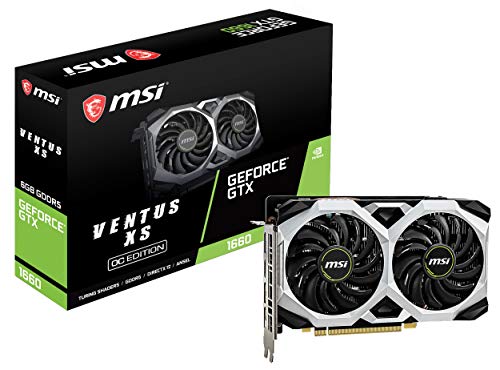
| 1 MSI GTX 1660 Ventus XS 6G OC Graphics Card | msi | 8.1 × 5.1 × 1.7 in | 1.6 lb | Three DisplayPort outputs | Check price |
| 2 XFX Swift RX 9060 XT 16GB | XFX | 11.42 × 4.92 × 0.04 in | Not listed | 16GB GDDR6 memory | Check price |
| 3 SOYO GeForce GT 730 4GB Quad HDMI | SOYO | 6.38 × 6.38 × 0.04 in | Not listed | Four HDMI display outputs | Check price |
| 4 51RISC Radeon RX 550 4GB Low Profile | 51RISC | 6.61 × 2.71 × 0.7 in | Not listed | Low-profile form factor | Check price |
| 5 ASRock Radeon RX 9070 Challenger 16GB OC | ASRock | 15.75 × 8.66 × 0.04 in | 3 lb | 16GB GDDR6 memory | Check price |
| 6 Sapphire Pulse RX 9070 XT 16GB | Sapphire | 12.6 × 4.73 × 0.04 in | 4 lb | 16GB of GDDR6 memory | Check price |
| 7 maxsun Radeon RX 580 2048SP 8GB | maxsun | 8.46 × 1.85 × 0.04 in | 1.4 lb | White graphics card design | Check price |
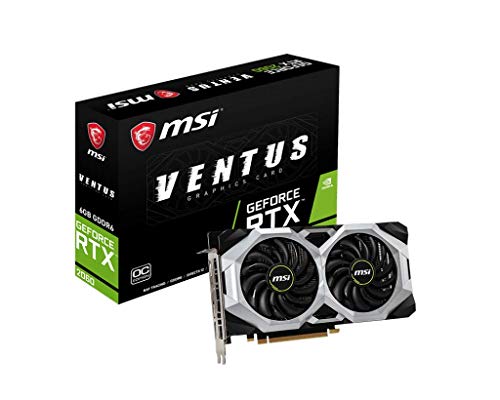
| 8 MSI RTX 2060 Ventus 6G OC | msi | 9.72 × 5.07 × 2.04 in | 1.7 lb | Three DisplayPort outputs | Check price |
| 9 EVGA GeForce GTX 1060 SC 6GB | EVGA | 6.8 × 1.62 × 4.38 in | 2.2 lb | Compact 6.8-inch length | Check price |
| 10 MSI GeForce RTX 3060 12GB Graphics Card | msi | 9.3 × 1.7 × 4.9 in | 0.7 lb | 12GB of GDDR6 memory | Check price |
Sizes and weights as listed by the manufacturer on Amazon. Check the retailer for current price and availability.
Pros
- Three DisplayPort outputs
- 6GB GDDR5 memory
- Stated 120 W power consumption
Cons
- Only one HDMI output
- Who should skip it: users who need more than 6GB of video memory
Pros
- 16GB GDDR6 memory
- Triple-fan cooling design
- HDMI and two DisplayPort outputs
Cons
- Who should skip it: buyers needing confirmed power and clearance specifications
Pros
- Four HDMI display outputs
- 4GB of DDR3 memory
- Stated 38W TDP
- Compact card dimensions
Cons
- 64-bit memory bus
- Who should skip it: gamers seeking graphics-heavy performance

Pros
- Low-profile form factor
- No external power connector required
- DisplayPort and HDMI outputs
Cons
- Who should skip it: users needing more than 4GB of VRAM

Pros
- 16GB GDDR6 memory
- Factory-overclocked clocks
- Three-fan design
- 0dB silent feature
Cons
- Requires two 8-pin power connectors
- 700W PSU recommended
- Who should skip it: buyers without room for a 2.5-slot card

Pros
- 16GB of GDDR6 memory
- Two HDMI and two DisplayPort outputs
- 256-bit memory interface
Cons
- Who should skip it: builders needing published power requirements

Pros
- White graphics card design
- 8GB GDDR5 memory
- Three digital display outputs
Cons
- Who should skip it: users needing more than three display outputs
Pros
- Three DisplayPort outputs
- HDMI 2.0b output
- GDDR6 graphics memory
Cons
- Who should skip it: buyers needing more than 6GB VRAM

Pros
- Compact 6.8-inch length
- 6GB of GDDR5 memory
- Supports up to four monitors
Cons
- Who should skip it: users needing more than 6GB of graphics memory

Pros
- 12GB of GDDR6 memory
- Four listed display outputs
Cons
- Who should skip it: builders needing stated power-connector details
Best Overall for a Newer Gaming Build: ASRock Radeon RX 9070 Challenger 16GB OC
ASRock Radeon RX 9070 Challenger 16GB OC pairs 16GB of GDDR6 with a 256-bit bus and a listed boost clock up to 2520 MHz, making it a strong spec-based candidate for a current gaming build. The trade-off is substantial power and space planning: it is a 2.5-slot, 290 mm card with two 8-pin connectors and a recommended 700W PSU. Skip it if your case cannot fit those dimensions or your power supply setup does not meet the stated requirements.
Best for 1440p or 4K-Oriented Builds: Sapphire Pulse RX 9070 XT 16GB
Sapphire Pulse RX 9070 XT 16GB has 16GB of GDDR6 on a 256-bit interface and offers two HDMI and two DisplayPort outputs. Those specifications suit buyers considering a higher-resolution gaming system, but the listing does not state dimensions, power draw, or PSU requirements, so verify those details before purchase. Skip it if you need a card whose case fit and power requirements are already documented in the product details at hand.
Best for a Small-Form-Factor Upgrade: 51RISC Radeon RX 550 4GB Low Profile
51RISC Radeon RX 550 4GB Low Profile is a low-profile card with 4GB GDDR5, a stated 35W TDP, and no external power connector requirement. Its compact design and modest power needs may help when upgrading a small desktop, but its specifications place it in a very different class from the 16GB gaming cards in this comparison. Skip it if your priority is a high-end Battlefield 6 gaming build rather than a low-profile upgrade.
Best for Multi-Monitor Office Use: SOYO GeForce GT 730 4GB Quad HDMI
SOYO GeForce GT 730 4GB Quad HDMI provides four HDMI 2.0B outputs and 4GB DDR3, features aimed at display walls and office monitoring rather than demanding games. The listing gives a 38W TDP, but the card’s display-focused design and memory make it a poor fit as a Battlefield 6 gaming upgrade. Skip it if gaming performance is your reason for adding a discrete GPU.
Key Numbers at a Glance
- Listed VRAM ranges from 4GB on the SOYO GeForce GT 730 4GB Quad HDMI to 16GB on the ASRock Radeon RX 9070 Challenger 16GB OC.
- The ASRock Radeon RX 9070 Challenger 16GB OC measures 290 x 123 x 51 mm and occupies 2.5 slots.
- The 51RISC Radeon RX 550 4GB Low Profile lists a 35W TDP; the SOYO GeForce GT 730 4GB Quad HDMI lists a 38W TDP.
- The MSI GTX 1660 Ventus XS 6G OC Graphics Card lists 120W power consumption and a recommended 450W PSU; the MSI RTX 2060 lists 190W power consumption.
How to Choose a Graphics Card for Battlefield 6
Match the GPU to your monitor and game settings
Bottom line: Choose a card based on your target resolution and settings, not its model name alone. The ASRock Radeon RX 9070 Challenger 16GB OC is described as built for 1440p and 4K gaming, and it has 16GB GDDR6; that is a more relevant starting point for those targets than a 4GB display card. No listed product data establishes Battlefield 6 frame rates, so check independent game-specific performance information for the resolution and quality settings you plan to use. For other GPU options aimed at that display class, see our best graphics cards for 1440p gaming.
Consider VRAM, but do not treat capacity as a performance guarantee
Bottom line: For a new gaming build, prioritize a gaming-class GPU and enough memory for your intended settings. The RX 9070 and RX 9070 XT cards each list 16GB GDDR6, compared with 6GB GDDR5 on the GTX 1660 and 6GB GDDR6 on the RTX 2060. More VRAM alone does not prove higher frame rates, and GPU architecture matters too; the GT 730’s 4GB DDR3 is not equivalent to 4GB of modern gaming memory. If creation work also matters, our best graphics cards for streaming guide covers a different workload.
Check power draw, connectors, and PSU headroom
Bottom line: Confirm both the card’s power connectors and the manufacturer’s PSU guidance before ordering. The ASRock RX 9070 Challenger lists two 8-pin connectors and a recommended 700W PSU, while the GTX 1660 listing recommends 450W and states 120W consumption. The RX 550 listing says it uses power from the PCIe slot without an external connector, but its modest gaming positioning is a separate consideration. Check your PSU model and available cables, and review our power supply category if your current unit may need replacing.
Measure card clearance and account for slot thickness
Bottom line: Measure the case and check neighboring expansion slots before choosing a full-size gaming card. The ASRock RX 9070 Challenger is 290 mm long and 2.5 slots thick, with a stated height of 123 mm; that can rule it out in a compact case even if the motherboard has a compatible PCIe slot. By contrast, the 51RISC RX 550 is described as low profile, though you should still verify the bracket and case clearance for your particular system. The EVGA GTX 1060 SC is 6.8 inches long and dual-slot according to its listing.
Match outputs to your displays and other devices
Bottom line: Make sure the card has the right output types for your monitor setup. The Sapphire Pulse RX 9070 XT lists two HDMI and two DisplayPort outputs, while the SOYO GT 730 lists four HDMI ports for multiple displays. The listed port count does not establish how a specific combination of displays behaves at every resolution or refresh rate, so confirm display requirements and cable types. For game-focused graphics-card options, browse our graphics cards category.
How We Compared These Products
This guide is based on product research, comparing the listed GPU family, memory, outputs, dimensions, power figures, and compatibility notes. The product pages do not provide comparable Battlefield 6 benchmarks, and customer feedback shown in the listings is not enough to establish game performance. Treat game-specific frame rates and recommended settings as information to verify separately before choosing.
Which Option Fits Your PC?
For a newer gaming build with a suitable case and PSU, the ASRock Radeon RX 9070 Challenger 16GB OC is the clearest match among these picks based on its 16GB memory and stated 1440p/4K gaming target. The Sapphire Pulse RX 9070 XT 16GB is another 16GB gaming-class candidate, but check its specific power and clearance requirements first. For a compact office PC or a multi-display setup, the low-profile RX 550 or quad-HDMI GT 730 addresses physical fit or display connectivity, not the same gaming goal.
Mistakes to Avoid When Choosing a Graphics Card
- Buying by VRAM alone. Compare the GPU class and memory type as well as capacity; 4GB DDR3 on the GT 730 is not a substitute for a gaming-class card.
- Ignoring power requirements. Check the exact PSU recommendation and connector count, particularly the RX 9070 Challenger’s two 8-pin connectors and 700W recommendation.
- Assuming the card fits because the PCIe slot does. Measure case length, card height, and slot thickness before selecting a 2.5-slot model.
- Choosing by output count without checking the monitor. Match HDMI or DisplayPort connections to your displays and verify the resolution and refresh rate you need.
Frequently Asked Questions
Which graphics card here is the strongest fit for Battlefield 6?
The ASRock Radeon RX 9070 Challenger 16GB OC is the most clearly documented gaming-focused pick here: it lists 16GB GDDR6 and a 1440p/4K gaming target. The Sapphire Pulse RX 9070 XT 16GB also lists 16GB GDDR6, but its product data here does not include power or physical dimensions. Neither listing establishes Battlefield 6 frame rates.
Is 6GB of VRAM enough for Battlefield 6?
The product data does not establish the game’s VRAM requirements or how a 6GB card performs in it. The GTX 1660 and RTX 2060 each have 6GB, so compare current game-specific requirements and performance information before buying either for this title.
Will the ASRock RX 9070 fit my PC?
Its listed dimensions are 290 x 123 x 51 mm, and it is 2.5 slots thick. Measure your case’s available GPU space and check clearance around adjacent slots, then confirm the power supply has the stated two 8-pin connectors and meets the recommended 700W rating.
Can I use the SOYO GT 730 for Battlefield 6?
The card is described for multi-monitor office and monitoring use, with 4GB DDR3 and four HDMI outputs. That is not evidence of suitability for Battlefield 6 gaming, so choose a gaming-class GPU and verify game-specific performance instead.
Do these cards work with every desktop PC?
No. Compatibility depends on the case’s clearance, motherboard slot, power supply, available connectors, and display connections. The RX 550 is described as low profile and slot-powered, while the RX 9070 Challenger specifies a 2.5-slot design, two 8-pin connectors, and a 700W recommended PSU.
Should I choose the RX 9070 or RX 9070 XT?
Both listings specify 16GB GDDR6, but the ASRock RX 9070 page also gives card dimensions, two 8-pin connectors, and a 700W PSU recommendation. The Sapphire RX 9070 XT page lists two HDMI and two DisplayPort outputs but does not state power draw or dimensions here. Choose based on verified game performance, case fit, and PSU requirements rather than the model name alone.


Write Your Review
No reviews yet. Be the first to share your experience!