

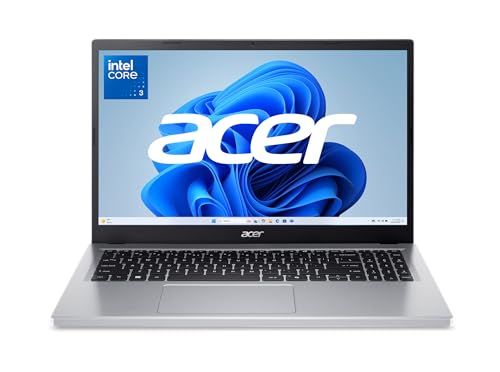


If you need a laptop for school, web browsing, or basic home tasks, the best laptops under $300 are the ones whose memory, storage, and screen match the way you work. The Acer Aspire Go 15 pairs 8GB of memory with a 15.6-inch FHD IPS screen, while the ASUS Vivobook Go 15 models have 4GB of RAM and the HP 14 has a smaller, lower-resolution display. Those differences matter when you keep several apps open, need room for files, or spend long sessions reading.
This guide compares the listed configurations and highlights what to check before buying, including Windows S mode, port needs, and unclear upgrade details. For more options, browse our budget laptops category or the broader laptops category.
Compare at a glance
| Product | Brand | Size | Weight | Stands out for | Price |
|---|---|---|---|---|---|
| 1 HP 14 14-Inch Laptop, Intel N150 | ist computers | 12.76 × 8.86 × 0.71 in | 3.2 lb | Light 3.24-pound design | Check price |
| 2 Acer Aspire Go 15, 15.6-inch FHD | Acer | 14.29 × 0.78 × 9.44 in | 3.8 lb | 15.6-inch FHD IPS display | Check price |
| 3 ASUS Vivobook Go 15 E1504FA-PS04-P | ASUS | 14.19 × 0.7 × 9.1 in | 3.6 lb | 15.6-inch Full HD display | Check price |
| 4 ASUS Vivobook Go 15, 15.6-inch FHD | ASUS | 14.19 × 0.7 × 9.1 in | 3.6 lb | Full HD 15.6-inch display | Check price |
| 5 DEHEYA 15.6-Inch Laptop, 12GB RAM | DEHEYA | 14.6 × 9.6 × 0.75 in | 1.5 kg | Full HD 15.6-inch display | Check price |
Sizes and weights as listed by the manufacturer on Amazon. Check the retailer for current price and availability.
Pros
- Light 3.24-pound design
- Wi-Fi 6 and Bluetooth 5.4
- HDMI and USB-C ports
- One-year Microsoft 365 subscription included
Cons
- 4GB of RAM limits multitasking headroom
- 1366 x 768 resolution is modest
- Who should skip it: users needing demanding multitasking or a sharper display
Pros
- 15.6-inch FHD IPS display
- Two full-function USB-C ports
- Wi-Fi 6 connectivity
- HDMI 2.1 output
Cons
- Who should skip it: users needing larger local storage
Pros
- 15.6-inch Full HD display
- Light 3.59 lb design
- Built-in webcam privacy shutter
- 180-degree lay-flat hinge
Cons
- 4GB RAM and 128GB storage limit headroom
- Who should skip it: users needing demanding apps or ample local storage

Pros
- Full HD 15.6-inch display
- Lightweight 3.59 lb design
- Built-in webcam privacy shutter
- HDMI and USB-C ports
Cons
- 4GB RAM limits headroom for multitasking
- 128GB SSD leaves limited room for files
- Who should skip it: users needing demanding workloads

Pros
- Full HD 15.6-inch display
- 12GB RAM and 256GB SSD
- Expandable storage up to 1TB
- Numeric keypad and backlit keyboard
Cons
- Integrated Intel HD Graphics 520
- Who should skip it: gamers needing stronger graphics performance
Best for More Memory: Acer Aspire Go 15, 15.6-inch FHD
Acer Aspire Go 15, 15.6-inch FHD stands out in this group with 8GB of DDR5 memory, a 15.6-inch 1920 x 1080 IPS display, and two full-function USB-C ports. Its 128GB UFS storage is limited for a large offline library, and Windows 11 Home in S mode may restrict which apps you can install until you change modes. Skip it if you need more than 128GB of built-in storage or require Windows apps that are not available through S mode.
Best for a Compact Screen: ist computers HP 14 14-Inch Laptop, Intel N150
ist computers HP 14 14-Inch Laptop, Intel N150 has a 14-inch screen and lists up to 11 hours of battery life, making it the more compact-screen choice among these models. The display is 1366 x 768, and its 4GB of DDR4 RAM is modest for juggling demanding apps. Skip it if you want a 15.6-inch FHD screen or need more memory for heavier multitasking.
Best for a Lay-Flat Hinge: ASUS Vivobook Go 15, 15.6-inch FHD
ASUS Vivobook Go 15, 15.6-inch FHD combines a 15.6-inch, 1920 x 1080 display with a 180-degree hinge that opens flat for sharing a screen across a table. It weighs 3.59 lb and has 4GB of RAM, so the hinge and portability may matter more than memory capacity for your choice. Skip it if you need 8GB or more of listed memory, or a higher-resolution display.
Best for a Rose Pink Finish: ASUS Vivobook Go 15 E1504FA-PS04-P
ASUS Vivobook Go 15 E1504FA-PS04-P offers the same listed 15.6-inch FHD display, 180-degree hinge, and 3.59 lb weight as the Peacock Blue ASUS configuration, in Rose Pink. Its listed 4GB of RAM and 128GB of storage leave less headroom for large app libraries and many open programs. Skip it if color is not a priority and you would rather compare the other listed configurations for memory, ports, or storage.
Best for a Numeric Keypad: DEHEYA 15.6-Inch Laptop, 12GB RAM
DEHEYA 15.6-Inch Laptop, 12GB RAM lists 12GB of RAM, a 256GB SSD, a numeric keypad, and a 15.6-inch 1920 x 1080 display, a useful combination for number-heavy documents. Its stated Intel Core i5 and Intel HD Graphics 520 are the listed configuration, but the product page does not give enough detail to compare its processor performance directly with the other models. Skip it if you need a well-documented processor model, Wi-Fi 6, or USB-C display support confirmed before purchase.
Key Numbers at a Glance
- Listed memory ranges from 4GB on the ASUS Vivobook Go 15 models and ist computers HP 14 to 12GB on the DEHEYA 15.6-Inch Laptop, 12GB RAM.
- Listed built-in storage ranges from 128GB on the Acer Aspire Go 15 and ASUS Vivobook Go 15 models to a 256GB SSD on the DEHEYA 15.6-Inch Laptop, 12GB RAM.
- Screen size ranges from 14 inches on the ist computers HP 14 14-Inch Laptop, Intel N150 to 15.6 inches on the other four models.
- Display resolution ranges from 1366 x 768 on the ist computers HP 14 14-Inch Laptop, Intel N150 to 1920 x 1080 on the Acer Aspire Go 15, ASUS Vivobook Go 15 models, and DEHEYA 15.6-Inch Laptop.
How to Choose the Best Laptops Under $300
Memory and everyday workload
Bottom line: Prefer more listed memory if you regularly keep several browser tabs and apps open. The Acer lists 8GB of DDR5 memory, the DEHEYA lists 12GB, and the HP and ASUS models each list 4GB. These figures do not establish comparative speed, but they help set expectations for multitasking; choose a 4GB model for lighter tasks and check upgradeability before assuming you can add memory later.
Display size and resolution
Bottom line: Match the screen to your reading and workspace needs, and favor FHD if sharper text and more screen detail matter. The HP 14 has a 14-inch, 1366 x 768 display, while the Acer, both ASUS configurations, and DEHEYA have 15.6-inch 1920 x 1080 screens. The Acer specifically lists an IPS panel; the other listings describe their display differently or do not specify panel type, so verify the panel and brightness if viewing conditions are important.
Storage capacity and type
Bottom line: Check both capacity and storage type before planning to keep large files or many apps on the laptop. The Acer lists 128GB of UFS storage, the ASUS models list a 128GB SSD, and the DEHEYA lists a 256GB SSD. The HP listing describes 128GB UFS plus a 128GB SD card, and notes that the advertised storage was expanded; confirm how that card is presented and what warranty applies to it. Do not assume any model has an open SSD slot or user-upgradeable storage unless the manufacturer confirms it.
Ports and wireless connections
Bottom line: Confirm the exact ports you need instead of treating every USB-C connector as a display or charging port. Acer lists two full-function USB-C ports and HDMI 2.1, while HP lists USB-C, two USB-A ports, and HDMI 1.4. DEHEYA lists USB 3.0 and Type-C, but its page does not specify the Type-C functions; the ASUS listings do not detail a complete port list. If you plan to connect an external monitor, verify video output support for the exact configuration.
Windows S mode and app needs
Bottom line: Check whether S mode fits your app requirements before ordering. Acer and HP list Windows 11 Home in S mode, and the HP product page says it can be switched to Windows 11 Home through Settings. The ASUS listings specify Windows 11 Home without mentioning S mode. Confirm the current configuration and app installation limits if you depend on software outside the Microsoft Store.
Battery claims, weight, and warranty
Bottom line: Treat battery-life figures as manufacturer claims and compare warranty details separately. The HP page states up to 11 hours and fast charge, while ASUS says its Vivobook Go 15 can charge to 60% in as little as 49 minutes. The DEHEYA page states 5 to 7 hours and a weight of 3.3 lb; ASUS lists 3.59 lb. HP describes a one-year manufacturer warranty for the laptop and a separate three-year warranty for the expanded SD card, so read warranty terms for the exact listing you choose.
How We Compared These Products
This comparison is based on product-page specifications and feature descriptions, including processor names, memory, storage, displays, ports, wireless details, battery claims, and stated warranty information. No firsthand evaluation is documented here, and the listed customer feedback does not establish comparative performance. Some details, including memory upgradeability and complete port functions, are not stated consistently, so check the exact configuration before purchase.
Which Option Fits Your Home and Devices?
If memory headroom and a full-HD IPS screen are priorities, the Acer Aspire Go 15, 15.6-inch FHD has 8GB of DDR5 and a 15.6-inch display. Choose the ist computers HP 14 14-Inch Laptop, Intel N150 if you prefer a 14-inch screen and value its stated battery-life claim, but accept its 4GB of RAM and 1366 x 768 resolution.
For a numeric keypad and listed 12GB of RAM, the DEHEYA 15.6-Inch Laptop, 12GB RAM is the distinct fit, though buyers should verify processor and port details. If the 180-degree hinge or color is more relevant, compare the two ASUS Vivobook Go 15 configurations; their listed screen, weight, hinge, RAM, and storage match, with finish as the clear stated difference.
Mistakes to Avoid When Choosing a Budget Laptop
- Choosing by processor label alone. A processor family name does not show how a laptop will perform in every app; compare the full configuration and look for independent performance information relevant to your workload.
- Ignoring limited memory. Three of these listed configurations have 4GB of RAM. Decide whether your normal browser and app use fits that capacity, and verify upgrade options rather than assuming memory can be added.
- Assuming USB-C supports video. Port shape alone does not confirm display output. Check the exact laptop documentation if you plan to connect a monitor or dock.
- Overlooking S mode or storage details. Confirm app installation requirements and whether listed storage is built-in, removable, or covered by a separate warranty.
Frequently Asked Questions
Is 4GB of RAM enough for a budget laptop?
It can suit lighter use such as basic browsing and documents, but the listed 4GB configurations provide less memory than the Acer’s 8GB or DEHEYA’s 12GB. If you keep many tabs and applications open, prioritize more memory and verify whether it is upgradeable.
Which laptop has the highest listed screen resolution?
The Acer Aspire Go 15, both ASUS Vivobook Go 15 models, and the DEHEYA list 1920 x 1080 displays. The ist computers HP 14 lists 1366 x 768, so choose among the FHD models if resolution is a priority.
Can I connect an external monitor?
The Acer lists HDMI 2.1 and the HP lists HDMI 1.4; the HP page also describes external-monitor support through HDMI and USB-C. For Acer, HP, ASUS, or DEHEYA, verify the exact port’s display capabilities and your monitor’s input before buying, since USB-C does not guarantee video output.
Can I install any Windows app on a laptop in S mode?
Windows 11 Home in S mode restricts app installation compared with standard Windows 11 Home. Acer and HP list S mode, and the HP page describes switching out of it through Settings; confirm the current process and consequences with the manufacturer if you need apps from outside the Microsoft Store.
Is the HP’s 256GB storage all built in?
The HP listing describes 128GB of UFS storage plus a 128GB SD card, not a single 256GB built-in drive. It also says the advertised storage was expanded and gives the SD card a separate warranty, so confirm the package and coverage details before ordering.
Can I upgrade the RAM or SSD later?
The product details do not consistently state whether memory or internal storage is user-upgradeable. Check the manufacturer documentation for the exact model and configuration before buying on the assumption that either component can be replaced or expanded.
Write Your Review
No reviews yet. Be the first to share your experience!