


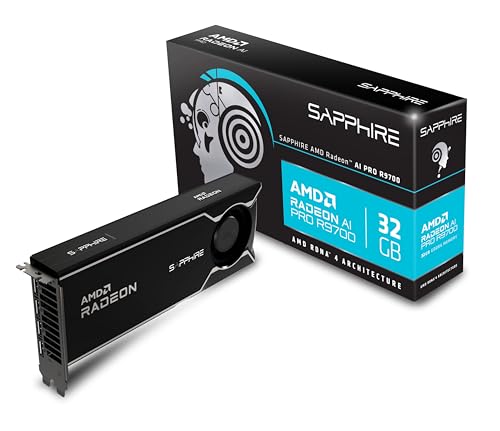

For local AI, start with the model and workload you need to run: a 24GB or 32GB card can suit projects with tighter memory needs, while 48GB to 96GB options provide more room for larger workloads. This guide to the best graphics cards for AI compares listed memory, workstation features, and form factors so you can weigh model capacity against your PC’s power, cooling, and software requirements.
Before you choose, check whether your framework and AI applications support the GPU architecture and driver stack, then confirm the card fits your case and power supply. For other graphics options, browse our graphics cards category.
Compare at a glance
| Product | Brand | Size | Weight | Stands out for | Price |
|---|---|---|---|---|---|
| 1 ASRock Intel Arc Pro B60 24GB | ASRock | 10.67 × 4.41 × 0.04 in | Not listed | 24GB GDDR6 memory | Check price |
| 2 GIGABYTE AORUS RTX 5090 AI Box | GIGABYTE | 11.89 × 6.77 × 7.44 in | Not listed | GeForce RTX 5090 with 32GB GDDR7 | Check price |
| 3 Sapphire Radeon AI PRO R9700 32GB | Sapphire | 13.78 × 9.84 × 0.04 in | 4.4 lb | 32GB of GDDR6 memory | Check price |
| 4 ASRock Radeon AI PRO R9700 32GB | ASRock | 10.67 × 4.41 × 0.04 in | 2.4 lb | 32GB GDDR6 memory | Check price |
| 5 Empowered PC RTX PRO 6000, 96GB | Empowered PC | 17 × 10 × 5 in | 4 lb | 96GB ECC GDDR7 memory | Check price |
| 6 ASUS Radeon AI PRO R9700 32GB | ASUS | 10.47 × 4.37 × 0.04 in | 2.3 lb | 32GB GDDR6 VRAM | Check price |
| 7 Gigabyte Radeon PRO W7900 AI TOP 48G | GIGABYTE | 4.96 × 11.54 × 0.1 in | 2.8 lb | 48GB GDDR6 memory | Check price |
| 8 GIGABYTE AORUS RTX 5090 AI Box, 32GB | GIGABYTE | 11.89 × 6.77 × 7.44 in | 12 lb | 32GB GDDR7 memory | Check price |
| 9 CyberGeek GeForce RTX 5090 32GB | CyberGeek | Not listed | Not listed | 32GB GDDR7 memory | Check price |
| 10 NVIDIA RTX PRO 5000 Blackwell 72GB | Empowered PC | Not listed | 3 lb | 72GB ECC GDDR7 memory | Check price |
Sizes and weights as listed by the manufacturer on Amazon. Check the retailer for current price and availability.
Pros
- 24GB GDDR6 memory
- Four DisplayPort 2.1 outputs
- Dual video encoders
- 2-slot blower design
Cons
- Who should skip it: builders without 10.67 inches of clearance or an available 8-pin power connector
Best for a compatible external-GPU setup
Pros
- GeForce RTX 5090 with 32GB GDDR7
- Thunderbolt 5 and USB4 connectivity
- Integrated Ethernet port
- 240mm radiator with two fans
Cons
- External enclosure measures 11.89 x 6.77 x 7.44 inches
- Who should skip it: users seeking an internal graphics card
Pros
- 32GB of GDDR6 memory
- Four DisplayPort 2.1a outputs
- PCIe 5.0 x16 interface
Cons
- HDMI output is not specified
- Who should skip it: users requiring confirmed HDMI output
Best for a dense internal workstation

Pros
- 32GB GDDR6 memory
- Four DisplayPort 2.1a outputs
- Two-slot blower design
- PCIe 5.0 support
Cons
- Who should skip it: users unable to verify application and driver compatibility

Pros
- 96GB ECC GDDR7 memory
- PCIe Gen 5 support
- DisplayPort 2.1 output
- Three-year manufacturer warranty
Cons
- Bulk OEM packaging, retail packaging not included
- Who should skip it: buyers who require retail packaging

Pros
- 32GB GDDR6 VRAM
- Two-slot design
- Four listed display outputs
- Dual ball-bearing fans
Cons
- Who should skip it: users needing more than four listed display outputs

Pros
- 48GB GDDR6 memory
- Three DisplayPort 2.1 outputs
- Dual-slot design
- Protective metal back plate
Cons
- Who should skip it: buyers who do not need 48GB of graphics memory

Pros
- 32GB GDDR7 memory
- Thunderbolt 5 with daisy-chain support
- Three USB 3.2 Gen 2 ports
- Ethernet port included
Cons
- Nearly 12 lb and about 12 inches long
- Who should skip it: buyers seeking a compact graphics card

Pros
- 32GB GDDR7 memory
- Three DisplayPort outputs plus HDMI
- GPU holder included
Cons
- Who should skip it: builders needing card clearance details
Best for larger local models

Pros
- 72GB ECC GDDR7 memory
- Four DisplayPort 2.1b outputs
- MIG support for two 36GB instances
- Blackwell architecture
Cons
- 300W stated maximum power draw
- Who should skip it: buyers seeking a low-power graphics card
Key Numbers at a Glance
- Listed VRAM spans 24GB on the ASRock Intel Arc Pro B60 24GB to 96GB on the Empowered PC RTX PRO 6000, 96GB.
- The Gigabyte Radeon PRO W7900 Dual Slot AI TOP 48G has 48GB GDDR6, while the Empowered PC NVlDlA RTX PRO 5000 Blackwell 72GB GDDR7 ECC has 72GB GDDR7 ECC.
- The ASRock Intel Arc Pro B60 24GB specifies a 200W TDP and a single 8-pin power connector.
- The Empowered PC RTX PRO 6000, 96GB specifies 600W power loads, compared with 300W maximum power consumption listed for the Empowered PC NVlDlA RTX PRO 5000 Blackwell 72GB GDDR7 ECC.
Best Graphics Cards for AI: Picks by Workload
Related guides: Best NVIDIA Graphics Cards for GTA 6, Best AMD Graphics Cards for GTA 6 and Best Graphics Cards for GTA 6.
Best for Large Local Models: Empowered PC NVlDlA RTX PRO 5000 Blackwell 72GB GDDR7 ECC
The PC Components category is a useful starting point for comparing workstation parts. For larger local models, the Empowered PC NVlDlA RTX PRO 5000 Blackwell 72GB GDDR7 ECC combines 72GB of GDDR7 ECC memory with a stated 300W maximum power consumption. The product page also describes MIG support for a 2x36GB mode, but its claim about model size and performance should be checked against your software and workload. Skip it if you need a lower-power card or your AI stack does not support the relevant NVIDIA features.
Best for Maximum Listed Memory: Empowered PC RTX PRO 6000, 96GB
The Empowered PC RTX PRO 6000, 96GB has the largest listed memory capacity here: 96GB GDDR7 ECC, with 1.8 TB/s bandwidth stated on the product page. It also lists PCIe Gen 5, MIG, and a 600W power load, so plan carefully for system power and cooling. Skip it if your models fit within less VRAM or your PC cannot accommodate the stated power demand.
Best for a Blower-Cooled 32GB Workstation: ASRock Radeon AI PRO R9700 32GB
The ASRock Radeon AI PRO R9700 32GB pairs 32GB GDDR6 with a two-slot design and blower cooling that exhausts heat out of the chassis. Those features suit buyers considering a dense workstation or multi-GPU layout, subject to case, board, and application compatibility. Skip it if you need more than 32GB of VRAM or your software requires a different GPU platform.
Best for Compact Workstation Builds: ASRock Intel Arc Pro B60 24GB
The ASRock Intel Arc Pro B60 24GB is a two-slot card measuring 271 x 112 x 39 mm, with a single 8-pin connector and 200W TDP. It lists 24GB GDDR6, four DisplayPort 2.1 outputs, and workstation-optimized drivers. Skip it if you need more memory or your AI software is not compatible with Intel’s GPU platform.
Best for an External GPU Setup: GIGABYTE AORUS RTX 5090 AI Box
The GIGABYTE AORUS RTX 5090 AI Box combines an RTX 5090 with Thunderbolt 5 and USB4 connectivity, plus a 240mm radiator and up to 100W Power Delivery. It may suit a compatible computer that needs external graphics, but the host’s port support and the enclosure’s included connection details need checking. Skip it if you want a standard internal PCIe graphics card or cannot confirm your computer supports the required connection.
How to Choose a Graphics Card for AI
VRAM and Model Size
Bottom line: Match VRAM to the model and context you intend to run, not just the AI label on the box. The listed cards range from 24GB on the ASRock Intel Arc Pro B60 24GB to 96GB on the Empowered PC RTX PRO 6000, 96GB; 32GB, 48GB, and 72GB choices sit between them. More memory can give a workload more room, but it does not guarantee that a model runs efficiently or that the required software supports the card. Check the memory requirements for your model, precision, context length, and application before buying.
GPU Architecture and Software Support
Bottom line: Choose the platform your framework and applications support, then compare hardware within that platform. The range includes NVIDIA Blackwell and GeForce RTX cards, AMD RDNA 4 and Radeon PRO models, and Intel Xe2-HPG. The ASRock Intel Arc Pro B60 24GB lists 197 INT8 TOPS, while the CyberGeek GeForce RTX 5090 Triple Fan Graphics lists 3352 AI TOPS; those figures use different products and listed specifications, and are not a direct measure of performance in your application. Verify framework, driver, and operating-system compatibility before treating any AI-acceleration figure as decisive.
Power, Cooling, and Case Fit
Bottom line: Confirm card dimensions, slot space, power connectors, and system power before ordering. The ASRock Intel Arc Pro B60 24GB lists a 271 x 112 x 39 mm body, two-slot thickness, one 8-pin connector, and 200W TDP. By contrast, the Empowered PC RTX PRO 6000, 96GB lists a 600W power load, so it calls for especially careful review of the full system’s power and cooling plans. The product page does not state every card’s dimensions or connector needs, so consult the exact manufacturer specifications and your PSU documentation; our RTX 5090 power supply guide can help with related build planning.
Workstation Layout and Cooling Style
Bottom line: Favor a cooling design that suits your case airflow and how tightly you plan to pack the system. The ASRock Radeon AI PRO R9700 32GB uses a two-slot blower cooler that exhausts heat out of the chassis, while the ASUS Turbo Radeon AI PRO 32GB R9700 is also described as a two-slot workstation card. The GIGABYTE AORUS RTX 5090 AI Box uses an external 240mm radiator, a different setup from an internal card. Check the case layout and cooler requirements, and do not assume a cooling design will make a card quiet under sustained load.
Memory Type, Outputs, and Display Needs
Bottom line: Treat memory type and display connections as practical fit checks, not stand-ins for AI performance. The products list GDDR6 or GDDR7 memory, and output choices include four DisplayPort connections on the ASRock Intel Arc Pro B60 24GB and four DisplayPort 2.1a outputs on the Sapphire Radeon AI PRO R9700 32GB. The RTX PRO 5000 and RTX PRO 6000 listings specify ECC memory, a relevant distinction for some workstation workflows. Count your displays, check their input standards, and confirm your applications benefit from ECC before paying for a feature you may not use.
How We Compared These Products
This comparison is based on product-page specifications and design details, including VRAM, memory type, stated power information, cooling, form factor, and outputs. Available customer feedback is limited in the product data, so ratings do not establish a pattern of ownership experience. We did not conduct firsthand evaluations; verify current manufacturer documentation and application compatibility before purchase.
Which Option Fits Your Workstation?
For larger local models: The Empowered PC NVlDlA RTX PRO 5000 Blackwell 72GB GDDR7 ECC offers 72GB ECC memory and lists 300W maximum power consumption. Skip it if 32GB or less meets your workload and you want a less demanding power plan.
For a dense internal workstation: The ASRock Radeon AI PRO R9700 32GB lists a two-slot blower design, 32GB GDDR6, and four DisplayPort 2.1a outputs. Skip it if your software needs a different GPU platform or your model requires more VRAM.
For a compatible external-GPU setup: The GIGABYTE AORUS RTX 5090 AI Box lists Thunderbolt 5 and USB4, plus an external 240mm radiator. Skip it if your computer lacks confirmed support for the connection or you need a conventional internal card.
Mistakes to Avoid When Choosing an AI Graphics Card
- Choosing by AI TOPS alone. Compare model memory needs and application support as well as the stated acceleration figure; the ASRock Intel Arc Pro B60 24GB and CyberGeek GeForce RTX 5090 Triple Fan Graphics list figures in different product contexts.
- Assuming every GPU works with your AI stack. Confirm framework, driver, and operating-system support for the exact GPU architecture before purchase.
- Overlooking power and physical fit. Check the case dimensions, slot clearance, connectors, and PSU capacity against the exact card specifications.
- Confusing display ports with compute compatibility. Count the monitor connections you need, but separately verify that your AI software supports the card.
Frequently Asked Questions
How much VRAM do I need for local AI?
It depends on the model, precision, context length, and other software using the GPU. These listings range from 24GB to 96GB, but the card’s capacity alone cannot confirm whether a particular model will run; check the model and application requirements.
Is 32GB enough for AI?
A 32GB card may suit projects whose model and workload fit within that available memory. The ASUS Turbo Radeon AI PRO 32GB R9700, Sapphire Radeon AI PRO R9700 32GB, and ASRock Radeon AI PRO R9700 32GB all list 32GB GDDR6; confirm your software’s requirements before choosing among them.
Is a workstation GPU better than a GeForce card for AI?
Neither category is automatically the better fit for every workload. These workstation cards include options with ECC memory or workstation driver features, while the listed GeForce RTX 5090 cards specify NVIDIA Blackwell or RTX features; choose based on application support, memory needs, and system fit.
Can I use an external GPU for AI?
The GIGABYTE AORUS RTX 5090 AI Box lists Thunderbolt 5 and USB4 connectivity. Before buying, verify that your host computer supports the required connection and that your operating system and AI software can use the external GPU; the product details do not establish compatibility with every computer.
What should I check before installing an AI graphics card?
Check card length and thickness, available slots, power connectors, PSU capacity, and case airflow against the exact card and system documentation. For example, the ASRock Intel Arc Pro B60 24GB lists a 200W TDP and one 8-pin connector, but those details do not apply to the other cards.



Write Your Review
No reviews yet. Be the first to share your experience!