



For an RTX 5090 build, the right power supply depends on the complete system, not the graphics card alone. The listed 1000W, 1200W, and 1600W models include options with a native 12V-2×6 connector, higher capacity for systems with substantial power needs, and features aimed at quieter operation.
Compare at a glance
| Product | Brand | Size | Weight | Stands out for | Price |
|---|---|---|---|---|---|
| 1 Apevia Galaxy 1000W Modular PSU | Apevia | 6.2 × 5.9 × 3.4 in | 5 lb | 1000W capacity | Check price |
| 2 Seasonic VERTEX GX-1200 1200W PSU | Seasonic | 7.3 × 13.6 × 4.5 in | 7.3 lb | 1200W capacity | Check price |
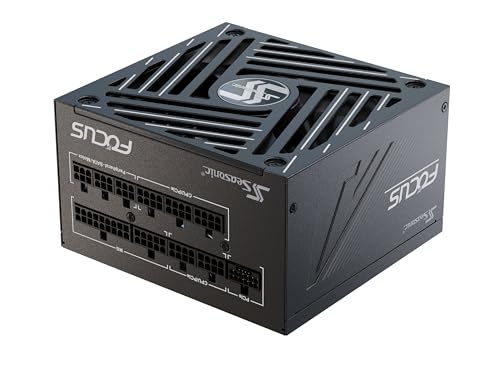
| 3 Seasonic FOCUS GX-1000 1000W PSU | Seasonic | 5.5 × 5.9 × 3.4 in | 3.5 lb | 1000W rated capacity | Check price |
| 4 ASUS ROG Strix 1200W Platinum PSU | ASUS | 6.3 × 5.9 × 3.4 in | Not listed | 1200W capacity | Check price |
| 5 Seasonic VERTEX PX-1200 1200W PSU | Seasonic | 6.3 × 5.9 × 3.4 in | 6 lb | 80 PLUS Platinum certified | Check price |
| 6 Seasonic PRIME PX-1600 1600W PSU | Seasonic | 8.3 × 6 × 3.4 in | 13 lb | 1600W capacity | Check price |
| 7 Seasonic PRIME TX-1600 1600W PSU | Seasonic | 8.2 × 6.1 × 3.5 in | 13 lb | 1,600W capacity for high-power systems | Check price |
| 8 Seasonic PRIME TX-1600 Noctua Edition | Noctua | 8.27 × 5.91 × 3.39 in | 13 lb | 1600W capacity for high-power builds | Check price |
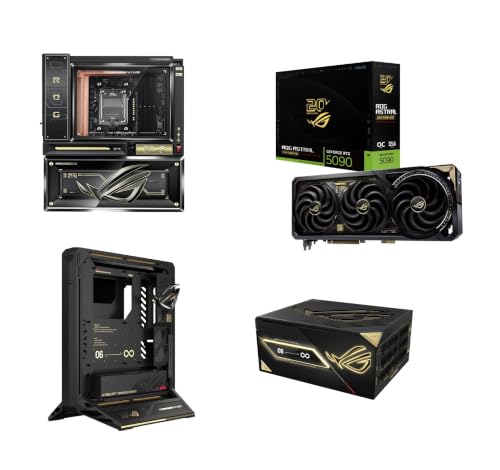
| 9 ASUS ROG 20th Anniversary Hardware Bundle | ASUS | Not listed | Not listed | Four coordinated ROG components in one bundle | Check price |
Sizes and weights as listed by the manufacturer on Amazon. Check the retailer for current price and availability.
Pros
- 1000W capacity
- Fully modular cabling
- 80+ Gold rating
- 600W 16-pin GPU cable
Cons
- Who should skip it: builders who do not need 1000W capacity
Pros
- 1200W capacity
- Fully modular design
- 12VHPWR cable included
- 12-year warranty
Cons
- Who should skip it: builders whose cases cannot fit the listed dimensions
Pros
- 1000W rated capacity
- Native 12V-2x6 connector
- Fully modular design
- Hybrid fan control
Cons
- Who should skip it: builders with modest power needs

Pros
- 1200W capacity
- 80 Plus Platinum certified
- Fully modular
- 10-year warranty
Cons
- Who should skip it: buyers whose systems do not need 1200W

Pros
- 80 PLUS Platinum certified
- Fully modular cabling
- Includes a 16-pin Gen 5 PCIe cable
- 135 mm FDB fan with hybrid control
Cons
- Who should skip it: builders who do not need 1,200W

Pros
- 1600W capacity
- Two native 12V-2x6 connectors
- Fully modular design
- 12-year warranty
Cons
- Who should skip it: buyers with modest power needs
Pros
- 1,600W capacity for high-power systems
- Two native 12V-2x6 connectors
- Fully modular design
- 12-year warranty
Cons
- Who should skip it: builders who do not need 1,600W capacity

Pros
- 1600W capacity for high-power builds
- Fully modular cabling
- ATX 3.1 and PCIe 5.1 compliant
- Semi-passive fan operation
Cons
- Who should skip it: owners of lower-power builds
Pros
- Four coordinated ROG components in one bundle
- 32GB GDDR7 graphics card
- AM5 X870E motherboard and 360mm AIO
Cons
- Final sale, with no returns or refunds
- Who should skip it: buyers who need return flexibility
Best Budget-Friendly 1000W Power Supply: Apevia Galaxy 1000W 80+ Gold ATX 3.1 Fully Modular
Apevia Galaxy 1000W 80+ Gold ATX 3.1 Fully Modular pairs a 1000W rating with an ATX 3.1 listing and a 16-pin cable specified for up to 600W. Its trade-offs are that the listed efficiency level is 80+ Gold rather than Platinum or Titanium, and the product page does not state a warranty length. Skip it if your component maker’s power recommendation or your planned upgrades call for more than 1000W.
Best 1200W Gold Option: Seasonic VERTEX GX-1200 1200W Power Supply ATX 3.1
Seasonic VERTEX GX-1200 1200W Power Supply ATX 3.1 offers 1200W, full modularity, and a 12VHPWR cable, with a 135mm FDB fan and hybrid fan control listed as features. Its Gold certification is a step below the Platinum certification on the VERTEX PX-1200, so prioritize wattage and modular cables over the higher certification tier. Skip it if you want a native 12V-2×6 connection explicitly stated in the product details.
Related guides: Best Power Supplies for GTA 6 Builds and Best Power Supplies for Gaming PCs.
Best for Higher-Capacity Builds: Seasonic PRIME TX-1600 1600W Power Supply ATX 3.1
Seasonic PRIME TX-1600 1600W Power Supply ATX 3.1 combines a 1600W rating with two native 12V-2×6 connectors and Titanium certifications from 80 PLUS and Cybenetics. Those features suit a high-demand workstation or a build whose component requirements justify the added capacity, but many single-GPU builds may not need 1600W. Skip it if your system’s calculated requirements do not warrant this capacity.
Best for a Quiet-Focused Build: Seasonic PRIME TX-1600 Noctua Edition
Seasonic PRIME TX-1600 Noctua Edition is a 1600W ATX 3.1 model with a Noctua NF-A12x25 fan, semi-passive operation, and a native 12V-2×6 connector. The product page claims the fan stays off until 50% load at up to 25°C ambient temperature, but that is a stated operating condition, not a guarantee for every room or build. Skip it if quiet-focused features are not worth choosing a high-capacity supply for your system.
Key Numbers at a Glance
- Listed capacities range from 1000W on the Apevia Galaxy 1000W 80+ Gold ATX 3.1 Fully Modular and Seasonic FOCUS GX-1000 1000W Power Supply ATX 3.1 to 1600W on the Seasonic PRIME TX-1600 1600W Power Supply ATX 3.1.
- The Seasonic PRIME TX-1600 1600W Power Supply ATX 3.1 and Seasonic PRIME PX-1600 1600W Power Supply ATX 3.1 each list two native 12V-2×6 connectors.
- The Seasonic VERTEX GX-1200 1200W Power Supply ATX 3.1 lists a 12-year warranty, while the Seasonic FOCUS GX-1000 1000W Power Supply ATX 3.1 lists a 10-year warranty.
- The Seasonic PRIME TX-1600 Noctua Edition lists semi-passive operation up to 50% load at ambient temperatures up to 25°C.
How to Choose a Power Supply for an RTX 5090
Match capacity to the whole PC
Bottom line: Choose wattage for your full component list, rather than assuming every RTX 5090 build needs the same capacity. The listed choices span 1000W, 1200W, and 1600W, while the product pages do not provide a single recommended wattage for every combination of GPU, CPU, and other parts. Check the graphics card and CPU makers’ guidance, then account for the rest of your build and planned upgrades before choosing.
Confirm the GPU power cable
Bottom line: Verify the exact connector required by your graphics card and the cable included with the PSU. The PRIME TX-1600 and PRIME PX-1600 list dual native 12V-2×6 connectors, while the FOCUS GX-1000 lists one native 12V-2×6 connector. The VERTEX GX-1200 listing instead names a 12VHPWR cable, so check the card and PSU documentation rather than treating connector names as interchangeable.
Choose efficiency for your priorities
Bottom line: Compare the stated certification tier, but do not use it as a substitute for checking wattage and compatibility. The range here includes Gold models such as the Apevia Galaxy 1000W and VERTEX GX-1200, Platinum on the VERTEX PX-1200, and Titanium on the PRIME TX-1600. Certification describes efficiency under defined conditions; it does not alone establish whether a PSU fits your workload or case.
If you are comparing general PC power options as well, our best power supplies for gaming PCs guide covers wattage choices for broader gaming builds. For more component buying guidance, browse PC components.
Check case fit and cable routing
Bottom line: Confirm the PSU dimensions and cable-bend clearance in the case manual before ordering. The product details here do not state dimensions, so check each exact model’s specification sheet and your case’s PSU clearance. Leave enough room to route the GPU cable without forcing a sharp bend at the connector, following the GPU and PSU manufacturers’ instructions.
Consider noise features and warranty
Bottom line: If low fan noise matters, compare the actual fan-control features and stated warranty, not wattage alone. The Noctua Edition lists semi-passive operation and an NF-A12x25 fan; the PRIME TX-1600 lists hybrid fan control and a 135mm FDB fan. Warranty terms also vary across the listings, including 12 years for the VERTEX GX-1200 and 10 years for the FOCUS GX-1000, so verify the terms for the exact model and region.
How We Compared These Products
This guide is based on product research, not firsthand evaluation. We compared the listed wattage, connector descriptions, ATX and PCIe standards, efficiency certifications, fan features, and warranty statements; some model details, including dimensions, are not stated in the product data and should be checked with the manufacturer.
Which Option Fits Your Build?
For a 1000W configuration where the listed 16-pin cable and modular design are priorities, the Apevia Galaxy is the lower-capacity pick; for 1200W with modular cables and a listed 12-year warranty, consider the VERTEX GX-1200. If your system genuinely calls for 1600W, the PRIME TX-1600 offers dual native 12V-2×6 connectors, while the Noctua Edition adds its named fan and semi-passive feature. Compare other wattage options in our power supplies category.
Mistakes to Avoid When Choosing an RTX 5090 Power Supply
- Choosing wattage by GPU alone. Add up the complete system requirements and check manufacturer recommendations before settling on 1000W, 1200W, or 1600W.
- Assuming every 16-pin cable is identical. Compare the exact connector named in the PSU listing with the GPU requirements and both manufacturers’ instructions.
- Ignoring case clearance. Check the specific PSU dimensions and available cable-routing space in your case documentation.
- Treating certification as a quality guarantee. Use the efficiency tier as one comparison point, alongside connectors, warranty, compatibility, and the PSU model’s full specifications.
Frequently Asked Questions
Is a 1000W power supply enough for an RTX 5090?
It depends on the full system and the graphics card maker’s requirements. The Apevia Galaxy and Seasonic FOCUS GX are listed at 1000W, but the product data does not establish that 1000W suits every RTX 5090 build; check your exact CPU, GPU, and other components.
Should I choose a 1200W or 1600W PSU?
A 1200W model such as the Seasonic VERTEX GX-1200 is a fit to consider when your system requirements support that capacity. A 1600W model such as the PRIME TX-1600 is aimed at builds that need more headroom; do not assume higher wattage improves performance by itself.
Do these power supplies include a cable for an RTX 5090?
The connector details differ by model. Several listings specify a native 12V-2×6 connector, while the VERTEX GX-1200 names a 12VHPWR cable and the Apevia Galaxy lists a 16-pin cable rated up to 600W. Confirm the exact card and PSU requirements before connecting anything.
Will these power supplies fit my PC case?
The product details do not include PSU dimensions, so compatibility cannot be confirmed from wattage or model name alone. Check the dimensions for the exact PSU revision against your case’s clearance and cable-routing space.
Is a Titanium-rated PSU necessary for an RTX 5090?
No. The listings include Gold, Platinum, and Titanium certifications, but the certification tier does not replace checks for capacity, connector fit, case clearance, and warranty. Choose the tier that matches your priorities after confirming the system requirements.





Write Your Review
No reviews yet. Be the first to share your experience!