


For machine-learning work, choose a GPU whose memory capacity and software requirements suit your models, then confirm that its form factor and power needs match your system. The listed options range from 8GB workstation cards to 80GB data-center hardware, but A100 SXM4 modules and baseboards are not drop-in PCIe graphics-card upgrades.
Compare at a glance
| Product | Brand | Stands out for | Price |
|---|---|---|---|
| 1 ASRock RX 7600 Challenger Pro 8GB OC | ASRock | Triple-fan cooling with low-temperature fan stop | Check price |
| 2 NVIDIA RTX PRO 4000 Blackwell, 24GB | NVIDIA | 24GB GDDR7 ECC memory | Check price |
| 3 ASRock Radeon AI PRO R9700 32GB | ASRock | 32GB GDDR6 memory | Check price |
| 4 sodeber A2000 Graphics Card, 8GB GDDR6 | sodeber | 8GB GDDR6 memory | Check price |
| 5 sodeber A2000 Graphics Card, 8GB GDDR6 | sodeber | 8GB GDDR6 memory | Check price |
| 6 PNY NVIDIA RTX A5500 24GB Graphics Card | PNY | 24GB GDDR6 ECC memory | Check price |
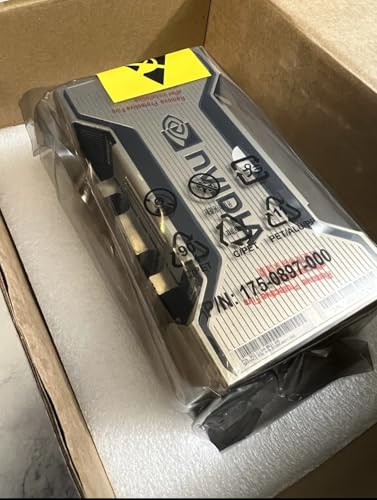
| 7 A100 SXM4 GPU Module, 80GB HBM2e | Generic | 80GB HBM2e memory | Check price |
| 8 VISION COMPUTERS A100 80GB Graphics Card | VISION COMPUTERS, INC. | 80 GB HBM2e memory | Check price |
| 9 Generic HGX A100 40GB SXM4 Baseboard | Generic | Identified as an HGX A100 replacement baseboard | Check price |
Sizes and weights as listed by the manufacturer on Amazon. Check the retailer for current price and availability.
Pros
- Triple-fan cooling with low-temperature fan stop
- Four display outputs
- Metal backplate
- Single 8-pin power connector
Cons
- 8GB of memory may constrain some high-resolution texture workloads
- Who should skip it: builders with cases that cannot fit a 303 mm card
Pros
- 24GB GDDR7 ECC memory
- Four DisplayPort 2.1b outputs
- Single-slot design
Cons
- Who should skip it: systems requiring a multi-slot graphics card
Pros
- 32GB GDDR6 memory
- Four DisplayPort 2.1a outputs
- Two-slot blower design
- PCIe 5.0 support
Cons
- Who should skip it: users unable to verify application and driver compatibility

Pros
- 8GB GDDR6 memory
- Ray tracing support
- PCIe host interface
Cons
- Who should skip it: buyers needing confirmed power, display-output, or clearance details

Pros
- 8GB GDDR6 memory
- PCIe host interface
- Metal housing
Cons
- Cables and adapters are not included
- Who should skip it: buyers needing bundled display cables or adapters

Pros
- 24GB GDDR6 ECC memory
- PCIe 4.0 x16 interface
- Four DisplayPort outputs
Cons
- Who should skip it: buyers seeking a gaming-focused card
Pros
- 80GB HBM2e memory
- High stated memory bandwidth
- NVLink for multi-GPU communication
Cons
- 400W TDP requires substantial power planning
- Who should skip it: desktop builders needing a standard card

Pros
- 80 GB HBM2e memory
- ECC memory
- Tensor Cores for deep learning
- PCIe Gen 4 support
Cons
- Who should skip it: gamers seeking a gaming-focused graphics card

Pros
- Identified as an HGX A100 replacement baseboard
- 8-GPU configuration specified
Cons
- Compatibility details are not provided
- Who should skip it: buyers seeking a standalone graphics card
Best for Large AI Models: ASRock Radeon AI PRO R9700 32GB
ASRock Radeon AI PRO R9700 32GB pairs 32GB of GDDR6 with a two-slot design and blower cooling that exhausts heat from the chassis, features that may suit a workstation handling larger models or a dense build. The product page lists PCIe 5.0 and four DisplayPort 2.1a outputs. Skip it if your machine-learning software requires a specific GPU platform that this Radeon card does not support.
Best for Memory Capacity: VISION COMPUTERS, INC. A100 80GB Graphics Card – 80 GB HBM2e ECC
VISION COMPUTERS, INC. A100 80GB Graphics Card – 80 GB HBM2e ECC offers 80GB of HBM2e ECC memory and a PCIe Gen 4 interface, making its capacity the standout for memory-intensive data-center workloads. Its data-center positioning and listing price indicate a specialized purchase, not a routine desktop upgrade. Skip it if you need a conventional gaming card or have not confirmed the host system, cooling, and power requirements.
Best Single-Slot Workstation Fit: NVIDIA RTX PRO 4000 Blackwell, 24GB
NVIDIA RTX PRO 4000 Blackwell, 24GB combines 24GB of GDDR7 ECC memory with a single-slot, full-height design, which can help when a workstation has limited expansion space. Its stated PCIe 5.0 x16 interface and four DisplayPort 2.1b outputs add practical workstation connectivity. Skip it if you need more than 24GB of GPU memory or cannot verify software compatibility.
Best for SXM4 Data-Center Builds: A100 SXM4 GPU Module, 80GB HBM2e Memory
A100 SXM4 GPU Module, 80GB HBM2e Memory lists 80GB of HBM2e, 600GB/s NVLink bandwidth, and a 400W TDP for compatible data-center platforms. The SXM4 module form factor is a major constraint: it is not a standard PCIe card for an ordinary desktop motherboard. Skip it if you do not already have a compatible SXM4 host system and appropriate power and cooling.
Key Numbers at a Glance
- Listed graphics memory ranges from 8GB on sodeber A2000 Graphics Card for 3D Modeling and CAD to 80GB on VISION COMPUTERS, INC. A100 80GB Graphics Card – 80 GB HBM2e ECC and A100 SXM4 GPU Module, 80GB HBM2e Memory.
- ASRock Radeon AI PRO R9700 32GB lists 32GB of GDDR6; NVIDIA RTX PRO 4000 Blackwell, 24GB lists 24GB of GDDR7 ECC.
- A100 SXM4 GPU Module, 80GB HBM2e Memory lists a 400W TDP and 600GB/s NVLink bandwidth.
- ASRock RX 7600 Challenger Pro 8GB OC measures 303 × 131 × 45 mm and uses one 8-pin power connector, with a recommended 550W power supply.
How to Choose the Best Graphics Cards for Machine Learning
GPU memory and model size
Bottom line: Match memory capacity to the model and batch size you plan to run, rather than assuming a faster-sounding GPU will fit the workload. The listings span 8GB on the sodeber A2000 cards, 24GB on the PNY NVIDIA RTX A5500 and NVIDIA RTX PRO 4000 Blackwell, 32GB on the Radeon AI PRO R9700, and 80GB on the A100 choices. More capacity can accommodate larger workloads, but memory alone does not establish speed or framework compatibility. Check the requirements of your model, framework, and intended training or inference setup before choosing.
Platform, drivers, and software support
Bottom line: Confirm your machine-learning framework supports the GPU platform before paying for specialized hardware. The NVIDIA cards list CUDA cores or Tensor Cores, while the Radeon AI PRO R9700 lists AMD AI accelerators; those details do not, by themselves, prove that your preferred software supports a particular card. Check current framework documentation and driver support for the exact model and operating system. If you are comparing more components for a workstation, browse our PC components category.
Form factor and host-system compatibility
Bottom line: Identify whether you need a standard PCIe card or a specialized data-center module before checking case clearance. The RTX PRO 4000 is listed as single-slot and full-height, while the RX 7600 card measures 303 × 131 × 45 mm and occupies 2.5 slots. By contrast, the A100 SXM4 module requires an SXM4 host platform, and the HGX A100 baseboard listing describes an eight-GPU baseboard rather than a single desktop card. Confirm the motherboard, chassis, slot spacing, and platform documentation before ordering. For another PCIe card size reference, compare our graphics cards category.
Power, cooling, and sustained workloads
Bottom line: Verify the card’s power specification and cooling approach against the complete system, not just the GPU slot. The A100 SXM4 listing states a 400W TDP, and the RX 7600 listing calls for a recommended 550W power supply and one 8-pin connector. The Radeon AI PRO R9700 uses a blower that exhausts heat from the chassis, a design worth considering in multi-GPU layouts. Check the card and system manuals for required connectors, airflow, and power supply guidance; our power supplies for gaming PCs guide offers related PSU selection context.
Memory type, bandwidth, and workload fit
Bottom line: Compare memory capacity and bandwidth together, then relate both to your actual workload. The A100 SXM4 listing specifies 80GB HBM2e and 2,039GB/s bandwidth; the A5500 lists 24GB GDDR6 ECC, and the RTX PRO 4000 lists 24GB GDDR7 ECC. Different memory types and bandwidth figures are not enough to predict performance across software or workloads. Use vendor and framework requirements to assess the task you intend to run, and avoid treating gaming specifications as a substitute for machine-learning compatibility.
How We Compared These Products
This guide compares the product-page details available for memory capacity and type, interfaces, form factors, listed power information, and stated workstation or data-center features. Customer ratings appear in the listings, but the review information is too limited to establish a dependable pattern of owner experience. This is product research, not a firsthand evaluation, so confirm current driver support, system compatibility, and platform requirements with the manufacturer before purchase.
Which Option Fits Your Workstation?
For larger workloads in a PCIe workstation: the ASRock Radeon AI PRO R9700 32GB combines 32GB of memory with a two-slot blower design. Skip it if your software stack requires NVIDIA-specific support, which the listing does not establish.
For an existing SXM4 data-center system: the A100 SXM4 GPU Module, 80GB HBM2e Memory lists 80GB HBM2e and NVLink, but its module form factor requires a compatible host. Skip it if you are building a standard desktop PC.
For a workstation with limited slot space: the NVIDIA RTX PRO 4000 Blackwell, 24GB has a single-slot, full-height design and 24GB of GDDR7 ECC. Skip it if you need 32GB or 80GB of listed memory capacity.
Mistakes to Avoid When Choosing a Machine-Learning GPU
- Buying by memory capacity alone. Check framework support, model requirements, and memory type as well as the number of gigabytes.
- Confusing SXM4 with PCIe. Verify the host platform before buying an A100 SXM4 module or HGX baseboard for a desktop build.
- Ignoring card clearance. Compare length, height, thickness, and available slot spacing with the case and motherboard documentation.
- Assuming a PSU wattage figure is a compatibility guarantee. Check the card’s connector needs and the complete system’s manufacturer guidance; our power supplies for RTX 5090 builds guide is another resource for planning a high-power PC.
Frequently Asked Questions
How much GPU memory do I need for machine learning?
It depends on the model, batch size, and framework. The cards here range from 8GB to 80GB, but the listing alone cannot establish what a particular workload requires. Check the model and software documentation first.
Can I install an A100 SXM4 module in a regular desktop?
The A100 SXM4 listing identifies a module, not a standard PCIe graphics card. Buy it only if your host system is built for SXM4 and its platform documentation confirms compatibility.
Is a PCIe graphics card easier to fit than an SXM4 module?
A PCIe card uses a PCIe host interface, but you still need to verify the motherboard slot, case clearance, power, and software support. An SXM4 module requires a compatible SXM4 platform and is not a direct desktop-card substitute.
Is 24GB enough for a machine-learning workstation?
It can suit workloads that fit within the available GPU memory, but the product details do not define a universal model-size limit. Compare the 24GB card’s capacity with your framework and workload requirements before deciding.
Should I choose a Radeon or NVIDIA card for machine learning?
Start with the GPU platform supported by your software and drivers, then compare memory, interface, and host compatibility. The listings describe NVIDIA CUDA or Tensor features on some models and AMD AI accelerators on the Radeon AI PRO R9700, but do not establish support for every framework.



Write Your Review
No reviews yet. Be the first to share your experience!