



If you stream games while playing on the same PC, a display-only card can leave you short on gaming capability, while an oversized upgrade can conflict with your case or power supply. For streaming-focused gaming, compare the RTX models here by graphics memory and intended workload; for a small case or extra displays, the low-profile cards serve different needs and are not equivalent gaming picks.
Compare at a glance
| Product | Brand | Size | Stands out for | Price |
|---|---|---|---|---|
| 1 MSI GT 1030 4GB DDR4 Graphics Card | msi | 5.91 × 0.75 × 2.72 in | 4GB of DDR4 video memory | Check price |
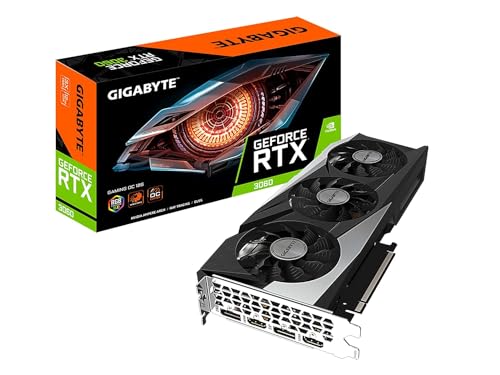
| 2 GIGABYTE RTX 3060 Gaming OC 12G | GIGABYTE | 11.1 × 4.61 × 1.61 in | 12GB of GDDR6 memory | Check price |
| 3 PNY RTX 5060 Ti 16GB OC | PNY | 9.65 × 4.72 × 0.1 in | 16GB GDDR7 frame buffer | Check price |
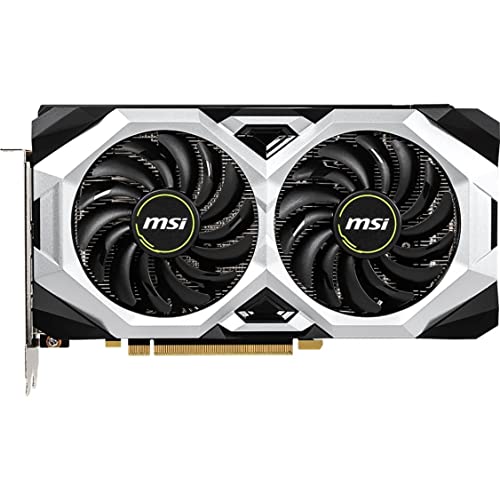
| 4 MSI RTX 3060 Ventus 2X 12G OC V1 | msi | Not listed | 12GB GDDR6 memory | Check price |
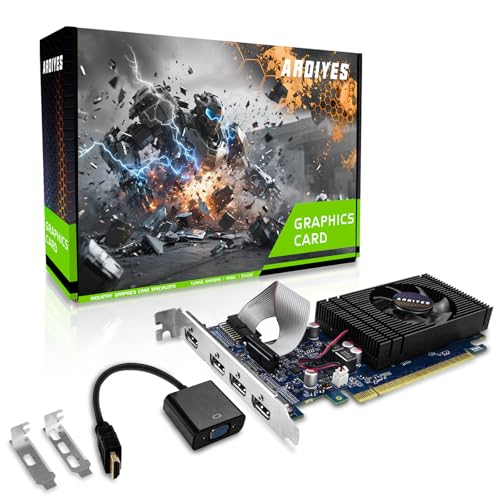
| 5 ARDIYES GT 740 4GB Graphics Card | ARDIYES | Not listed | Four built-in HDMI ports | Check price |
| 6 MSI RTX 3050 Ventus 2X 6G OC | msi | 7.4 × 4.3 × 0.1 in | 7.4-inch listed length | Check price |
| 7 Glorto GeForce GT 730 4GB Low-Profile | Glorto | 6.03 × 4.73 × 0.1 in | Low-profile design with half-height bracket | Check price |
| 8 QTHREE GeForce GT 730 4GB | QTHREE | Not listed | Four display outputs | Check price |
| 9 GIGABYTE RTX 3060 WINDFORCE OC 12G | GIGABYTE | 7.8 × 4.72 × 1.54 in | 12GB GDDR6 memory | Check price |
| 10 Glorto GeForce GT 210 1GB DDR3 | Glorto | 6.15 × 4.73 × 0.1 in | Low-profile bracket included | Check price |
Sizes and weights as listed by the manufacturer on Amazon. Check the retailer for current price and availability.
Pros
- 4GB of DDR4 video memory
- DisplayPort and HDMI outputs
- Compact 5.91-inch length
Cons
- 64-bit memory interface
- Who should skip it: users needing more than two display outputs
Pros
- 12GB of GDDR6 memory
- Three WINDFORCE fans
- Second-generation RT cores
Cons
- Who should skip it: users needing more than 12GB of graphics memory
Pros
- 16GB GDDR7 frame buffer
- Compact two-slot design
- Adjustable fan curves and clock settings
Cons
- 128-bit memory interface
- Who should skip it: buyers prioritizing a wider memory interface

Pros
- 12GB GDDR6 memory
- Three DisplayPort outputs
- HDMI 2.1 output
Cons
- Who should skip it: builders needing multiple HDMI outputs
Pros
- Four built-in HDMI ports
- 4GB GDDR5 memory
- Low-profile design with two bracket options
Cons
- Listed display outputs are HDMI
- Who should skip it: users whose monitors lack HDMI

Pros
- 7.4-inch listed length
- One DisplayPort and two HDMI outputs
- 6GB GDDR6 memory
Cons
- Who should skip it: users who need more than 6GB of graphics memory

Pros
- Low-profile design with half-height bracket
- HDMI, DisplayPort, and VGA outputs
- Compatible with Windows 11
Cons
- Who should skip it: users needing demanding gaming or graphics performance

Pros
- Four display outputs
- Low-profile design
- No external power connection
Cons
- Requires a PCIe x8 lane slot and 300W or greater power supply
- Who should skip it: users needing graphics for demanding workloads

Pros
- 12GB GDDR6 memory
- Two WINDFORCE fans
- Listed physical dimensions for clearance checks
Cons
- Who should skip it: builders whose cases cannot fit its listed dimensions

Pros
- Low-profile bracket included
- HDMI and VGA outputs
- Supports two-screen output
Cons
- 1GB DDR3 memory with a 64-bit bus
- Who should skip it: users needing newer graphics APIs
Key Numbers at a Glance
- Largest listed memory capacity: 16GB GDDR7 on the PNY RTX 5060 Ti 16GB OC; the RTX 3060 cards list 12GB GDDR6.
- The MSI RTX 3050 Ventus 2X 6G OC lists 6GB GDDR6 and a 96-bit memory interface.
- The MSI GT 1030 4GB DDR4 Graphics Card lists one DisplayPort 1.4a output and one HDMI 2.0b output.
- The ARDIYES GT 740 4GB Graphics Card lists four HDMI outputs for a quad-monitor setup.
Streaming Graphics Card with the Most Listed Memory: PNY RTX 5060 Ti 16GB OC
The PNY RTX 5060 Ti 16GB OC pairs 16GB of GDDR7 with a compact dual-fan, 2-slot design, making it the strongest memory-focused match in this selection for gaming alongside streaming or creative work. Its listing also names HDMI and DisplayPort 2.1 outputs and PCIe 5.0. Those details do not establish frame rates or stream quality, so match the card to your games and monitor before purchasing.
Skip it if you only need basic desktop display outputs or do not need its higher-end feature set.
Related guides: Best Graphics Cards for VR, Best Graphics Cards for Machine Learning and Best AMD Graphics Cards for GTA 6.
Streaming Graphics Card for 12GB Memory: GIGABYTE RTX 3060 Gaming OC 12G
The GIGABYTE RTX 3060 Gaming OC 12G has 12GB of GDDR6 on a 192-bit interface and three WINDFORCE fans. That gives shoppers a clear alternative to the 16GB PNY card when they are comparing memory capacity and a listed triple-fan design, though the product details here do not establish comparative performance.
Skip it if you need a compact 2-slot card or specifically want the PNY model’s listed GDDR7 memory.
Streaming Graphics Card with a Twin-Fan Design: MSI RTX 3060 Ventus 2X 12G OC V1
The MSI RTX 3060 Ventus 2X 12G OC V1 also lists 12GB of GDDR6 and a 192-bit interface, with a twin-fan design and three DisplayPort 1.4a outputs plus one HDMI 2.1 output. The output mix can be useful when your monitor setup uses those connections, but confirm the exact ports your displays require.
Skip it if your priority is 16GB of listed graphics memory or you need a different output configuration.
Entry-Level RTX Streaming Card: MSI RTX 3050 Ventus 2X 6G OC
The MSI RTX 3050 Ventus 2X 6G OC is the RTX choice here with 6GB of GDDR6 and a 96-bit interface. Its outputs are one DisplayPort 1.4a and two HDMI 2.1a ports, so check that this combination suits your monitors and other display equipment.
Skip it if your games or other workloads call for more than the listed 6GB of graphics memory, or if you need more than one DisplayPort output.
How to Choose the Best Graphics Cards for Streaming
Match the GPU to your games and stream workload
Bottom line: Choose an RTX card for a gaming-and-streaming build, then verify that its performance suits your games and display resolution. The products here range from RTX 3050 and RTX 3060 models to the RTX 5060 Ti, but the supplied specifications do not include benchmark results or frame rates. If you are also choosing a complete system, browse our gaming PCs category to compare the wider platform needs.
Use memory capacity as a workload clue, not a performance guarantee
Bottom line: Compare the memory capacity and type against your games, resolution, and other applications. The PNY RTX 5060 Ti lists 16GB GDDR7, the RTX 3060 cards list 12GB GDDR6, and the MSI RTX 3050 lists 6GB GDDR6. More memory alone does not prove faster performance, so consider it alongside the GPU model and independent evidence for the exact games you play.
Check outputs against your monitors and capture setup
Bottom line: Confirm every display connection you need before picking a card. The MSI RTX 3060 Ventus 2X lists three DisplayPort 1.4a ports and one HDMI 2.1 port, while the MSI RTX 3050 lists one DisplayPort 1.4a and two HDMI 2.1a ports. For a streaming PC with multiple displays, count the screens and compare their input ports with the card’s listed outputs; a capture device may have its own connection requirements.
Confirm case clearance and card format
Bottom line: Check the card’s exact dimensions and slot clearance against your case before ordering. The PNY RTX 5060 Ti is described as a compact 2-slot design, but the product data does not give its length. The RTX 3060 options have different two- and three-fan layouts, so do not assume they take up the same space; verify dimensions on the manufacturer page and in your case manual.
Verify power supply requirements
Bottom line: Check the card maker’s power recommendation and connector requirements against your existing PSU. The product details here do not establish a complete power requirement for each RTX card, so do not infer it from the GPU name alone. Compare your PSU model, available connectors, and the exact card’s documentation; our guide to power supplies for gaming PCs can help with the broader PSU decision.
Separate gaming cards from display and office adapters
Bottom line: Do not treat a card with multiple monitor outputs as a gaming-streaming equivalent. The ARDIYES GT 740 advertises four HDMI ports and the low-profile Glorto GT 730 lists several output types, but their product descriptions emphasize office, multimedia, or display use. For an upgrade to an older desktop, confirm slot and driver compatibility as well as the actual workload; the graphics cards category offers more options to compare.
How We Compared These Products
This guide is based on product research, not firsthand evaluation. We compared the listed GPU families, memory capacities and types, outputs, cooling layouts, and stated form-factor details, and used the product descriptions to distinguish gaming-oriented RTX cards from basic display adapters. The listings do not provide consistent card dimensions, power requirements, benchmarks, or enough customer-feedback evidence to make claims about measured performance, noise, or reliability.
Which Option Fits Your PC and Streaming Setup?
For gaming and streaming with a larger memory capacity in this selection, start with the PNY RTX 5060 Ti 16GB OC; for a 12GB RTX 3060, compare the GIGABYTE Gaming OC and MSI Ventus 2X based on their listed fan layouts and monitor outputs. Choose the MSI RTX 3050 when its 6GB capacity and port mix fit your needs, and avoid substituting the GT-series display cards for an RTX gaming upgrade just because they advertise several monitor connections.
Mistakes to Avoid When Choosing a Streaming Graphics Card
- Choosing by memory alone. Compare the GPU model, memory type, and workload together; the 16GB figure by itself does not establish frame rates.
- Assuming every card fits. Check exact length, thickness, slot clearance, and case documentation because the listings do not give consistent dimensions.
- Overlooking power connections. Verify the selected card’s connector and PSU requirements with the card maker before reusing an existing power supply.
- Counting ports without checking display inputs. Match the card’s HDMI and DisplayPort versions to your monitors and any capture equipment.
Frequently Asked Questions
Which graphics card is a sensible starting point for streaming games?
Start by comparing the RTX models with the game performance and resolution you need. The PNY RTX 5060 Ti lists 16GB GDDR7, the RTX 3060 cards list 12GB GDDR6, and the MSI RTX 3050 lists 6GB GDDR6; these figures do not establish frame rates or streaming quality.
Is 6GB of graphics memory enough for streaming?
Whether 6GB is enough depends on the games, resolution, settings, and other applications you run. The MSI RTX 3050 Ventus 2X 6G OC lists 6GB GDDR6, so compare that capacity with requirements and independent performance information for your specific workload before buying.
Can a GT 730 or GT 740 replace an RTX card for game streaming?
The GT 730 and GT 740 listings focus on office, multimedia, and multiple-display use, while the RTX cards are the gaming-oriented choices in this selection. The product details do not establish that either GT model can handle your games and stream together, so choose based on the actual gaming workload rather than output count.
Do these graphics cards work with every PC power supply?
No. Power capacity and connector needs vary, and the product data here does not specify all the requirements for each card. Check the exact card documentation, your PSU label and connectors, and available case clearance before purchasing.
Which card has the most listed monitor outputs?
The ARDIYES GT 740 4GB Graphics Card lists four HDMI ports. That feature is aimed at multi-monitor display use, not proof of suitability for gaming and streaming; check your monitor inputs and workload before choosing it.


Write Your Review
No reviews yet. Be the first to share your experience!