


For PC players who want a direct wired connection, the Corsair HS55 Stereo Gaming Headset and Corsair HS35 – Stereo Gaming Headset use 3.5 mm connectors, while the iMangoo USB Earbuds with Microphone for PC Laptop connect over USB. If you prefer wireless chat, the SteelSeries Arctis 9 Wireless Wireless Gaming Headset for PC combines 2.4 GHz audio with Bluetooth, and the Avantree C519M – Bluetooth Gaming Headset uses a USB-C adapter. Choosing the wrong connection or microphone setup can leave you short on ports, flexibility, or the comfort you need for long sessions.
Compare at a glance
| Product | Brand | Size | Weight | Stands out for | Price |
|---|---|---|---|---|---|
| 1 iMangoo USB Earbuds with 7.5ft Cord | iMangoo | Not listed | Not listed | Long 7.5-foot cord | Check price |
| 2 Avantree C519M Bluetooth Gaming Headset | Avantree | 7.48 × 6.89 × 3.15 in | 0.4 lb | Plug-and-go USB-C adapter | Check price |
| 3 Corsair HS55 Stereo Gaming Headset | Corsair | 7.24 × 3.43 × 7.6 in | 0.6 lb | Lightweight 273g construction | Check price |
| 4 Corsair HS35 Stereo Gaming Headset | Corsair | 7.24 × 3.46 × 8.07 in | 0.3 lb | Detachable microphone | Check price |
| 5 ASUS TUF Gaming H1 Headset, 40mm Drivers | ASUS | Not listed | 0.7 lb | Lightweight 297-gram design | Check price |
| 6 Corsair HS60 HAPTIC Gaming Headset | Corsair | 6.34 × 3.9 × 8.15 in | 0.9 lb | Adjustable memory foam ear cups | Check price |
| 7 ASUS ROG Delta Origin USB-C Headset | ASUS | 8.4 × 10 × 4.5 in | 2 lb | Broad platform compatibility through USB-C | Check price |
| 8 SteelSeries Arctis 9 Wireless Gaming Headset | SteelSeries | 6.65 × 3.62 × 7.56 in | 0.8 lb | Simultaneous wireless audio and Bluetooth | Check price |
Sizes and weights as listed by the manufacturer on Amazon. Check the retailer for current price and availability.
Pros
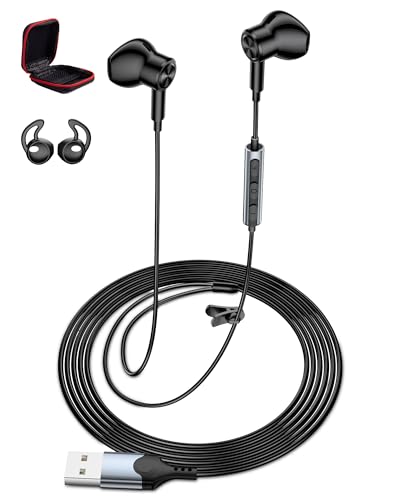
- Long 7.5-foot cord
- In-line volume and mic controls
- Includes ear covers and storage case
Cons
- Wired USB-A connection
- Who should skip it: listeners who prefer wireless earbuds
Pros
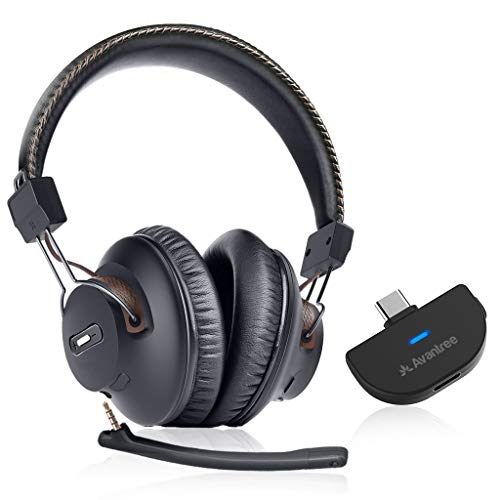
- Plug-and-go USB-C adapter
- Stated low-latency audio
- Up to 40 hours of battery life
Cons
- Not compatible with TVs
- Who should skip it: users whose device lacks USB-C audio output
Pros
- Lightweight 273g construction
- Adjustable memory foam ear pads
- Flip-to-mute microphone
- Broad stated device compatibility
Cons
- Who should skip it: players who need wireless audio

Pros
- Detachable microphone
- On-ear volume and mute controls
- Broad listed device compatibility
- Memory foam earcups
Cons
- Who should skip it: PC users who need a Y-splitter included
Pros
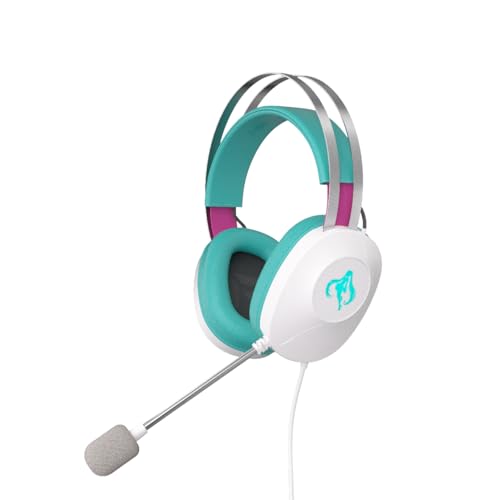
- Lightweight 297-gram design
- Removable, cleanable ear cushions
- TeamSpeak-certified unidirectional microphone
Cons
- Who should skip it: players seeking wireless audio
Pros
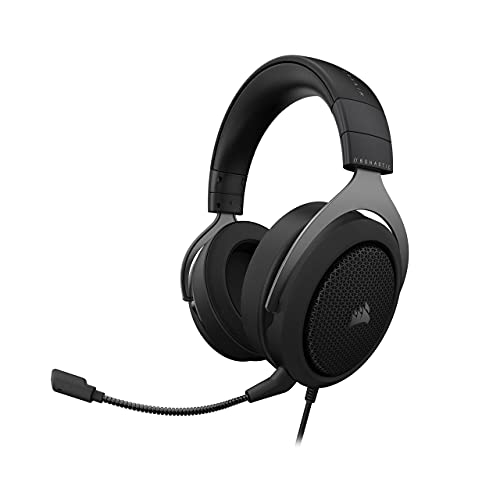
- Adjustable memory foam ear cups
- Detachable noise-cancelling microphone
- On-ear volume and haptic controls
- Aluminum yokes
Cons
- Who should skip it: buyers who prefer conventional audio without tactile bass effects

Pros
- Broad platform compatibility through USB-C
- Ergonomic D-shaped ear cups
- Three customizable lighting effects
- Discord Certified microphone
Cons
- Who should skip it: users needing a non-USB-C connection

Pros
- Simultaneous wireless audio and Bluetooth
- On-headset game and chat balance control
- Stated 20-plus-hour battery life
Cons
- Who should skip it: buyers needing confirmed support for other consoles
Best Budget USB Headset for Discord: iMangoo USB Earbuds with Microphone for PC Laptop
iMangoo USB Earbuds with Microphone for PC Laptop stand out for a compact wired setup with a 7.5-foot cord and an in-line mute button. USB plug-and-play connection avoids Bluetooth pairing, but the semi-in-ear design will not suit everyone who prefers over-ear cups.
Skip it if you want an over-ear headset or a wireless connection.
Best Wireless Headset for Simultaneous Chat: SteelSeries Arctis 9 Wireless Wireless Gaming Headset for PC
SteelSeries Arctis 9 Wireless Wireless Gaming Headset for PC pairs lossless 2.4 GHz audio with simultaneous Bluetooth, so you can use Bluetooth for calls, music, or VoIP while gaming. Its listed battery life is 20+ hours, and the on-ear ChatMix control adjusts game and chat balance; wireless convenience means keeping battery charge in mind.
Skip it if you want a simple wired headset without a rechargeable battery.
Related guides: Best PS5 Headsets for GTA 6, Best Wireless Headsets for GTA 6 and Best PC Gaming Headset for the Money.
Best USB-C Headset for Cross-Device Use: ASUS ROG Delta Origin Gaming Headset
ASUS ROG Delta Origin Gaming Headset uses USB-C and is listed for laptops, consoles, smartphones, and smart devices. Its D-shaped ear cups and angled drivers are design features intended to support fit and sound direction, while the red LED lighting may matter more to some setups than others.
Skip it if your device lacks a compatible USB-C connection or you prefer a 3.5 mm headset.
Best Headset for Tactile Bass: Corsair HS60 HAPTIC Stereo Gaming Headset
Corsair HS60 HAPTIC Stereo Gaming Headset adds Taction Technology haptic bass and provides on-headset controls for volume and haptic effect. It connects to PC over USB and supports CORSAIR iCUE, but its haptic feature is specific to buyers who want bass they can feel.
Skip it if you want a lightweight, uncomplicated headset without haptic effects or USB software features.
Key Numbers at a Glance
- The iMangoo USB Earbuds with Microphone for PC Laptop have a 7.5-foot cord; the Corsair HS55 Stereo Gaming Headset uses a 3.5 mm connection.
- The ASUS TUF Gaming H1 Gaming Headset Wired weighs 297 grams, while the Corsair HS55 Stereo Gaming Headset weighs 273 grams.
- The Avantree C519M – Bluetooth Gaming Headset lists up to 40 hours of battery life; the SteelSeries Arctis 9 Wireless Wireless Gaming Headset for PC lists 20+ hours.
- The Corsair HS60 HAPTIC Stereo Gaming Headset and Corsair HS55 Stereo Gaming Headset both specify 50 mm neodymium drivers.
How to Choose Among the Best Headsets for Discord
Connection type and available ports
Bottom line: Match the headset connector to the device you will use for Discord. The Corsair HS55 Stereo Gaming Headset connects through 3.5 mm and includes a Y-cable adapter for PC compatibility, while the iMangoo USB Earbuds with Microphone for PC Laptop use USB-A. The ASUS ROG Delta Origin Gaming Headset uses USB-C, and the Avantree C519M – Bluetooth Gaming Headset depends on a USB-C adapter. Check your PC or laptop ports before choosing, and confirm whether any adapter you need is included.
For more options in the same category, browse our PC headsets page, or see the broader peripherals category if you are also choosing a keyboard, mouse, or other desk gear.
Microphone design and chat controls
Bottom line: Choose a microphone and mute method you can manage during play. The Corsair HS35 – Stereo Gaming Headset has a detachable unidirectional microphone and on-ear mute controls, while the Corsair HS55 Stereo Gaming Headset uses a flip-to-mute omnidirectional microphone. The iMangoo USB Earbuds with Microphone for PC Laptop put a mute button on the cord. If you frequently mute between calls, consider which control is easiest to reach without leaving your game.
Wireless convenience, battery, and latency claims
Bottom line: Wireless freedom comes with a battery or adapter check. The SteelSeries Arctis 9 Wireless Wireless Gaming Headset for PC lists 20+ hours of battery life and simultaneous Bluetooth, while the Avantree C519M – Bluetooth Gaming Headset lists up to 40 hours at 60% volume and says its adapter-to-headphone Bluetooth latency is under 40 ms. Those are manufacturer claims, not a guarantee of the same experience in every setup. Choose the SteelSeries if simultaneous Bluetooth and 2.4 GHz use matter; choose Avantree if a USB-C adapter and its stated battery duration fit your devices.
Fit, weight, and session comfort
Bottom line: Compare stated weight and ear-cup style if you wear a headset for long sessions. The ASUS TUF Gaming H1 Gaming Headset Wired weighs 297 grams and has a metal suspension headband; the Corsair HS55 Stereo Gaming Headset weighs 273 grams and uses adjustable leatherette memory foam ear cups. The iMangoo USB Earbuds with Microphone for PC Laptop are semi-in-ear rather than over-ear. Weight and design can narrow your choices, but fit is personal, so check return terms if comfort is uncertain.
Sound features versus chat priorities
Bottom line: Pay for the sound feature you will actually use, not a label alone. The Corsair HS60 HAPTIC Stereo Gaming Headset adds haptic bass, 50 mm drivers, USB connection, and iCUE support; the ASUS TUF Gaming H1 Gaming Headset Wired lists 40 mm drivers and virtual 7.1 surround sound. The Corsair HS55 Stereo Gaming Headset lists 50 mm drivers and Tempest 3D AudioTech support on PS5. These features do not establish which headset will sound best to you, so prioritize connection, microphone controls, and fit before optional effects.
How We Compared These Products
This guide is based on product research, comparing listed connection types, microphone designs, comfort details, device compatibility, and manufacturer-stated audio or battery features. The product pages list no customer review details in the data considered here, and no firsthand evaluation is documented, so recommendations are tied to stated features rather than claims of personal use.
Which Option Fits Your Setup?
If you want wireless gaming audio plus Bluetooth for calls or VoIP, the SteelSeries Arctis 9 Wireless Wireless Gaming Headset for PC is the more directly aligned choice, with 20+ hours of listed battery life and ChatMix control. If USB-C compatibility and a stated 40-hour battery are more useful, consider the Avantree C519M – Bluetooth Gaming Headset, while checking that your device has USB-C.
For a wired PC connection, the iMangoo USB Earbuds with Microphone for PC Laptop provide USB-A and an in-line mute button; for 3.5 mm connectivity across platforms, the Corsair HS55 Stereo Gaming Headset is listed for PC, Mac, consoles, and mobile devices. Choose based on your actual ports and whether you prefer earbuds or over-ear cups.
Mistakes to Avoid When Choosing a Discord Headset
- Assuming every USB-C port works the same way. Confirm that your device supports the headset’s connection, and check the Avantree adapter requirement before ordering.
- Ignoring the PC audio connection. The Corsair HS35 – Stereo Gaming Headset may require a 4-pole Y-splitter for PC or laptop compatibility, while the Corsair HS55 Stereo Gaming Headset includes a Y-cable adapter.
- Choosing wireless without considering charging. Compare the stated battery claims and decide whether you want to manage charging or stay wired.
- Buying by surround or driver claims alone. Check microphone controls, fit, ports, and platform support too; driver size alone does not establish how a headset will sound to you.
Frequently Asked Questions
Will these headsets work with Discord on a PC?
The listed products are presented for PC or computer use, but their connection requirements differ. Confirm your PC has the required USB-A, USB-C, or 3.5 mm connection, and select the headset and microphone as Discord’s input and output devices.
Which headsets use a 3.5 mm connection?
The Corsair HS55 Stereo Gaming Headset and Corsair HS35 – Stereo Gaming Headset use 3.5 mm connectors. The HS55 includes a Y-cable adapter for PC compatibility; the HS35 listing says PC or laptop use may require a 4-pole Y-splitter, which is not included.
Can I use Bluetooth and game audio at the same time?
The SteelSeries Arctis 9 Wireless Wireless Gaming Headset for PC specifies simultaneous 2.4 GHz wireless and Bluetooth, with Bluetooth intended for calls, music, and VoIP chat while gaming. The Avantree C519M – Bluetooth Gaming Headset instead uses its USB-C adapter and describes automatic switching between music and talk modes.
Does the Avantree C519M work with a USB-C PC?
The Avantree C519M – Bluetooth Gaming Headset is listed for PC systems and devices that output audio through USB-C. The product page says it is not compatible with TVs, so check your device’s port and operating system before buying.
Which headset has the longest stated battery life?
The Avantree C519M – Bluetooth Gaming Headset lists up to 40 hours per charge, tested by its manufacturer at 60% volume. The SteelSeries Arctis 9 Wireless Wireless Gaming Headset for PC lists 20+ hours; actual battery life can vary with use.
Do Discord-certified headsets guarantee better microphone sound?
A certification label does not tell you whether a microphone’s sound will suit your voice, room, or settings. Compare the listed microphone direction and mute controls, such as the Corsair HS35 – Stereo Gaming Headset’s detachable unidirectional microphone or the Corsair HS55 Stereo Gaming Headset’s flip-to-mute omnidirectional mic.




Write Your Review
No reviews yet. Be the first to share your experience!