


Call center agents need a headset that connects to the right device and stays practical through back-to-back calls. For a desk phone, check the connector first; for a computer-based calling setup, USB options offer straightforward wired connections, while wireless models add room to move but need charging. This guide to the best headsets for a call center compares those trade-offs, plus single-ear designs and a headset training kit.
Compare at a glance
| Product | Brand | Size | Weight | Stands out for | Price |
|---|---|---|---|---|---|
| 1 AGPTEK RJ9 Monaural Call Center Headset | AGPTEK | Not listed | 0.4 lb | Adjustable microphone and headband | Check price |
| 2 Arama USB-A Mono Headset | Arama | 7.87 × 1.57 × 3.15 in | 0.3 lb | Lightweight single-ear design | Check price |
| 3 Soothielec Wireless Headset with USB Dongle | Soothielec | Not listed | 1 lb | Bluetooth 5.3 and USB-A dongle | Check price |
| 4 Yealink UH37 USB Headset | Yealink | 7.64 × 8.15 × 20.91 in | 0.3 lb | USB-C and USB-A connectivity | Check price |
| 5 Angteela Wireless Headset with Mic, Bluetooth 5.4 | Angteela | Not listed | 1.2 lb | Flip-to-mute microphone | Check price |
| 6 OTYHVV Wireless Headset, 40-Hour Talk Time | OTYHVV | Not listed | Not listed | USB dongle included | Check price |
| 7 Jabra Evolve 20 Wired USB Headset | Jabra | 5.9 × 2.3 × 6.7 in | 0.3 lb | USB-A and USB-C connections | Check price |
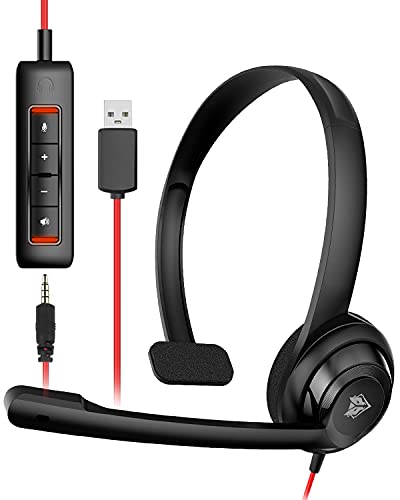
| 8 NUBWO HW02 USB Headset with Mic | NUBWO | 275.59 × 3.15 × 7.87 in | 0.1 lb | Adjustable boom microphone | Check price |
Sizes and weights as listed by the manufacturer on Amazon. Check the retailer for current price and availability.
Pros
- Adjustable microphone and headband
- Padded earpad
- Direct 4-pin RJ9 connection
Cons
- Not for computer use
- Who should skip it: users without an RJ9-compatible desk phone
Pros
- Lightweight single-ear design
- In-line mute and volume controls
- No Bluetooth charging or pairing
Cons
- Who should skip it: users who need stereo audio
Pros
- Bluetooth 5.3 and USB-A dongle
- Simultaneous laptop and smartphone pairing
- 40-hour stated talk time
- Adjustable headband and memory foam earcups
Cons
- Mute function activates only during calls
- Who should skip it: desk-phone users

Pros
- USB-C and USB-A connectivity
- Dual noise-canceling microphones
- Flip-to-mute microphone
- Teams-certified
Cons
- Who should skip it: users who need wireless movement

Pros
- Flip-to-mute microphone
- USB-A dongle included
- Bluetooth 5.4 with dual connectivity
- Stated 35-hour talk time
Cons
- Who should skip it: desk-phone and VoIP-phone users

Pros
- USB dongle included
- Charging dock included
- Up to 40 hours of talk time
- Adjustable boom microphone
Cons
- Who should skip it: users who need a two-ear headset

Pros
- USB-A and USB-C connections
- In-line call and volume controls
- Dual-ear design
- Lightweight construction
Cons
- Who should skip it: users who need wireless freedom
Pros
- Adjustable boom microphone
- Inline volume and mute controls
- 3.5 mm and detachable USB connections
- Listed weight of 0.10625 lb
Cons
- Who should skip it: people who need a wireless headset
Best for Desk Phones: AGPTEK RJ9 Monaural Call Center Headset
AGPTEK RJ9 Monaural Call Center Headset is the direct-fit choice here for a compatible desk phone, with an RJ9 connector and a single-ear design. Its flexible microphone and adjustable headband suit voice calls, and the listing specifically warns it is not for computers. Skip it if your calls run through a PC or your phone requires a different headset connector.
Best for USB-A Simplicity: Arama USB-A Mono Headset
Arama USB-A Mono Headset connects to a Windows or Mac computer over USB-A and has in-line volume and mute controls. The single-ear fit leaves one ear uncovered, but it does not offer the movement of a wireless headset. Skip it if your computer lacks USB-A and you do not have a compatible adapter.
Best for Call Coaching: VT 2 x PLT-QD Pro Headsets with Noise Cancelling
VT 2 x PLT-QD Pro Headsets with Noise Cancelling is a purpose-built training bundle with two headsets and a QD Y USB training cable. The cable supports trainer call controls, and the kit is listed for computers, softphones, and platforms including Zoom and Teams. Skip it if you need only one headset for independent calls.
Best for Wireless PC Calls: Angteela Wireless Headset with Mic, Bluetooth 5.4
Angteela Wireless Headset with Mic, Bluetooth 5.4 pairs Bluetooth with a Qualcomm USB-A dongle, and its flip-to-mute boom gives you a physical way to mute. The product page lists up to 35 hours of talk time, though wireless use means keeping the battery charged. Skip it if you need a headset for a desk phone, since the dongle is not listed as compatible with desk phones or VoIP phones.
Key Numbers at a Glance
- Listed wireless talk time ranges from up to 35 hours on Angteela Wireless Headset with Mic, Bluetooth 5.4 to up to 40 hours on Soothielec Wireless Headset with USB Dongle, OTYHVV Wireless Headset, 40-Hour Talk Time, and AOC Wireless Headset with Mic, Bluetooth 5.4.
- OTYHVV Wireless Headset, 40-Hour Talk Time lists a weight of 102 g, while AOC Wireless Headset with Mic, Bluetooth 5.4 lists 124 g.
- AGPTEK RJ9 Monaural Call Center Headset uses a 4-pin RJ9 connector, while Arama USB-A Mono Headset connects over USB-A.
- VT 2 x PLT-QD Pro Headsets with Noise Cancelling includes two QD headsets and one QD Y USB training cable.
How to Choose a Call Center Headset
Match the connector to the calling device
Bottom line: Identify your computer or phone connection before choosing a headset. The AGPTEK RJ9 Monaural Call Center Headset has a 4-pin RJ9 plug and is explicitly not for computers. Arama USB-A Mono Headset is a plug-and-play USB-A choice for Windows and Mac, while Yealink UH37 USB Headset supports both USB-C and USB-A. Check your device’s available ports and the softphone or phone system requirements; a connector that fits physically does not by itself confirm support for every calling platform.
Choose mono or stereo for your workspace
Bottom line: Pick mono to keep one ear open, or stereo if you want sound at both ears. Arama USB-A Mono Headset and OTYHVV Wireless Headset, 40-Hour Talk Time are single-ear designs; Yealink UH37 USB Headset is described as stereo. A mono headset may suit agents who need to hear nearby colleagues, while a stereo model covers both ears. Consider your office norms and personal comfort rather than assuming one design is right for every shift.
Decide whether wireless freedom is worth charging
Bottom line: Choose wireless for movement, and wired for a direct connection without battery upkeep. Soothielec Wireless Headset with USB Dongle lists up to 40 hours of talk time and a 33-foot Bluetooth range; Angteela Wireless Headset with Mic, Bluetooth 5.4 lists up to 35 hours. Those are manufacturer-stated figures, not a guarantee of runtime in every setup. Wired models such as Jabra Evolve 20 Wired USB Headset avoid routine headset charging, but keep you physically connected to the device.
Prioritize microphone controls and noise features
Bottom line: For frequent calls, choose controls you can reach without leaving the conversation. Jabra Evolve 20 Wired USB Headset has in-line call controls, while Yealink UH37 USB Headset lists earcup controls and a flip-to-mute microphone. Angteela Wireless Headset with Mic, Bluetooth 5.4 uses a flip-to-mute boom, and AOC Wireless Headset with Mic, Bluetooth 5.4 lists an AI noise-canceling microphone. Noise-reduction terms describe product claims, not a measured result; if a noisy room is a concern, check return terms and confirm the headset works with your calling app’s mute controls.
Consider comfort and coaching needs
Bottom line: Match the fit to your wear preference, and use a dedicated training kit when two people need to join one call. OTYHVV Wireless Headset, 40-Hour Talk Time lists a 102 g weight and a single-ear design, while Yealink UH37 USB Headset describes breathable leather ear cups. For supervisor coaching, the VT bundle includes two headsets and a Y cable that lets trainer and trainee join simultaneously. Product descriptions cannot establish how a headset will feel on your head, so check its fit details and seller return policy before relying on it for a full shift.
How We Compared These Products
This guide is based on product research, not firsthand evaluation. We compared the listed connector types, mono and stereo designs, call controls, stated battery figures, compatibility notes, and training features. The product pages do not provide a consistent basis for ranking microphone performance across every model, so noise-cancellation claims are presented as listed features rather than verified outcomes.
Which Option Fits Your Home and Devices?
For a computer-based desk with USB-C or USB-A, compare Yealink UH37 USB Headset’s dual USB connector options with Jabra Evolve 20 Wired USB Headset’s USB-A/USB-C connection and in-line controls. For a desk phone, start with the RJ9 connector on AGPTEK RJ9 Monaural Call Center Headset and verify your phone’s compatibility before buying. For coaching, the VT headset bundle directly addresses a trainer-and-trainee call; choose a single-user headset instead if you do not need that setup.
If your work is mainly video meetings, our best headsets for Zoom calls guide focuses on that use. For broader desk-based comparisons, see best headsets for office work, or compare comfort considerations in best headsets for glasses wearers. If voice chat is also part of your PC use, best headsets for Discord covers that separate setup.
Mistakes to Avoid When Choosing a Call Center Headset
- Buying by connector name alone. Match the headset to the actual phone or computer port and confirm support for the calling system; RJ9 is not the same as USB.
- Assuming every USB headset works with a desk phone. The listed USB dongles are for computers, and some explicitly exclude desk phones or VoIP phones.
- Ignoring battery upkeep. Wireless runtime is stated as a maximum; choose a wired model if charging is an avoidable source of interruption for your workflow.
- Expecting noise cancellation to remove every sound. Treat microphone noise-reduction language as a feature claim, and assess your room and call app before settling on a model.
Frequently Asked Questions
Can I use the AGPTEK RJ9 headset with a computer?
No. The product page says the AGPTEK RJ9 Monaural Call Center Headset is not for computers and identifies it as an RJ9 headset. Choose a USB model for a computer, after checking the available port and software compatibility.
Which headsets in this guide connect over USB-C?
Yealink UH37 USB Headset is listed with USB-C and USB-A compatibility. Jabra Evolve 20 Wired USB Headset is also described as supporting USB-A and USB-C. Confirm whether your particular device and calling app recognize the headset connection.
Do wireless headsets work without a USB dongle?
Several listed wireless models also support Bluetooth, including Soothielec Wireless Headset with USB Dongle and Angteela Wireless Headset with Mic, Bluetooth 5.4. Their included dongles provide another connection route for computers, but compatibility varies by model and the listed dongles are not for desk phones. Check the product details for the exact device you plan to use.
Which headset is suitable for supervisor call coaching?
VT 2 x PLT-QD Pro Headsets with Noise Cancelling is listed as a training kit with two QD headsets and a QD Y USB training cable. The product description says trainer and trainee can join the same call, with call controls on the cable. It is less appropriate if you need only one headset for routine individual calls.
Is mono or stereo better for call center work?
Mono models such as Arama USB-A Mono Headset leave one ear uncovered, which can suit a workspace where you want to remain aware of nearby conversation. Yealink UH37 USB Headset is a stereo option for listening with both ears. Choose based on your workplace, listening preference, and comfort during long calls.




Write Your Review
No reviews yet. Be the first to share your experience!