


If your home has Wi-Fi dead zones or you are buying a router for newer devices, Wi-Fi 6E can add a less-congested 6 GHz band, while Wi-Fi 7 adds features such as Multi-Link Operation (MLO) on compatible devices. Choose a Wi-Fi 6E model when 6 GHz access and tri-band mesh matter most; consider Wi-Fi 7 for newer client support, MLO, or multi-gig Ethernet, while checking whether each router’s band configuration and coverage suit your home.
This comparison covers single routers and mesh systems, so you can weigh device compatibility, coverage claims, wired ports, and setup needs before replacing your network equipment.
Compare at a glance
| Product | Brand | Size | Weight | Stands out for | Price |
|---|---|---|---|---|---|
| 1 eero 7 Wi-Fi 7 Mesh Router, 3-Pack | eero | 5.12 × 2.52 × 5.12 in | 1.3 lb | Three-router mesh package | Check price |
| 2 TP-Link Deco BE63 Wi-Fi 7 Mesh, 3-Pack | TP-Link | 4.23 × 4.23 × 6.93 in | 5 lb | Three-unit mesh system | Check price |
| 3 TP-Link Archer AXE75 Wi-Fi 6E Router | TP-Link | 12.91 × 10.43 × 4.72 in | 1.5 lb | Tri-band Wi-Fi 6E | Check price |
| 4 TP-Link Deco BE25 Wi-Fi 7 Mesh, 3-Pack | TP-Link | 5.91 × 5.91 × 2.44 in | 3.3 lb | Three-unit mesh system | Check price |
| 5 TP-Link Deco XE75 Wi-Fi 6E Mesh, 2-Pack | TP-Link | 4.13 × 4.13 × 6.67 in | 2.7 lb | Two-node mesh design | Check price |
Sizes and weights as listed by the manufacturer on Amazon. Check the retailer for current price and availability.
Pros
- Three-router mesh package
- Up to 6,000 square feet of stated coverage
- Two 2.5 GbE ports per router
- Supports more than 120 devices
Cons
- Who should skip it: users with internet plans over 2.5 Gbps
Best for a Wi-Fi 7 mesh system
Pros
- Three-unit mesh system
- Four 2.5G WAN/LAN ports
- Supports wired and wireless backhaul
- Deco app setup and management
Cons
- Who should skip it: buyers needing a modem included
Pros
- Tri-band Wi-Fi 6E
- 2.5Gbps WAN port
- EasyMesh-compatible
- VPN server and client support
Cons
- Who should skip it: users who need a built-in modem

Pros
- Three-unit mesh system
- Two 2.5G Ethernet ports per unit
- Supports wired and wireless backhaul
- Works with other Deco routers
Cons
- Requires a separate modem
- Who should skip it: shoppers requiring tri-band Wi-Fi
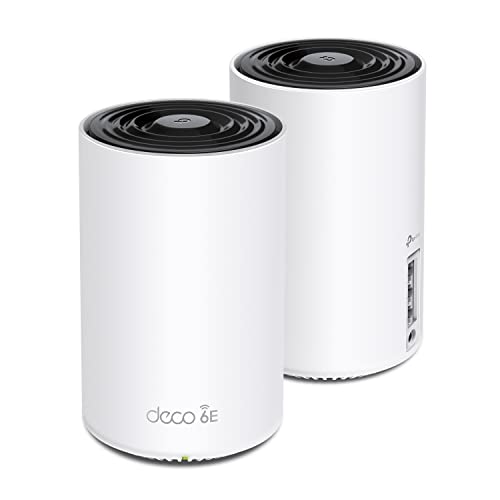
Pros
- Two-node mesh design
- 6 GHz band supports Wi-Fi 6E
- App-based setup and management
- Works with all internet service providers
Cons
- A modem is required for most providers
- Who should skip it: households that do not need mesh coverage
Key Numbers at a Glance
- Stated maximum mesh coverage ranges from 5,500 sq. ft. for the TP-Link Deco XE75 Wi-Fi 6E Mesh, 2-Pack to 7,600 sq. ft. for the TP-Link Deco BE63 Wi-Fi 7 Mesh, 3-Pack.
- The TP-Link Archer BE230 Wi-Fi 7 Router lists coverage up to 2,000 sq. ft.; the TP-Link Archer BE400 Wi-Fi 7 Router lists up to 2,400 sq. ft.
- The TP-Link Deco BE63 Wi-Fi 7 Mesh, 3-Pack lists four 2.5G WAN/LAN ports, while the TP-Link Archer BE230 Wi-Fi 7 Router lists two 2.5G ports.
- The eero 7 Wi-Fi 7 Mesh Router, 3-Pack lists support for 120+ devices; the eero Pro 6E Mesh Wi-Fi System, 3-Pack lists 100+.
Wi-Fi 6E vs Wi-Fi 7: What to Check Before You Buy
Band support and client compatibility
Bottom line: Choose 6 GHz only if your client devices support it, and do not assume every Wi-Fi 7 router includes that band. Wi-Fi 6E opens the 6 GHz band for compatible devices. Wi-Fi 7 routers vary: the dual-band TP-Link Archer BE230 Wi-Fi 7 Router and TP-Link Archer BE400 Wi-Fi 7 Router do not offer 6 GHz, while the tri-band TP-Link Deco BE63 Wi-Fi 7 Mesh, 3-Pack lists 2.4, 5, and 6 GHz bands. Check the wireless capabilities of your laptop, phone, or desktop adapter before paying for a band it cannot use.
MLO and the practical Wi-Fi 7 upgrade
Bottom line: Wi-Fi 7’s MLO is relevant when your router and client both support it, not simply because the router says Wi-Fi 7. MLO is listed on the eero 7 Wi-Fi 7 Mesh Router, 3-Pack and TP-Link Archer BE230 Wi-Fi 7 Router, among other Wi-Fi 7 models here. It allows supported devices to use multiple links, but the listing does not establish a particular real-world speed or latency gain. If your current devices are Wi-Fi 6E or older, base the upgrade on coverage, ports, and the devices you expect to connect.
Mesh coverage versus a single router
Bottom line: For a home with hard-to-reach rooms, compare mesh systems by node count and stated coverage, then plan placement. The three-unit TP-Link Deco BE25 Wi-Fi 7 Mesh, 3-Pack lists coverage up to 6,600 sq. ft.; the three-unit TP-Link Deco XE75 Wi-Fi 6E Mesh, 3-Pack lists up to 7,200 sq. ft. These are manufacturer coverage claims, not guarantees for every floor plan. A single router such as the TP-Link Archer BE230 Wi-Fi 7 Router lists up to 2,000 sq. ft., so it may be a simpler fit where one central access point can reach the rooms you use.
Ethernet ports and wired backhaul
Bottom line: Count the multi-gig ports you need for your modem, wired PC, and mesh connections before choosing. The TP-Link Deco BE63 Wi-Fi 7 Mesh, 3-Pack lists four 2.5G ports and wired backhaul support; the TP-Link Archer BE230 Wi-Fi 7 Router lists two 2.5G ports plus three 1G LAN ports. The eero 7 Wi-Fi 7 Mesh Router, 3-Pack lists two auto-sensing 2.5 GbE ports. Check whether a port is needed for WAN or LAN, and whether your modem and wired devices can use its speed.
Tri-band design and mesh backhaul
Bottom line: A tri-band system offers another band to allocate between clients and mesh nodes, but check how the system uses it. The TP-Link Deco XE75 Wi-Fi 6E Mesh, 3-Pack says 6 GHz can serve as backhaul by default, with an option to use it for Wi-Fi 6E clients. The dual-band TP-Link Deco BE25 Wi-Fi 7 Mesh, 3-Pack lists simultaneous wired and wireless backhaul, but lacks a 6 GHz band. A wired connection between nodes can be useful if you can run Ethernet; otherwise, compare the system’s band arrangement and your floor plan.
Related guides: Best Router for Business, Best Nighthawk Router for Gaming and Best Wi-Fi Router for Long Range Outdoor.
How We Compared These Products
This guide is based on product research, not firsthand evaluation. We compared listed wireless bands, Wi-Fi features, Ethernet ports, mesh configuration, device capacity, stated coverage, and setup or management details. Coverage and speed figures are manufacturer claims; actual results depend on the network environment and client devices.
Which Option Fits Your Home and Devices?
For a Wi-Fi 6E mesh network with a broad stated coverage area: TP-Link Deco XE75 Wi-Fi 6E Mesh, 3-Pack is listed for up to 7,200 sq. ft. and uses tri-band Wi-Fi, with 6 GHz available for backhaul or compatible clients. Skip it if you want Wi-Fi 7 features such as MLO or prefer a two-unit system.
For a Wi-Fi 7 mesh system with multiple multi-gig ports: TP-Link Deco BE63 Wi-Fi 7 Mesh, 3-Pack lists four 2.5G WAN/LAN ports and coverage up to 7,600 sq. ft. Skip it if you do not need a three-unit mesh system or its port capacity.
For a single Wi-Fi 7 router with two 2.5G ports: TP-Link Archer BE230 Wi-Fi 7 Router lists coverage up to 2,000 sq. ft. and includes MLO. Skip it if you need 6 GHz access, since this dual-band model does not support that band.
Mistakes to Avoid When Choosing a Wi-Fi Router
- Assuming Wi-Fi 7 always means 6 GHz. Check the band specifications: the Archer BE230 and Archer BE400 are dual-band, while the Deco BE63 is tri-band.
- Buying for a maximum coverage figure alone. Walls, layout, and node placement affect coverage; compare the stated area with your home and consider whether mesh nodes can be placed where they are useful.
- Ignoring client compatibility. A Wi-Fi 6E or Wi-Fi 7 router cannot add those client capabilities to an older device. Check the wireless standard supported by each important device.
- Overlooking port roles. Count the wired connections you need and confirm which ports can serve WAN or LAN, especially if you have multi-gig internet or wired mesh nodes.
Frequently Asked Questions
Is Wi-Fi 7 backward compatible with older devices?
Wi-Fi routers generally support older Wi-Fi clients, but older devices do not gain Wi-Fi 7 features by connecting to a Wi-Fi 7 router. The eero 7 listing specifically says it is backward compatible with earlier eero generations. Check device and router documentation for compatibility details.
Does a Wi-Fi 6E router work with Wi-Fi 7 devices?
Wi-Fi 7 devices can connect using compatible Wi-Fi standards supported by a Wi-Fi 6E router, but they will not receive Wi-Fi 7-only router features such as MLO. Verify the bands and modes supported by both devices, especially if you want to use 6 GHz.
Do all Wi-Fi 7 routers include the 6 GHz band?
No. The TP-Link Archer BE230 Wi-Fi 7 Router is explicitly dual-band and does not support 6 GHz, while the tri-band TP-Link Deco BE63 Wi-Fi 7 Mesh, 3-Pack lists a 6 GHz band. Confirm the exact model’s band configuration rather than relying on its Wi-Fi generation alone.
Should I choose a mesh system or one router?
A single router can suit a layout where one central unit covers the areas you use; the Archer BE230 lists up to 2,000 sq. ft. Mesh systems use multiple units and can suit homes where coverage across rooms is a priority. Compare the stated coverage claims with your layout, recognizing that walls and placement affect results.
Can a Wi-Fi 6E mesh system use 6 GHz for backhaul?
The TP-Link Deco XE75 Wi-Fi 6E Mesh systems can use 6 GHz as backhaul by default, according to their listings; the three-pack can also switch that band to Wi-Fi network use for compatible clients. Check the system’s settings and documentation if you want to change how the band is allocated.


Write Your Review
No reviews yet. Be the first to share your experience!