


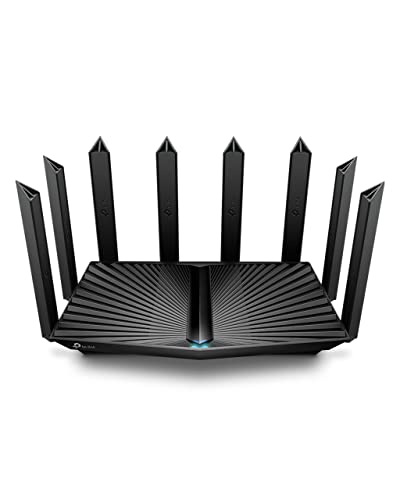

If your Wi-Fi drops in a far bedroom, garage, or yard, the right choice depends on whether you need a stronger router, a different Wi-Fi band, or a dedicated outdoor access point. This guide to the best long range wireless router compares options for everyday homes, busy networks, Wi-Fi 6E devices, and outdoor coverage, while flagging manufacturer range claims that need realistic expectations.
Compare at a glance
| Product | Brand | Size | Weight | Stands out for | Price |
|---|---|---|---|---|---|
| 1 TP-Link Archer A6 AC1200 Router | TP-Link | 8.46 × 4.92 × 1.81 in | 0.7 lb | Four Gigabit LAN ports | Check price |
| 2 TP-Link EAP225-Outdoor AC1200 Access Point | TP-Link | 8.46 × 1.81 × 1.05 in | 0.4 lb | IP65 weather-resistant enclosure | Check price |
| 3 TP-Link Archer AX80 Wi-Fi 6 Router | TP-Link | 9.84 × 7.87 × 3.15 in | 2 lb | 2.5 Gbps WAN/LAN port | Check price |
| 4 TP-Link Archer A8 AC1900 Router | TP-Link | 9.57 × 6.32 × 1.28 in | 0.9 lb | Four Gigabit LAN ports | Check price |
| 5 Cyseed Wi-Fi Extender, Four Antennas | Cyseed | Not listed | Not listed | Four external antennas | Check price |
| 6 FLBI Wi-Fi Extender, Four Antennas | FLBI | Not listed | 0.5 lb | Four external antennas | Check price |
Sizes and weights as listed by the manufacturer on Amazon. Check the retailer for current price and availability.
Pros
- Four Gigabit LAN ports
- Access Point Mode
- OneMesh extender support
- WPA3 support
Cons
- Modem required for most internet providers
- Who should skip it: users seeking Wi-Fi 6
Best for extending Wi-Fi outside
Pros
- IP65 weather-resistant enclosure
- 802.3af/at and passive PoE support
- Standalone operation is supported
- Multiple Omada management options
Cons
- SDN setups require compatible SDN devices and controllers
- Who should skip it: buyers who need a documented Ethernet speed
Pros
- 2.5 Gbps WAN/LAN port
- Wi-Fi 6 with MU-MIMO and OFDMA
- OneMesh extender support
Cons
- Most internet providers require a separate modem
- Who should skip it: users who need a modem included

Pros
- Four Gigabit LAN ports
- MU-MIMO with three data streams
- OneMesh extender compatibility
- App-based setup and management
Cons
- No 6 GHz band
- No USB port
- Who should skip it: users needing USB-connected devices

Pros
- Four external antennas
- WPS setup option
- Five operating modes
- Ethernet port
Cons
- Who should skip it: buyers needing specified Wi-Fi standards or throughput

Pros
- Four external antennas
- WPS setup button
- Ethernet port
- Five working modes
Cons
- Who should skip it: buyers needing a stated Wi-Fi generation or throughput
Best for Wi-Fi 6 Coverage: TP-Link Archer AX73 AX5400 Wi-Fi 6 Router
The TP-Link Archer AX73 AX5400 Wi-Fi 6 Router pairs six antennas and Beamforming with a stated coverage claim of up to 2,000 square feet. It also supports MU-MIMO and OFDMA for handling multiple connected devices, plus a USB 3.0 port for media sharing.
The 2,000-square-foot figure is a manufacturer claim, not a guarantee through walls or across floors. Skip it if your main need is an outdoor, weatherproof access point rather than indoor Wi-Fi.
Best for Outdoor Coverage: TP-Link EAP225-Outdoor AC1200 Access Point
The TP-Link EAP225-Outdoor AC1200 Access Point is designed for outdoor use, with an IP65-rated enclosure and support for PoE power. Its listing claims outdoor range beyond 200 meters on 2.4 GHz and beyond 300 meters on 5 GHz.
Those distances describe the manufacturer’s outdoor range claim, not guaranteed usable coverage through obstacles. Skip it if you want a simple indoor router with multiple Ethernet LAN ports instead of an access point.
Related guides: Best Wi-Fi Router for Long Range Outdoor, Best Router for Business and Best Nighthawk Router for Gaming.
Best for Wi-Fi 6E Devices: MSI Radix AXE6600 Wi-Fi 6E Router
The MSI Radix AXE6600 Wi-Fi 6E Router adds a 6 GHz band alongside 2.4 GHz and 5 GHz, with a stated combined speed class of up to 6.6 Gbps. AI QoS and a 1.8 GHz quad-core processor are listed features for networks with varied traffic.
To use 6 GHz, client devices must support Wi-Fi 6E; older devices use compatible bands instead. Skip it if your devices do not support 6 GHz and you would rather prioritize a stated coverage figure or a multi-gigabit port.
Best for a Lower-Cost Router Upgrade: TP-Link Archer A6 AC1200 Router
The TP-Link Archer A6 AC1200 Router offers dual-band Wi-Fi, four external antennas, Beamforming, and four Gigabit LAN ports. It also supports access point mode and OneMesh-compatible expansion.
The AC1200 class is more modest than the Wi-Fi 6 and Wi-Fi 6E options here, and the product data does not give a square-foot coverage figure. Skip it if you need a stated multi-gigabit connection or a dedicated 6 GHz band.
Key Numbers at a Glance
- The TP-Link Archer AX73 AX5400 Wi-Fi 6 Router lists coverage up to 2,000 square feet.
- The TP-Link EAP225-Outdoor AC1200 Access Point claims outdoor range beyond 200 meters at 2.4 GHz and beyond 300 meters at 5 GHz.
- The MSI Radix AXE6600 Wi-Fi 6E Router lists three bands: 2.4 GHz, 5 GHz, and 6 GHz.
- The TP-Link Archer AX80 Wi-Fi 6 Router lists a 2.5 Gbps WAN/LAN port.
How to Choose the Best Long Range Wireless Router
Coverage claims and home layout
Bottom line: Treat square-foot and distance figures as claims to compare, not guarantees for your floor plan. The Archer AX73 lists up to 2,000 square feet, while the EAP225-Outdoor claims more than 200 meters at 2.4 GHz and 300 meters at 5 GHz outdoors. Walls, floors, placement, and interference affect the signal a device receives, so map dead zones and consider whether a wired access point or mesh-capable extension better suits the layout.
A single router placed centrally can be simpler, but it may not reach an outbuilding. For a broader view of available models, browse the routers category.
Wi-Fi generation and frequency bands
Bottom line: Choose bands and Wi-Fi generation around the devices you actually connect. The Archer A6 and Archer A8 use dual-band Wi-Fi 5, the AX73 and AX80 use dual-band Wi-Fi 6, and the MSI Radix adds a 6 GHz Wi-Fi 6E band. A 6 GHz band is useful only with compatible clients, so check your PC, phone, and other important devices before paying for that capability.
Wi-Fi 6 options such as the AX73 list OFDMA and MU-MIMO, features intended to manage traffic among devices. If gaming is your main priority, compare the router’s actual ports and wireless standards with the systems you own, and see our best nighthawk router for gaming guide for a gaming-focused comparison.
Ethernet ports and internet speed
Bottom line: Match the router’s wired ports to your service plan and devices. The Archer A6 has four Gigabit LAN ports, while the Archer AX80 lists a 2.5 Gbps WAN/LAN port. That faster port can matter when your internet service or wired equipment supports multi-gigabit connections, but it does not make a Gigabit-only device connect faster than its own port allows.
Check how many wired PCs, consoles, and access points need direct connections before choosing. A modem is required for most internet providers, according to the TP-Link listings, and the router does not replace that modem.
Indoor router or outdoor access point
Bottom line: For a yard or outdoor work area, prioritize an outdoor-rated access point over an indoor router’s range claim. The EAP225-Outdoor has an IP65-rated enclosure and lists 802.3af/at PoE and passive PoE options. Its access-point role and power options differ from a typical all-in-one home router, so check your network equipment and mounting location before buying.
The FLBI and Cyseed products are Wi-Fi extenders, not routers; their very large coverage claims are not independently demonstrated by the product data. If you compare extenders with routers, confirm the operating mode, Ethernet needs, and whether the device can be placed where it can still receive a useful signal.
Expansion, setup, and management
Bottom line: Check the expansion system and management approach before planning a multi-access-point network. The Archer A6 and AX80 list OneMesh support with compatible extenders, while the EAP225-Outdoor supports Omada management and standalone mode. The Ubiquiti UniFi UTR listing identifies it as a travel router but gives few technical details, so verify its ports and management requirements for your setup.
Product pages do not establish that different brands’ mesh or management systems work together. Review your current router’s supported standards and the manufacturer’s setup instructions; the networking category has related equipment guides.
How We Compared These Products
This guide is based on product research, comparing listed Wi-Fi standards, bands, Ethernet ports, coverage claims, outdoor ratings, and management features. The product data includes no documented firsthand evaluation, and customer feedback is not available here to establish a pattern of real-world performance.
Which Option Fits Your Home and Devices?
For an indoor Wi-Fi 6 upgrade with a stated coverage figure: TP-Link Archer AX73 AX5400 Wi-Fi 6 Router lists coverage up to 2,000 square feet and includes six antennas. Skip it if your coverage problem is outdoors or you specifically need a 2.5 Gbps port.
For extending Wi-Fi outside: TP-Link EAP225-Outdoor AC1200 Access Point has an IP65-rated enclosure and supports PoE power options. Skip it if you need an all-in-one indoor router and do not want to check access-point power and network requirements.
For a network with Wi-Fi 6E clients: MSI Radix AXE6600 Wi-Fi 6E Router provides 2.4, 5, and 6 GHz bands and lists AI QoS. Skip it if none of your devices can use 6 GHz and a different feature, such as outdoor weather protection, matters more.
Mistakes to Avoid When Choosing a Long-Range Router
- Taking a range claim as a guarantee. Walls, floors, and placement affect coverage; compare claims with your home layout and plan for an access point where needed.
- Ignoring client compatibility. Check that devices support Wi-Fi 6 or 6E before choosing a router for those features.
- Overlooking wired ports. Count the devices that need Ethernet and verify whether Gigabit or multi-gigabit connectivity fits your plan.
- Confusing a router with an extender or access point. Confirm the device’s role, power method, and management system before adding it to an existing network.
Frequently Asked Questions
Will a long-range router cover my entire home?
No listed coverage claim guarantees coverage in every building. The Archer AX73 lists up to 2,000 square feet, but walls, floors, router placement, and interference affect results.
Do Wi-Fi 6E routers work with older devices?
The MSI Radix AXE6600 has 2.4 GHz, 5 GHz, and 6 GHz bands. Older devices that lack Wi-Fi 6E cannot use the 6 GHz band, so check client compatibility before choosing it.
Can I use the EAP225-Outdoor as my main router?
The product is described as an outdoor access point, with standalone mode and Omada management options. The listing does not establish that it replaces a router, so confirm your network design and required gateway functions before purchase.
Do these routers include a modem?
The TP-Link router listings say a modem is required for most internet providers. Check your provider’s equipment requirements and whether your existing modem is compatible with your service.
Are Wi-Fi extenders the same as routers?
No. The FLBI and Cyseed products are listed as extenders, while the Archer models are routers and the EAP225-Outdoor is an access point. Confirm the role and setup mode you need instead of choosing by a coverage claim alone.


Write Your Review
No reviews yet. Be the first to share your experience!