


For PC gamers who prioritize clear game audio, the right headset depends on whether you want a wired connection, virtual surround features, or wireless freedom. The HyperX Cloud III offers a wired USB-C, USB-A, and 3.5 mm connection, while the Razer BlackShark V2 X uses 3.5 mm and weighs 240 g; wireless picks add flexibility but require you to check platform support and battery claims.
This guide to the best pc gaming headset for sound quality compares listed audio features, microphone designs, comfort details, and device connections. If voice chat is a priority, see our guide to best headsets for discord for more options.
Compare at a glance
| Product | Brand | Size | Weight | Stands out for | Price |
|---|---|---|---|---|---|
| 1 Turtle Beach Stealth 600 Wireless Headset | Turtle Beach | 8.58 × 7.81 × 3.74 in | 1.3 lb | 2.4GHz wireless and Bluetooth 5.2 | Check price |
| 2 Razer BlackShark V2 X 3.5 mm Headset | Razer | 7.6 × 6.76 × 3.86 in | 0.5 lb | Lightweight 240 g design | Check price |
| 3 EKSA E1000 USB Gaming Headset | EKSA | 9.84 × 3.94 × 1.97 in | 0.4 lb | Driver-free 7.1 surround sound | Check price |
| 4 AOC Wireless Gaming Headset, 45-Hour Battery | AOC | Not listed | 0.8 lb | Three connection options | Check price |
| 5 HyperX Cloud III Wired Gaming Headset | HyperX | 3.41 × 6.1 × 7.48 in | 0.7 lb | Multiple connection options | Check price |
| 6 Valorise UG-08S Wireless Gaming Headset | Valorise | 0 × 0 × 0 in | Not listed | Three connection options | Check price |
| 7 Corsair HS80 RGB USB Gaming Headset | Corsair | 8.07 × 3.82 × 7.2 in | 0.8 lb | Flip-up microphone with mute indicator | Check price |
| 8 Ozeino Gaming Headset with 7.1 Sound | Ozeino | 7.48 × 4.05 × 8.07 in | 0.7 lb | Broad 3.5 mm device compatibility | Check price |
| 9 Turtle Beach Stealth 600 Wireless Headset | Turtle Beach | 8.58 × 7.81 × 3.74 in | 1.3 lb | 2.4GHz wireless and Bluetooth 5.4 | Check price |
Sizes and weights as listed by the manufacturer on Amazon. Check the retailer for current price and availability.
Pros
- 2.4GHz wireless and Bluetooth 5.2
- Stated 80-hour battery life
- Flip-to-mute microphone
- Glasses-friendly memory foam cushions
Cons
- Who should skip it: Xbox and other unlisted-platform users
Best for a lighter wired headset
Pros
- Lightweight 240 g design
- Passive noise-isolating earcups
- 3.5 mm cross-platform connection
- Cardioid microphone
Cons
- 7.1 surround sound limited to 64-bit Windows 10
- Who should skip it: users who need wireless audio
Pros
- Driver-free 7.1 surround sound
- Adjustable noise-reducing microphone
- 2.2-meter cable
Cons
- Does not work with game controllers
- Who should skip it: users without USB audio

Pros
- Three connection options
- Detachable microphone
- Up to 45-hour stated battery life
Cons
- PS5 and PS4 do not support Bluetooth audio
- Xbox connection is wired only
Best for a wired PC or console setup

Pros
- Multiple connection options
- Memory foam comfort
- Microphone mute indicator
- Flexible aluminum frame
Cons
- Who should skip it: buyers who need wireless audio
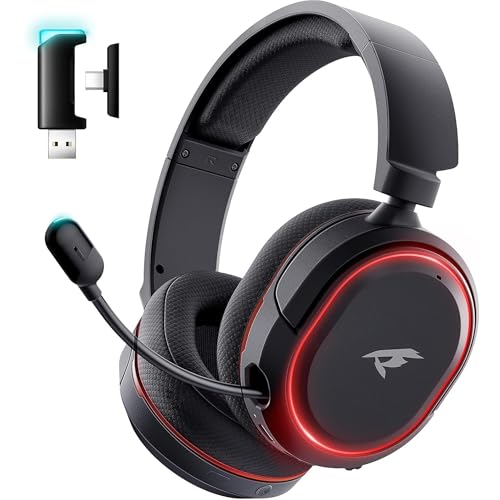
Pros
- Three connection options
- Retractable microphone with one-touch mute
- Supports use while charging
- Memory foam cushions with breathable fabric
Cons
- Not compatible with Xbox wireless
- PS5 wireless connection requires the 2.4 GHz dongle
- Who should skip it: PS5 players seeking Bluetooth audio
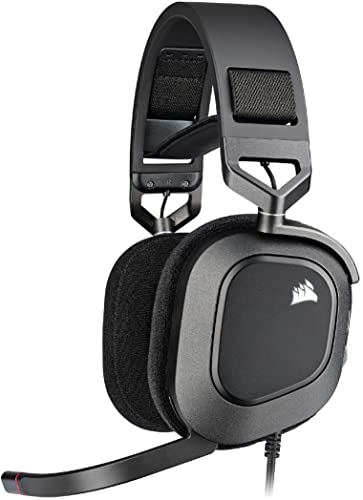
Pros
- Flip-up microphone with mute indicator
- Memory-foam earpads
- Adjustable floating headband
Cons
- Who should skip it: wireless users
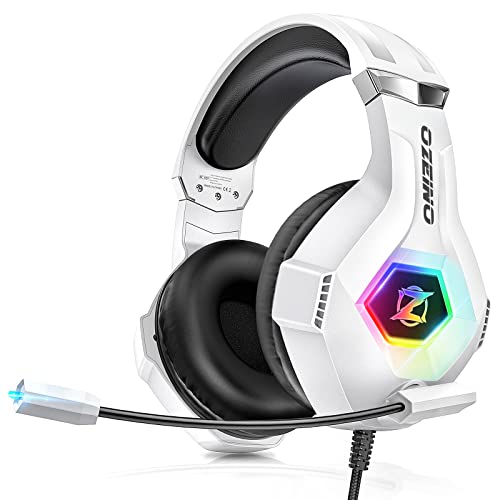
Pros
- Broad 3.5 mm device compatibility
- Adjustable, rotatable microphone
- Over-ear pads and adjustable headband
Cons
- PC use requires a 1-to-2 audio splitter
- USB connector powers lighting only
- Who should skip it: users seeking USB audio
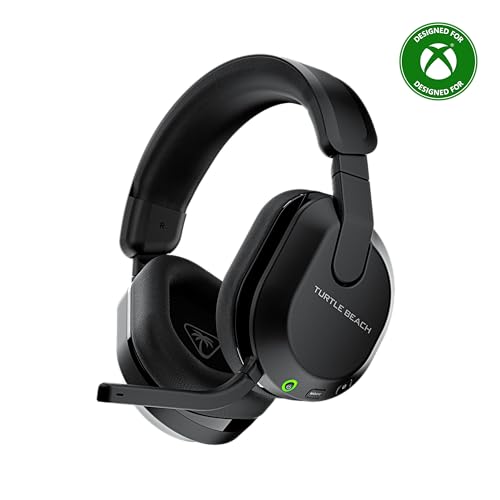
Pros
- 2.4GHz wireless and Bluetooth 5.4
- Stated 80-hour battery life
- Glasses-friendly memory foam cushions
- Mappable controls and 10-band EQ
Cons
- Who should skip it: buyers who prefer wired-only headsets
Best Wired Gaming Headset for Multiple Connections: HyperX Cloud III Wired Gaming Headset
HyperX Cloud III Wired Gaming Headset connects by USB-C, USB-A, or 3.5 mm and has angled 53 mm drivers tuned by HyperX audio engineers. Its wired design avoids charging, but it does not offer the wireless freedom of the Stealth 600 models. Skip it if you need wireless play or want a listed battery-life figure.
Best Lightweight Wired Gaming Headset: Razer BlackShark V2 X 3.5 mm Headset
Razer BlackShark V2 X 3.5 mm Headset weighs 240 g and uses TriForce Titanium 50 mm drivers, with software-enabled 7.1 surround sound listed for Windows 10 64-bit. The 3.5 mm connection is broadly useful, but its surround feature has a stated operating-system limitation. Skip it if wireless connectivity or surround sound on another operating system is essential.
Best Wireless Gaming Headset for Long Battery Life: Turtle Beach Stealth 600 Wireless Headset
Turtle Beach Stealth 600 Wireless Headset lists up to 80 hours of battery life, low-latency 2.4 GHz wireless, Bluetooth 5.2, and 50 mm drivers. Its QuickSwitch button supports switching between wireless and Bluetooth, though the listed compatibility is for PlayStation, PC, and mobile, not Xbox. Skip it if you need Xbox support or prefer a wired-only setup.
Key Numbers at a Glance
- Driver size: 53 mm on the HyperX Cloud III Wired Gaming Headset versus 50 mm on the Razer BlackShark V2 X 3.5 mm Headset.
- Listed weight: the Razer BlackShark V2 X 3.5 mm Headset weighs 240 g.
- Listed battery life: the Turtle Beach Stealth 600 Wireless Headset specifies up to 80 hours.
- The Valorise UG-08S Wireless Gaming Headset lists 45 to 100 hours depending on connection and settings.
How to Choose a PC Gaming Headset for Sound Quality
Connection and platform compatibility
Bottom line: Match the connection to your PC ports and the device you actually play on. The HyperX Cloud III includes USB-C, USB-A, and 3.5 mm connectivity, while the Razer BlackShark V2 X connects through 3.5 mm. The AOC Wireless Gaming Headset, 45-Hour Battery uses a USB dongle for 2.4 GHz audio on PC, PS5, PS4, Mac, and Switch, and its listing says Xbox works through wired 3.5 mm only. Check whether you need a free USB port, a headset jack, or console-specific support before choosing.
Driver design and virtual surround
Bottom line: Treat driver size and surround features as listed design details, not a guarantee of better sound. The HyperX Cloud III has angled 53 mm drivers; the Razer BlackShark V2 X lists TriForce Titanium 50 mm drivers and software-enabled 7.1 surround sound on Windows 10 64-bit. The EKSA E1000 USB Gaming Headset describes driver-free 7.1 surround through its USB audio chip, while the EKSA E900 Pro USB Gaming Headset for PC specifies that 7.1 is available on PC over USB. If positional audio matters, confirm the feature works with your operating system and connection.
Microphone and chat controls
Bottom line: Choose the microphone style and mute control that fit how often you chat. The HyperX Cloud III lists a noise-cancelling 10 mm microphone with an LED mute indicator, while the Turtle Beach Stealth 600 has a flip-to-mute mic with AI-based noise reduction. The Corsair HS80 RGB USB Gaming Headset lists a broadcast-quality omnidirectional microphone and flip-up mute. For frequent team calls, compare these controls with the needs in our best headsets for zoom calls guide.
Comfort and fit for long sessions
Bottom line: Look for a stated weight, cushion design, and fit features that address your own comfort needs. The Razer BlackShark V2 X weighs 240 g and lists breathable foam cushions; the Turtle Beach Stealth 600 specifies memory foam cushions with glasses-friendly technology. The Corsair HS80 RGB USB Gaming Headset uses memory foam earpads and a floating headband design. If you wear glasses, also compare the fit guidance in our best headsets for glasses wearers guide.
Wireless battery and everyday flexibility
Bottom line: Wireless models trade a cable for charging and platform checks. The Turtle Beach Stealth 600 lists up to 80 hours of battery life, while the AOC Wireless Gaming Headset lists up to 45 hours, or 20 hours with RGB lighting on. The Valorise UG-08S lists 45 to 100 hours depending on mode and settings. Treat these as manufacturer figures and compare them with your preferred wireless mode and lighting use.
How We Compared These Products
This guide is based on product research, not firsthand evaluation. We compared the listed driver and surround features, connection types, platform compatibility, microphone controls, comfort details, and battery claims; customer feedback information was not available in the product data used here.
Which Option Fits Your Devices?
For a wired PC or console setup with several connection choices: HyperX Cloud III Wired Gaming Headset has USB-C, USB-A, and 3.5 mm connectivity, plus angled 53 mm drivers. Skip it if you need wireless play.
For a lighter wired headset with a 3.5 mm jack: Razer BlackShark V2 X 3.5 mm Headset weighs 240 g and lists 50 mm drivers. Skip it if you need wireless or rely on its software surround feature outside Windows 10 64-bit.
For wireless sessions without frequent charging: Turtle Beach Stealth 600 Wireless Headset lists up to 80 hours of battery life and Bluetooth 5.2 alongside 2.4 GHz wireless. Skip it if you need Xbox compatibility, since this version is listed for PlayStation, PC, and mobile.
Mistakes to Avoid When Choosing a PC Gaming Headset
- Assuming virtual surround works everywhere. Check the operating system and connection requirements; the Razer BlackShark V2 X lists Windows 10 64-bit for its software-enabled surround feature.
- Buying by driver size alone. Compare the complete connection, microphone, and comfort details too. A 53 mm driver on the HyperX Cloud III does not by itself establish that it suits every listener better than a 50 mm model.
- Overlooking the console connection. Verify whether a headset uses a dongle, Bluetooth, or a wired jack on your particular platform. The AOC listing, for example, states that Xbox support is through 3.5 mm wired mode only.
- Taking battery claims out of context. Check the stated mode and settings. Valorise lists different battery-life ranges for Bluetooth and 2.4 GHz use, with RGB and microphone settings affecting the claim.
Frequently Asked Questions
Are wired or wireless gaming headsets better for PC?
Wired headsets avoid battery charging and can offer multiple connection choices, as with the HyperX Cloud III. Wireless models such as the Turtle Beach Stealth 600 add 2.4 GHz and Bluetooth connectivity but require you to manage charging and confirm platform support.
Does 7.1 surround sound work on every device?
No. The Razer BlackShark V2 X lists software-enabled 7.1 surround for Windows 10 64-bit, and the EKSA E900 Pro specifies PC use over USB for its 7.1 feature. Check the exact model’s connection and operating-system requirements.
Can I use these headsets with Xbox?
Compatibility varies by model and connection. The Razer BlackShark V2 X lists compatibility through its 3.5 mm jack, the AOC Wireless Gaming Headset lists Xbox use through wired 3.5 mm mode only, and the Turtle Beach Stealth 600 version compared here is listed for PlayStation, PC, and mobile rather than Xbox.
What should I check if I wear glasses?
Look for explicit fit features and cushion details, then confirm the headset’s fit suits your needs. The Turtle Beach Stealth 600 lists glasses-friendly memory foam cushions, but comfort can vary from person to person.
Do larger headset drivers mean better sound quality?
Driver diameter alone does not establish sound quality. The listed models differ in tuning, connection, surround features, and other design details, so compare those factors and prioritize the sound presentation and device compatibility you want.




Write Your Review
No reviews yet. Be the first to share your experience!