


If you play on a PC and want one headset for voice chat, long sessions, or a second device, connection and platform support matter as much as sound features. For a wired setup, the HyperX Cloud III offers USB-C, USB-A, and 3.5 mm connections; for wireless play, the Turtle Beach Stealth 600 combines 2.4GHz wireless with Bluetooth 5.2 and lists an 80-hour battery life.
This guide to the best pc gaming headset for the money compares those trade-offs with budget wired models and other wireless choices, so you can match a headset to your PC ports, console, and play habits.
Compare at a glance
| Product | Brand | Size | Weight | Stands out for | Price |
|---|---|---|---|---|---|
| 1 Turtle Beach Stealth 600 Wireless Headset | Turtle Beach | 8.58 × 7.81 × 3.74 in | 1.3 lb | 2.4GHz wireless and Bluetooth 5.2 | Check price |
| 2 Krysenix Wireless Gaming Headset, 50mm | Krysenix | Not listed | Not listed | Up to 60 hours of stated battery life | Check price |
| 3 Razer BlackShark V2 X 3.5 mm Headset | Razer | 7.6 × 6.76 × 3.86 in | 0.5 lb | Lightweight 240 g design | Check price |
| 4 AOC Wireless Gaming Headset, 45-Hour Battery | AOC | Not listed | 0.8 lb | Three connection options | Check price |
| 5 HyperX Cloud III Wired Gaming Headset | HyperX | 3.41 × 6.1 × 7.48 in | 0.7 lb | Multiple connection options | Check price |
| 6 Valorise UG-08S Wireless Gaming Headset | Valorise | 0 × 0 × 0 in | Not listed | Three connection options | Check price |
| 7 Ozeino Gaming Headset with 7.1 Sound | Ozeino | 7.48 × 4.05 × 8.07 in | 0.7 lb | Broad 3.5 mm device compatibility | Check price |
| 8 AOC Wireless Gaming Headset, 45-Hour Battery | AOC | Not listed | 0.5 lb | Multiple wired and wireless connection options | Check price |
Sizes and weights as listed by the manufacturer on Amazon. Check the retailer for current price and availability.
Pros
- 2.4GHz wireless and Bluetooth 5.2
- Stated 80-hour battery life
- Flip-to-mute microphone
- Glasses-friendly memory foam cushions
Cons
- Who should skip it: Xbox and other unlisted-platform users
Pros
- Up to 60 hours of stated battery life
- 2.4GHz USB and Bluetooth connections
- 50mm titanium-coated drivers
Cons
- Not compatible with Xbox
- Bluetooth does not support PS4 or PS5
- Who should skip it: players needing Bluetooth console audio
Pros
- Lightweight 240 g design
- Passive noise-isolating earcups
- 3.5 mm cross-platform connection
- Cardioid microphone
Cons
- 7.1 surround sound limited to 64-bit Windows 10
- Who should skip it: users who need wireless audio

Pros
- Three connection options
- Detachable microphone
- Up to 45-hour stated battery life
Cons
- PS5 and PS4 do not support Bluetooth audio
- Xbox connection is wired only

Pros
- Multiple connection options
- Memory foam comfort
- Microphone mute indicator
- Flexible aluminum frame
Cons
- Who should skip it: buyers who need wireless audio
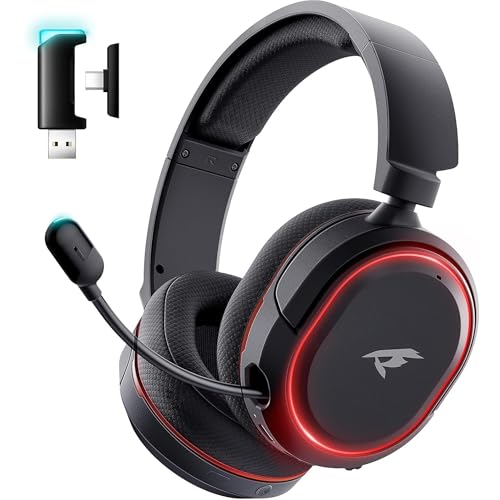
Pros
- Three connection options
- Retractable microphone with one-touch mute
- Supports use while charging
- Memory foam cushions with breathable fabric
Cons
- Not compatible with Xbox wireless
- PS5 wireless connection requires the 2.4 GHz dongle
- Who should skip it: PS5 players seeking Bluetooth audio
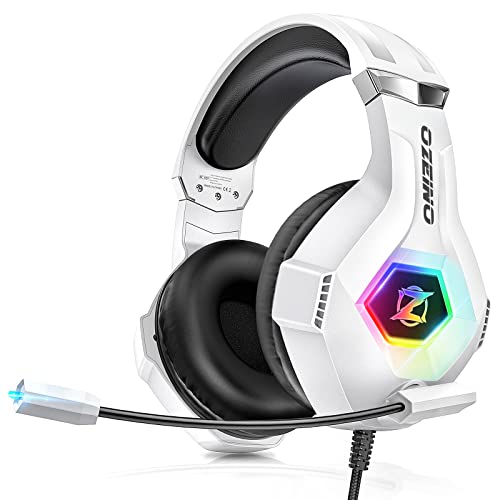
Pros
- Broad 3.5 mm device compatibility
- Adjustable, rotatable microphone
- Over-ear pads and adjustable headband
Cons
- PC use requires a 1-to-2 audio splitter
- USB connector powers lighting only
- Who should skip it: users seeking USB audio

Pros
- Multiple wired and wireless connection options
- Stated battery life up to 45 hours
- 239 g listed weight
Cons
- Bluetooth is incompatible with PS5
- Who should skip it: PS5 players needing Bluetooth
Best Wired Headset for Multiple Connections: HyperX Cloud III Wired Gaming Headset
The HyperX Cloud III Wired Gaming Headset connects over USB-C, USB-A, or 3.5 mm, making it a flexible fit if your setup includes different ports or devices. Its memory foam and aluminum frame are listed features, and the microphone has a mute indicator. The trade-off is a cable, so it does not offer wireless movement.
Skip it if you want Bluetooth or wireless freedom while gaming.
Best Wireless Battery Life for PC and PlayStation: Turtle Beach Stealth 600 Wireless Headset
The Turtle Beach Stealth 600 Wireless Headset lists up to 80 hours of battery life and supports low-latency 2.4GHz wireless plus Bluetooth 5.2. Its flip-to-mute microphone and memory foam cushions suit players who want wireless convenience and a quick mute control. The stated platform compatibility covers PlayStation 5, PlayStation 4, PC, and mobile devices, not every console.
Skip it if Xbox compatibility is essential or you prefer a wired headset.
Best Budget Wired Pick: BENGOO G9000 Gaming Headset
The BENGOO G9000 Gaming Headset offers a wired connection, an adjustable microphone, and an inline volume control with a mute button. Its listing describes support for PC, PlayStation, Xbox, and Nintendo devices, though an extra Microsoft adapter may be needed for an older Xbox One controller. The USB connection powers the LED lights, while audio uses the headset connection.
Skip it if you need wireless play or want a headset with a detachable microphone.
Best Lightweight Wired Pick: Razer BlackShark V2 X 3.5 mm Headset
The Razer BlackShark V2 X 3.5 mm Headset weighs 240 g and uses a 3.5 mm connection, with a cardioid microphone and passive noise-isolating earcups. It is a straightforward choice if your PC or controller has a compatible audio jack; its listed 7.1 surround feature is software-enabled and limited to Windows 10 64-bit. That makes the connection simple, but it is not a wireless or USB-first design.
Skip it if your setup lacks a 3.5 mm audio jack or you need wireless connectivity.
How to Choose the Best PC Gaming Headset for the Money
Check connection type and device support
Bottom line: Match the headset connection to the ports and platforms you actually use. The HyperX Cloud III lists USB-C, USB-A, and 3.5 mm connections, while the Razer BlackShark V2 X uses 3.5 mm. The Valorise UG-08S lists 2.4GHz wireless, Bluetooth 5.4, and 3.5 mm, but its wireless function is not compatible with Xbox. Check the exact connection mode for each device, since Bluetooth and dongle support can differ by platform.
If voice chat is a priority, compare the microphone and mute controls as well as listening features. Our guide to best headsets for Discord focuses on chat-oriented choices.
Choose wireless convenience or a cable
Bottom line: Choose 2.4GHz for a wireless gaming connection, or wired audio if charging and battery management are not worth the trade-off. The Turtle Beach Stealth 600 lists 2.4GHz and Bluetooth 5.2, while the Krysenix Wireless Gaming Headset, 50mm lists up to 60 hours with RGB off and up to 50 hours with it on. Those are manufacturer-stated figures, and actual battery life depends on the listed operating mode. A wired model such as the HyperX Cloud III avoids a battery requirement but keeps you tethered.
For a second use beyond gaming, check whether the connection and microphone suit your calls. The best headsets for Zoom calls guide compares call-focused options.
Look at fit, weight, and long-session comfort
Bottom line: Prioritize the comfort details that match your head, glasses, and session length. The Razer BlackShark V2 X is listed at 240 g, and the AOC Wireless Gaming Headset, 45-Hour Battery with ASIN B0HNRSRX9V is listed at 239 g. The Turtle Beach Stealth 600 specifies glasses-friendly memory foam cushions. Weight and cushion descriptions help narrow choices, but fit is personal, so check return terms and adjustability before choosing.
Glasses wearers may also want to compare cushion styles in our guide to best headsets for glasses wearers.
Separate useful audio features from marketing labels
Bottom line: Favor clearly described drivers, microphone controls, and platform limits over a surround-sound label alone. The Razer BlackShark V2 X specifies 50 mm drivers and software-enabled 7.1 surround for Windows 10 64-bit; the HyperX Cloud III lists angled 53 mm drivers and a noise-cancelling microphone. These descriptions are not independent performance measurements. If positional audio matters, verify whether the feature works with your operating system and game setup.
How We Compared These Products
This guide is based on product research, not firsthand evaluation. We compared the listed connection types, platform compatibility, battery claims, microphone controls, comfort features, and stated weight, while treating manufacturer audio and battery claims as specifications rather than independently verified results.
Which Option Fits Your PC and Devices?
For a wired setup with several connection choices: the HyperX Cloud III has USB-C, USB-A, and 3.5 mm connections plus a mute indicator. Skip it if you need wireless use. For a wireless setup with long stated battery life, the Turtle Beach Stealth 600 lists up to 80 hours and Bluetooth 5.2. Skip it if you need Xbox support or a cable-free headset with a different platform combination.
For a simple 3.5 mm headset: the Razer BlackShark V2 X weighs 240 g and has a cardioid mic. Skip it if your PC lacks a compatible audio jack or you want wireless. For a low-cost wired setup with inline controls, the BENGOO G9000 has volume and mute controls. Skip it if you need a detachable mic or wireless convenience.
Mistakes to Avoid When Choosing a PC Gaming Headset
- Assuming every wireless mode works on every device. Check each product’s platform notes; Bluetooth, 2.4GHz dongle, and wired support can differ.
- Buying by battery figure alone. Compare the mode and lighting conditions attached to the claim, such as the Krysenix headset’s different stated runtimes with RGB on and off.
- Ignoring PC ports. Confirm whether your computer has the required USB or 3.5 mm connection before choosing a headset.
- Treating virtual surround as a universal feature. Check the operating system restriction; the Razer BlackShark V2 X lists Windows 10 64-bit for software-enabled 7.1 surround.
Frequently Asked Questions
Can I use a 3.5 mm gaming headset on a PC?
Yes, if the PC has a compatible 3.5 mm audio connection. The Ozeino Gaming Headset with 7.1 Sound notes that PC use requires its 1-to-2 3.5 mm splitter cable, so check the connection arrangement for the specific headset and computer.
Do these wireless headsets work with Xbox?
Support varies by model and connection mode. The Valorise UG-08S says its wireless function is not compatible with Xbox, while the AOC Wireless Gaming Headset, 45-Hour Battery with ASIN B0HHLTJQCS lists Xbox Series use through 3.5 mm wired mode only. Confirm the exact Xbox generation and connection before buying.
Is 2.4GHz or Bluetooth better for gaming?
For gaming, a headset’s dedicated 2.4GHz mode is generally intended for a low-latency connection, while Bluetooth is useful for compatible phones and everyday listening. Check the manufacturer’s stated latency and device restrictions; the Krysenix listing gives different latency figures for 2.4GHz and Bluetooth.
Does a gaming headset need a USB connection?
No. Several listed headsets use 3.5 mm, and the HyperX Cloud III lists USB-C, USB-A, and 3.5 mm. Pick a connection your computer supports and verify whether any software-based audio feature requires a particular operating system or connection.
Which headset is suitable for long gaming sessions?
Look at weight, cushion design, adjustability, and battery needs together. The Razer BlackShark V2 X is listed at 240 g, while the Turtle Beach Stealth 600 specifies memory foam cushions described as glasses-friendly; neither figure alone guarantees a comfortable fit for every person.
Can I use one headset for gaming and calls?
Many listed models include microphones, but pickup design and mute controls differ. Check the microphone style, connection compatibility, and whether the headset supports your call device; the best headsets for office work guide covers options aimed at calls and comfort.




Write Your Review
No reviews yet. Be the first to share your experience!