




If you want to play Borderlands 4, do not assume that a card with 4GB of VRAM will meet the game’s requirements: most cards in this lineup are entry-level models, and the listings do not establish their performance in this game. The RX 560 and RX 550 have more gaming-oriented specifications here than the GT 730 and GT 740 options, but check the game’s current system requirements and your target resolution before choosing any of them.
This comparison helps you sort the cards by practical factors such as memory type, display outputs, low-profile fit, and stated power needs. If you are considering a newer gaming card instead, our best graphics cards for 1440p gaming guide covers a different performance target.
Compare at a glance
| Product | Brand | Size | Stands out for | Price |
|---|---|---|---|---|
| 1 SOYO GeForce GT 740 4GB Low-Profile Card | SOYO | Not listed | Low-profile design for slim desktops | Check price |
| 2 MSI GT 1030 4GB DDR4 Graphics Card | msi | 5.91 × 0.75 × 2.72 in | 4GB of DDR4 video memory | Check price |
| 3 MAXSUN Radeon RX 550 4GB ITX | maxsun | 7.28 × 1.37 × 0.04 in | Compact ITX card design | Check price |
| 4 ARDIYES GT 740 4GB Graphics Card | ARDIYES | Not listed | Four built-in HDMI ports | Check price |
| 5 Glorto GeForce GT 730 4GB Low-Profile | Glorto | 6.03 × 4.73 × 0.1 in | Low-profile design with half-height bracket | Check price |
| 6 maxsun GeForce GT 730 4GB | maxsun | 7.48 × 4.33 × 0.1 in | Compact ITX form factor | Check price |
| 7 QTHREE GeForce GT 730 4GB | QTHREE | Not listed | Four display outputs | Check price |
| 8 ARDIYES GT 730 4GB 4x HDMI | ARDIYES | Not listed | Four independent HDMI outputs | Check price |
| 9 maxsun GeForce GT 730 4GB | maxsun | 5.91 × 0.63 × 0.04 in | Four HDMI display outputs | Check price |
Sizes and weights as listed by the manufacturer on Amazon. Check the retailer for current price and availability.
Pros
- Low-profile design for slim desktops
- HDMI, DVI, and VGA outputs
- No external power connector required
- 4GB DDR3 memory
Cons
- Who should skip it: buyers seeking demanding modern gaming
Pros
- 4GB of DDR4 video memory
- DisplayPort and HDMI outputs
- Compact 5.91-inch length
Cons
- 64-bit memory interface
- Who should skip it: users needing more than two display outputs
Best for a compact card
Pros
- Compact ITX card design
- Three types of display output
- 4GB GDDR5 memory
Cons
- Who should skip it: users needing more than 4GB VRAM
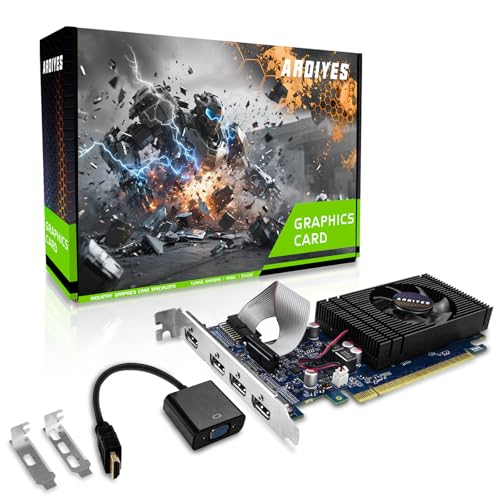
Pros
- Four built-in HDMI ports
- 4GB GDDR5 memory
- Low-profile design with two bracket options
Cons
- Listed display outputs are HDMI
- Who should skip it: users whose monitors lack HDMI

Pros
- Low-profile design with half-height bracket
- HDMI, DisplayPort, and VGA outputs
- Compatible with Windows 11
Cons
- Who should skip it: users needing demanding gaming or graphics performance

Pros
- Compact ITX form factor
- Three display outputs
- Supports up to three monitors
Cons
- 4K output limited to 30Hz
- Who should skip it: buyers needing high-refresh 4K

Pros
- Four display outputs
- Low-profile design
- No external power connection
Cons
- Requires a PCIe x8 lane slot and 300W or greater power supply
- Who should skip it: users needing graphics for demanding workloads

Pros
- Four independent HDMI outputs
- 4GB of GDDR3 memory
- No external power connector required
Cons
- 64-bit memory interface
- Who should skip it: small-form-factor PC owners

Pros
- Four HDMI display outputs
- Supports up to four simultaneous monitors
- Compact single-slot form factor
- Fanless passive cooling
Cons
- Who should skip it: users needing 4K above 30Hz
Best Listed Gaming-Oriented Option: Xynsviu RX 560 4GB 4 HDMI Graphics Card
The Xynsviu RX 560 4GB 4 HDMI Graphics Card is described as suitable for light gaming and lists 4GB of GDDR5 memory, a PCIe-slot power limit of 60W, and four HDMI outputs. Its product page does not establish Borderlands 4 performance, so treat it as a candidate to check against the game’s requirements, not a confirmed match. Skip it if you need verified performance in Borderlands 4 or need different display connectors.
Best for a Compact Gaming Upgrade: MAXSUN Radeon RX 550 4GB ITX
The MAXSUN Radeon RX 550 4GB ITX pairs a compact ITX format with 4GB of GDDR5 and HDMI, DisplayPort, and DVI-D outputs. The listing describes it for 1080p games, but that is not a Borderlands 4 performance result, and the card’s case fit still needs checking. Skip it if you need a game-specific performance guarantee or your case cannot accommodate its shape.
Best for Low-Profile Legacy PCs: SOYO GeForce GT 740 4GB Low-Profile Card
The SOYO GeForce GT 740 4GB Low-Profile Card has a half-height design, HDMI, DVI-D, and VGA, and draws power from the PCIe slot according to its product page. Those traits can help with an older small desktop, but its DDR3 memory and entry-level GPU make it a poor choice to buy for demanding modern gaming without confirming game compatibility. Skip it if Borderlands 4 is the main reason for your upgrade.
Best for Four HDMI Displays: ARDIYES GT 740 4GB Graphics Card
The ARDIYES GT 740 4GB Graphics Card specifies four HDMI outputs and 4GB of GDDR5, making its listed feature set more relevant to multi-screen work than to a demanding new game. Its low-profile format is useful for some compact builds, but verify bracket and case compatibility as well as the game requirements. Skip it if your priority is Borderlands 4 gaming rather than multiple displays.
How to Choose a Graphics Card for Borderlands 4
Check the Game’s Requirements First
Bottom line: Confirm Borderlands 4’s current minimum and recommended GPU requirements before buying any card here. The product listings identify older or entry-level GPUs, including the GT 730, GT 740, RX 550, and RX 560, but do not show game benchmarks or official compatibility results. Compare the game’s stated requirements with the exact model, then consider your resolution and graphics settings; a VRAM figure alone cannot establish suitability.
If you also plan to stream, compare the game’s needs with the card’s encoding and software support rather than assuming every GPU handles streaming alike. Our best graphics cards for streaming guide focuses on that separate workload.
Compare Memory Type, Not Just Capacity
Bottom line: Treat 4GB as a capacity figure, not proof of gaming speed. The RX 550 and RX 560 listings specify 4GB of GDDR5, while several GT 730 cards list 4GB of DDR3; the MSI GT 1030 is listed with 4GB of DDR4. Memory type is one useful distinction, but the provided specifications do not support a frame-rate comparison or a Borderlands 4 recommendation based on it alone.
Match the Card to Your Case and Slot
Bottom line: Check card dimensions, bracket height, slot access, and motherboard fit before ordering. The SOYO GT 740 and Glorto GT 730 are identified as low-profile cards, while the RX 550 is described as ITX. The Xynsviu RX 560 listing gives a full-height bracket size of 180 × 120 × 40 mm; do not assume other cards share its dimensions.
Confirm your case supports the card’s physical format and that adjacent expansion slots will remain usable. A compact card can solve a fit problem, but it does not make an entry-level GPU more capable in a demanding game.
Check Power and Existing Connectors
Bottom line: Verify the card’s stated power needs and your PC’s available power before installation. The RX 560 listing says it draws up to 60W from the PCIe slot and does not require an external power connector. The maxsun GT 730 with four HDMI ports lists a 200W-or-greater power supply requirement, while the triple-output maxsun GT 730 lists 250W or greater.
Those requirements belong to their specific models; do not transfer them to another card with the same GPU name. Check the exact product page and your system’s power supply details, including available connectors, before committing.
Choose Outputs for Your Monitor Setup
Bottom line: Match the card’s physical ports to your displays, and do not confuse multi-monitor support with game performance. The SOYO GT 740 lists HDMI, DVI-D, and VGA, while the MSI GT 1030 lists DisplayPort and HDMI. The ARDIYES GT 740 and ARDIYES GT 730 list four HDMI ports, which can suit a multi-display workstation, but the listings do not establish that these cards are strong Borderlands 4 choices.
Check the monitor’s input, resolution, and refresh-rate needs against the specific card’s output limits. For a different operating-system priority, see our guide to best graphics cards for Linux, which considers driver fit.
How We Compared These Products
This guide is based on product research, including the listed GPU models, memory types, display outputs, form-factor notes, and power details. The listings do not include Borderlands 4 benchmarks or confirmed game-specific results, so recommendations distinguish general gaming-oriented descriptions from verified suitability, which cannot be established from these details.
Which Option Fits Your PC and Displays?
For a card to investigate for light gaming and four HDMI displays: Xynsviu RX 560 4GB 4 HDMI Graphics Card lists 4GB GDDR5 and four HDMI ports, and its product page describes light gaming use. Skip it if you need confirmed Borderlands 4 performance or your monitor setup uses other inputs.
For an older small desktop needing a low-profile display upgrade: SOYO GeForce GT 740 4GB Low-Profile Card lists a half-height design, three different outputs, and no external power connector. Skip it if you are buying primarily to play Borderlands 4, since the listing does not establish its suitability for that game.
For a compact card with GDDR5 and common display connectors: MAXSUN Radeon RX 550 4GB ITX combines an ITX form factor with HDMI, DisplayPort, and DVI-D. Skip it if the game’s current requirements call for a stronger GPU or your case cannot fit the card.
Mistakes to Avoid When Choosing a Graphics Card
- Buying by VRAM capacity alone. A 4GB label does not establish performance; compare the exact GPU and memory type with the game’s stated requirements.
- Assuming a listed gaming use covers every game. A listing that mentions light gaming or 1080p does not confirm Borderlands 4 performance.
- Ignoring physical fit. Check the card’s actual dimensions and bracket style against your case and available slots.
- Assuming similar GPU names share power needs. Verify the exact model’s power requirements and connector needs rather than relying on another card’s listing.
Frequently Asked Questions
Can these graphics cards run Borderlands 4?
The product data does not confirm Borderlands 4 compatibility or performance for any card in this comparison. Check the game’s current system requirements against the exact GPU before purchasing, and do not use 4GB of VRAM as the only deciding factor.
Is the RX 560 better suited to gaming than a GT 730?
The RX 560 listing describes light gaming and specifies 4GB GDDR5; the GT 730 listings mainly describe basic display, office, and multimedia use and specify DDR3. That makes the RX 560 the more gaming-oriented candidate in this set, but it does not establish Borderlands 4 performance.
Does a 4GB graphics card have enough memory for Borderlands 4?
The product information does not answer that game-specific question. Compare Borderlands 4’s current requirements with the exact GPU and its memory, and consider that capacity alone does not determine performance.
Will a low-profile card fit any small desktop?
No. Low-profile descriptions do not guarantee compatibility with every small-form-factor case, motherboard, or slot layout. Check the card dimensions, bracket, available slot, and case clearance before buying.
Can these cards connect multiple monitors?
Several listings advertise multiple displays, with configurations varying from HDMI and DisplayPort combinations to four HDMI ports. Confirm the exact model’s outputs and resolution limits, then match them to your monitors; port count does not indicate gaming capability.

Write Your Review
No reviews yet. Be the first to share your experience!