


If you are choosing a graphics card for Linux, the practical split is between a modern GPU for gaming or GPU-accelerated work and an older, low-power card for basic display output. The GIGABYTE and MSI RTX 3050 models offer current-generation hardware, while the ARDIYES GT 740 listing explicitly claims Linux support; verify driver availability for your distribution and kernel before buying.
Compare at a glance
| Product | Brand | Size | Stands out for | Price |
|---|---|---|---|---|
| 1 SOYO GeForce GT 740 4GB Low-Profile Card | SOYO | Not listed | Low-profile design for slim desktops | Check price |
| 2 MAXSUN Radeon RX 550 4GB ITX | maxsun | 7.28 × 1.37 × 0.04 in | Compact ITX card design | Check price |
| 3 GIGABYTE RTX 3050 WINDFORCE OC V2 6G | GIGABYTE | 7.5 × 4.4 × 0.1 in | 6GB GDDR6 memory | Check price |
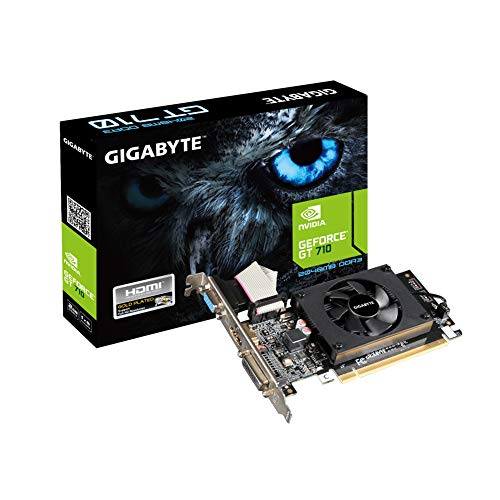
| 4 GIGABYTE GV-N710D3-2GL 2GB Graphics Card | GIGABYTE | 1.34 × 6.06 × 8.9 in | Low-profile form factor | Check price |
| 5 Glorto GeForce GT 210 1GB DDR3 | Glorto | 6.15 × 4.73 × 0.1 in | Low-profile bracket included | Check price |
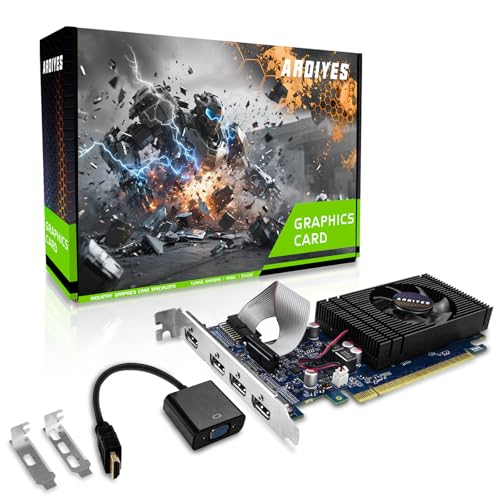
| 6 ARDIYES GT 740 4GB Graphics Card | ARDIYES | Not listed | Four built-in HDMI ports | Check price |
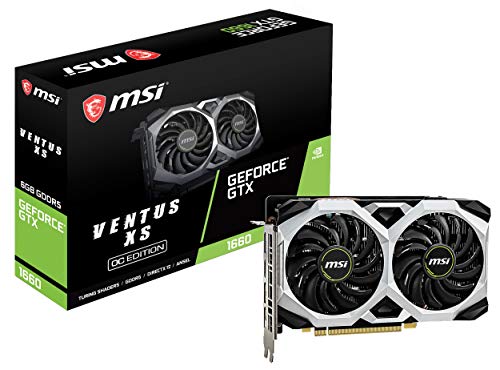
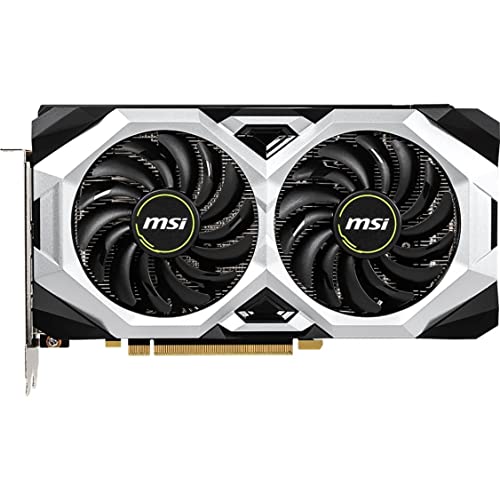
| 7 MSI RTX 3050 Ventus 2X 6G OC | msi | 7.4 × 4.3 × 0.1 in | 7.4-inch listed length | Check price |
| 8 Glorto GeForce GT 610 2GB Low Profile | Glorto | 6.15 × 4.73 × 0.1 in | Half-height bracket included | Check price |
| 9 Glorto GeForce GT 730 4GB Low-Profile | Glorto | 6.03 × 4.73 × 0.1 in | Low-profile design with half-height bracket | Check price |
| 10 QTHREE GeForce GT 730 4GB | QTHREE | Not listed | Four display outputs | Check price |
Sizes and weights as listed by the manufacturer on Amazon. Check the retailer for current price and availability.
Pros
- Low-profile design for slim desktops
- HDMI, DVI, and VGA outputs
- No external power connector required
- 4GB DDR3 memory
Cons
- Who should skip it: buyers seeking demanding modern gaming
Pros
- Compact ITX card design
- Three types of display output
- 4GB GDDR5 memory
Cons
- Who should skip it: users needing more than 4GB VRAM
Best for a Linux PC
Pros
- 6GB GDDR6 memory
- Two WINDFORCE fans
- 7.5-inch listed length
Cons
- Who should skip it: users needing over 6GB graphics memory
Pros
- Low-profile form factor
- Three types of display output
Cons
- Who should skip it: users needing over 2GB

Pros
- Low-profile bracket included
- HDMI and VGA outputs
- Supports two-screen output
Cons
- 1GB DDR3 memory with a 64-bit bus
- Who should skip it: users needing newer graphics APIs
Best for the clearest Linux-specific claim
Pros
- Four built-in HDMI ports
- 4GB GDDR5 memory
- Low-profile design with two bracket options
Cons
- Listed display outputs are HDMI
- Who should skip it: users whose monitors lack HDMI

Pros
- 7.4-inch listed length
- One DisplayPort and two HDMI outputs
- 6GB GDDR6 memory
Cons
- Who should skip it: users who need more than 6GB of graphics memory

Pros
- Half-height bracket included
- HDMI and VGA outputs
- Windows 11 compatibility stated
Cons
- 64-bit memory bus
- Who should skip it: buyers needing demanding gaming performance

Pros
- Low-profile design with half-height bracket
- HDMI, DisplayPort, and VGA outputs
- Compatible with Windows 11
Cons
- Who should skip it: users needing demanding gaming or graphics performance

Pros
- Four display outputs
- Low-profile design
- No external power connection
Cons
- Requires a PCIe x8 lane slot and 300W or greater power supply
- Who should skip it: users needing graphics for demanding workloads
Best for Linux Display Claims: ARDIYES GT 740 4GB Graphics Card
For the clearest Linux-specific claim: ARDIYES GT 740 4GB Graphics Card is the only product listing here that explicitly names Linux support, and it specifies four HDMI outputs for a multi-monitor setup. The card has 4GB GDDR5 memory and includes both half-height and full-height brackets, according to its listing. Its GT 740 chipset is an older design, so confirm that a driver supporting it is available and maintained for your Linux distribution.
Skip it if you need a newer GPU for demanding games or compute workloads, or if you need DisplayPort or USB-C outputs.
Best for a Newer NVIDIA GPU: GIGABYTE RTX 3050 WINDFORCE OC V2 6G
For a Linux PC that needs newer graphics hardware: GIGABYTE RTX 3050 WINDFORCE OC V2 6G lists 6GB of GDDR6 memory, a 96-bit interface, second-generation RT cores, and third-generation Tensor cores. NVIDIA provides Linux driver packages for supported GPUs, but the listing does not state distribution or kernel compatibility, so check NVIDIA’s current driver documentation for your setup. The product data does not specify the card’s dimensions, power draw, or connectors.
Skip it if you need a confirmed Linux compatibility statement from the product listing or have not verified your case clearance and power-supply requirements.
Related guides: Best AMD Graphics Cards for GTA 6, Best Budget Graphics Cards for GTA 6 and Best Graphics Cards for GTA 6.
Best for Linux-Friendly AMD Driver Research: MAXSUN Radeon RX 550 4GB ITX
For a compact AMD card to check against your Linux stack: MAXSUN Radeon RX 550 4GB ITX lists 4GB GDDR5 memory, a 128-bit bus, and HDMI, DisplayPort, and DVI-D outputs. AMD GPUs commonly use the in-kernel amdgpu driver, but support depends on the specific GPU and software versions; confirm RX 550 support with your distribution before purchase. The listing calls out an ITX form factor, though it does not provide card dimensions.
Skip it if you require a product-specific Linux compatibility guarantee, or if you need more graphics performance than this entry-level card is intended to provide.
Key Numbers at a Glance
- The two RTX 3050 listings have 6GB GDDR6 memory: GIGABYTE RTX 3050 WINDFORCE OC V2 6G and MSI RTX 3050 Ventus 2X 6G OC.
- ARDIYES GT 740 4GB Graphics Card lists four HDMI outputs; Glorto GeForce GT 730 4GB Low-Profile lists two HDMI outputs plus DisplayPort and VGA.
- Glorto GeForce GT 210 1024 MB DDR3 Low Profile lists 1GB of memory, while the Glorto GeForce GT 730 4GB Low-Profile lists 4GB.
- SOYO GeForce GT 740 4GB Low-Profile Card lists HDMI, DVI, and VGA; GIGABYTE GV-N710D3-2GL 2GB Graphics Card lists DVI-D, D-Sub, and HDMI.
How to Choose the Best Graphics Cards for Linux
Check Linux Driver Support First
Bottom line: Confirm that your distribution supports the exact GPU before comparing secondary features. The ARDIYES GT 740 listing explicitly says Linux, while most other product descriptions focus on Windows or do not name an operating system. That claim does not identify a distribution, kernel version, or driver branch, so check those details rather than treating the word Linux as a compatibility guarantee.
AMD’s open-source graphics drivers are integrated into the Linux kernel and Mesa stack, while NVIDIA’s proprietary driver is a separate installation on many distributions. Driver support changes with GPU generation and software versions. For the RTX 3050, check the current NVIDIA Linux driver documentation and your distribution’s installation guidance; for older cards such as the GT 210, GT 610, GT 710, GT 730, and GT 740, establish whether an appropriate maintained driver remains available.
Match the GPU to Your Linux Workload
Bottom line: Pick a card for the software and display work you actually do, not its memory number alone. The RTX 3050 cards list 6GB GDDR6 and modern RTX features, while the MAXSUN RX 550 lists 4GB GDDR5. Older low-profile cards with DDR3 memory are positioned in their listings for basic display, office, or multimedia use, not as equivalents to the RTX 3050 for demanding gaming.
Linux gaming performance also depends on game compatibility, graphics APIs, driver versions, and the rest of the PC. A larger memory figure does not establish a frame rate. Check the games or applications you use, their Linux requirements, and current GPU support before committing to a card.
Count the Display Outputs You Need
Bottom line: Match the card’s actual ports to your monitors before ordering. ARDIYES lists four HDMI ports, while Glorto GeForce GT 730 4GB Low-Profile lists two HDMI, DisplayPort, and VGA outputs. The SOYO GT 740 offers HDMI, DVI, and VGA, a mix that can help when connecting an older display but may require an adapter depending on the monitor.
Count how many screens you will connect and identify each monitor’s input. Also check the maximum resolution supported by both the card output and the monitor; a product’s number of ports does not by itself guarantee the resolution or refresh rate you want across every connected display.
Verify Case Clearance and Power
Bottom line: Confirm physical fit and power requirements from the exact card and PC manuals. Several listings identify low-profile designs, including the SOYO GT 740, GIGABYTE GT 710, and Glorto GT 730. The QTHREE GT 730 listing specifies a 300-watt-or-greater power supply and says the card draws 30W without an external power supply, but do not apply those figures to other models.
Product data does not give dimensions for most cards here, and the RTX 3050 descriptions do not state power requirements. Measure the available case space, check slot clearance, and confirm the power supply’s capacity and connector requirements from the card manufacturer’s documentation. For broader component planning, see our guide to power supplies for gaming PCs.
Consider Memory Type, Not Just Capacity
Bottom line: Compare both memory capacity and memory type, then weigh them against the task. The SOYO GT 740 lists 4GB DDR3, the MAXSUN RX 550 lists 4GB GDDR5, and the RTX 3050 listings specify 6GB GDDR6. Those figures describe different cards and do not establish equal performance just because capacities are close.
For basic desktop output, port selection and driver support may matter more than extra memory. For games or GPU-accelerated applications, check the application’s requirements and independent performance information for the exact model rather than relying on capacity alone.
How We Compared These Products
This guide is based on product research, including the listed GPU models, memory type and capacity, outputs, form-factor claims, power details where stated, and operating-system claims. The product pages include no consistent Linux distribution or kernel compatibility details, so Linux support recommendations are deliberately conditional; confirm current driver support for your setup before purchase. Listed customer ratings are not enough to establish Linux compatibility or real-world performance.
Which Option Fits Your PC?
If an explicit Linux claim and four HDMI ports are priorities, start with the ARDIYES GT 740, then confirm the driver branch supports your distribution. If you want newer NVIDIA hardware, compare the GIGABYTE and MSI RTX 3050 cards by case fit, power needs, and current driver support; the listings specify 6GB GDDR6 for both, but do not include enough power and dimension information to declare either a universal fit.
For a compact AMD option with HDMI, DisplayPort, and DVI-D, investigate the MAXSUN RX 550 and verify support in your Linux kernel and Mesa version. For more component guidance, browse our graphics cards category or the broader PC components section.
Mistakes to Avoid When Choosing a Linux Graphics Card
- Assuming the product page’s operating-system claim settles compatibility. Check your distribution, kernel, graphics stack, and the specific GPU driver branch.
- Choosing by memory capacity alone. Compare memory type, GPU generation, workload requirements, and driver support as well.
- Overlooking monitor connectors. Match each display’s input to the card’s HDMI, DisplayPort, DVI, or VGA outputs and confirm resolution support.
- Assuming low-profile means it fits every small PC. Check the card dimensions, bracket, available slots, and power requirements against your case and PC documentation.
Frequently Asked Questions
Which graphics card in this guide explicitly claims Linux support?
The ARDIYES GT 740 listing explicitly mentions Linux support. It does not identify a distribution, kernel, or driver version, so verify compatibility for your particular installation before buying.
Are the RTX 3050 cards compatible with Linux?
NVIDIA offers Linux drivers for supported GPUs, and both cards are listed as RTX 3050 models. The product listings do not specify Linux compatibility, so check NVIDIA’s current driver support and your distribution’s instructions before purchase.
Is an AMD card easier to use on Linux?
Many AMD GPUs use the open-source amdgpu driver and Mesa, which are integrated into common Linux software stacks. Exact support still depends on the GPU and software versions. Verify the MAXSUN RX 550 against your distribution rather than assuming every AMD card is supported equally.
Can these cards connect multiple monitors?
The listings show multiple outputs on several models. ARDIYES specifies four HDMI ports, and Glorto GeForce GT 730 4GB Low-Profile lists two HDMI, DisplayPort, and VGA. Confirm supported monitor count, resolution, and output combinations with the manufacturer documentation.
Will a low-profile card fit my small Linux PC?
A low-profile designation does not establish the card’s full length, thickness, or case compatibility. Check the card dimensions, bracket height, motherboard clearance, and power requirements against your PC’s manual.


Write Your Review
No reviews yet. Be the first to share your experience!