


For a tight ITX case, the right cooler depends first on the height limit and then on the CPU socket and heat load. The 37mm Noctua NH-L9i-17xx chromax.black targets especially shallow Intel builds, while the 57mm ID-COOLING IS-55 makes room for five heat pipes and a 120mm fan; taller cases can also accommodate compact tower designs such as the 125mm Noctua NH-U9S.
This guide to the best cpu cooler for itx build compares low-profile and compact tower options so you can check case clearance, motherboard fit, and platform support before buying. For more component planning, browse our PC components and processors sections.
Compare at a glance
| Product | Brand | Size | Weight | Stands out for | Price |
|---|---|---|---|---|---|
| 1 ID-COOLING SE-903-XT V2 3-Heatpipe Cooler | ID-COOLING | Not listed | Not listed | Compact design for ITX and mATX builds | Check price |
| 2 ID-COOLING IS-55 57mm Low-Profile Cooler | ID-COOLING | 2.17 × 9.06 × 4.72 in | 1 lb | Compact 57 mm cooler height | Check price |
| 3 Thermalright AXP90 X47 Black CPU Cooler | Thermalright | 3.72 × 1.85 × 3.74 in | Not listed | Compact 47 mm height | Check price |
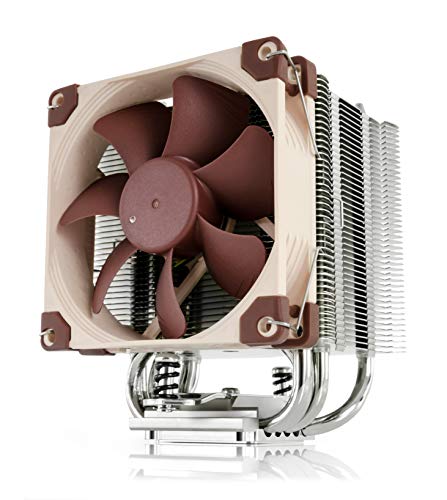
| 4 Noctua NH-U9S 125mm CPU Cooler | Noctua | 3.74 × 3.74 × 4.92 in | 1.4 lb | Compact 125mm height | Check price |
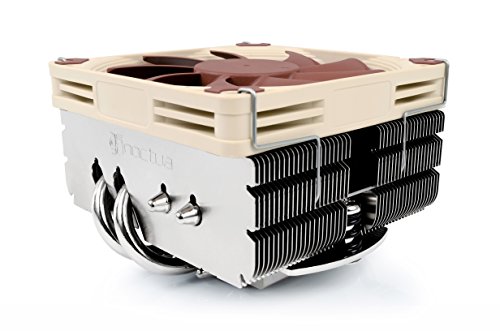
| 5 Noctua NH-L9x65 65mm CPU Cooler | Noctua | 3.74 × 3.74 × 2.56 in | 0.9 lb | Compact 65mm height | Check price |
| 6 ID-COOLING IS-40X V3 45mm CPU Cooler | ID-COOLING | 3.62 × 0.59 × 3.62 in | 0.7 lb | Compact 45 mm height | Check price |
| 7 Thermalright AXP90-X53 Black 53mm Cooler | Thermalright | 3.72 × 3.74 × 2.09 in | 1 lb | Compact 53mm cooler height | Check price |
| 8 Thermalright AXP90 X47 Black CPU Cooler | Thermalright | 3.74 × 3.74 × 1.26 in | 1.1 lb | Low 47mm total height | Check price |
| 9 Noctua NH-L9i-17xx chromax.black, 37mm | Noctua | 3.74 × 3.74 × 1.46 in | 0.9 lb | Compact 37mm height | Check price |
Sizes and weights as listed by the manufacturer on Amazon. Check the retailer for current price and availability.
Pros
- Compact design for ITX and mATX builds
- 100mm PWM fan
- Intel and AMD platform compatibility
Cons
- Who should skip it: builds requiring cooling above its stated 150W rating
Pros
- Compact 57 mm cooler height
- Five heat pipes
- Broad listed Intel and AMD socket support
Cons
- Who should skip it: builders whose cases require more than 57 mm of cooler clearance
Pros
- Compact 47 mm height
- PWM fan control
- Supports listed Intel and AMD sockets
Cons
- Who should skip it: builders using unlisted CPU sockets
Pros
- Compact 125mm height
- No RAM overhang on most current motherboards
- PWM fan with Low-Noise Adaptor
- Six-year manufacturer warranty
Cons
- Who should skip it: builders using unlisted CPU sockets
Pros
- Compact 65mm height
- No RAM or PCIe overhang on most current motherboards
- PWM fan with Low-Noise Adaptor
- Includes NT-H1 thermal paste
Cons
- Who should skip it: builders cooling high-heat CPUs

Pros
- Compact 45 mm height
- Four heat pipes
- PWM fan speed control
- Broad listed socket support
Cons
- Who should skip it: builders using unlisted CPU sockets

Pros
- Compact 53mm cooler height
- PWM fan speed control
- AM4 and AM5 mounting support
Cons
- Who should skip it: builders using unlisted processor sockets

Pros
- Low 47mm total height
- Includes a 92mm PWM fan
- Supports AMD AM4 and AM5
Cons
- Who should skip it: builders using sockets outside the stated support list

Pros
- Compact 37mm height
- No RAM or PCIe overhang
- PWM fan with Low-Noise Adaptor
- Includes thermal paste and mounting system
Cons
- Intended for CPUs with moderate heat loads
- Who should skip it: owners of CPUs needing higher heat-load cooling
Best Compact Air Cooler: ID-COOLING SE-903-XT V2 3-Heatpipe Cooler
The ID-COOLING SE-903-XT V2 3-Heatpipe Cooler pairs three heat pipes with a 100mm PWM fan and lists support for Intel and AMD platforms. Its compact footprint is intended to avoid interference with memory and motherboard components, useful in ITX layouts where nearby parts can constrain cooler choice. The listing states a 150W rating, but that figure alone does not guarantee suitable temperatures in every case or with every CPU.
Skip it if your case requires a cooler height limit that the product page does not clearly specify, or if you need confirmation for a particular socket before ordering.
Best 57mm Low-Profile Cooler: ID-COOLING IS-55 57mm Low-Profile Cooler
The ID-COOLING IS-55 57mm Low-Profile Cooler stands out for its five heat pipes and 120mm slim fan in a 57mm-tall package. Its listed 54.6 CFM airflow and compatibility with Intel LGA1851/1700 and AMD AM4/AM5 provide useful checkpoints when matching it to a compact build. The trade-off is its height: a case with less than 57mm of CPU-cooler clearance cannot accommodate it.
Skip it if your case has a strict sub-57mm cooler limit or your board’s socket is not listed.
Best for a 47mm Clearance Limit: Thermalright AXP90 X47 Black Low Profile CPU
The Thermalright AXP90 X47 Black Low Profile CPU measures 47mm tall and uses four 6mm heat pipes with a 92mm slim PWM fan. The product page lists AM4/AM5 and Intel 1150/1151/1155/1851/1200/1700 support, though socket details can vary among similarly named AXP90 X47 variants. Confirm the exact listing and mounting hardware for your board before purchase.
Skip it if you need a cooler below 47mm or cannot confirm that the listed mounting support matches your exact CPU socket.
Best for a 37mm Intel Build: Noctua NH-L9i-17xx chromax.black
The Noctua NH-L9i-17xx chromax.black is just 37mm tall and is specified for Intel LGA1700 and LGA1851. Its tailored footprint is listed as avoiding RAM and PCIe overhang, which can simplify fit in a compact motherboard layout. The product page recommends it for moderate heat loads, so it is not the default choice for every high-power CPU or sustained workload.
Skip it if you use an AMD platform or need a cooler suited to a higher heat load than the manufacturer recommends.
Best Compact Tower: Noctua NH-U9S 125mm CPU Cooler
The Noctua NH-U9S 125mm CPU Cooler offers a different balance: a 125mm single-tower design with a 92mm fan rather than a very low-profile heatsink. Its listed Intel and AMD support includes LGA1851, LGA1700, AM5, and AM4, and the product page describes RAM and PCIe compatibility on most current motherboards. Its greater height can make it unsuitable for slim ITX cases.
Skip it if your case cannot clear 125mm or you need a top-down cooler with a lower profile.
Key Numbers at a Glance
- Listed cooler heights range from 37mm for the Noctua NH-L9i-17xx chromax.black to 125mm for the Noctua NH-U9S 125mm CPU Cooler.
- The ID-COOLING IS-55 57mm Low-Profile Cooler uses five heat pipes; the ID-COOLING SE-903-XT V2 3-Heatpipe Cooler uses three.
- The ID-COOLING IS-55 57mm Low-Profile Cooler has a 120×120×15mm fan, while the Thermalright AXP90 X47 Black Low Profile CPU uses a 92mm slim fan.
- The Thermalright AXP90-X53 Full Cooper Low Profile CPU is 53mm tall, while the Thermalright AXP90 X47 Black CPU Cooler is 47mm tall.
How to Choose the Best CPU Cooler for ITX Build
Measure cooler clearance in your case
Bottom line: Choose a cooler no taller than the case’s stated CPU-cooler clearance. The products span 37mm for the Noctua NH-L9i-17xx chromax.black, 45mm for the ID-COOLING IS-40X V3, 47mm for the Thermalright AXP90 X47 models, 53mm for the AXP90-X53 models, 57mm for the ID-COOLING IS-55, 65mm for the Noctua NH-L9x65, and 125mm for the NH-U9S.
Measure from the CPU contact area to the case panel and account for the cooler’s full listed height. A slim case may rule out the 57mm IS-55 even though it is marketed for ITX, while a roomier enclosure could allow the NH-U9S tower. Case labels such as “ITX” do not establish a universal cooler-height limit.
Match the mounting hardware to your CPU socket
Bottom line: Verify the exact socket listing before comparing cooling features. The ID-COOLING IS-55 lists Intel LGA1851/1700/1200/115X and AMD AM4/AM5, while the Noctua NH-L9i-17xx chromax.black is specified for LGA1700 and LGA1851 only.
Other models have their own support lists, and products with similar names can differ. Check the exact model variant and mounting kit against your motherboard and processor, especially when buying an AXP90 X47 or X53. For additional processor planning, see our best CPUs for RTX 5090 guide if that system is part of your build.
Balance cooler size with CPU heat load
Bottom line: A compact cooler’s listed size and heat pipes are selection clues, not a guarantee of a specific temperature. The SE-903-XT V2 lists a 150W rating and three heat pipes, while the IS-55 has five heat pipes and a 120mm fan. Noctua describes the NH-L9i-17xx as intended for moderate heat loads and the NH-L9x65 for low to moderate heat dissipation.
Consider the CPU’s power behavior and whether your workload is brief gaming sessions or sustained rendering. The product data does not establish equivalent real-world performance across these designs, so consult the cooler maker’s compatibility guidance for your exact processor instead of treating heat-pipe count or a wattage claim as a direct performance ranking.
Check RAM, PCIe, and motherboard clearance
Bottom line: Favor a stated non-overhanging footprint when your ITX board has crowded sockets. Noctua says the NH-L9i-17xx chromax.black does not overhang RAM or PCIe, and the NH-U9S is described as avoiding those areas on most current motherboards. Several low-profile listings also emphasize memory compatibility.
Motherboard layouts differ, so compare the cooler outline and mounting orientation with your board manual. Check tall memory modules, heatsinks, and nearby components rather than assuming that every cooler sold for ITX clears every ITX board.
Consider fan size, noise claims, and serviceability
Bottom line: Compare the stated fan dimensions and noise figures, but do not treat them as a direct system-noise ranking. The IS-55 lists a 120×120×15mm fan and 13.8–31.2dB(A), while the IS-40X V3 lists a 92mm fan and up to 35.2dB(A). Different test conditions and case airflow can affect how these figures translate to your PC.
PWM fans can adjust speed according to the motherboard’s fan control, but BIOS settings and case airflow still matter. The Noctua products list a Low-Noise Adaptor and thermal paste, while accessory details should be checked for other models rather than assumed.
How We Compared These Products
This guide is based on product research, comparing listed cooler heights, fan dimensions, heat-pipe counts, socket support, clearance claims, and manufacturer guidance on heat load. Product-page specifications and claims are not independent performance measurements, and the available ratings do not establish comparative cooling results.
Which Option Fits Your Build?
Use the labeled picks above as a shortlist: start with the case height limit, then confirm CPU socket support and workload suitability. If your build is primarily gaming, match cooler selection to the processor and the airflow available in your case; our guide to best graphics cards for 1440p gaming can help with the other major component decision.
Mistakes to Avoid When Choosing an ITX CPU Cooler
- Buying by “ITX compatible” alone. Check the case’s actual cooler-height limit and the cooler’s full height.
- Assuming socket support is universal. Match the exact cooler variant and listed mounting support to your motherboard socket.
- Choosing by heat-pipe count alone. Consider the CPU’s heat load, cooler dimensions, fan, and manufacturer compatibility guidance together.
- Ignoring neighboring components. Review motherboard and memory clearances because ITX layouts and component placement vary.
Frequently Asked Questions
How tall should an ITX CPU cooler be?
It must fit within the case’s stated CPU-cooler clearance. The listed models range from 37mm to 125mm, so check the case specification and measure the available space rather than relying on the ITX label alone.
Will an AM5 cooler fit an Intel motherboard?
Not unless that specific cooler also lists support for your Intel socket and includes the matching mounting hardware. For example, the ID-COOLING IS-55 lists AM5 and several Intel sockets, while the Noctua NH-L9i-17xx chromax.black lists Intel LGA1700 and LGA1851.
Is a 47mm or 53mm low-profile cooler better?
The 47mm Thermalright AXP90 X47 models suit tighter height limits; the 53mm AXP90-X53 models need an additional 6mm of clearance. Choose based on your case limit and confirm the exact variant’s socket support. The listed specifications alone do not prove which will cool a particular CPU better.
Does a larger fan mean a quieter cooler?
Not necessarily. Fan size is only one factor, and the listed noise figures may not be directly comparable across products or conditions. The IS-55 has a 120mm slim fan, while several other models use 92mm fans; check the stated noise information and plan to tune fan control for your build.
Can a low-profile cooler handle a high-power processor?
That depends on the processor’s heat load, case airflow, and the cooler’s supported-use guidance. Noctua describes the NH-L9i-17xx chromax.black for moderate heat loads, while the SE-903-XT V2 lists a 150W rating. Verify the exact CPU against the manufacturer’s compatibility guidance before choosing.






Write Your Review
No reviews yet. Be the first to share your experience!