


For a compact Proxmox cluster, prioritize systems with upgradeable memory and storage if you plan to add virtual machines over time; for a simpler start, consider a model sold with Proxmox and Home Assistant ready to run. The picks here range from refurbished business desktops to newer mini PCs, so the wrong choice could leave you short on RAM, storage expansion, or the Ethernet connections your lab needs.
Compare at a glance
| Product | Brand | Size | Stands out for | Price |
|---|---|---|---|---|
| 1 GMKtec K17 Mini PC, Core Ultra 5 226V | GMKtec | 5.07 × 5 × 1.88 in | USB4 connectivity | Check price |
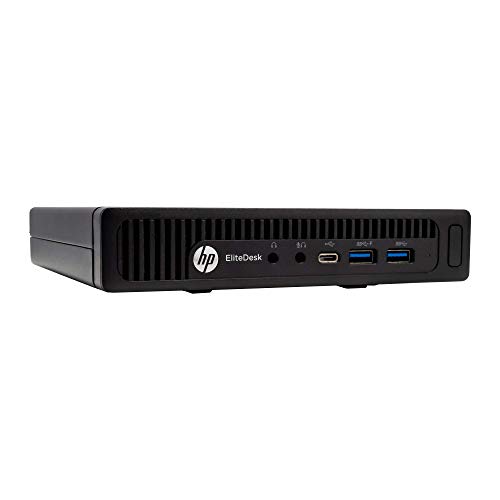
| 2 HP EliteDesk 705 G4 Mini, Ryzen 5 PRO | HP | Not listed | Four-core, eight-thread Ryzen 5 PRO processor | Check price |
| 3 HP 600 G2 PC, 16GB RAM | HP | 19 × 17 × 9 in | 16GB DDR4 memory | Check price |
| 4 HP ProDesk 600 G4 Mini, Core i5 | HP | Not listed | Six-core Intel Core i5 | Check price |
| 5 HP ProDesk 600 G5 Mini, 16GB RAM | HP | 10 × 2 × 50 in | Six-core processor | Check price |
| 6 HP ProDesk 600 G5 Mini, Core i5 | HP | 10 × 2 × 50 in | Six-core Intel Core i5 processor | Check price |
| 7 Lenovo ThinkCentre M715Q, Ryzen 5 2400GE | Lenovo | Not listed | 16GB DDR4 memory | Check price |
| 8 Pulcro.io TK Node Mini PC, AMD R2514 | Pulcro.io | 5 × 5 × 1.7 in | Proxmox VE and Home Assistant VM included | Check price |
| 9 Pulcro TK X Mini PC, Core i5-12450H | Pulcro.io | Not listed | Proxmox VE and Home Assistant configuration | Check price |
Sizes and weights as listed by the manufacturer on Amazon. Check the retailer for current price and availability.
Pros
- USB4 connectivity
- Three 4K display support
- Two NVMe storage slots
- Compact, VESA-mountable design
Cons
- Who should skip it: users who need upgradeable memory
Pros
- Four-core, eight-thread Ryzen 5 PRO processor
- 256GB SSD
- Five USB 3.1 ports
- Two DisplayPort outputs
- Windows 11 Pro
Cons
- 8GB RAM may constrain heavier multitasking
- Who should skip it: users needing more memory or storage
Pros
- 16GB DDR4 memory
- 256GB SSD storage
- Windows 11 Pro
Cons
- Who should skip it: buyers who require a warranty beyond 91 days

Pros
- Six-core Intel Core i5
- 16GB DDR4 memory
- Compact mini chassis
- Windows 11 Pro
Cons
- 250GB SSD may limit space for large files
- Who should skip it: users needing more than 250GB of built-in storage

Pros
- Six-core processor
- 16GB memory
- 256GB SSD
- Two DisplayPort outputs
Cons
- Who should skip it: buyers requiring original HP power supply or packaging

Pros
- Six-core Intel Core i5 processor
- 16GB memory and 256GB SSD
- Two DisplayPort outputs
- Windows 11 Pro
Cons
- Power supply may be compatible but non-original
- Who should skip it: buyers requiring original retail packaging

Pros
- 16GB DDR4 memory
- SSD storage
- Windows 11 Pro included
- Keyboard and mouse included
Cons
- 90-day warranty
- Who should skip it: users needing more than 256GB of storage
Best for a ready-to-run home lab

Pros
- Proxmox VE and Home Assistant VM included
- RAM and NVMe storage are expandable
- Compact design with VESA mounting kit
Cons
- Who should skip it: users who need more than 256GB of storage from the start

Pros
- Proxmox VE and Home Assistant configuration
- Upgradeable memory and SSD storage
- Support for up to three 4K displays
- Two-year US-based limited hardware warranty
Cons
- Who should skip it: users needing more than 256GB of included storage
Key Numbers at a Glance
- Upgradeable memory tops out at 64GB on the Pulcro.io TK Node Mini PC and Pulcro.io Pulcro TK X Mini PC.
- The Pulcro.io TK Node Mini PC lists up to 4TB total NVMe storage; the Pulcro.io Pulcro TK X Mini PC lists up to 2TB.
- The BOSGAME P6 Neo Mini Gaming PC has 24GB onboard LPDDR5 memory, while the GMKtec K17 Mini PC, Core Ultra 5 226V has 16GB LPDDR5X memory.
- The BOSGAME P6 Neo Mini Gaming PC has two 1 Gigabit Ethernet ports; the HP ProDesk 600 G5 Mini Desktop Computer Tiny PC lists one RJ-45 port.
Best Mini PC for Proxmox Cluster: Pulcro.io TK Node Mini PC – Proxmox + Home Assistant
For a ready-to-run home lab: Pulcro.io TK Node Mini PC – Proxmox + Home Assistant comes with Proxmox VE and a Home Assistant VM preinstalled, plus 16GB RAM and a 256GB SSD. Its dual SO-DIMM slots support up to 64GB memory, and dual NVMe slots support up to 4TB total storage. The product page lists a 2-year US-based limited hardware warranty. Skip it if you need more than 16GB RAM or 256GB storage already installed, or require network ports beyond the listed Gigabit Ethernet.
Related guides: Best Mini PCs for Self Hosting, Best Mini PCs for Music Production and Best Mini PCs for Local LLM.
Best Upgrade Headroom: Pulcro.io Pulcro TK X Mini PC, Proxmox + Home Assistant
For a cluster node you expect to expand: Pulcro.io Pulcro TK X Mini PC, Proxmox + Home Assistant pairs an Intel Core i5-12450H with upgradeable DDR4 memory up to 64GB and storage listed up to 2TB. It is configured for Proxmox VE and Home Assistant, and has a 2-year US-based limited hardware warranty. The listed 16GB RAM and 256GB SSD are starting capacities, so account for upgrades if your VM plans need more. Skip it if you want the TK Node’s listed dual NVMe slots or up to 4TB total storage.
Best for a Low-Cost Cluster Node: HP ProDesk 600 G5 Mini Desktop Computer Tiny PC
For adding a refurbished office PC to a budget-conscious lab: HP ProDesk 600 G5 Mini Desktop Computer Tiny PC lists an Intel Core i5-9500T with 6 cores, 16GB RAM, a 256GB SSD, and one RJ-45 port. The two DisplayPort outputs and USB Type-C connections are useful for desk use, but the product page does not describe Proxmox preinstallation or storage expansion. Check the seller’s refurbishment details and confirm that the installed memory and drive suit your planned workloads. Skip it if you want a Proxmox-ready configuration or documented memory and NVMe upgrade limits.
Best Mini PCs for Proxmox Cluster: Buying Guide
Memory and CPU for virtual machines
Bottom line: Plan RAM around the number and type of VMs you expect to run, and favor upgradeable memory for a growing lab. The Pulcro.io TK Node Mini PC and Pulcro.io Pulcro TK X Mini PC support up to 64GB in dual SO-DIMM slots; the TK Node starts with 16GB. The BOSGAME P6 Neo Mini Gaming PC has 24GB onboard memory, which is not listed as upgradeable, while the GMKtec K17 Mini PC, Core Ultra 5 226V has 16GB LPDDR5X. Check whether memory is soldered or socketed and whether the CPU virtualization features match your chosen hypervisor before buying.
Storage for VM disks and backups
Bottom line: Prefer documented drive expansion if VM images, snapshots, or local backups will grow. The Pulcro.io TK Node lists dual NVMe slots and up to 4TB total storage, while the Pulcro.io Pulcro TK X lists expansion up to 2TB. The BOSGAME P6 Neo Mini Gaming PC has a 512GB drive and an extra empty M.2 2280 PCIe 4.0 slot. By contrast, several renewed HP and Lenovo models in the comparison list a 256GB SSD without expansion details, so confirm internal slots and drive compatibility with the seller.
Networking and cluster connections
Bottom line: Check the number and speed of Ethernet ports on every node, not just the first machine. The BOSGAME P6 Neo Mini Gaming PC lists dual 1 Gigabit Ethernet ports, which can give a lab more wired connection flexibility. The HP ProDesk 600 G5 Mini Desktop Computer Tiny PC lists one RJ-45 port, and the Pulcro.io TK Node lists Gigabit Ethernet. If your design needs faster-than-Gigabit networking or multiple physical interfaces per node, verify those details before choosing; Wi-Fi is not a substitute for a wired connection when your cluster design calls for Ethernet.
For other compact computer ideas, browse our mini PC category. Readers considering local AI workloads can also compare systems in our guide to best desktop computer for AI development.
Proxmox setup and support
Bottom line: A preinstalled hypervisor can reduce initial setup work, but verify the configuration and support terms. The Pulcro.io TK Node is listed with Proxmox VE and a ready-to-run Home Assistant VM; the Pulcro.io Pulcro TK X is described as a Proxmox and Home Assistant system. The other listed PCs ship with Windows or have no Proxmox configuration stated, so check licensing, installation steps, and whether the seller supports your intended operating system. A Windows 11 listing does not establish that a system is already configured for Proxmox.
Cooling, power, and physical placement
Bottom line: For a node that runs continuously, account for ventilation, power use, and maintenance access. The Pulcro.io TK Node is described as designed for continuous operation and measures 5 inches by 5 inches by 1.7 inches. The product data does not give power consumption or operating temperatures for the full set, so do not infer energy costs or sustained performance from CPU names alone. Leave airflow around each unit and check the adapter, ventilation, and maintenance requirements for the specific configuration.
How We Compared These Products
This guide compares listed processor, memory, storage, Ethernet, operating system, expansion, and support details, along with available customer feedback. Some products are refurbished business desktops, while the Pulcro.io models are described as Proxmox-oriented systems. This is product research based on listing information, not firsthand evaluation; confirm variant-specific specifications with the seller before purchase.
Which Option Fits Your Home and Devices?
For a Proxmox and Home Assistant setup with documented storage expansion: the Pulcro.io TK Node Mini PC offers preinstalled software, up to 64GB RAM, and dual NVMe slots supporting up to 4TB. Skip it if you need a larger starting RAM or SSD configuration than the listed 16GB and 256GB.
For a refurbished node with a six-core Intel CPU: the HP ProDesk 600 G5 Mini Desktop Computer Tiny PC lists an i5-9500T, 16GB RAM, and a 256GB SSD. Skip it if you need documented dual-drive expansion or Proxmox preinstallation. For a broader desktop comparison, see our desktop PC category.
Mistakes to Avoid When Choosing a Mini PC for Proxmox
- Buying by CPU name alone. Count available memory and check upgrade limits against the VMs and containers you intend to run.
- Assuming every mini PC has multiple Ethernet ports. Confirm port count and speed; the BOSGAME P6 Neo lists two 1 Gigabit ports, while the HP ProDesk 600 G5 Tiny lists one RJ-45.
- Assuming the SSD can be expanded. Look for a stated spare M.2 slot or confirmed drive limit before planning VM storage.
- Confusing Windows preinstallation with hypervisor readiness. Confirm whether Proxmox is installed and whether the configuration supports your intended deployment.
Frequently Asked Questions
Can I use these mini PCs in a Proxmox cluster?
The Pulcro.io TK Node and Pulcro.io Pulcro TK X are explicitly described for Proxmox, with the TK Node listed as preinstalled with Proxmox VE. The other models are not described as preconfigured Proxmox systems. Check CPU virtualization support, network requirements, and operating system compatibility for the exact model and configuration before deploying it.
Which mini PC has the most memory and storage expansion?
The Pulcro.io TK Node supports up to 64GB RAM and up to 4TB total NVMe storage according to its product details. The Pulcro.io Pulcro TK X also supports up to 64GB RAM, with storage listed up to 2TB. Those maximums are expansion limits, not the installed starting capacities.
Do these mini PCs have dual Ethernet?
The BOSGAME P6 Neo Mini Gaming PC lists two 1 Gigabit Ethernet ports. The HP ProDesk 600 G5 Mini Desktop Computer Tiny PC lists one RJ-45 port, and the product data does not establish dual Ethernet for every other model. Verify the exact configuration if your cluster plan needs multiple physical network connections.
Is 16GB RAM enough for a Proxmox node?
It can be a starting point for a modest setup, but whether it is enough depends on the guest systems and services you plan to run. The Pulcro.io TK Node and TK X support memory upgrades up to 64GB, while the BOSGAME P6 Neo lists 24GB onboard memory. Estimate the memory needs of each VM and container, then check whether the selected model can expand to your target.
Should I choose a refurbished HP or a Proxmox-ready Pulcro.io system?
Choose a Pulcro.io model if you value a configuration described for Proxmox and Home Assistant, and check its installed RAM and storage against your needs. A refurbished HP may suit a buyer who wants a compact business desktop with a stated Intel Core i5 and 16GB RAM, but its product details do not describe Proxmox preinstallation or the same documented upgrade limits. Confirm refurbishment terms and compatibility before ordering.






Write Your Review
No reviews yet. Be the first to share your experience!