


If you are upgrading a desktop for GTA 6, the right budget graphics card depends on your case, power supply, and target resolution, not just the name on the box. The ASRock RX 6600 and Intel Arc A750 list 8GB of memory, while the 51RISC RX 550 is a low-profile, 35W option for systems with tight space or power constraints. The game’s requirements are not established by these product listings, so treat any pick as a component comparison, not a performance guarantee.
Compare at a glance
| Product | Brand | Size | Weight | Stands out for | Price |
|---|---|---|---|---|---|
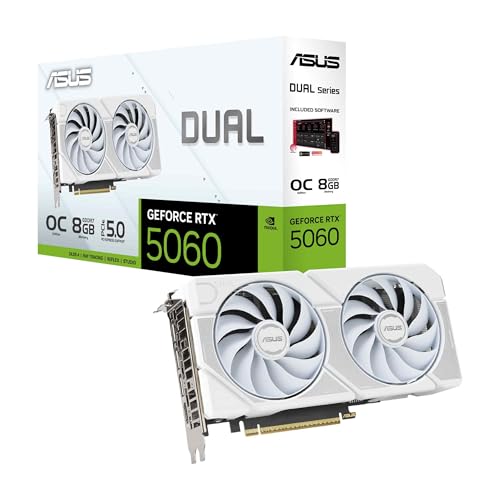
| 1 ASUS Dual GeForce RTX 5060 8GB White OC | ASUS | 9 × 4.8 × 0.1 in | 2.4 lb | 2.5-slot design | Check price |
| 2 51RISC Radeon RX 550 4GB Low Profile | 51RISC | 6.61 × 2.71 × 0.7 in | Not listed | Low-profile form factor | Check price |
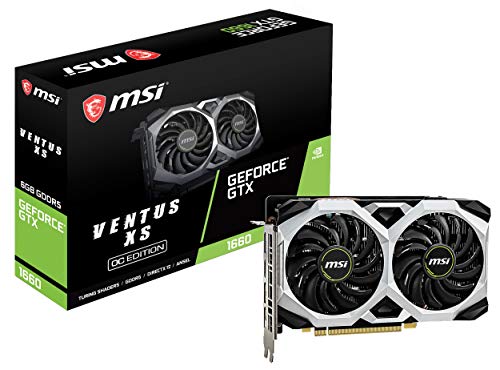
| 3 MSI GTX 1660 Ti Gaming X 6GB | msi | 5 × 1.81 × 9.72 in | 1.8 lb | Three DisplayPort 1.4 outputs | Check price |
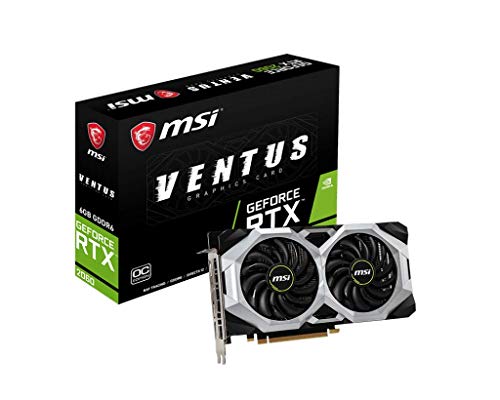
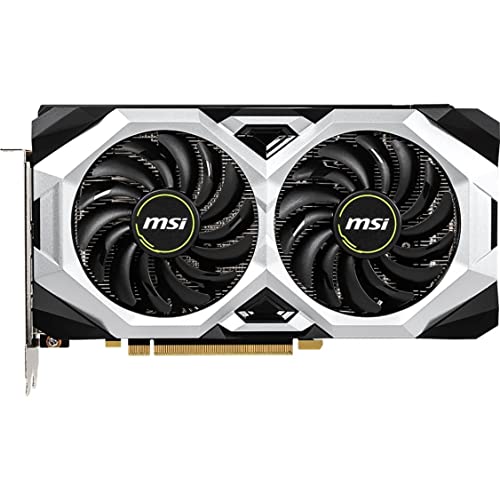
| 4 MSI RTX 2060 Ventus 6G OC | msi | 9.72 × 5.07 × 2.04 in | 1.7 lb | Three DisplayPort outputs | Check price |
| 5 GIGABYTE RTX 3050 WINDFORCE OC V2 6G | GIGABYTE | 7.5 × 4.4 × 0.1 in | 0.9 lb | 6GB GDDR6 memory | Check price |
| 6 EVGA GeForce GTX 1060 SC 6GB | EVGA | 6.8 × 1.62 × 4.38 in | 2.2 lb | Compact 6.8-inch length | Check price |
| 7 Intel Arc A750 8GB Graphics Card | Intel | 17.3 × 11.1 × 0.1 in | 2 lb | PCI Express 4.0 interface | Check price |
| 8 MOUGOL Radeon RX 580 8GB | MOUGOL | 4.4 × 1.7 × 0.1 in | Not listed | 8GB of GDDR5 memory | Check price |
| 9 ASRock RX 6600 Challenger D 8GB | ASRock | 10.59 × 5.2 × 1.61 in | 1.1 lb | 8GB GDDR6 memory | Check price |
| 10 MSI RTX 2060 Gaming Z 6G Graphics Card | msi | 9.7 × 5.1 × 2.1 in | 2.1 lb | Three DisplayPort outputs | Check price |
Sizes and weights as listed by the manufacturer on Amazon. Check the retailer for current price and availability.
Best for someone comparing newer display
Pros
- 2.5-slot design
- Dual BIOS profiles
- White color option
Cons
- Who should skip it: users whose workloads require more than 8GB of VRAM
Best for a low-profile desktop
Pros
- Low-profile form factor
- No external power connector required
- DisplayPort and HDMI outputs
Cons
- Who should skip it: users needing more than 4GB of VRAM
Pros
- Three DisplayPort 1.4 outputs
- HDMI 2.0b output
- 6GB of GDDR6 memory
Cons
- Who should skip it: buyers needing more than 6GB of graphics memory
Pros
- Three DisplayPort outputs
- HDMI 2.0b output
- GDDR6 graphics memory
Cons
- Who should skip it: buyers needing more than 6GB VRAM

Pros
- 6GB GDDR6 memory
- Two WINDFORCE fans
- 7.5-inch listed length
Cons
- Who should skip it: users needing over 6GB graphics memory

Pros
- Compact 6.8-inch length
- 6GB of GDDR5 memory
- Supports up to four monitors
Cons
- Who should skip it: users needing more than 6GB of graphics memory

Pros
- PCI Express 4.0 interface
- 8GB capacity
Cons
- Performance and power requirements are not specified
- Who should skip it: buyers requiring stated performance or power details

Pros
- 8GB of GDDR5 memory
- HDMI, DisplayPort, and DVI outputs
- Triple-monitor support
- Dual-fan cooling
Cons
- Power requirements are not provided
- Who should skip it: users needing display connections beyond HDMI, DisplayPort, or DVI
Best for a 1080p upgrade

Pros
- 8GB GDDR6 memory
- Four display outputs
- Dual-fan cooling design
- FSR support
Cons
- Who should skip it: users with incompatible built-in systems

Pros
- Three DisplayPort outputs
- HDMI 2.0b output
- 6GB GDDR6 memory
Cons
- Who should skip it: users whose workloads need more than 6GB of video memory
Best Compact Low-Power Graphics Card: 51RISC Radeon RX 550 4GB Low Profile
The 51RISC Radeon RX 550 4GB Low Profile is a fit-focused pick because it uses a low-profile bracket, draws power through the PCIe slot, and lists a 35W TDP. Its 4GB GDDR5 memory and older RX 550 graphics class are important trade-offs for a demanding new game. Skip it if your priority is a substantial gaming upgrade rather than fitting an older small-form-factor PC.
Best 8GB AMD Option for 1080p: ASRock AMD Radeon RX 6600 Challenger D 8GB GDDR6
The ASRock AMD Radeon RX 6600 Challenger D 8GB GDDR6 has 8GB GDDR6 and a dual-fan cooler, and its listing describes it as suited to 1080p gaming. It also specifies HDMI 2.1 and three DisplayPort 1.4 outputs, but requires an 8-pin power connector. Skip it if your power supply lacks the required connector or your case cannot accommodate the card.
Best 8GB Intel Option to Compare: Intel Arc A750 8GB Graphics Card
The Intel Arc A750 8GB Graphics Card offers 8GB of memory and a PCI Express 4.0 interface, making it a useful alternative to compare with other 8GB cards. The product details do not specify its power connector, board dimensions, or display outputs, so verify those against the card maker’s specifications before buying. Skip it if you need a card whose listed fit and power details are immediately clear.
Best Newer-Generation Feature Set: ASUS Dual GeForce RTX 5060 8GB White OC
The ASUS Dual GeForce RTX 5060 8GB White OC lists 8GB GDDR7, DLSS 4, a 2.5-slot design, and HDMI 2.1b plus DisplayPort 2.1b. Those newer features do not establish how it will run GTA 6, and the listing does not give its card dimensions or power connector details. Skip it if your budget is strict or you cannot confirm case and PSU compatibility first.
Key Numbers at a Glance
- Memory ranges from 4GB GDDR5 on the 51RISC Radeon RX 550 4GB Low Profile to 8GB on the ASRock AMD Radeon RX 6600 Challenger D 8GB GDDR6.
- The 51RISC Radeon RX 550 4GB Low Profile lists a 35W TDP and no external power connector.
- The MOUGOL AMD Radeon RX 580 8GB GDDR5 Gaming Graphics measures 9.45 x 5.31 x 1.77 inches.
- The EVGA GeForce GTX 1060 SC 6GB measures 6.8 inches long and is dual slot.
Best Budget Graphics Cards for GTA 6: What to Check Before Buying
Memory capacity and game requirements
Bottom line: Compare memory capacity, but do not treat it as proof that a card will meet GTA 6 requirements. The ASRock RX 6600, Intel Arc A750, and ASUS RTX 5060 each list 8GB, while the GTX 1660 Ti and RTX 2060 models list 6GB. Memory is only one part of performance, and these listings do not state official game requirements or frame rates. Check the game’s published PC requirements when available and compare them with the exact card you plan to buy.
Case clearance and card thickness
Bottom line: Measure your case and confirm slot clearance before choosing a full-size card. The 51RISC RX 550 has a low-profile design, while the ASUS RTX 5060 uses 2.5 slots and the MOUGOL RX 580 measures 9.45 inches long. Check your case manual for available card length, thickness, and bracket space, and verify the exact variant’s dimensions with its manufacturer. For other games with different requirements, compare our guides to graphics cards for Battlefield 6 and graphics cards for Borderlands 4.
Power draw and PSU connectors
Bottom line: Match the card’s connector and power needs to your existing PSU before ordering. The RX 550 listing specifies 35W and no external power connector, but the MSI RTX 2060 Ventus lists 190W. The MSI RTX 2060 Gaming Z specifies one 8-pin connector. Check the manufacturer’s PSU recommendation and connector requirements for the exact card, and do not assume a PSU’s wattage alone confirms compatibility.
Monitor resolution, refresh rate, and outputs
Bottom line: Choose a card and outputs that suit your monitor, then verify game performance separately. The RX 6600 lists HDMI 2.1 and DisplayPort 1.4, while the MSI GTX 1660 Ti lists HDMI 2.0b and three DisplayPort 1.4 outputs. A newer output standard does not ensure a higher frame rate in a game. Check the monitor’s input ports and resolution, then use published performance information for the game and card combination you are considering.
Older cards, drivers, and upgrade value
Bottom line: Consider older cards only when their full-system fit and verified game support suit your upgrade plan. The GTX 1060 SC has 6GB GDDR5, and the RX 580 listing specifies 8GB GDDR5; neither memory figure alone establishes suitability for a newer game. Check current driver support, the game’s requirements, and whether your CPU and PSU can support the planned upgrade. For a platform-specific comparison, see our guide to graphics cards for AM4 motherboards.
How We Compared These Products
This guide is based on product research, comparing the listed memory, interfaces, card dimensions where stated, power details, cooling designs, and display outputs. Product pages do not establish GTA 6 frame rates or final compatibility with every PC, and the available customer feedback does not support a dependable performance ranking. Verify the exact model’s manufacturer specifications and the game’s requirements before purchasing.
Which Option Fits Your PC?
For a low-profile desktop with limited PSU capacity: the 51RISC Radeon RX 550 4GB Low Profile has a low-profile bracket and lists 35W with no external power connector. Skip it if you need a card selected specifically for demanding new-game performance.
For a 1080p upgrade with an 8-pin power lead available: the ASRock AMD Radeon RX 6600 Challenger D 8GB GDDR6 lists 8GB GDDR6 and a dual-fan design, and its product page identifies 1080p gaming as its performance class. Skip it if you cannot confirm the case clearance or power connection.
For someone comparing newer display and upscaling features: the ASUS Dual GeForce RTX 5060 8GB White OC lists DLSS 4, 8GB GDDR7, and HDMI 2.1b and DisplayPort 2.1b. Skip it if the missing listing details on exact dimensions and power connectors prevent you from confirming fit.
Mistakes to Avoid When Choosing a Graphics Card
- Buying by memory alone. Compare the GPU model, official game requirements, and reliable performance information as well as VRAM.
- Ignoring case dimensions. Check card length, thickness, and slot space against your case manual before ordering.
- Assuming the PSU will work. Confirm the exact card’s power draw and connectors against your PSU documentation.
- Choosing a card by port version alone. Match its outputs to your monitor, but do not treat a newer HDMI or DisplayPort version as a guarantee of gaming performance.
Frequently Asked Questions
Are GTA 6 PC requirements available in these product listings?
No. The graphics card product details do not state GTA 6 system requirements or performance results. Check the game publisher’s official PC requirements when they are announced before choosing a card for that game.
Is 8GB of VRAM enough for GTA 6?
The listings cannot confirm that. Several cards here have 8GB, including the RX 6600, Arc A750, and RTX 5060, but memory capacity alone does not establish that a GPU meets a game’s requirements.
Will a low-profile graphics card fit my desktop?
The 51RISC RX 550 is explicitly described as low profile, but you still need to confirm your case bracket and available clearance. Check the card’s exact dimensions and your PC maker’s upgrade guidance, especially for prebuilt systems.
Do these graphics cards work with every desktop?
No single listing establishes compatibility with every PC. Confirm the PCIe slot, case clearance, PSU connectors and capacity, motherboard support, and display connections for your specific system before buying.
Should I choose the RX 6600 or the Arc A750?
Both listings specify 8GB, but the RX 6600 product page identifies a 1080p gaming class and lists its display outputs and 8-pin connector. The Arc A750 listing confirms PCIe 4.0 but leaves important fit and power details unstated, so choose based on verified specs for your exact PC and current game requirements.



Write Your Review
No reviews yet. Be the first to share your experience!