


If you are choosing a monitor for GTA 6 on PS5, decide first whether you value a larger desktop screen, a compact portable setup, or a 4K image more. The listed choices range from 15.6-inch portable Full HD displays to 27-inch desktop monitors and 4K models, but check HDMI capabilities carefully because the product data does not consistently state HDMI versions or PS5 refresh-rate support.
Compare at a glance
| Product | Brand | Size | Weight | Stands out for | Price |
|---|---|---|---|---|---|
| 1 MNN 15.6-Inch 1080p Portable Monitor | MNN | 14.48 × 8.85 × 0.3 in | 1.5 lb | Full HD IPS display | Check price |
| 2 Sceptre E225W-FW144 22-Inch Gaming Monitor | Sceptre | 7 × 19.9 × 15.5 in | 7 lb | Up to 144Hz refresh rate | Check price |
| 3 Sceptre C248W-1920RN 24-Inch Curved Monitor | Sceptre | 16.04 × 21.61 × 9.06 in | 6 lb | 1080p resolution on a 24-inch screen | Check price |
| 4 G-STORY 14-Inch 4K Portable Gaming Monitor | G-STORY | 16 × 3 × 12 in | 4.3 lb | 4K resolution in a 14-inch portable design | Check price |
| 5 Dell SE2726HG 27-inch 240Hz Monitor | Dell | 7.4 × 24.05 × 17.83 in | 8.2 lb | 240Hz refresh rate | Check price |
| 6 G-STORY 15.6-Inch 4K Portable Monitor | G-STORY | 9.45 × 14.17 × 1.18 in | 2 lb | Compact 15.6-inch IPS display | Check price |
| 7 AOC AGON AG276UZD 27-Inch 4K OLED | AOC | 9.45 × 23.97 × 15.57 in | 13 lb | 4K QD-OLED panel with 240Hz refresh rate | Check price |
| 8 Sceptre C275B-FW180T 27-Inch 180Hz Monitor | Sceptre | 7.7 × 24.4 × 17.9 in | Not listed | Up to 180Hz refresh rate | Check price |
Sizes and weights as listed by the manufacturer on Amazon. Check the retailer for current price and availability.
Pros
- Full HD IPS display
- One-cable USB-C connection on compatible devices
- Smart cover doubles as a stand
- Landscape and portrait use
Cons
- USB-C video requires DP Alt Mode support
- Who should skip it: buyers who require a specified refresh rate
Pros
- Up to 144Hz refresh rate
- Built-in speakers
- Blue-Light Shift technology
- Minimal bezel design
Cons
- Who should skip it: users needing a larger or higher-resolution display
Pros
- 1080p resolution on a 24-inch screen
- Two HDMI ports plus VGA
- Built-in speakers
- VESA mount ready
Cons
- Who should skip it: players seeking refresh rates above 75Hz

Pros
- 4K resolution in a 14-inch portable design
- Two HDMI ports
- FreeSync and VRR support
- Built-in stereo speakers
Cons
- 60Hz refresh rate
- Who should skip it: buyers needing more than 60Hz

Pros
- 240Hz refresh rate
- IPS panel with 99% sRGB coverage
- FreeSync Premium and HDMI VRR
- Two HDMI ports and DisplayPort 1.4
Cons
- 1080p resolution on a 27-inch display
- Stand adjustment is limited to tilt
- Who should skip it: buyers seeking higher resolution
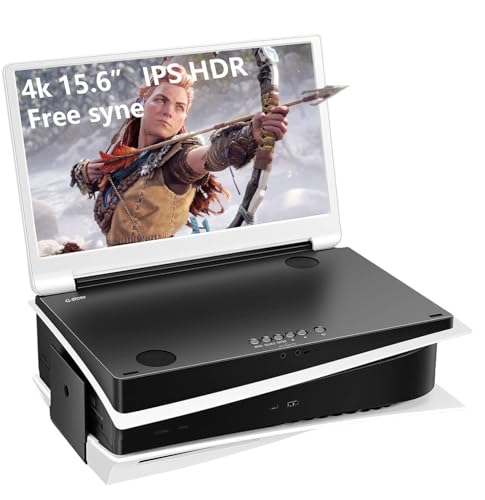
Pros
- Compact 15.6-inch IPS display
- 4K support through HDMI 2
- Built-in stereo speakers
- Closable design
Cons
- HDMI 1 supports only 1080p
- Who should skip it: users needing dual 4K HDMI

Pros
- 4K QD-OLED panel with 240Hz refresh rate
- Two HDMI 2.1 ports and DisplayPort 2.1
- 65W USB-C charging and built-in KVM
- Adjustable stand and 100mm VESA mounting
Cons
- Who should skip it: buyers unwilling to manage OLED burn-in risk

Pros
- Up to 180Hz refresh rate
- Four video inputs across two connection types
- 100% sRGB color gamut claim
- Built-in speakers and audio-out jack
Cons
- Resolution and panel type are not specified
- Who should skip it: buyers who require a stated resolution
Best for a Compact PS5 Setup: G-STORY 14-Inch 4K Portable Gaming Monitor
The G-STORY 14-Inch 4K Portable Gaming Monitor pairs a 14-inch 4K IPS display with a portable design that closes like a laptop. The listing also specifies dual HDMI ports, FreeSync and VRR; however, confirm which HDMI input supports the PS5 features you want, since its HDMI version is not stated.
Its small screen saves desk space, but 14 inches is a substantial compromise for a game viewed from a typical desk or couch distance. Skip it if you want a large shared screen or need stated HDMI 2.1 support.
Best for a 4K Portable Screen: G-STORY 15.6-inch IPS 4K 60Hz Portable Gaming Monitor
The G-STORY 15.6″ IPS 4K 60Hz Portable Gaming Monitor offers a 15.6-inch 4K display and a compact design that closes like a laptop. Its product page specifies 60Hz, dual HDMI and built-in stereo speakers, making it a portable 4K choice rather than a high-refresh desktop screen.
The listing says one HDMI input supports 4K and recommends that port for PS5, while the other supports 1080p. Skip it if you prefer a larger monitor or want a refresh rate above 60Hz.
Best for a Large Full HD Screen: Dell SE2726HG 27-inch 240Hz Monitor
The Dell SE2726HG 27-inch 240Hz Monitor combines a 27-inch IPS panel, Full HD resolution, FreeSync Premium and HDMI VRR. Its 240Hz specification is a monitor capability, not a promise that a PS5 game will run at that rate.
Two HDMI ports and DisplayPort 1.4 give you several connection options, but the listing does not identify HDMI versions. Skip it if 4K detail matters more to you than a 27-inch Full HD panel.
Best for a High-Refresh Curved Screen: Sceptre C275B-FW180T 27-Inch 180Hz Monitor
The Sceptre C275B-FW180T 27-Inch 180Hz Monitor has a 27-inch curved display, a stated 180Hz overclocked refresh rate and a 1ms blur-reduction claim. It lists two HDMI ports and two DisplayPort inputs, but does not specify HDMI versions or resolution in the product data.
That missing resolution information makes it important to confirm the exact listing and PS5 compatibility before purchasing. Skip it if you need a clearly specified 4K or Full HD resolution.
Best for 4K OLED Features: AOC AGON OLED 4K 27 Inch 240Hz Gaming Monitor
The AOC AGON OLED 4K 27 Inch 240Hz Gaming Monitor specifies a 27-inch 4K QD-OLED panel, dual HDMI 2.1 ports and HDR True Black 400 certification. It also lists Adaptive-Sync, but the 240Hz maximum is not a PS5 frame-rate guarantee.
Its 4K resolution, OLED panel and HDMI 2.1 connections make it the most feature-rich listed match for buyers prioritizing image quality and modern console connectivity. Skip it if you do not need those features or would rather spend less on a simpler screen.
Key Numbers at a Glance
- Largest clearly specified desktop panel: Dell SE2726HG at 27 inches; it is Full HD.
- Portable display sizes range from 14 inches (G-STORY 14-Inch 4K Portable Gaming Monitor) to 16 inches (kksmart Portable Monitor for Laptop MacBook).
- Listed resolutions include 1920 × 1080 on the KYY 15.6” FHD monitor, 2560 × 1600 on the kksmart portable monitor and 3840 × 2160 on the AOC AGON OLED 4K monitor.
- Stated desktop refresh-rate figures include 180Hz for the Sceptre C275B-FW180T and 240Hz for the Dell SE2726HG and AOC AGON OLED.
How to Choose the Best Monitors for GTA 6 on PS5
Resolution and screen size
Bottom line: Choose resolution and size together, because a small 4K panel and a large Full HD panel serve different viewing preferences. The AOC AGON OLED is 27 inches at 3840 × 2160, while the Dell SE2726HG is 27 inches at 1920 × 1080. The G-STORY portable models put 4K resolution on 14- and 15.6-inch screens, which saves space but gives you less screen area.
Think about where you sit and how much desk space you have before prioritizing pixel count. For other screen-size and resolution trade-offs, see our guide to best 4K monitors for text clarity and our overview of best monitors for bright rooms.
Refresh rate and adaptive sync
Bottom line: Treat a monitor’s maximum refresh rate as a capability, not a PS5 game-performance promise. The Dell lists 240Hz and HDMI VRR, while the Sceptre C275B-FW180T lists up to 180Hz. The G-STORY 15.6-inch 4K model specifies 60Hz, a simpler match if portable 4K matters more than a high refresh ceiling.
PS5 output and a game’s supported modes determine the refresh rate you can actually use. If comparing high-refresh options, our best 240Hz gaming monitors guide offers additional context; verify the console’s supported output and the monitor’s input specifications before choosing.
HDMI ports and console compatibility
Bottom line: Check the HDMI version and supported resolution and refresh rate on the exact input you plan to use. The AOC lists two HDMI 2.1 ports, while the Dell lists two HDMI ports without specifying their versions. The G-STORY 15.6-inch model distinguishes its inputs, stating that one supports 4K and recommending it for PS5.
Port count alone does not confirm support for a particular console mode. Product data for several models names HDMI but omits its version, so consult the manufacturer’s specifications for the exact model before relying on 4K or variable refresh rate.
Portable versus desktop design
Bottom line: Pick a portable monitor for compact or temporary setups, and a desktop model when a larger fixed screen is the priority. The kksmart is a 16-inch portable display weighing 1.5 lb, with a 2560 × 1600 panel and a stated USB-C refresh rate up to 144Hz. Its HDMI input supports up to 120Hz, but that does not establish the PS5 output mode available through that connection.
The MNN and KYY are 15.6-inch Full HD portable options, while the Sceptre C248W-1920RN is a 24-inch curved 1080p screen with a stated 75Hz refresh rate. Compare stand or mounting needs too: the Sceptre C248W lists VESA mounting, while portable models describe covers or kickstands.
Panel and HDR claims
Bottom line: Give more weight to a stated panel type and HDR certification than to an unqualified HDR label. The AOC specifies a QD-OLED panel and VESA DisplayHDR True Black 400; the portable G-STORY 14-inch model lists an IPS panel and HDR without a certification in its product data. The MNN also advertises HDR mode, but does not list a certification.
HDR support alone does not establish how bright or impactful a display will look. Check certified HDR details and the manufacturer’s full specifications if HDR is a deciding factor. For art and color-focused work beyond gaming, see our guide to best monitors for artists.
How We Compared These Products
This guide is based on product research, comparing listed resolutions, screen sizes, refresh rates, panel types, ports, adaptive-sync features and portable or mounting designs. Customer feedback data was not available in the product details used here, and we did not conduct firsthand evaluation; treat manufacturer claims as specifications to verify for the exact model.
Which Option Fits Your Setup?
If you want 4K in a compact, console-oriented design, compare the G-STORY 14-inch and 15.6-inch models, paying particular attention to their HDMI input details and stated 60Hz ceiling on the larger model. For a 27-inch screen, the Dell has clearly stated Full HD resolution and HDMI VRR, while the AOC combines 4K OLED with two specified HDMI 2.1 ports.
If you are deciding between a gaming monitor and a screen for mixed work, our best monitors for both gaming and work guide covers that broader trade-off.
Mistakes to Avoid When Choosing a Gaming Monitor
- Buying by refresh rate alone. A 240Hz or 180Hz monitor does not mean a PS5 game will run at that rate. Check the console mode, game support and monitor input together.
- Assuming every HDMI port is equivalent. The G-STORY 15.6-inch model lists different capabilities for its two HDMI inputs. Confirm the right input and supported mode in the model documentation.
- Choosing 4K without considering screen size. A 14-inch portable display and a 27-inch desktop monitor offer very different viewing areas. Match the panel size to your seating distance and desk.
- Taking HDR wording as a certification. Some listings state HDR mode while the AOC identifies VESA DisplayHDR True Black 400. Check whether a certification and brightness details are actually specified.
Frequently Asked Questions
Will any HDMI monitor work with a PS5?
Many monitors with HDMI can connect to a PS5, but the available resolution and refresh rate depend on the monitor’s input and capabilities. Several listings here do not state HDMI versions, so check the exact model documentation before buying.
Does a 240Hz monitor make PS5 games run at 240Hz?
No. A 240Hz specification describes the monitor’s maximum refresh rate, not the frame rate a PS5 game will output. Game support, console output and the monitor connection all matter.
Is a 4K portable monitor a good choice for PS5?
It can suit a compact setup if you value 4K resolution and portability over a large screen. The G-STORY 15.6-inch model specifies 4K at 60Hz and recommends one of its HDMI inputs for PS5; verify the input details and whether its screen size suits your viewing distance.
Should I choose the Dell Full HD monitor or the AOC 4K OLED?
Choose the Dell SE2726HG if you want a 27-inch Full HD IPS display with HDMI VRR and a listed 240Hz maximum. Choose the AOC AGON OLED if you prioritize 27-inch 4K QD-OLED, HDR True Black 400 and two HDMI 2.1 ports; its feature set is more extensive, but those features may not suit every budget or priority.
Can a USB-C portable monitor connect directly to PS5?
The portable monitors in this guide describe HDMI connections for consoles; USB-C support is not a substitute for confirming a PS5-compatible video input. The kksmart listing states HDMI support up to 120Hz, but check the cable, input and console mode you plan to use.


Write Your Review
No reviews yet. Be the first to share your experience!