


If you are choosing a monitor for GTA 6 on PS5 Pro, first decide whether you value a larger desktop screen, a portable setup, or a compact 4K display. The listed monitors range from 15.6-inch portable screens to 27-inch desktop models, but refresh rate and resolution claims do not by themselves confirm how a particular game will run on the console.
This guide to the best monitors for gta 6 on ps5 pro compares the listed display sizes, resolutions, refresh rates, connections, and adaptive-sync features. Check the monitor’s input specifications and the game’s available console modes before buying, especially if you are prioritizing 4K or high-refresh gameplay.
Compare at a glance
| Product | Brand | Size | Weight | Stands out for | Price |
|---|---|---|---|---|---|
| 1 MNN 15.6-Inch 1080p Portable Monitor | MNN | 14.48 × 8.85 × 0.3 in | 1.5 lb | Full HD IPS display | Check price |
| 2 Sceptre E225W-FW144 22-Inch Gaming Monitor | Sceptre | 7 × 19.9 × 15.5 in | 7 lb | Up to 144Hz refresh rate | Check price |
| 3 Sceptre C248W-1920RN 24-Inch Curved Monitor | Sceptre | 16.04 × 21.61 × 9.06 in | 6 lb | 1080p resolution on a 24-inch screen | Check price |
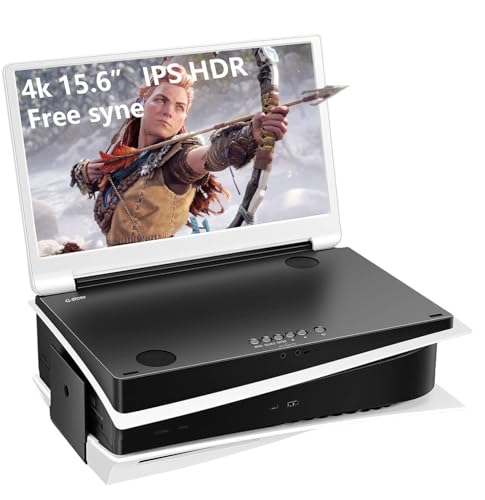
| 4 G-STORY 15.6-Inch 4K Portable Monitor | G-STORY | 9.45 × 14.17 × 1.18 in | 2 lb | Compact 15.6-inch IPS display | Check price |
| 5 G-STORY 14-Inch 4K Portable Gaming Monitor | G-STORY | 16 × 3 × 12 in | 4.3 lb | 4K resolution in a 14-inch portable design | Check price |
| 6 Sceptre C275B-FW180T 27-Inch 180Hz Monitor | Sceptre | 7.7 × 24.4 × 17.9 in | Not listed | Up to 180Hz refresh rate | Check price |
| 7 Philips 241V8LB 24-Inch 100Hz Monitor | Philips Computer Monitors | 8.7 × 21.3 × 16.4 in | 6.4 lb | 100Hz refresh rate | Check price |
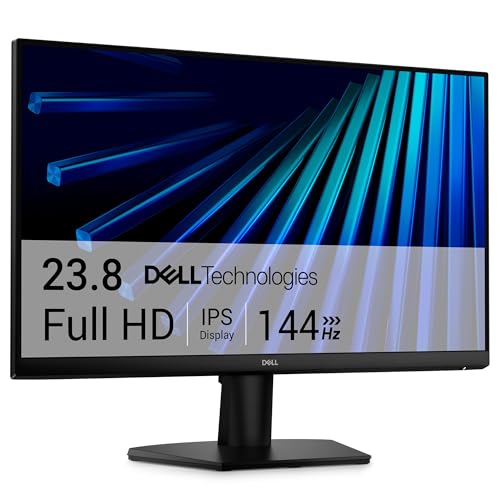
| 8 Dell SE2426H 24-Inch 144Hz Monitor | Dell | 7.04 × 21.21 × 16.23 in | 7.4 lb | 144Hz refresh rate | Check price |
| 9 Dell SE2726HG 27-inch 240Hz Monitor | Dell | 7.4 × 24.05 × 17.83 in | 8.2 lb | 240Hz refresh rate | Check price |
| 10 Sceptre E275W-FW100T 27-Inch Monitor | Sceptre | 7.66 × 24.13 × 17.21 in | 7.2 lb | Three video inputs | Check price |
Sizes and weights as listed by the manufacturer on Amazon. Check the retailer for current price and availability.
Pros
- Full HD IPS display
- One-cable USB-C connection on compatible devices
- Smart cover doubles as a stand
- Landscape and portrait use
Cons
- USB-C video requires DP Alt Mode support
- Who should skip it: buyers who require a specified refresh rate
Pros
- Up to 144Hz refresh rate
- Built-in speakers
- Blue-Light Shift technology
- Minimal bezel design
Cons
- Who should skip it: users needing a larger or higher-resolution display
Pros
- 1080p resolution on a 24-inch screen
- Two HDMI ports plus VGA
- Built-in speakers
- VESA mount ready
Cons
- Who should skip it: players seeking refresh rates above 75Hz
Pros
- Compact 15.6-inch IPS display
- 4K support through HDMI 2
- Built-in stereo speakers
- Closable design
Cons
- HDMI 1 supports only 1080p
- Who should skip it: users needing dual 4K HDMI
Best for a compact 4K console setup

Pros
- 4K resolution in a 14-inch portable design
- Two HDMI ports
- FreeSync and VRR support
- Built-in stereo speakers
Cons
- 60Hz refresh rate
- Who should skip it: buyers needing more than 60Hz

Pros
- Up to 180Hz refresh rate
- Four video inputs across two connection types
- 100% sRGB color gamut claim
- Built-in speakers and audio-out jack
Cons
- Resolution and panel type are not specified
- Who should skip it: buyers who require a stated resolution

Pros
- 100Hz refresh rate
- EasyRead mode for documents
- 178-degree viewing angles
Cons
- Who should skip it: users who need resolution above Full HD
Best for a smaller desktop
Pros
- 144Hz refresh rate
- IPS panel with wide viewing angles
- Two HDMI ports
- Tilt adjustment
Cons
- Who should skip it: users who need resolution above 1080p

Pros
- 240Hz refresh rate
- IPS panel with 99% sRGB coverage
- FreeSync Premium and HDMI VRR
- Two HDMI ports and DisplayPort 1.4
Cons
- 1080p resolution on a 27-inch display
- Stand adjustment is limited to tilt
- Who should skip it: buyers seeking higher resolution

Pros
- Three video inputs
- Stated 100Hz refresh rate
- Built-in speakers
- VESA mountable
Cons
- Resolution and panel type are not specified
- Who should skip it: shoppers who require stated resolution and panel specifications
Key Numbers at a Glance
- The desktop screens listed here span 22 inches to 27 inches; the MNN, G-STORY 15.6-inch, and G-STORY 14-inch models are portable.
- Among the desktop monitors, listed refresh rates range from 75Hz on the Sceptre C248W-1920RN to 240Hz on the Dell SE2726HG.
- The G-STORY 15.6-inch and 14-inch portable models are listed as 4K 60Hz displays; both include dual HDMI ports.
- Listed 1080p desktop refresh rates range from 75Hz on the Sceptre C248W-1920RN to 240Hz on the Dell SE2726HG.
Best Monitors for GTA 6 on PS5 Pro: Picks by Use
Best Portable 4K Monitor: G-STORY 15.6″ IPS 4K 60Hz Portable Gaming Monitor
G-STORY 15.6″ IPS 4K 60Hz Portable Gaming Monitor is listed with a 15.6-inch IPS 4K display, 60Hz refresh rate, and two HDMI ports, making it a compact choice for a portable console setup. The listing says HDMI 2 supports 4K, while HDMI 1 supports 1080p, so connect to the appropriate input for your intended resolution. Its small screen limits viewing area compared with a 24- or 27-inch desktop monitor.
Skip it if you want a large screen or a refresh rate above 60Hz.
Best 4K Console Companion: G-STORY 14-Inch 4K Portable Gaming Monitor
G-STORY 14-Inch 4K Portable Gaming Monitor combines a 14-inch 4K IPS panel with a stated 60Hz refresh rate, dual HDMI, and FreeSync/VRR. Its compact, closeable design suits a portable setup, but its 14-inch screen is smaller than the 15.6-inch G-STORY model. The listing also states a 1ms response time, though that figure does not establish the performance of a specific PS5 Pro game.
Skip it if you prefer a larger viewing area or need a refresh rate above 60Hz.
Best Compact Desktop Monitor: Dell SE2426H 24-Inch 144Hz Monitor
Dell SE2426H 24-Inch 144Hz Monitor offers a 23.8-inch Full HD IPS screen, 144Hz refresh rate, and two HDMI ports. Its size may suit a desk where a 27-inch screen would take up too much space, and the listing specifies AMD FreeSync. It is a 1080p monitor, not a 4K display.
Skip it if native 4K resolution is your priority.
Best High-Refresh Desktop Option: Dell SE2726HG 27-inch 240Hz Monitor
Dell SE2726HG 27-inch 240Hz Monitor pairs a 27-inch Full HD IPS panel with a listed 240Hz refresh rate, FreeSync Premium, HDMI VRR, two HDMI ports, and DisplayPort 1.4. The high refresh-rate specification gives headroom for compatible devices and content, but the screen remains 1920×1080, and the console and game must support the mode you want. A 27-inch 1080p screen also trades pixel density for a larger image compared with a smaller Full HD monitor.
Skip it if you want 4K resolution or a smaller screen for a tight desk.
How to Choose a Monitor for GTA 6 on PS5 Pro
Resolution and console picture modes
Bottom line: Choose resolution based on the image detail you want, then confirm the monitor accepts the PS5 Pro’s output mode. The G-STORY 14-inch and 15.6-inch models are listed as 4K 60Hz, while the Dell SE2426H and SE2726HG are 1920×1080 displays. The product data does not specify every HDMI input’s supported resolution and refresh combinations, so check the manual for the exact input before expecting a particular console mode.
A 4K portable display can fit a compact setup, but a 14- or 15.6-inch screen is much smaller than a desktop display. For additional display-resolution considerations, see our guide to best 4K monitor for text clarity.
Refresh rate and variable refresh rate
Bottom line: Do not pay extra for a high refresh rate unless your console and game can use a supported mode. The Dell SE2726HG is listed at 240Hz, the Dell SE2426H at 144Hz, and the G-STORY portable 4K models at 60Hz. The G-STORY 14-inch model lists FreeSync/VRR, and the Dell SE2726HG lists FreeSync Premium and HDMI VRR; verify the monitor’s manual and PS5 settings for the required connection and supported refresh range.
If you are comparing high-refresh desktop displays for other devices as well, our best 240Hz gaming monitors guide covers that category more broadly.
Screen size, viewing distance, and desk space
Bottom line: Match screen size to how far you sit and how much desk space you have. The portable choices measure 14 or 15.6 inches, while the listed desktop choices span 22 to 27 inches. A larger screen can occupy more of your view at a normal desk distance, while a small portable screen is easier to place in a limited space.
Check the product page for stand footprint and VESA details if those affect your desk or mounting plan. The Sceptre C248W-1920RN is listed as VESA wall-mount ready, and the Sceptre E275W-FW100T is listed as VESA wall-mountable.
HDMI inputs and connection details
Bottom line: Confirm the exact HDMI input supports the resolution and refresh rate you intend to use. Both G-STORY portable displays have two HDMI ports, and the 15.6-inch model specifies that only HDMI 2 supports 4K. The Dell SE2426H and Dell SE2726HG each list two HDMI ports; the Dell SE2726HG also lists DisplayPort 1.4, which is useful to know if you plan to connect a PC too.
Do not assume every HDMI port on a monitor has identical capabilities. If you want one screen for console play and computer work, compare the ports and refresh-rate limits with our best monitors for both gaming and work guide.
Panel, HDR, and image claims
Bottom line: Treat HDR wording as a feature claim, not proof of a particular HDR experience. The G-STORY listings mention HDR, and the 14-inch model lists 99% sRGB color reproduction. The product data does not include a DisplayHDR certification or brightness figure for these models, so check the full specifications if HDR brightness is a key reason for your purchase.
Panel type also affects how you weigh viewing angles and contrast: the Dell SE2426H and SE2726HG are listed as IPS, while the Philips 241V8LB is VA. For a room with strong daylight or glare, compare brightness specifications before deciding; our best monitors for bright rooms guide explains what to check.
How We Compared These Products
This guide is based on product research, not firsthand evaluation. We compared the listed screen sizes, resolutions, refresh rates, panel types, input connections, adaptive-sync claims, and portability features; the product pages do not establish how GTA 6 will perform in a particular console mode. Confirm the monitor’s manual and game settings for any resolution, refresh-rate, or VRR requirement that matters to your setup.
Which Option Fits Your Home and Devices?
For a compact 4K console setup: G-STORY 14-Inch 4K Portable Gaming Monitor is listed with a 14-inch 4K IPS panel and dual HDMI, plus FreeSync/VRR. Skip it if you need a larger screen or refresh rates above its listed 60Hz.
For a more spacious Full HD desktop screen: Dell SE2726HG 27-inch 240Hz Monitor offers a 27-inch IPS display, 1920×1080 resolution, HDMI VRR, and two HDMI ports. Skip it if your priority is 4K detail or a smaller footprint.
For a smaller desktop with a higher listed refresh rate: Dell SE2426H 24-Inch 144Hz Monitor combines a 23.8-inch Full HD IPS panel with 144Hz and two HDMI inputs. Skip it if you want 4K or a screen larger than 24 inches.
Mistakes to Avoid When Choosing a Gaming Monitor
- Buying by refresh rate alone. A 240Hz label does not mean a console game will output at 240 frames per second; confirm the supported console and game modes.
- Assuming every HDMI input is equal. The G-STORY 15.6-inch model specifies different resolution support by HDMI port, so check the input labels and manual.
- Confusing 4K with high refresh. The listed G-STORY 4K portable displays are 60Hz, while the high-refresh Dell models are Full HD; choose which trade-off matters more.
- Ignoring viewing distance and footprint. Compare the 14- to 27-inch screen sizes with your seating position and available desk area before ordering.
Frequently Asked Questions
Is a 4K monitor necessary for PS5 Pro?
No. The listed Dell SE2426H and Dell SE2726HG are Full HD monitors, while the two G-STORY portable displays are listed as 4K. Choose based on your preferred resolution, screen size, and the console modes you plan to use.
Will a 240Hz monitor make GTA 6 run at 240 frames per second?
No monitor can make a game render frames faster than the console and game support. The Dell SE2726HG is listed at 240Hz, but confirm the game’s output mode and the display’s supported HDMI mode rather than treating the monitor’s maximum rate as a guaranteed console frame rate.
Which is better for a small desk, a portable G-STORY or a 24-inch Dell?
The G-STORY 14-inch and 15.6-inch models use smaller portable screens and are described as closeable, while the Dell SE2426H has a 23.8-inch desktop panel. Choose a G-STORY model when portability and its listed 4K resolution matter; choose the Dell if you want a larger Full HD screen. Check the specific stand or mounting details for your layout.
Can I connect a PS5 Pro to a portable monitor over USB-C?
The MNN 15.6-Inch 1080p Portable Monitor lists HDMI and USB-C connections and says it supports PS5, but the product data does not detail the console’s required cable or power arrangement. Check the monitor manual for how to connect HDMI video and supply power before relying on a USB-C-only setup.
Does VRR work automatically with every monitor on this list?
No. The G-STORY 14-inch model lists FreeSync/VRR, and the Dell SE2726HG lists FreeSync Premium and HDMI VRR; those claims do not establish support on every input or in every console mode. Check the monitor manual and console settings for the supported connection and range.
Should I choose a 27-inch 1080p monitor over a 24-inch one?
Choose the 27-inch Dell SE2726HG if you want a larger Full HD screen and its listed 240Hz capability. The 23.8-inch Dell SE2426H takes less screen space and is also Full HD, with a listed 144Hz rate. Neither model is listed as 4K.


Write Your Review
No reviews yet. Be the first to share your experience!