


For GTA 6, choose a 4K OLED if sharp detail and a larger view matter most, or a 1440p OLED if you want a high refresh rate without moving to 4K. The monitors here range from 27-inch QHD displays at 240Hz to 32-inch 4K models, so your graphics card, console, desk space, and available ports should drive the choice.
Compare at a glance
| Product | Brand | Size | Weight | Stands out for | Price |
|---|---|---|---|---|---|
| 1 Samsung Odyssey OLED G6 27-inch QHD | Samsung | 11.74 × 24.01 × 21.35 in | 8.4 lb | QHD QD-OLED display | Check price |
| 2 LG 32GX850A-B 32-inch 4K OLED Monitor | LG | 9.8 × 28.1 × 24.4 in | 20 lb | 4K OLED resolution with deep stated contrast | Check price |
| 3 AOC Q27GAZDV 27-Inch QHD OLED Monitor | AOC | 9.45 × 23.99 × 21.17 in | Not listed | 27-inch QHD QD-OLED panel | Check price |
| 4 AOC AGON AG276UZD 27-Inch 4K OLED | AOC | 9.45 × 23.97 × 15.57 in | 13 lb | 4K QD-OLED panel with 240Hz refresh rate | Check price |
| 5 AOC AGON Pro AG276QZD2 27-Inch QD-OLED | AOC | 9.01 × 23.99 × 20.73 in | 15 lb | QD-OLED panel with 2560 × 1440 resolution | Check price |
| 6 KOORUI 32-Inch 4K OLED Gaming Monitor | KOORUI | 8.89 × 28.3 × 23.3 in | 26 lb | 4K OLED display with 99% DCI-P3 coverage | Check price |
| 7 Samsung Odyssey OLED G7 G70SH 27-inch | Samsung | 9.85 × 24 × 20.21 in | Not listed | 4K QD-OLED panel | Check price |
| 8 Samsung Odyssey OLED G7 32-inch 4K Monitor | Samsung | 9.85 × 27.07 × 23.31 in | Not listed | Glossy 4K OLED panel | Check price |
Sizes and weights as listed by the manufacturer on Amazon. Check the retailer for current price and availability.
Best for a high-refresh QHD setup
Pros
- QHD QD-OLED display
- 240Hz refresh rate
- Height-adjustable, pivoting stand
- Glare Free technology
Cons
- Who should skip it: buyers who prefer a non-OLED panel
Pros
- 4K OLED resolution with deep stated contrast
- Two refresh-rate and resolution modes
- G-SYNC Compatible and FreeSync Premium Pro
- Four-way stand adjustment
Cons
- 330Hz mode runs at Full HD
- Who should skip it: buyers needing typical brightness above 275 nits
Pros
- 27-inch QHD QD-OLED panel
- 240Hz refresh rate
- HDMI 2.1 and DisplayPort 1.4
- Height-adjustable stand with pivot
Cons
- Who should skip it: buyers who require 4K resolution

Pros
- 4K QD-OLED panel with 240Hz refresh rate
- Two HDMI 2.1 ports and DisplayPort 2.1
- 65W USB-C charging and built-in KVM
- Adjustable stand and 100mm VESA mounting
Cons
- Who should skip it: buyers unwilling to manage OLED burn-in risk
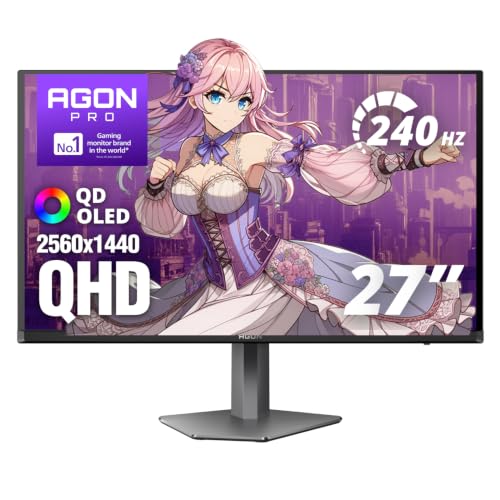
Pros
- QD-OLED panel with 2560 × 1440 resolution
- Stated 240Hz refresh rate
- Height-adjustable stand and VESA mounting
- Built-in speakers
Cons
- Who should skip it: buyers who require 4K resolution
Best for a larger 4K display

Pros
- 4K OLED display with 99% DCI-P3 coverage
- 240Hz refresh rate and AdaptiveSync
- Multiple video and USB connections
- Height-adjustable stand with pivot
Cons
- Who should skip it: buyers seeking a basic office display
Best for a 27-inch 4K screen

Pros
- 4K QD-OLED panel
- 165Hz refresh rate
- AMD FreeSync Premium
- 3-year warranty
Cons
- Who should skip it: shoppers who prefer a larger screen

Pros
- Glossy 4K OLED panel
- Two resolution and refresh-rate modes
- G-Sync compatibility and AMD FreeSync
- Height-adjustable, pivoting stand
Cons
- Who should skip it: 4K-only gamers avoiding FHD mode
Best 1440p OLED for a High Refresh Rate: Samsung Odyssey OLED G6 27-inch QHD
The Samsung Odyssey OLED G6 27-inch QHD pairs a 27-inch QHD panel with a 240Hz refresh rate and 0.03ms stated response time. Its glare-free design and height-adjustable stand are useful considerations if room reflections or monitor positioning matter, while OLED Safeguard technology is intended to help prevent burn-in.
Its resolution is 2560 × 1440 rather than 4K, and the listing does not specify HDMI or DisplayPort versions. Skip it if 4K resolution or confirmed HDMI 2.1 connectivity is your priority.
Best 32-Inch 4K Dual-Mode OLED: LG 32GX850A-B 32-inch 4K OLED Monitor
The LG 32GX850A-B 32-inch 4K OLED Monitor offers 3840 × 2160 at up to 165Hz, with a Full HD mode listed at up to 330Hz. That combination suits someone who wants detailed 4K play for story-driven games and a separate high-refresh mode for faster titles.
The 32-inch screen needs more desk space than the 27-inch QHD options, and the high-refresh Full HD mode trades resolution for speed. Skip it if you want a compact display or expect to play every game in 4K at the highest listed refresh rate.
Best 4K OLED with HDMI 2.1: KOORUI 32 inch 4K OLED Gaming Monitor
The KOORUI 32 inch 4K OLED Gaming Monitor combines 4K resolution, a stated 240Hz refresh rate, and two HDMI 2.1 ports. Its product details also list DisplayPort 1.4, USB-C, USB-A and USB-B, plus an adjustable stand with height, tilt, swivel, and pivot.
The listing gives a one-year warranty for the display, while accessories are listed with three years of coverage. Check the warranty terms and the capabilities of the specific USB-C connection before buying. Skip it if you need a stated three-year display warranty or a smaller screen.
Best 27-Inch 4K OLED with Glare Control: Samsung 27" Odyssey OLED G7 (G70SH)
The Samsung 27" Odyssey OLED G7 (G70SH) brings 4K QD-OLED resolution to a 27-inch screen, with a 165Hz refresh rate and glare-free technology. Its stated three-year warranty includes Safeguard technology intended to help prevent burn-in.
The refresh rate is lower than the 240Hz QHD models in this guide, and the product details do not list port versions. Skip it if your priority is a 240Hz panel or you need to confirm a particular HDMI or DisplayPort version before choosing.
Key Numbers at a Glance
- Screen sizes range from 27 inches on the Samsung Odyssey OLED G6 27-inch QHD to 32 inches on the LG 32GX850A-B 32-inch 4K OLED Monitor.
- Resolution choices include 2560 × 1440 on the Samsung Odyssey OLED G6 27-inch QHD and 3840 × 2160 on the Samsung 27" Odyssey OLED G7 (G70SH).
- Listed refresh rates include 165Hz on the Samsung 27" Odyssey OLED G7 (G70SH) and 240Hz on the KOORUI 32 inch 4K OLED Gaming Monitor.
- The LG 32GX850A-B 32-inch 4K OLED Monitor lists a dual mode of 4K at up to 165Hz or Full HD at up to 330Hz.
How to Choose an OLED Monitor for GTA 6
Resolution, screen size, and viewing distance
Bottom line: Match resolution to your graphics hardware and how close you sit. The 27-inch QHD models offer 2560 × 1440, while the 27-inch and 32-inch 4K choices list 3840 × 2160. A 32-inch 4K screen gives more viewing area and resolution, but takes up more desk space and asks more of a gaming PC’s graphics hardware.
For a closer look at resolution and ports across screen sizes, see our best 4K monitor for text clarity guide. Measure your desk and consider your usual seating distance before selecting a 27-inch or 32-inch display.
Refresh rate and graphics capability
Bottom line: A high refresh rate is useful only if your system can supply enough frames for the games and settings you choose. The QHD Samsung Odyssey OLED G6 27-inch QHD lists 240Hz, while the 4K LG 32GX850A-B 32-inch 4K OLED Monitor lists 165Hz in 4K and up to 330Hz in Full HD mode. A monitor’s maximum refresh rate does not mean GTA 6 will run at that frame rate.
For more displays focused on high refresh rates, compare our best 240Hz gaming monitors. Check the graphics card’s output capabilities and the game’s actual performance before paying extra for refresh headroom.
Ports and console or PC connections
Bottom line: Confirm the exact port version and supported signal mode for your device, not just the connector shape. The KOORUI 32 inch 4K OLED Gaming Monitor lists two HDMI 2.1 ports and DisplayPort 1.4. The AOC Q27GAZDV 27-Inch QHD OLED Monitor also lists HDMI 2.1, while several other product descriptions do not specify port versions.
For console gaming, check the console’s supported resolution and refresh rate against the monitor’s input details. For a PC, confirm the graphics card’s output and the cable needed for the selected mode. A USB-C connector alone does not establish its video or charging capabilities.
OLED care, room lighting, and HDR
Bottom line: Consider room reflections and the maker’s OLED-care features alongside HDR labels. The Samsung Odyssey OLED G6 27-inch QHD lists glare-free technology and OLED Safeguard, while the ASUS ROG XG27AQDMGR 27-Inch OLED Monitor lists OLED Care Pro with a proximity sensor. The Samsung 27" Odyssey OLED G7 (G70SH) also lists glare-free technology and a three-year warranty.
Several products list DisplayHDR True Black 400, but that certification is not a guarantee that every game will look equally bright in every room. Compare the listed HDR and care features, then review the warranty terms for the exact model. For more help with reflections, see our best monitors for bright rooms guide.
Stand adjustments, desk fit, and mixed use
Bottom line: Choose a stand and screen size that suit your desk and daily posture. Several models list height adjustment, tilt, swivel, or pivot, but the exact adjustments vary. The KOORUI model lists all four, while the Samsung Odyssey OLED G6 27-inch QHD lists a height-adjustable stand that pivots, tilts, and swivels.
If you also use the monitor for work, USB-C, a USB hub, or a KVM may matter as much as gaming refresh rate. The AOC AGON OLED 4K 27 Inch 240Hz Gaming Monitor lists USB-C with 65W power delivery and KVM, but confirm that its connections suit your devices. Our guide to best monitors for both gaming and work covers that shared-use decision.
How We Compared These Products
This guide is based on product research, comparing the listed panel resolution, screen size, refresh rate, response time, adaptive-sync details, HDR and OLED-care features, connections, stand adjustments, and warranty information where stated. Product-specific descriptions are manufacturer or listing claims, not independently verified performance results; no firsthand evaluation is documented here. Customer feedback is not used to claim consistent real-world performance.
Which Option Fits Your Home and Devices?
For a 27-inch 4K screen with glare control: Samsung 27" Odyssey OLED G7 (G70SH) combines 4K QD-OLED with a 165Hz refresh rate and glare-free technology. Skip it if you need 240Hz or must have a confirmed HDMI 2.1 input.
For a high-refresh QHD setup: Samsung Odyssey OLED G6 27-inch QHD lists 240Hz, a 0.03ms response time, and an adjustable stand, with glare-free technology for reflective rooms. Skip it if 4K resolution is essential to your setup.
For a larger 4K display with two HDMI 2.1 ports: KOORUI 32 inch 4K OLED Gaming Monitor lists a 32-inch 4K panel, 240Hz, and two HDMI 2.1 connections. Skip it if desk space is tight or you require a longer stated display warranty.
Mistakes to Avoid When Choosing an OLED Gaming Monitor
- Choosing refresh rate without checking graphics capability. A 240Hz specification is the monitor’s ceiling, not a promise that a PC or game will reach that frame rate. Check your graphics card and intended settings.
- Assuming every HDMI port supports the same modes. Verify the port version and resolution-refresh combinations for the exact model and device.
- Buying 4K without considering desk and system fit. A 32-inch screen takes more room than a 27-inch model, and 4K gaming places a different workload on the graphics card than QHD.
- Treating an HDR label as a full brightness comparison. Compare the stated certification and room-lighting needs, and look for actual brightness details when they matter to you.
Frequently Asked Questions
Is a 1440p OLED enough for GTA 6?
A 1440p display can suit a gaming PC whose graphics capability and settings make QHD a better fit than 4K. The Samsung Odyssey OLED G6 27-inch QHD lists 2560 × 1440 and 240Hz, but the monitor specification does not establish the game’s frame rate.
Should I choose a 4K or 1440p OLED monitor?
Choose 4K when resolution and fine detail are your priority and your graphics hardware can support your intended settings. Choose QHD if you prefer a 2560 × 1440 screen and want to prioritize a high listed refresh rate; the Samsung Odyssey OLED G6 27-inch QHD lists 240Hz.
Will these monitors work with a PS5 or Xbox Series X?
Some listings describe console gaming support, and the KOORUI 32 inch 4K OLED Gaming Monitor lists HDMI 2.1. Confirm the exact resolution, refresh rate, and HDR modes supported by your console and the monitor’s relevant input before purchasing; a monitor’s maximum refresh rate does not guarantee a console will output it.
Does a 240Hz monitor make GTA 6 run at 240 frames per second?
No. The listed refresh rate describes the monitor’s capability, not the frame rate a game or connected system will deliver. Actual output depends on the platform, game, graphics hardware, settings, and connection mode.
Should I worry about OLED burn-in?
OLED-care features and warranty terms differ by model. The Samsung Odyssey OLED G6 27-inch QHD lists OLED Safeguard, the ASUS ROG XG27AQDMGR 27-Inch OLED Monitor lists OLED Care Pro with a proximity sensor, and the Samsung 27" Odyssey OLED G7 (G70SH) lists a three-year warranty with Safeguard technology. Check each manufacturer’s current warranty terms and care guidance.


Write Your Review
No reviews yet. Be the first to share your experience!