


If over-ear cups press on your ears, an open-ear headset such as the QOEKUEY may be a better fit; if you want to keep one ear free, consider a single-ear design from Joso or Megadream. For conventional over-ear headphones, compare cushion depth, glasses-friendly claims, weight, and connection type before buying, since comfort depends on your fit and setup.
Compare at a glance
Sizes and weights as listed by the manufacturer on Amazon. Check the retailer for current price and availability.
Pros
- Works with a range of listed platforms
- Inline volume and mute controls
- Can be worn on either ear
- Braided cable
Cons
- Does not work with older Xbox One controllers
- Who should skip it: listeners who need stereo audio
Pros
- Removable cat ears
- RGB lighting
- Memory foam cushions
- Self-adjusting headband
Cons
- Microphone is incompatible with Switch; headset does not work with Xbox
- Who should skip it: users seeking wireless audio
Pros
- One-ear design
- Detachable flexible microphone
- Broad listed device compatibility
- Adjustable headband
Cons
- Older Xbox One controllers require a separate Microsoft adapter
- Who should skip it: players who need two-ear audio

Pros
- Removable decorative deer ears
- RGB lighting
- Adjustable microphone
- Broad listed device compatibility
Cons
- Microphone is incompatible with Switch consoles
- Does not work with Xbox
- Who should skip it: Xbox users

Pros
- Open-ear design preserves awareness of surroundings
- USB-C and USB-A connectors
- Three selectable audio modes
Cons
- Headband fit is specified for 20.5 to 23.6-inch circumferences
- Who should skip it: users who need a detachable microphone

Pros
- Glasses-friendly ear cushions
- Rotatable noise-cancelling microphone
- Listed compatibility across multiple platforms
Cons
- Who should skip it: users seeking wireless connectivity
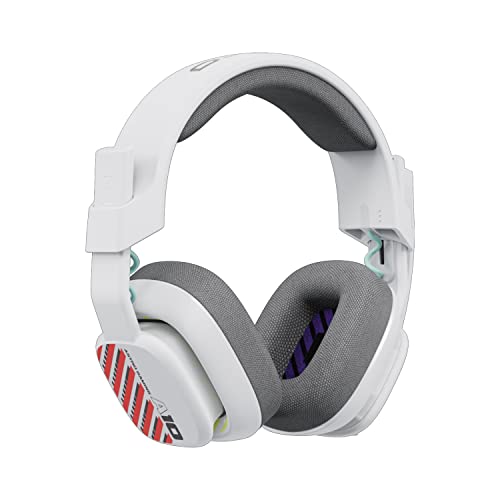
Pros
- Flip-to-mute microphone
- In-line volume control
- Cross-platform 3.5 mm connection
- Sturdy headband construction
Cons
- Who should skip it: wireless headset seekers

Pros
- Inline volume and microphone mute controls
- Bass boost
- Supports movies, TV, music, and Skype audio
Cons
- Who should skip it: users seeking a headset for other platforms
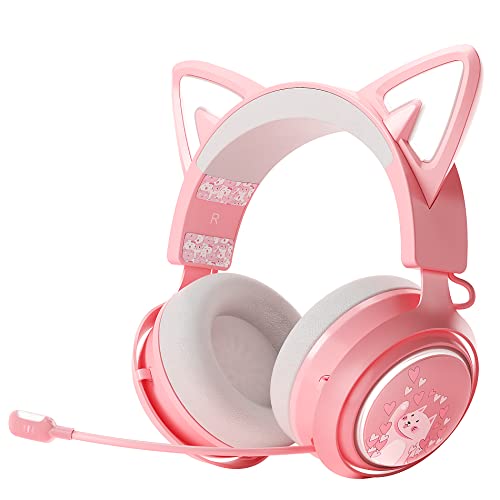
Pros
- Bluetooth and wired connection options
- Retractable, adjustable microphone
- Nine selectable lighting colors
- Longer stated runtime with lighting off
Cons
- Wired connection disables the lighting
- USB dongle not included
- Who should skip it: users who need a USB wireless dongle

Pros
- Memory foam ear cushions
- Detachable noise-cancelling microphone
- Aluminum frame
- PC and Mac virtual surround sound
Cons
- Virtual surround sound is limited to PC and Mac
- Who should skip it: wireless headset shoppers
Key Numbers at a Glance
- The QOEKUEY is designed for head circumferences from 20.5 to 23.6 inches.
- The ONITOON cat-ear headset weighs 356 grams bare.
- Listed driver sizes include 16 mm on the QOEKUEY, 40 mm on the Joso, 50 mm on the Megadream, and 53 mm on the HyperX Cloud II. Driver size alone does not establish comfort or sound quality.
- The EASARS wireless cat-ear headset lists about 10 to 12 hours of use with lighting, or about 50 hours without lighting.
Best Open-Ear Gaming Headset: QOEKUEY Gaming Headset with Mic, Open Ear Headphones
QOEKUEY Gaming Headset with Mic, Open Ear Headphones is the clearest fit here for players who dislike earcups touching their ears: its air-conduction design leaves the ears open, and its USB-C and USB-A connectors support listed devices including PC, Mac, PS5, and Switch. Its fixed 6-inch boom microphone is not detachable, and the stated fit range is 20.5 to 23.6 inches around the head. It also lists three audio modes through an inline controller. Skip it if you need a traditional closed-back headset or your head circumference falls outside its stated range.
Best Single-Ear Headset for Consoles: Megadream One Ear Gaming Headset for PS5/PS4/Xbox Series
Megadream One Ear Gaming Headset for PS5/PS4/Xbox Series leaves one ear uncovered and has a flexible, adjustable microphone, with 3.5 mm compatibility listed for PlayStation, Xbox Series, Switch, PC, and mobile devices. The listing describes soft leather cushions and an adjustable headband, but does not give a headset weight or cushion dimensions. Older Xbox One controllers require a separate Microsoft adapter, which is not included. Skip it if you want both ears covered or need that adapter included.
Best Single-Ear Option for Calls: Joso Wired One Ear Headset with Mic
Joso Wired One Ear Headset with Mic is another one-ear design, with a 40 mm speaker, in-line chat volume and mic-mute controls, and a braided cable. Its listed connections include a 3.5 mm jack, plus USB-C and USB-A adapters; the product page says it does not work with older Xbox One controllers. The microphone is high-sensitivity and bends for positioning, according to the listing. Skip it if you need stereo game audio across both ears or older Xbox One controller compatibility.
Best Over-Ear Fit for Glasses: EKSA Fenrir S Gaming Headset with Microphone
EKSA Fenrir S Gaming Headset with Microphone has extra-large, deep cushions that the listing describes as glasses-friendly, plus a 120-degree rotatable microphone. It connects through a 3.5 mm jack and lists PC, PlayStation, Xbox One, Switch, and mobile support. The product page does not give a weight or precise earcup dimensions, so check whether its fit suits your head and glasses. Skip it if you prefer an open-ear or single-ear design.
Buying Guide: Best Gaming Headset That Doesn’t Hurt Ears
Choose the ear-contact style first
Bottom line: If earcup pressure is your main concern, start by deciding whether you want open-ear, one-ear, or over-ear coverage. The QOEKUEY uses an air-conduction open-ear design, while the Joso and Megadream cover one ear. These styles reduce or change contact around the ears, but they do not guarantee comfort for every wearer; try a returnable option if fit is uncertain.
Check fit, glasses clearance, and weight
Bottom line: Look for a stated fit detail that matches your head and glasses rather than relying on “comfortable” alone. The QOEKUEY specifies a head circumference range of 20.5 to 23.6 inches, and EKSA describes its deeper cushions as glasses-friendly. ONITOON lists a bare weight of 356 grams, but the other models’ product details here do not provide comparable weights. If you wear glasses, prioritize cushion space and avoid assuming a generic over-ear shape will clear your frames.
Match the connection to your device
Bottom line: Confirm the exact connector and console support before choosing a comfort design. The QOEKUEY lists USB-C and USB-A, while the Joso and Megadream use 3.5 mm connections and note limitations with older Xbox One controllers. ONITOON’s 3.5 mm cat-ear model does not work with Xbox, and its microphone is not compatible with Switch series consoles. Check your controller, computer, and any required separate audio and microphone ports.
Separate sound features from comfort evidence
Bottom line: Treat driver size and virtual surround as audio features, not proof that a headset will feel better. The HyperX Cloud II lists 53 mm drivers and memory foam cushions; the Megadream lists a 50 mm driver, while the QOEKUEY lists a 16 mm driver and open-ear fit. Those figures describe different designs and do not establish comfort or directly predict sound quality. For audio priorities beyond fit, compare our guides to best PC gaming headsets for sound quality and best PC gaming headsets for footsteps.
How We Compared These Headsets
This guide is based on product research, not firsthand evaluation. We compared the listed design and comfort claims, fit details, microphone controls, connection types, device compatibility, and stated battery life where available. Comfort language comes from product listings and is not an independently verified result; customer ratings alone cannot establish how a headset will fit you.
Which Option Fits Your Devices and Preferences?
For ears that need to stay uncovered: the QOEKUEY is the open-ear pick, with USB-C and USB-A connections and a stated head-fit range. Skip it if you want padded cups around both ears. For one-ear listening, the Megadream and Joso offer 3.5 mm connections, but check their older Xbox controller limitations before ordering. Skip either if you need full over-ear coverage. If you want conventional earcups and wear glasses, the EKSA’s listed glasses-friendly, deeper cushions are relevant; skip it if open-ear comfort is your priority.
Mistakes to Avoid When Choosing a Gaming Headset
- Assuming over-ear means pain-free. Cushion depth, headband fit, and glasses clearance vary; check the listed fit details and choose a seller with a suitable return policy.
- Buying by driver size alone. A 53 mm driver does not show whether the headset will fit comfortably or suit your preferred sound.
- Ignoring controller connections. Check whether your device has a compatible 3.5 mm jack or USB port, and note the older Xbox One adapter limitation on the Joso and Megadream.
- Expecting every feature on every platform. ONITOON’s cat-ear model lists no Xbox support and no Switch microphone compatibility; verify platform-specific limits before purchase.
Frequently Asked Questions
Which headset design is least likely to press on my ears?
The QOEKUEY is the only listed open-ear design, so it avoids conventional earcups resting over the ears. The Joso and Megadream cover one ear instead of both. Personal fit still matters, and the product data does not establish a guaranteed pain-free result.
Can I use these headsets with Xbox?
Compatibility varies by model. The Megadream lists Xbox Series support but says older Xbox One controllers need a separate Microsoft adapter; the Joso also excludes older Xbox One controllers. The ONITOON cat-ear model says it does not work with Xbox, so check the exact model and controller.
Does open-ear mean bone conduction?
No. The QOEKUEY listing describes air conduction and explicitly says it is not bone conduction. It connects through USB-C or USB-A according to the product details.
Which headset is a better fit for glasses?
The EKSA Fenrir S listing specifically describes its extra-large, deeper ear cushions as glasses-friendly. The HyperX Cloud II lists memory foam ear cushions, but the product details here do not make the same glasses-fit claim. Confirm fit and return terms if frame pressure is a concern.
Do the ONITOON cat-ear headphones work with Switch?
The ONITOON 3.5 mm cat-ear model lists Nintendo Switch compatibility, but says its microphone is not compatible with Switch series consoles. Its listing also says the model does not work with Xbox. Check whether game audio without headset chat meets your needs.
Should I choose wired or wireless for gaming?
Most options here use wired connections, including 3.5 mm or USB. The EASARS cat-ear headset adds Bluetooth 5.0 and a wired 3.5 mm connection, with listed battery life of about 10 to 12 hours with lighting or about 50 hours without it. It says the USB dongle is not included, so confirm the connection method you need.



Write Your Review
No reviews yet. Be the first to share your experience!