


For a desktop workstation, the easiest path is a matched three-monitor bundle such as the Kado Triple Monitor 3-Pack 27″ 1920×1080 75Hz FHD. Laptop users need to solve the display-output problem first, so the Plugable Triple Display USB-C Dock or a portable extender may fit better. Choosing incorrectly can leave you with unsupported Mac display modes, too many cables, or monitors that overwhelm your desk.
This guide to the best monitors for a 3 monitor setup compares screen size, resolution, refresh rate, USB-C display support, laptop compatibility, VESA mounting, and physical space. It also separates monitors from the docks, adapters, extenders, and wall mount hardware needed to make a three-screen arrangement work.
Compare at a glance
| Product | Brand | Size | Weight | Stands out for | Price |
|---|---|---|---|---|---|
| 1 HP 327se 27-Inch FHD Monitor | HP | 0 × 0 × 0 in | 13 lb | 100Hz refresh rate | Check price |
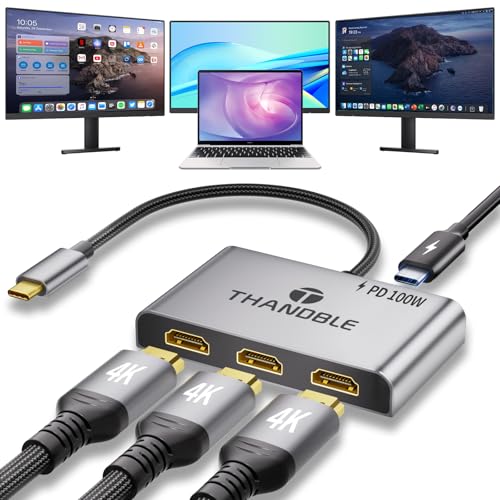
| 2 THANDBLE USB-C to 3 HDMI Adapter, 100W PD | THANDBLE | Not listed | 0.2 lb | Three HDMI display outputs | Check price |
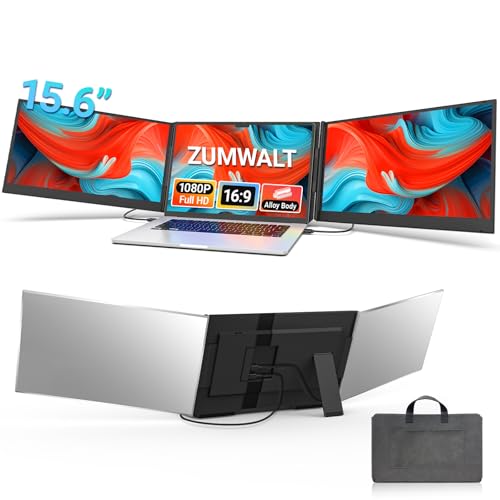
| 3 ZUMWALT P7 15.6-Inch Laptop Screen Extender | ZUMWALT | 10 × 6 × 1.11 in | Not listed | Two FHD displays | Check price |
| 4 Plugable UD-3900 Dual HDMI Dock | Plugable | 6.45 × 3.22 × 4.02 in | 0.8 lb | Dual HDMI display outputs | Check price |
| 5 Plugable Triple Display USB-C Dock | Plugable | 7.87 × 3.54 × 1.18 in | 0.7 lb | Three HDMI display outputs | Check price |
| 6 VIVO MOUNT-TS03C Triple Monitor Wall Mount | VIVO | 64 × 5.5 × 5.2 in | Not listed | Supports three monitors | Check price |
| 7 Vixtan 14-Inch Triple Laptop Screen Extender | Vixtan | 0.59 × 8.3 × 14.29 in | Not listed | Full HD IPS display | Check price |
Sizes and weights as listed by the manufacturer on Amazon. Check the retailer for current price and availability.
Pros
- 100Hz refresh rate
- IPS panel with wide viewing angles
- HDMI, DisplayPort, and VGA inputs
- Tilt-adjustable stand and built-in speakers
Cons
- Who should skip it: buyers seeking higher-than-FHD resolution
Pros
- Three HDMI display outputs
- Windows extended-display support
- Up to 100W PD charging
Cons
- macOS supports mirror mode only
- Who should skip it: Mac users needing extended displays
Pros
- Two FHD displays
- Includes carrying bag
- Extended, mirrored, and portrait modes
Cons
- Some systems require an extra cable and driver
- Who should skip it: users who need a driver-free setup with every laptop

Pros
- Dual HDMI display outputs
- Six USB ports
- Gigabit Ethernet and audio jacks
- Windows, macOS, and ChromeOS support
Cons
- Does not charge the host laptop
- Requires a DisplayLink driver on macOS
- Who should skip it: users who need 4K, gaming, or protected streaming
Best for a USB-C laptop workstation

Pros
- Three HDMI display outputs
- Six USB-A ports
- Gigabit Ethernet
- Up to 100W laptop charging
Cons
- DisplayLink displays do not support HDCP-protected content
- Who should skip it: Linux users

Pros
- Supports three monitors
- Flush-to-wall telescoping arm design
- Tilt, swivel, and rotation adjustments
- Detachable VESA brackets
Cons
- Who should skip it: users with screens over 22 lb

Pros
- Full HD IPS display
- Multiple display modes
- Includes USB-C and HDMI cables
- Compatible with 13- to 17.3-inch laptops
Cons
- MacBook M1, M2, and M3 support one added screen only
- May require a separate 5V/3A power adapter
- Who should skip it: MacBook M-series owners needing multiple added screens without a DisplayLink adapter
Key Numbers at a Glance
- Kado Triple Monitor 3-Pack 27″ 1920×1080 75Hz FHD includes three 27-inch FHD displays, while the Vixtan 14-Inch Triple Laptop Screen Extender uses a 14-inch FHD screen format.
- HP Series 3 27 inch FHD Monitor lists a 100Hz refresh rate, compared with 75Hz for the Kado Triple Monitor 3-Pack 27″ 1920×1080 75Hz FHD.
- Plugable Triple Display USB-C Dock supports 1x 4K at 30Hz plus 2x 1080p at 60Hz, while Plugable UD-3900 Dual HDMI Dock supports two displays up to 1920×1200 at 60Hz.
- VIVO Premium Triple Ultrawide Monitor Wall Mount supports up to 22 lb per screen and fits three standard displays from 24 to 32 inches.
- ZUMWALT P7 15.6-Inch Laptop Screen Extender weighs 4 lb, while Vixtan 14-Inch Triple Laptop Screen Extender weighs 3.0 lb.
Best Triple Monitor Bundle: Kado Triple Monitor 3-Pack 27″ 1920×1080 75Hz FHD
Kado Triple Monitor 3-Pack 27″ 1920×1080 75Hz FHD earns this label because it includes three matching 27-inch, 1920×1080 monitors in one listing. The 75Hz refresh rate, built-in speakers, 100% sRGB claim, and VESA mounting support suit a straightforward office and gaming desk, although FHD at 27 inches gives you less desktop detail than a higher-resolution arrangement.
Skip it if you need USB-C laptop docking, a higher refresh rate than 75Hz, or a compact travel arrangement.
Best 27-Inch Office Monitor: HP Series 3 27 inch FHD Monitor
HP Series 3 27 inch FHD Monitor fits a flexible desktop setup with 1920×1080 resolution, an IPS panel, a 100Hz refresh rate, and HDMI 1.4, DisplayPort 1.2, and VGA inputs. Its three-sided micro-edge design is useful for a cleaner multi-monitor line, while the 250-nit brightness and FHD resolution are more office-oriented than HDR-focused.
Skip it if you want one purchase to include all three screens or if your priority is high-resolution gaming across three displays.
Best USB-C Dock for Three Displays: Plugable Triple Display USB-C Dock
Plugable Triple Display USB-C Dock is the most capable display connector in this comparison for a compatible laptop, with three HDMI outputs, 100W power delivery, Gigabit Ethernet, and six USB 5Gbps ports. Its output mix matters: one screen can run at 4K 30Hz and two at 1080p 60Hz, with DisplayLink software required for two of the displays.
Skip it if your computer lacks compatible USB-C display support, runs Linux, or you need three high-refresh gaming outputs.
Best Portable Laptop Extender: ZUMWALT P7 15.6-Inch Laptop Screen Extender
ZUMWALT P7 15.6-Inch Laptop Screen Extender adds two 15.6-inch 1080p displays around a compatible laptop, with 280 nits brightness, 178-degree viewing angles, and a listed weight of 4 lb. Two full-featured USB-C connections can simplify the setup, but M1, M2, and M3 MacBooks need an additional H5-T cable according to the product page.
Skip it if you want three independent desktop monitors, a lighter travel accessory, or a setup without checking laptop hinge and port compatibility.
Best Wall-Mount Hardware: VIVO Premium Triple Ultrawide Monitor Wall Mount
VIVO Premium Triple Ultrawide Monitor Wall Mount addresses desk depth rather than display output. It supports three screens up to 22 lb each, accepts VESA 75x75mm or 100x100mm mounting holes, and can hold three 24-to-32-inch standard monitors or a 34-to-38-inch center ultrawide with two smaller side screens.
Skip it if your wall cannot accept the stated mounting method or your monitors lack compatible VESA holes.
Best Monitors for a 3 Monitor Setup: Buying Guide
Match Size and Resolution to Viewing Distance
Bottom line: Choose three 27-inch FHD screens for a simple wide desktop, but consider smaller laptop displays when desk space and portability matter. The Kado Triple Monitor 3-Pack 27″ 1920×1080 75Hz FHD gives you three consistent 27-inch panels, while the HP Series 3 27 inch FHD Monitor offers a single 27-inch IPS screen for buyers building a setup gradually. FHD keeps graphics demands lower, but text and windows occupy less desktop detail than a higher-resolution monitor.
The ZUMWALT P7 15.6-Inch Laptop Screen Extender and Wixzet 15.6″ Laptop Screen Extender use two 15.6-inch panels around a laptop. Vixtan 14-Inch Triple Laptop Screen Extender is smaller and weighs 3.0 lb, which favors travel, but the reduced screen size is a trade-off for portability.
Check Refresh Rate and Image Features
Bottom line: Match refresh rate to your graphics output instead of assuming three screens need gaming-grade speed. HP Series 3 27 inch FHD Monitor lists 100Hz, while the Kado Triple Monitor 3-Pack 27″ 1920×1080 75Hz FHD lists 75Hz. The Kado listing also states 100% sRGB, and the HP monitor uses an IPS panel with 250 nits brightness and a 1300:1 contrast ratio.
Neither listing establishes HDR certification or adaptive sync support, so verify those features before buying for a gaming-focused triple-screen system. For a separate display comparison focused on console resolution and connections, see best monitors for GTA 6 on PS5 Pro.
Verify Ports, Operating Systems, and Display Modes
Bottom line: Confirm both the computer’s video capability and the dock’s operating-system limits before ordering. HP Series 3 27 inch FHD Monitor accepts VGA, HDMI 1.4, and DisplayPort 1.2, so it can connect directly to compatible desktop outputs. The THANDBLE USB C to 3 HDMI Adapter with PD 100W lists three 4K 60Hz HDMI outputs and Windows MST, but its Mac mode is mirror-only according to the product page.
Plugable Triple Display USB-C Dock combines one 4K 30Hz HDMI output with two 1080p 60Hz DisplayLink outputs and supports Windows, macOS, and ChromeOS, but not Linux. Plugable UD-3900 Dual HDMI Dock supports two HDMI displays up to 1920×1200 at 60Hz, requires a driver, does not charge the host laptop, and is intended for productivity rather than gaming. For general USB4 terminology, consult the USB4 specification overview.
Plan the Desk, Stand, and Mounting Hardware
Bottom line: Measure the desk or wall before choosing three 27-inch screens, a laptop extender, or a wall mount. The VIVO Premium Triple Ultrawide Monitor Wall Mount supports up to 22 lb per screen and offers tilt, swivel, and rotation, but it requires compatible VESA mounting holes and suitable wood-stud attachment. The HP monitor lists four-way adjustability, which can help align a separately purchased multi-monitor arrangement.
Portable extenders reduce the need for three full-size desktop stands, but they still add weight to a laptop setup. The Wixzet 15.6″ Laptop Screen Extender offers detachable screens, 235-degree folding, and 90-degree rotation, while the Vixtan 14-Inch Triple Laptop Screen Extender lists a 0.3-inch thickness and 180-degree horizontal rotation.
Separate Monitor Purchases from Connectivity Purchases
Bottom line: A three-monitor arrangement needs enough displays, outputs, cables, and power, not just a monitor count. The Kado listing bundles three monitors, while the HP Series 3 27 inch FHD Monitor is a single display that works better for a staged upgrade. The THANDBLE adapter adds 100W PD and three HDMI outputs, but it only works as intended when the USB-C source supports video through DP Alt Mode.
The Plugable docks add Ethernet and USB peripherals as well as display outputs. The Plugable Triple Display USB-C Dock offers 100W charging, whereas the Plugable UD-3900 Dual HDMI Dock does not charge the host laptop. Buyers focused on OLED contrast or HDR should consult best OLED monitors for GTA 6 rather than assuming a three-screen bundle includes those features.
How We Compared These Products
This comparison uses the listed screen sizes, resolutions, refresh rates, brightness figures, ports, display modes, operating-system information, mounting details, power delivery, and portability claims. It also considers the available customer feedback shown in the product data, but no independent performance measurements or firsthand evaluation are documented. Where the listings do not state adaptive sync, HDR certification, response time, or a specific cable requirement, those details should be verified before purchase.
Which Option Fits Your Home and Devices?
For a fixed desktop with three matching screens: Kado Triple Monitor 3-Pack 27″ 1920×1080 75Hz FHD combines three 27-inch FHD monitors and includes built-in speakers. Skip it if your laptop needs USB-C docking or your graphics workload calls for higher resolution. For a USB-C laptop workstation: Plugable Triple Display USB-C Dock adds three HDMI outputs, 100W power delivery, Gigabit Ethernet, and six USB 5Gbps ports. Skip it if you use Linux or need three 4K 60Hz outputs. For travel and temporary laptop expansion: Vixtan 14-Inch Triple Laptop Screen Extender weighs 3.0 lb, supports portrait mode, and includes USB-C and HDMI connection options. Skip it if your laptop cannot provide the required display connections or if you need three independent full-size monitors.Mistakes to Avoid When Choosing a Three-Monitor Setup
- Buying three screens before checking outputs. Count the computer’s usable HDMI, DisplayPort, or USB-C display connections, then verify whether a dock uses native video or DisplayLink.
- Assuming USB-C always supports video. The THANDBLE adapter requires a USB-C source with DP Alt Mode, so check the laptop specification or the port markings first.
- Ignoring operating-system limits. The THANDBLE adapter lists mirror-only Mac support, while Plugable Triple Display USB-C Dock requires DisplayLink software for some displays and does not support Linux.
- Skipping measurements. Three 27-inch monitors need more desk width than a 14-inch or 15.6-inch laptop extender, and a wall mount needs compatible VESA holes, screen weights, and a suitable mounting surface.
Frequently Asked Questions
Can I use the THANDBLE adapter with a MacBook?
The product page says the adapter supports Mac OS in mirror mode only because of Mac display limitations. Windows users get extended-display MST support, so Mac buyers should confirm the exact behavior they need before ordering.
Does the Plugable Triple Display USB-C Dock charge a laptop?
Yes, it lists 100W USB-C Power Delivery for compatible laptops. It still requires compatible USB-C, USB4, or Thunderbolt connectivity, and some display outputs use DisplayLink software.
Is the Plugable UD-3900 suitable for gaming?
The product page positions the UD-3900 for web and productivity software and says it does not support gaming. It supports two HDMI displays up to 1920×1200 at 60Hz, but it does not support 4K or DisplayPort connections.
Do laptop screen extenders work with every USB-C port?
No. Full functionality generally requires USB-C ports that support video output and power delivery. The ZUMWALT P7 15.6-Inch Laptop Screen Extender and Vixtan 14-Inch Triple Laptop Screen Extender both list HDMI or additional cable methods for devices without enough full-featured USB-C ports.
Can the VIVO mount hold three ultrawide monitors?
It is designed for one 34-to-38-inch center ultrawide with two 24-to-27-inch standard side monitors, or three standard displays from 24 to 32 inches. Each screen must stay within the 22 lb limit and use 75x75mm or 100x100mm VESA mounting holes.
Should I buy a three-monitor bundle or build the setup gradually?
A bundle such as the Kado Triple Monitor 3-Pack 27″ 1920×1080 75Hz FHD gives you three matching 27-inch screens immediately. Buying a single HP Series 3 27 inch FHD Monitor at a time makes more sense when your desk, graphics outputs, or budget priorities favor a gradual upgrade.


Write Your Review
No reviews yet. Be the first to share your experience!