


If you want a wider view for GTA 6, a 34-inch 3440 × 1440 monitor is a less demanding resolution choice than a 49-inch 5120 × 1440 screen, while the larger display gives you more horizontal workspace. The right pick depends on your graphics card, desk, preferred refresh rate, and whether the game supports ultrawide resolutions as you expect.
This guide to the best ultrawide monitors for gta 6 compares the listed sizes, resolutions, refresh rates, panel features, and connections. Game-specific ultrawide support and performance are not established by these product listings, so confirm those details for your PC and the game before choosing.
Compare at a glance
| Product | Brand | Size | Weight | Stands out for | Price |
|---|---|---|---|---|---|
| 1 INNOCN 49C1G 49-Inch 144Hz Monitor | INNOCN | 6.28 × 45.5 × 14.57 in | Not listed | 49-inch curved 32:9 screen | Check price |
| 2 Sceptre C345B-QUT168 34-Inch Ultrawide Monitor | Sceptre | 8.6 × 31.8 × 17.96 in | 15 lb | Wide 3440 × 1440 resolution | Check price |
| 3 LG 34WR55QK-B 34-Inch UltraWide Monitor | LG | 10.2 × 31.9 × 22.4 in | 15 lb | 34-inch curved WQHD ultrawide display | Check price |
| 4 Samsung Odyssey G9 G91F 49-Inch Monitor | Samsung | 16.56 × 45.18 × 22.38 in | 34 lb | 49-inch DQHD 32:9 display | Check price |
| 5 INNOCN 49C1R 49-Inch 120Hz Monitor | INNOCN | 6.28 × 45.5 × 14.57 in | Not listed | 49-inch ultrawide, 5120 x 1440 resolution | Check price |
| 6 Samsung LS49C954UANXZA 49-Inch Ultrawide | Samsung | 22.38 × 45.18 × 16.56 in | 32 lb | 49-inch Dual QHD display | Check price |
| 7 Deco Gear DGEDGE495K 49-Inch Monitor | Deco Gear | 10.9 × 46.7 × 22.1 in | 24 lb | 49-inch DQHD workspace | Check price |
| 8 CRUA 49-Inch DQHD 120Hz Monitor | CRUA | 1.9 × 46 × 16 in | Not listed | 49-inch DQHD ultrawide resolution | Check price |
| 9 ASUS ROG XG34WCDG 34-Inch QD-OLED | ASUS | 7.8 × 31.9 × 21.5 in | 18 lb | 34-inch QD-OLED ultrawide display | Check price |
Sizes and weights as listed by the manufacturer on Amazon. Check the retailer for current price and availability.
Pros
- 49-inch curved 32:9 screen
- 144Hz refresh rate
- USB-C with 65W power delivery
- Height-, tilt-, and swivel-adjustable stand
Cons
- Who should skip it: shoppers wanting more than 1080 pixels of vertical resolution
Pros
- Wide 3440 × 1440 resolution
- 21:9 ultrawide screen
- Up to 180Hz/165Hz refresh rate
- Two DisplayPort connections
Cons
- Who should skip it: users with limited desk space
Pros
- 34-inch curved WQHD ultrawide display
- 100Hz refresh rate
- USB-C with up to 65W power delivery
- Height- and tilt-adjustable stand
Cons
- Who should skip it: buyers needing refresh rates above 100Hz

Pros
- 49-inch DQHD 32:9 display
- 144Hz refresh rate and stated 1ms response time
- AMD FreeSync Premium Pro and VRR
- Picture-in-Picture and split-screen features
Cons
- The large display requires substantial desk space
- Who should skip it: shoppers seeking a compact monitor

Pros
- 49-inch ultrawide, 5120 x 1440 resolution
- 120Hz refresh rate with Adaptive-Sync
- USB-C with 65W power delivery
- Height, tilt, and swivel adjustments
Cons
- 32:9 screen requires substantial desk space
- Response time and VESA mounting are not specified
- Who should skip it: buyers seeking a standard 16:9 display

Pros
- 49-inch Dual QHD display
- 120Hz refresh rate
- USB-C with 90W charging
- Height-adjustable stand
Cons
- Weighs 32.19 lb
- Who should skip it: buyers with limited desk space

Pros
- 49-inch DQHD workspace
- 120Hz refresh rate with Adaptive Sync
- USB-C with up to 65W power delivery
- Built-in KVM and PIP/PBP
Cons
- No built-in speakers
- Who should skip it: users who need built-in speakers
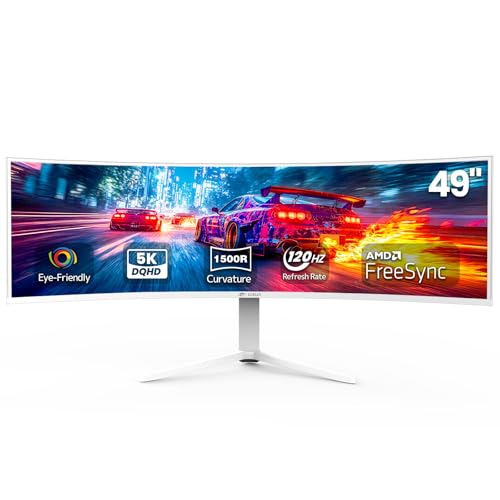
Pros
- 49-inch DQHD ultrawide resolution
- 120Hz refresh rate with FreeSync
- Height-adjustable stand
- HDMI 2.1 and DisplayPort 1.4
Cons
- Who should skip it: users who need built-in speakers

Pros
- 34-inch QD-OLED ultrawide display
- 175Hz refresh rate
- G-SYNC compatible
- True 10-bit color
- Three-year warranty with burn-in coverage
Cons
- Who should skip it: buyers who prefer standard 16:9 screens
Key Numbers at a Glance
- The 34-inch models have 3440 × 1440 resolution; the 49-inch DQHD models have 5120 × 1440 resolution.
- Refresh rates range from 100Hz on the LG 34WR55QK-B 34-Inch UltraWide Monitor to 240Hz on the CRUA 49" DQHD 240Hz Ultrawide Curved.
- The ASUS ROG XG34WCDG 34 Inch 1440p 175Hz Ultrawide lists a 0.03ms response time and a 175Hz refresh rate.
- USB-C power delivery is listed as 65W on the INNOCN 49C1G 49-Inch 144Hz Monitor and 90W on the Samsung LS49C954UANXZA 49-Inch Ultrawide.
Best for OLED Contrast: ASUS ROG XG34WCDG 34 Inch 1440p 175Hz Ultrawide
ASUS ROG XG34WCDG 34 Inch 1440p 175Hz Ultrawide pairs a 3440 × 1440 QD-OLED panel with 175Hz refresh and a stated 0.03ms response time. Its listed 99.3% DCI-P3 coverage, true 10-bit color, and DisplayHDR 400 True Black suit buyers prioritizing OLED image features. The listing also specifies OLED Care Pro and a three-year warranty with burn-in coverage. Skip it if you prefer a 49-inch 32:9 screen or do not want to consider OLED care features.
Best for 49-Inch Gaming: Samsung Odyssey G9 G91F 49-Inch Monitor
Samsung Odyssey G9 G91F 49-Inch Monitor combines 5120 × 1440 resolution and a 32:9 aspect ratio with a 144Hz refresh rate, AMD FreeSync Premium Pro, and DisplayHDR 600. Its 1000R curve and listed picture-in-picture feature also suit an immersive setup that keeps a secondary source visible. The trade-off is the higher pixel load compared with a 3440 × 1440 display. Skip it if your GPU or desk is better suited to a 34-inch monitor.
Best for a Lower Resolution Load: Sceptre C345B-QUT168 34-Inch Ultrawide Monitor
Sceptre C345B-QUT168 34-Inch Ultrawide Monitor offers 3440 × 1440 resolution and a listed refresh rate up to 180Hz, with two DisplayPort inputs. That smaller pixel count than 5120 × 1440 gives you a practical resolution alternative to a 49-inch DQHD panel, though actual game performance depends on your PC. The product page lists built-in speakers, but does not specify HDMI port versions. Skip it if you need USB-C video or a stated HDMI 2.1 connection.
Best for USB-C Desk Use: LG 34WR55QK-B 34-Inch UltraWide Monitor
LG 34WR55QK-B 34-Inch UltraWide Monitor has a 3440 × 1440 resolution, 100Hz refresh rate, and USB-C with up to 65W power delivery. Its listed ports include two HDMI connections, DisplayPort, and two USB ports, making it a flexible choice for a mixed work-and-game desk. The lower refresh rate than the 144Hz and faster options is a clear compromise for gaming. Skip it if a high refresh rate is your priority.
How to Choose an Ultrawide Monitor for GTA 6
Resolution and graphics-card fit
Bottom line: Match resolution to your GPU before prioritizing screen width. A 3440 × 1440 display has fewer pixels to render than a 5120 × 1440 model, while both give you a wider-than-standard 16:9 format. The 49-inch monitors can make driving and expansive scenes feel more panoramic, but they ask more of the graphics card. Check your GPU’s supported outputs and your expected performance at the monitor’s native resolution; our best RTX 5070 gaming PCs for GTA 6 guide can help if you are also comparing a complete PC.
Refresh rate, response, and adaptive sync
Bottom line: Choose a refresh rate your PC can use, not just the largest number on the box. The 34-inch Sceptre lists up to 180Hz, the ASUS lists 175Hz, and the 49-inch CRUA lists 240Hz. The CRUA 49" DQHD 240Hz Ultrawide Curved also specifies FreeSync, while the Samsung Odyssey G9 lists AMD FreeSync Premium Pro. A high refresh rate cannot guarantee a matching game frame rate, and these listings do not establish GTA 6 performance. Compare additional monitors for gaming and work if you want a display for more than one use.
Aspect ratio and game support
Bottom line: Verify how the game handles ultrawide before committing to 21:9 or 32:9. The 34-inch options use a 21:9 format, while 49-inch models use 32:9. Monitor specifications cannot confirm whether a particular game will display its interface correctly, support the full width, or use black bars. Check current game and platform information for resolution support and menu behavior before purchase.
Panel, HDR, and color claims
Bottom line: Treat HDR labels and color coverage as separate specifications, not a promise of identical picture quality. The ASUS lists QD-OLED, DisplayHDR 400 True Black, and 99.3% DCI-P3; the Samsung Odyssey G9 lists DisplayHDR 600. Several VA models specify 3000:1 contrast, while their HDR claims differ. If color work matters alongside gaming, compare coverage claims and consider our monitors for artists guide for a more color-focused shortlist.
Desk space, ports, and mounting
Bottom line: Check the physical fit and exact port needs before choosing a wide screen. A 49-inch monitor takes substantially more horizontal desk space than a 34-inch model; measure your usable desk width and viewing position, since exact dimensions are not stated consistently here. The INNOCN 49C1G lists USB-C with 65W power delivery, HDMI 2.1, and DisplayPort 1.4, while the Samsung business model lists USB-C at 90W. Verify the specific model’s port versions, stand adjustments, and VESA mounting details against your devices and mounting plan.
How We Compared These Products
This guide is based on product research, not firsthand evaluation. We compared the listed resolutions, sizes, refresh rates, panel and HDR claims, adaptive-sync features, ports, and stated stand or mounting details; customer feedback was not available in the supplied product data. Features such as game-specific ultrawide support and real-world frame rates cannot be established from monitor listings alone.
Which Option Fits Your Setup?
For a 34-inch screen with OLED features, the ASUS ROG XG34WCDG offers 3440 × 1440, 175Hz, and a stated 0.03ms response time. Choose the Samsung Odyssey G9 G91F if you specifically want a 49-inch 32:9 screen with 5120 × 1440 and 144Hz; skip either if the desk or GPU cannot suit its size and resolution.
For a simpler work-and-game connection setup, the LG 34WR55QK-B combines USB-C power delivery up to 65W with 3440 × 1440 resolution, while the Sceptre C345B-QUT168 lists up to 180Hz and two DisplayPort inputs. Skip these if you need a 49-inch display, or if the LG’s 100Hz ceiling does not suit your refresh-rate preference.
Mistakes to Avoid When Choosing an Ultrawide Monitor
- Choosing by refresh rate alone. A 240Hz panel is useful only if the graphics card and game can deliver a frame rate that benefits from it.
- Assuming every game fills the screen. Confirm GTA 6’s supported aspect ratios and interface behavior for your platform before buying.
- Underestimating desk space. Measure the available width and check the exact monitor dimensions and stand footprint before ordering.
- Confusing USB-C with guaranteed compatibility. Confirm the port supports the video and charging features you need; USB-C connectors do not all provide identical functions.
Frequently Asked Questions
Will GTA 6 support ultrawide monitors?
The monitor product details do not establish GTA 6’s aspect-ratio support. Check current information for your game version and platform to confirm whether 21:9 or 32:9 fills the screen and how the interface behaves.
Is 3440 × 1440 or 5120 × 1440 better for gaming?
3440 × 1440 is the lower-resolution choice and is found on the 34-inch models here; 5120 × 1440 gives a 49-inch display more horizontal pixels. Choose based on your GPU, desk space, and preference for a wider view, rather than assuming either resolution will produce a particular frame rate.
Is a 49-inch monitor too large for a desk?
That depends on your desk width, viewing distance, and monitor placement. Measure the available space and check the chosen model’s exact dimensions; the product data identifies 49-inch models but does not give comparable dimensions for every stand.
Do these monitors work with a gaming PC?
The models list DisplayPort, HDMI, or both, but you should confirm that your graphics card has a matching output and supports the intended resolution and refresh rate. Check the exact input version and cable requirements in the product documentation before connecting.
Should I choose OLED or VA for an ultrawide?
The ASUS listing identifies a QD-OLED panel and OLED care features. Several 49-inch models specify VA panels and 3000:1 contrast; weigh panel type, stated picture features, screen size, and your preference for OLED care considerations rather than treating one technology as right for everyone.


Write Your Review
No reviews yet. Be the first to share your experience!