


For a streamer whose camera background needs personality, an illuminated ON AIR sign is a more relevant gift than a controller or desk accessory; for someone who wants quicker OBS controls, a macro pad fits the task better. This guide to the best gifts for streamers compares decor, personalized gear, desk organization, and shortcut controls so you can match the gift to the creator’s space and workflow.
Compare at a glance
| Product | Brand | Size | Stands out for | Price |
|---|---|---|---|---|
| 1 PUOEYTA Gamer Decision Coin, Vintage Copper | PUOEYTA | 1.57 × 1.57 × 0.22 in | Two clear, humorous decision sides | Check price |
| 2 DMKYDM ON AIR Recording Sign | DMKYDM | 9.84 × 3.54 × 2.36 in | Simple on/off button | Check price |
| 3 NPW On Air LED Retro Sign | NPW | 9 × 2 × 3.25 in | USB-powered operation | Check price |
| 4 LEBURRY ON AIR LED Sign, 16.5-Inch | LEBURRY | 16.5 × 5.9 × 0.04 in | USB powered | Check price |
| 5 Lumoonosity Live Neon Sign, 12.6-Inch | Lumoonosity | 12.6 × 12.6 × 0.63 in | Large 12.6-inch diameter | Check price |
| 6 Kaseny Wooden Gaming Organizer | Kaseny | Not listed | Three organizer functions in one accessory | Check price |
| 7 Personalized Gamertag Headphone Stand | Generic | Not listed | Custom gamertag light sign | Check price |
| 8 BitsyLabs Personalized Twitch Name Plate | BitsyLabs | Not listed | Customizable name plate | Check price |
| 9 AmpliGame D6 15-Key Macro Pad | AmpliGame | 4.33 × 6.2 × 2.44 in | 15 customizable LCD macro keys | Check price |
Sizes and weights as listed by the manufacturer on Amazon. Check the retailer for current price and availability.
Pros
- Two clear, humorous decision sides
- Compact 1.57-inch dimensions
- Suitable for display or gifting
Cons
- Novelty item, not a functional gaming accessory
- Who should skip it: anyone seeking legal tender
Pros
- Simple on/off button
- Soft LED illumination
- Suitable for indoor studio decor
Cons
- Battery contacts may need manual adjustment
- Who should skip it: users who need clearly specified mounting details
Pros
- USB-powered operation
- Desktop or wall placement
Cons
- Who should skip it: shoppers wanting a larger sign

Pros
- USB powered
- Built-in on/off switch
- Wall-mount holes or leaning option
- Large 16.5-by-6-inch design
Cons
- Listed in red only
- Who should skip it: users seeking other colors
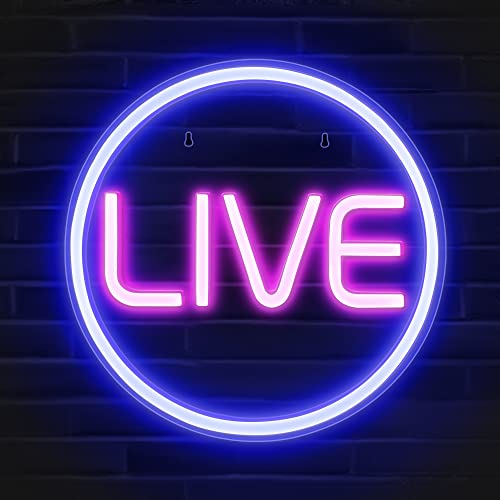
Pros
- Large 12.6-inch diameter
- Distinctive blue-and-pink design
- Pre-drilled hanging holes
- Simple on/off switch
Cons
- Adhesive strips are specified for smooth, non-textured walls
- Who should skip it: users needing textured-wall adhesive installation

Pros
- Three organizer functions in one accessory
- Solid natural wood construction
- Designed for many gaming controllers
Cons
- Assembly is required
- Who should skip it: anyone seeking a ready-to-use organizer
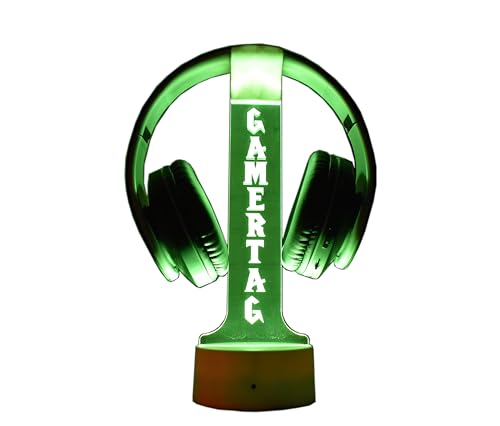
Pros
- Custom gamertag light sign
- Compatible with wired and wireless headsets
- Remote and touch sensor controls
- Micro USB cord included
Cons
- Batteries are not included
- Who should skip it: shoppers seeking a plain, unlit headset stand
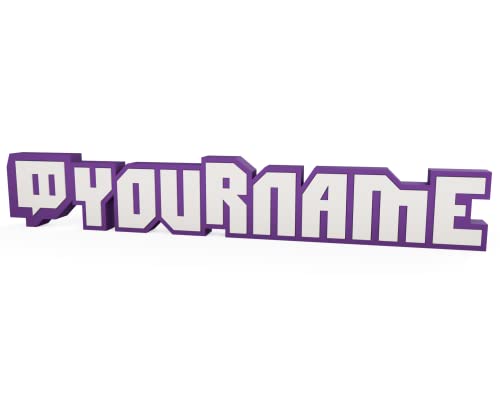
Pros
- Customizable name plate
- Suitable for several room types
- Designed with streamers in mind
Cons
- Dimensions and customization options are unspecified
- Who should skip it: buyers who need confirmed sizing or design details
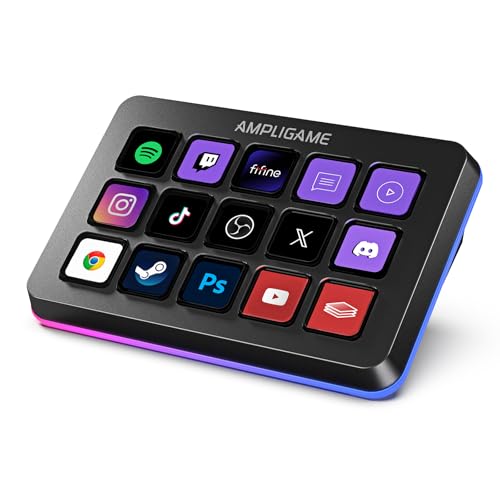
Pros
- 15 customizable LCD macro keys
- Supports popular streaming software and services
- Nine RGB lighting modes
- Folder-based program organization
Cons
- Requires current software and firmware for initial use
- Who should skip it: users who do not need programmable shortcuts
Best Streamer Control Gift: AmpliGame D6 15-Key Macro Pad
AmpliGame D6 15-Key Macro Pad suits creators who want physical shortcuts, with 15 customizable LCD keys and stated support for OBS Studio, Streamlabs, Twitch, and YouTube. It also offers RGB lighting and lets users assign actions such as switching scenes or adjusting audio. Its dedicated software and setup are a different kind of gift than plug-in decor. Skip it if the recipient wants a simple background accent rather than a configurable controller.
Best Adjustable Backdrop Sign: MuShang On Air LED Neon Sign, 15.75-Inch
MuShang On Air LED Neon Sign, 15.75-Inch is a backdrop-focused choice with dimmable brightness and 5V USB power. The listing specifies a 15.75-inch sign, giving buyers a concrete size to compare with the available wall or camera-frame space. The trade-off is that it adds atmosphere rather than stream controls or desk storage. Skip it if the recipient has no suitable place for a visible sign or would rather receive a workflow tool.
Best Large Backdrop Sign: LEBURRY ON AIR LED Sign, 16.5-Inch
LEBURRY ON AIR LED Sign, 16.5-Inch has a listed 16.5 by 6-inch size, USB power, an on/off switch, and pre-drilled mounting holes. Its larger stated dimensions may suit a creator who wants the sign to be a visible part of the background, but buyers should measure the mounting area first. Skip it if wall or desktop space is tight, or if adjustable brightness is a priority, which the MuShang sign lists.
Key Numbers at a Glance
- The LEBURRY ON AIR LED Sign, 16.5-Inch measures 16.5 by 6 inches; the MuShang On Air LED Neon Sign, 15.75-Inch is listed at 15.75 inches.
- The AmpliGame D6 15-Key Macro Pad has 15 customizable LCD keys.
- The Lumoonosity Live Neon Sign, 12.6-Inch has a listed 12.6-inch diameter.
- The Personalized Gamertag Headphone Stand illuminates in 7 colors, according to its product description.
How to Choose Gifts for Streamers
Match the gift to the streaming task
Bottom line: Choose a control device for workflow, a sign for the camera background, or a stand for desk organization. The AmpliGame D6 has 15 customizable keys for assigned actions, while the ON AIR signs focus on visible decor. The Kaseny Wooden Gaming Organizer combines a headset holder, phone stand, and controller stand, so it addresses a different desk need. Ask what the recipient wants to improve before choosing between functional controls and visual styling.
Check available space and viewing area
Bottom line: Measure the backdrop or desk before choosing a large sign or organizer. The LEBURRY sign is 16.5 by 6 inches, the Lumoonosity sign is 12.6 inches in diameter, and the MuShang sign is 15.75 inches. Those shapes occupy different areas, so compare the dimensions with the intended camera frame and mounting spot. For a closer look at camera selection for calls and streams, see our guide to best webcams for business.
Verify power and connections
Bottom line: Confirm that the gift’s power method works with the recipient’s setup. The MuShang and LEBURRY signs specify USB power, and NPW says its On Air LED Retro Sign is USB powered. The personalized headphone stand can use batteries or its included micro USB cord, while the product page does not specify the macro pad’s connection type. Check the listing and the recipient’s available outlets or USB ports before ordering.
Consider personalization and setup preferences
Bottom line: Personalization makes a gift more specific, but it requires getting the details right. The BitsyLabs Personalized Twitch Name Plate is customizable, and the Personalized Gamertag Headphone Stand displays a gamertag with seven color options. Confirm the spelling and customization process before purchase, since the product details do not explain turnaround or how changes are submitted. If the creator uses a MacBook for calls or streaming, our best webcam for a MacBook guide covers a more camera-focused gift category.
Look beyond decoration when choosing a practical gift
Bottom line: A useful streamer gift should solve a real desk or workflow problem. The Kaseny organizer is made from natural wood according to its product description and holds a headset and controller; the AmpliGame D6 provides customizable shortcuts. These features address different needs, so consider whether the streamer has cluttered gear or wants easier access to assigned commands. For headset-related gift ideas, compare the recipient’s needs with our guide to best PC gaming headset for the money.
How We Compared These Products
This guide is based on product research, comparing the listed dimensions, power methods, personalization, desk features, and stated software support. Available customer feedback is limited in the product data, so ratings are not treated as proof of performance. Product descriptions are manufacturer or seller claims, not independent verification.
Which Option Fits Your Setup?
For scene and audio shortcuts, consider the AmpliGame D6 15-Key Macro Pad; for a visible background accent, compare the MuShang On Air LED Neon Sign, 15.75-Inch with the LEBURRY ON AIR LED Sign, 16.5-Inch and measure the available space. If the recipient needs a place for a headset and controller instead, the Kaseny Wooden Gaming Organizer is the more relevant type of gift. The right choice depends on whether the priority is controls, decor, or keeping accessories together.
Mistakes to Avoid When Choosing a Streamer Gift
- Buying decor without checking the camera frame. Compare a sign’s listed dimensions with the wall or background area before choosing.
- Assuming every USB-powered item has the same connection needs. Check the product page for its stated power method and cable details.
- Choosing a controller without checking software needs. The AmpliGame D6 lists support for OBS Studio, Streamlabs, Twitch, and YouTube; verify that the recipient’s workflow matches.
- Ordering personalization before confirming spelling. Check the requested name or gamertag carefully and review the seller’s customization instructions.
Frequently Asked Questions
Are these gifts webcams?
Most products in this comparison are streamer accessories rather than cameras. They include signs, desk organizers, personalized items, a decision coin, and a macro pad, so choose a webcam-specific gift if the recipient needs a camera.
Which sign is largest?
The LEBURRY ON AIR LED Sign is listed at 16.5 by 6 inches. The MuShang sign is listed at 15.75 inches, while the Lumoonosity sign has a 12.6-inch diameter; compare their different shapes with the available mounting area.
Which gift offers customizable streaming controls?
The AmpliGame D6 15-Key Macro Pad has 15 customizable LCD keys. Its product description lists compatibility with OBS Studio, Streamlabs, Twitch, and YouTube, but check the latest software and setup requirements before gifting it.
Do the ON AIR signs need a computer USB port?
Not necessarily. The MuShang sign specifies 5V USB power and says it can connect to a compatible computer USB port, USB power adapter, or power bank; the LEBURRY and NPW descriptions also specify USB power. Check each product page for its exact cable and power details.
Can I personalize a streamer gift?
Yes. The BitsyLabs name plate is described as fully customizable, and the Personalized Gamertag Headphone Stand displays a custom gamertag. Confirm the seller’s personalization steps and spelling before completing an order.
Which gift is better for a small desk?
The product details do not give footprint dimensions for the Kaseny organizer or the macro pad, so compare their product-page measurements with the desk before buying. A wall-mounted sign may preserve desk surface, but measure its dimensions and confirm the intended mounting arrangement first.


Write Your Review
No reviews yet. Be the first to share your experience!