



If you are choosing a graphics card for Arc Raiders, match the card to your monitor, case, power supply, and budget before focusing on model names. The XFX Swift RX 9060 XT 16GB and ASUS Dual RTX 5060 Ti 16GB cards have 16 GB of graphics memory, while the RTX 5070 and RTX 4070 Ti listed here have 12 GB; the right fit still depends on game requirements and your system.
This comparison helps you weigh memory capacity, stated features, cooling design, and physical compatibility. The product pages do not establish Arc Raiders frame rates or specific graphics settings, so verify the game’s current requirements and compare them with your complete PC before buying. For more options, browse our graphics cards category.
Compare at a glance
| Product | Brand | Size | Weight | Stands out for | Price |
|---|---|---|---|---|---|
| 1 XFX Swift RX 9060 XT 16GB | XFX | 11.42 × 4.92 × 0.04 in | Not listed | 16GB GDDR6 memory | Check price |
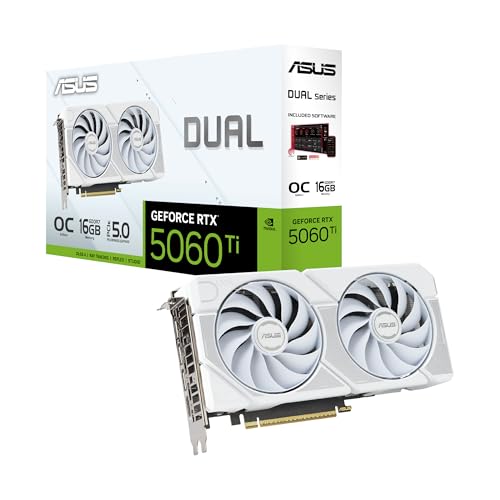
| 2 ASUS Dual RTX 5060 Ti 16GB White OC | ASUS | 9 × 4.7 × 0.1 in | 1.4 lb | 16GB GDDR7 memory | Check price |
| 3 ASUS Dual RTX 5060 Ti 16GB OC | ASUS | 9 × 4.7 × 2 in | 1.4 lb | 16GB GDDR7 memory | Check price |
| 4 ASUS PRIME RTX 5070 12GB OC | ASUS | 12 × 5 × 2 in | 2.3 lb | 12GB GDDR7 memory | Check price |
| 5 GIGABYTE RTX 4070 Ti Gaming OC 12G | GIGABYTE | 13.23 × 5.51 × 2.28 in | 4.9 lb | 12GB GDDR6X memory | Check price |
Sizes and weights as listed by the manufacturer on Amazon. Check the retailer for current price and availability.
Pros
- 16GB GDDR6 memory
- Triple-fan cooling design
- HDMI and two DisplayPort outputs
Cons
- Who should skip it: buyers needing confirmed power and clearance specifications
Pros
- 16GB GDDR7 memory
- Dual BIOS profiles
- 0dB technology for light gaming
Cons
- Who should skip it: builders needing a single-slot graphics card
Pros
- 16GB GDDR7 memory
- Dual BIOS profiles
- 2.5-slot design
- 0dB technology for light gaming
Cons
- Who should skip it: builders lacking 2.5-slot clearance

Pros
- 12GB GDDR7 memory
- 2.5-slot design
- Dual BIOS profiles
- Dual-ball fan bearings
Cons
- Who should skip it: builders limited to two slots

Pros
- 12GB GDDR6X memory
- Three-fan WINDFORCE cooling
- Dual BIOS
- Anti-sag bracket included
Cons
- 750W recommended power supply
- Who should skip it: builders without 13.2 inches of card clearance
Best for 16 GB of Graphics Memory: XFX Swift RX 9060 XT 16GB
XFX Swift RX 9060 XT 16GB pairs 16 GB of GDDR6 with an AMD RX 9060 XT chipset and a stated boost clock up to 3320 MHz. Its triple-fan cooling design is a listed feature, but the product information does not establish its noise or Arc Raiders performance.
Skip it if you need confirmed case clearance, power connector details, or game-specific performance figures before deciding; check those against the manufacturer and your PC.
Best for a White Build: ASUS Dual RTX 5060 Ti 16GB White OC
ASUS Dual RTX 5060 Ti 16GB White OC is the listed white RTX 5060 Ti option, with 16 GB of GDDR7 and a 2.5-slot design. It also specifies DLSS 4, HDMI 2.1b, DisplayPort 2.1b, and dual BIOS.
Those details can help if you want a white card and value the listed display connections or Quiet and Performance BIOS profiles. Skip it if your case cannot accommodate a 2.5-slot card or you need game-specific benchmarks to choose.
Related guides: Best NVIDIA Graphics Cards for GTA 6, Best AMD Graphics Cards for GTA 6 and Best Graphics Cards for GTA 6.
Best for a Compact Dual-Fan Design: ASUS Dual RTX 5060 Ti 16GB OC
ASUS Dual RTX 5060 Ti 16GB OC combines 16 GB of GDDR7 with a 2.5-slot design and Axial-tech fans. Its listed features include DLSS 4, 0dB technology for light gaming, and dual BIOS.
The product page also states 767 AI TOPS, a figure that describes AI performance rather than an Arc Raiders frame rate. Skip it if you need a card with confirmed dimensions or demonstrated performance at your chosen resolution.
Best for an SFF-Ready RTX 5070: ASUS PRIME RTX 5070 12GB OC
ASUS PRIME RTX 5070 12GB OC is described as SFF-Ready and has a 2.5-slot design, with 12 GB of GDDR7. The listing also specifies DLSS 4, dual BIOS, and a phase-change GPU thermal pad.
The smaller memory capacity is a practical distinction from the 16 GB cards in this comparison, not proof of how the game will run. Skip it if your workload or target settings make 16 GB a priority, or if you need verified card dimensions before checking a compact case.
Best for a Listed 750 W PSU Recommendation: GIGABYTE GeForce RTX 4070 Ti Gaming OC 12G
GIGABYTE GeForce RTX 4070 Ti Gaming OC 12G has 12 GB of GDDR6X memory and a stated recommended PSU of 750 W. Its listed features include DLSS 3, WINDFORCE cooling, RGB Fusion, dual BIOS, and an anti-sag bracket.
That PSU recommendation gives you a concrete starting point for checking system power, but it does not confirm your own PSU’s quality, connectors, or headroom. Skip it if you need 16 GB of graphics memory or a newer listed feature set such as DLSS 4.
Key Numbers at a Glance
- Graphics memory ranges from 12 GB on ASUS PRIME RTX 5070 12GB OC and GIGABYTE GeForce RTX 4070 Ti Gaming OC 12G to 16 GB on XFX Swift RX 9060 XT 16GB and both ASUS Dual RTX 5060 Ti 16GB cards.
- XFX Swift RX 9060 XT 16GB lists a boost clock up to 3320 MHz; the ASUS Dual RTX 5060 Ti cards list 2632 MHz in OC mode and 2602 MHz in default mode.
- ASUS Dual RTX 5060 Ti 16GB White OC, ASUS Dual RTX 5060 Ti 16GB OC, and ASUS PRIME RTX 5070 12GB OC each specify a 2.5-slot design.
- GIGABYTE GeForce RTX 4070 Ti Gaming OC 12G lists a recommended PSU of 750 W.
How to Choose a Graphics Card for Arc Raiders
Check the Game Requirements and Your Target Resolution
Bottom line: Confirm the game’s current requirements and your monitor’s resolution before choosing a GPU. The product data gives memory capacities and selected GPU features, but no Arc Raiders frame rates, benchmark results, or supported settings. If you are targeting a particular resolution or refresh rate, look for reliable game-specific performance information for the exact card model rather than treating a clock speed or AI figure as a gaming result.
Compare Graphics Memory and Memory Type
Bottom line: Choose 16 GB when graphics-memory capacity is a priority, while recognizing that capacity alone does not predict frame rates. XFX Swift RX 9060 XT 16GB lists 16 GB of GDDR6, and both ASUS Dual RTX 5060 Ti cards list 16 GB of GDDR7. ASUS PRIME RTX 5070 12GB OC and GIGABYTE GeForce RTX 4070 Ti Gaming OC 12G each list 12 GB, using GDDR7 and GDDR6X respectively.
Memory type is only one part of a graphics card’s performance. Compare credible results for the game, resolution, and settings you plan to use, and consider the rest of your PC when deciding whether the price of an upgrade is worthwhile.
Confirm Case Clearance and Slot Space
Bottom line: Verify the exact card dimensions and available case clearance before ordering. Three listed ASUS cards have a 2.5-slot design, and ASUS PRIME RTX 5070 12GB OC is described as SFF-Ready. The product information here does not give card length, so the slot description alone cannot confirm fit in your case.
Check the manufacturer’s full dimensions against your case and confirm that the card will not obstruct adjacent slots or other parts. A compact-build description is useful, but it is not a substitute for a clearance check.
Match the Power Supply and Connectors
Bottom line: Check the card’s power connectors and manufacturer guidance against your PSU before upgrading. GIGABYTE GeForce RTX 4070 Ti Gaming OC 12G lists a recommended 750 W PSU. Comparable PSU guidance and connector details are not included for every card here, so do not apply that figure to the other models.
Confirm your PSU model, available connectors, and the card maker’s recommendation for your specific system. A wattage label by itself does not establish PSU quality or suitability.
Compare Features, Cooling, and Display Outputs
Bottom line: Choose listed features that solve a real need, then verify your monitor connections. The ASUS RTX 5060 Ti listings specify HDMI 2.1b and DisplayPort 2.1b, while XFX lists HDMI and two DisplayPort outputs without naming versions. NVIDIA cards in this comparison list DLSS features, DLSS 4 on the RTX 5060 Ti and RTX 5070 models and DLSS 3 on the RTX 4070 Ti.
Cooling features differ too: XFX lists triple-fan cooling, ASUS Dual cards list Axial-tech fans, and GIGABYTE lists WINDFORCE cooling. These details do not establish measured noise or temperatures, so compare independent evidence if quiet operation or sustained performance is central to your decision.
How We Compared These Products
This guide is based on product research rather than firsthand evaluation. We compared the listed graphics memory, memory type, clocks, cooling designs, display outputs, stated features, slot information, and PSU guidance where available. The product pages do not provide Arc Raiders benchmarks, full dimensions for every card, or complete power requirements for all models, so those details should be verified before purchase.
Which Option Fits Your PC and Plans?
If 16 GB of listed graphics memory is your priority, compare XFX Swift RX 9060 XT 16GB with the two ASUS Dual RTX 5060 Ti 16GB models, then decide based on game-specific performance, outputs, case fit, and the features you need. For a compact build, ASUS PRIME RTX 5070 12GB OC has the SFF-Ready description and 2.5-slot design, but confirm its dimensions and power needs with ASUS before buying. If you need a stated PSU reference, GIGABYTE GeForce RTX 4070 Ti Gaming OC 12G lists 750 W, which is not a substitute for checking the manufacturer’s complete requirements and your PSU model.
Mistakes to Avoid When Choosing a Graphics Card
- Choosing by model name alone. Compare game-specific results at your intended resolution instead of assuming a newer or higher-numbered GPU will suit every game better.
- Assuming memory capacity guarantees performance. The 16 GB cards have more listed graphics memory than the 12 GB cards, but capacity alone does not establish frame rates or image quality.
- Skipping the physical fit check. Confirm card length, slot clearance, and any obstructions using the exact card and case specifications.
- Applying one PSU recommendation to every card. The 750 W recommendation applies to the listed GIGABYTE card; check the chosen model’s connector and PSU guidance separately.
Frequently Asked Questions
Which graphics card will run Arc Raiders at my target settings?
The product data does not include Arc Raiders benchmarks or confirmed settings for these cards. Check the game’s current system requirements and seek results for the exact GPU at your monitor’s resolution before deciding.
Is 16 GB of graphics memory better than 12 GB for Arc Raiders?
The 16 GB options include XFX Swift RX 9060 XT 16GB and both ASUS Dual RTX 5060 Ti cards; ASUS PRIME RTX 5070 and GIGABYTE GeForce RTX 4070 Ti each list 12 GB. More memory can be a useful capacity distinction, but the listings do not show how that difference affects Arc Raiders performance.
Will a 2.5-slot graphics card fit my PC case?
A 2.5-slot design describes the listed thickness class for the ASUS Dual RTX 5060 Ti cards and ASUS PRIME RTX 5070. It does not confirm card length or fit in a particular case, so compare the complete manufacturer dimensions with your available clearance.
What power supply do I need for these graphics cards?
The GIGABYTE GeForce RTX 4070 Ti Gaming OC 12G listing recommends a 750 W PSU. The other listings in this comparison do not give a matching PSU figure here; check each manufacturer’s guidance and confirm your PSU has the required connectors.
Can I connect my monitor to any of these cards?
Check your monitor’s input against the exact card’s outputs. The ASUS Dual RTX 5060 Ti listings specify HDMI 2.1b and DisplayPort 2.1b, while XFX lists HDMI and two DisplayPort outputs without specifying versions; verify the full port details for the model you choose.


Write Your Review
No reviews yet. Be the first to share your experience!