



For a gaming PC with a newer graphics card, prioritize the wattage your full system needs and whether the PSU has the GPU connector your card calls for. The MSI MAG A750GL 750W Power Supply pairs 750W with ATX 3.1 and a native 12V-2×6 cable, while the be quiet! Pure Power 13 M 1000W offers 1000W and the same connector for higher-draw builds; a 500W or 600W model suits only systems whose requirements fit that capacity and connectors.
This guide to the best power supplies for gaming PCs compares capacity, GPU cabling, efficiency certifications, modular design, and stated warranty terms. Check your graphics card and case documentation before choosing, especially if you plan to upgrade.
Compare at a glance
| Product | Brand | Size | Weight | Stands out for | Price |
|---|---|---|---|---|---|
| 1 be quiet! Pure Power 13 M 1000W | be quiet! | 6.3 × 5.91 × 3.39 in | 6.9 lb | ATX 3.1 and native 12V-2x6 connector | Check price |
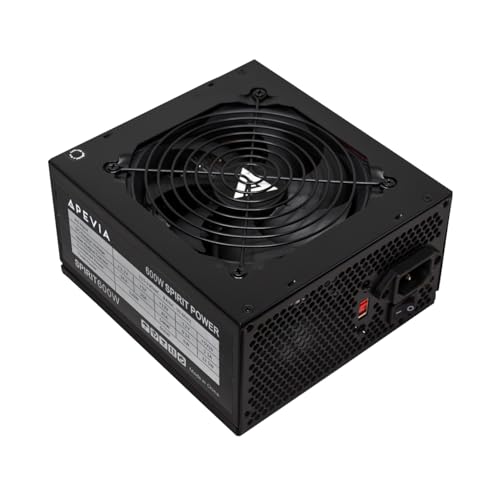
| 2 Apevia Spirit 600W ATX Power Supply | Apevia | 6.3 × 5.91 × 3.35 in | Not listed | Single 12V output rated at 45A | Check price |
| 3 MSI MAG A750GL 750W Power Supply | msi | 12 × 9 × 5 in | 6.1 lb | Fully modular design | Check price |
| 4 Auotac 1000W Modular Gold PSU | Auotac | 6 × 6 × 3.7 in | 3.2 lb | 1000W capacity | Check price |
| 5 ASRock PRO 850G 850W Power Supply | ASRock | 5.51 × 5.91 × 3.39 in | Not listed | Native 12V-2x6 connector | Check price |
| 6 Corsair RM1000x 1000W ATX 3.1 PSU | Corsair | 2.3 × 3.39 × 5.91 in | 6.9 lb | Fully modular cabling | Check price |
| 7 ASUS ROG Strix 1000W Platinum PSU | ASUS | 6.3 × 5.9 × 3.4 in | Not listed | Fully modular design | Check price |
Sizes and weights as listed by the manufacturer on Amazon. Check the retailer for current price and availability.
Best for a higher-capacity system
Pros
- ATX 3.1 and native 12V-2x6 connector
- Four PCIe 6+2-pin connectors
- Fully modular design
- Semi-passive fan operation
Cons
- Who should skip it: builders who do not need 1000W
Pros
- Single 12V output rated at 45A
- Four SATA and four Molex connectors
- Multiple listed protection types
Cons
- Who should skip it: builders needing more than two PCIe power connectors
Pros
- Fully modular design
- 80 PLUS Gold certified
- ATX 3.1 and PCIe 5.1 support
- 10-year limited warranty
Cons
- Who should skip it: builders whose systems require more than 750W

Pros
- 1000W capacity
- Fully modular design
- Native 12V-2x6 cable
- Includes PSU setup accessories
Cons
- Who should skip it: buyers needing documented GPU compatibility or independent performance data

Pros
- Native 12V-2x6 connector
- ATX 3.1 and PCIe 5.1 ready
- 80 PLUS Gold certified
- Standard ATX form factor
Cons
- Who should skip it: builders whose systems need more than 850W

Pros
- Fully modular cabling
- Native 12V-2x6 connector
- ATX 3.1 and PCIe 5.1 support
- Cybenetics Gold certified
Cons
- Who should skip it: builders who need less capacity

Pros
- Fully modular design
- ATX 3.1
- 80 Plus Platinum certified
- 10-year warranty
Cons
- Who should skip it: builders needing a different wattage
Best 1000W ATX 3.1 Power Supply: be quiet! Pure Power 13 M 1000W
be quiet! Pure Power 13 M 1000W earns this label for combining a 1000W rating, a native 12V-2×6 connector, and four PCIe 6+2-pin connectors. The listing also specifies a 10-year warranty and semi-passive cooling, with the fan off at low loads. Skip it if your build needs less capacity and you would rather avoid paying for headroom you do not need.
Best 750W ATX 3.1 Power Supply: MSI MAG A750GL 750W Power Supply
MSI MAG A750GL 750W Power Supply combines 750W capacity with a native dual-color 12V-2×6 cable, fully modular cabling, and a 10-year limited warranty. Its 80 PLUS Gold certification is a stated efficiency tier, not a guarantee of a particular gaming performance level. Skip it if your component makers call for more than 750W or your GPU needs connectors the listing does not identify.
Related guides: Best Power Supplies for GTA 6 Builds and Best Power Supplies for RTX 5090.
Best Lower-Wattage Gold Option: ASRock PRO 750G 750W Power Supply
ASRock PRO 750G 750W Power Supply offers 750W, an 80 PLUS Gold certification, ATX 3.1 and PCIe 5.1 support, and a native 12V-2×6 connector. Its stated warranty is three years, shorter than the 10-year terms listed for the MSI A750GL and be quiet! 1000W models. Skip it if a longer stated warranty matters more to you than choosing a 750W Gold unit.
Key Numbers at a Glance
- Listed capacities range from 500W for Thermaltake Smart 500W PSU to 1000W for be quiet! Pure Power 13 M 1000W, Auotac 1000W Modular Gold PSU, Corsair RM1000x 1000W ATX 3.1 PSU, and ASUS ROG Strix 1000W Platinum PSU.
- The Apevia Spirit 600W ATX Power Supply lists two PCIe 6+2-pin connectors; the be quiet! Pure Power 13 M 1000W lists four PCIe 6+2-pin connectors.
- The be quiet! Pure Power 13 M 1000W and MSI MAG A750GL 750W Power Supply list 10-year warranties; the ASRock PRO 750G 750W Power Supply lists a three-year warranty.
- The Auotac 1000W Modular Gold PSU lists dimensions of 150 × 150 × 86 mm (5.91 × 5.91 × 3.39 inches).
How to Choose a Power Supply for a Gaming PC
Match wattage to the complete build
Bottom line: Choose a capacity that meets your CPU and graphics card requirements, with sensible room for the rest of the system. The products span 500W to 1000W, but wattage alone does not establish build quality or suitability. Check the graphics card and processor makers’ recommendations, then account for other components and planned upgrades before choosing between, for example, the MSI MAG A750GL 750W Power Supply and the be quiet! Pure Power 13 M 1000W.
Check GPU connectors and ATX standards
Bottom line: Confirm the exact GPU power plug before comparing wattage. The be quiet! Pure Power 13 M 1000W lists a native 12V-2×6 connector and four PCIe 6+2-pin connectors; the Apevia Spirit 600W ATX Power Supply lists two PCIe 6+2-pin connectors. Several listed models specify ATX 3.1 and PCIe 5.1 support, including both MSI MAG GL models and the ASRock PRO G models. Match the PSU cable to the graphics card manual and do not assume every 750W or 1000W unit has the same connectors.
Use efficiency certification as one comparison point
Bottom line: Treat efficiency labels as a certification category, not a substitute for capacity or compatibility. Several models list 80 PLUS Gold, while the Thermaltake Smart 500W PSU lists 80 PLUS White. The be quiet! Pure Power 13 M 1000W also lists Cybenetics Platinum, and the ASUS ROG Strix 1000W Platinum PSU lists 80 PLUS Platinum. For general information on the certification program, see 80 PLUS power supply efficiency certification.
Decide whether modular cables and quiet modes matter
Bottom line: Modular cables can simplify cable routing, but they do not increase the PSU’s rated capacity. The MSI MAG A750GL 750W Power Supply, MSI MAG A850GL 850W Power Supply, Corsair RM1000x 1000W ATX 3.1 PSU, and Auotac 1000W Modular Gold PSU are listed as fully modular. The be quiet! model specifies semi-passive fan operation, while the ASUS ROG Strix model lists 0dB technology. Check the case’s PSU clearance and the cable routing space before ordering; only the Auotac listing gives dimensions, 150 × 150 × 86 mm.
Weigh warranty and model-specific trade-offs
Bottom line: Compare the warranty for the exact model, not just the brand. The MSI MAG A750GL 750W Power Supply and MSI MAG A850GL 850W Power Supply list 10-year limited warranties, as does the be quiet! model; the ASRock PRO 750G and PRO 850G list three years. The Apevia Spirit 600W lists protection features, but the product data does not state a warranty term. Choose based on the support terms and features that matter to your build, rather than assuming a larger wattage number means better quality.
How We Compared These Products
This guide is based on product research, not firsthand evaluation. We compared the listed wattage, connector details, ATX and PCIe standards, modularity, efficiency labels, cooling features, dimensions where stated, and warranty terms. Customer feedback data is not available in the product information here, so it does not support claims about recurring owner experiences.
Which Option Fits Your Build?
For a higher-capacity system with modern GPU cabling: be quiet! Pure Power 13 M 1000W combines a 1000W rating with a native 12V-2×6 cable and four PCIe 6+2-pin connectors. Its 10-year warranty and semi-passive fan mode are additional stated features. Skip it if your system requirements do not justify 1000W or your case cannot accommodate the unit; verify case dimensions because the product data here does not state its size.
For a 750W build needing a native 12V-2×6 cable: MSI MAG A750GL 750W Power Supply lists ATX 3.1, PCIe 5.1, fully modular cables, and a 10-year limited warranty. Skip it if your parts call for more than 750W or a connector not listed for this model.
For a basic system whose requirements fit 500W: Thermaltake Smart 500W PSU lists 500W continuous output, 80 PLUS certification, two PCIe 6+2-pin connectors, and a five-year warranty. Skip it if your GPU requires a native 12V-2×6 connector, ATX 3.1 support, or more capacity; those features are not listed for this model.
For more component comparisons, browse the power supplies category or the wider PC components section.
Mistakes to Avoid When Choosing a Gaming PC Power Supply
- Buying by wattage alone. Check the full system’s power needs and the GPU maker’s guidance; capacity does not tell you which cables a PSU includes.
- Assuming all PCIe cables are interchangeable. Match the connector required by your graphics card to the PSU’s listed cables, including whether it calls for 12V-2×6 or PCIe 6+2-pin.
- Ignoring case clearance. Confirm the case’s PSU dimensions and cable-routing space before purchase. Only some listings here state physical dimensions.
- Overlooking the warranty difference. Compare the exact model terms: listed warranties range from three years for the ASRock PRO G models to 10 years for several other options.
Frequently Asked Questions
How many watts does a gaming PC power supply need?
It depends on the processor, graphics card, and other components, so there is no single wattage that fits every gaming PC. Check the component makers’ recommendations and compare them with the PSU’s continuous output; this roundup includes models from 500W through 1000W.
Does a 1000W power supply use 1000W all the time?
No. The wattage rating describes the unit’s rated output capacity, not a constant draw from the wall. Actual system demand varies with the components and workload.
Do I need an ATX 3.1 power supply for a gaming PC?
Not for every build. ATX 3.1 and PCIe 5.1 support are listed for several options here, but your motherboard, graphics card, required connector, and PSU compatibility determine whether those features are useful to you.
What is the difference between 12V-2×6 and PCIe 6+2-pin cables?
They are different GPU power connector types. Some products, such as the be quiet! Pure Power 13 M 1000W, list both a native 12V-2×6 cable and PCIe 6+2-pin cables; check your GPU documentation and the exact PSU cable list before buying.
Is a modular power supply worth choosing?
Fully modular models let you connect only the cables your system needs, which can help with cable routing. That convenience does not determine wattage or compatibility, so check the connectors and physical fit as well.
Can I reuse cables from my old power supply?
Do not assume modular cables from different PSU models are compatible, even if their plugs appear to fit. Use the cables specified for the exact power supply and consult its manufacturer documentation.





Write Your Review
No reviews yet. Be the first to share your experience!