


For graphic design, choose a mouse that matches how you work: the Perixx PERIMICE-608II Wireless Vertical Mouse offers four DPI settings and a right-handed vertical shape, while the JYKEYMOUT Bluetooth and 2.4G (2-in-1) connects by Bluetooth or USB receiver. If your desk surface is uneven or you want room for a keyboard and mouse, the listed mouse pads offer compact and extended formats. The wrong shape, connection, or pad size can make everyday cursor work less convenient.
Compare at a glance
| Product | Brand | Size | Weight | Stands out for | Price |
|---|---|---|---|---|---|
| 1 MROCO Mouse Pad, 8.5 x 11 Inches | MROCO | 11 × 8.5 × 0.1 in | 0.2 lb | Compact 8.5 x 11-inch size | Check price |
| 2 CANFLASHION 9.5 x 7.9-Inch Mouse Pad | CANFLASHION | 9.5 × 7.9 × 0.04 in | Not listed | Compact 9.5 x 7.9-inch footprint | Check price |
| 3 JYKEYMOUT Rechargeable Vertical Mouse | JYKEYMOUT | 4.8 × 2.4 × 0.1 in | 0.3 lb | Bluetooth and 2.4 GHz connection options | Check price |
| 4 Perixx PERIMICE-608II Vertical Mouse | Perixx | 4.87 × 2.67 × 2.43 in | 0.3 lb | Four selectable DPI levels | Check price |
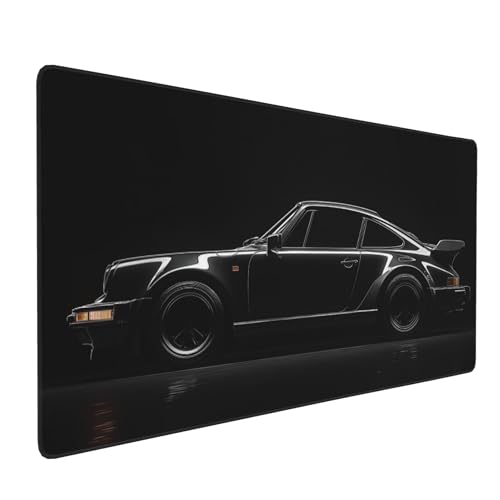
| 5 Rsaoyan Mouse Pad, 35.4 x 15.7 Inches | Rsaoyan | 35.4 × 15.7 × 0.1 in | Not listed | Room for keyboard, mouse, and accessories | Check price |
| 6 AQQA Topographic Mouse Pad, 35 x 17 Inches | AQQA | 17 × 35 × 0.04 in | 1.8 lb | Room for keyboard and mouse | Check price |
| 7 elec Space Turtle-Green Wireless Mouse | elec Space | Not listed | Not listed | Silent click design | Check price |
Sizes and weights as listed by the manufacturer on Amazon. Check the retailer for current price and availability.
Pros
- Compact 8.5 x 11-inch size
- Stitched edges
- Non-slip rubber base
- Water- and stain-resistant coating
Cons
- Who should skip it: users needing a larger mouse surface
Pros
- Compact 9.5 x 7.9-inch footprint
- Washable surface
- Rubber base
Cons
- Who should skip it: users who need a larger mouse surface
Pros
- Bluetooth and 2.4 GHz connection options
- Connects to two devices simultaneously
- Rechargeable battery with USB-C charging
- Six silent buttons
Cons
- Back and forward buttons are not compatible with Mac OS
- Who should skip it: left-handed users

Pros
- Four selectable DPI levels
- Six buttons, including forward and backward
- Plug-and-play USB receiver
Cons
- AA battery not included
- Who should skip it: left-handed users
Pros
- Room for keyboard, mouse, and accessories
- Non-slip rubber base
- Reinforced stitched edges
Cons
- Who should skip it: users with less than 35.4 x 15.7 inches of desk space

Pros
- Room for keyboard and mouse
- Non-slip rubber base
- Water-resistant surface
- Reinforced stitched edges
Cons
- Who should skip it: users with limited desk space

Pros
- Silent click design
- No software installation required
- Lightweight, portable construction
- Distinctive turtle-green transparent design
Cons
- Requires a USB receiver for the stated 2.4G connection
- Who should skip it: users who need a mouse that works without a USB receiver
Best for Adjustable DPI: Perixx PERIMICE-608II Wireless Vertical Mouse
Perixx PERIMICE-608II Wireless Vertical Mouse lists four DPI settings: 800, 1200, 1600, and 2400, plus six buttons and a right-handed vertical design. Its 110 × 73 × 75 mm body and 93 g weight give you specific size and weight figures to check against your grip and desk habits. It uses a 2.4GHz USB receiver and one AA battery, which is not included.
Skip it if you need Bluetooth, a left-handed shape, or a rechargeable battery.
Best for Bluetooth and Two Devices: JYKEYMOUT Bluetooth and 2.4G (2-in-1)
JYKEYMOUT Bluetooth and 2.4G (2-in-1) supports Bluetooth 5.2/3.0 and 2.4GHz USB receiver connections, with switching between a Bluetooth-connected device and a USB-connected device. Its vertical, right-hand design includes 1000, 1200, and 1600 DPI settings, six silent buttons, and USB-C charging. The listing says its back and forward buttons are not compatible with Mac OS.
Skip it if you need a left-handed mouse or rely on the back and forward buttons in macOS.
Related guides: Best Mice for FPS Games, Best Gaming Mouse That Doesn’t Cramp Your Hand and Best Mice for Butterfly Clicking.
Best for a Compact Work Surface: MROCO Essential Office & Gaming Mouse Pad
MROCO Essential Office & Gaming Mouse Pad measures 8.5 × 11 inches, a letter-size footprint that can suit a desk with limited free space. It has a 3 mm thickness, stitched edges, a non-slip rubber base, and a water- and stain-resistant surface. This is a mouse pad, not a mouse, so it does not add cursor controls or change the mouse’s connection.
Skip it if you want space for a keyboard and mouse together on one extended mat.
Best for an Extended Desk Mat: AQQA Large Mouse Pad Mat 35×17 Inch
AQQA Large Mouse Pad Mat 35×17 Inch measures 35 × 17 inches, with a 3 mm thickness and a high-density polyester surface. Its natural rubber base and stitched edges are listed features, and the extended format is intended to make room for a keyboard, mouse, and other desk accessories. Measure your desk first, since this footprint takes substantially more space than a standard pad.
Skip it if your desk cannot accommodate a 35 × 17-inch mat or you only need a small mouse surface.
Key Numbers at a Glance
- The Perixx PERIMICE-608II Wireless Vertical Mouse has four DPI settings, from 800 to 2400.
- The JYKEYMOUT Bluetooth and 2.4G (2-in-1) lists three DPI settings: 1000, 1200, and 1600.
- The MROCO Essential Office & Gaming Mouse Pad measures 8.5 × 11 inches; the AQQA Large Mouse Pad Mat 35×17 Inch measures 35 × 17 inches.
- The Perixx PERIMICE-608II Wireless Vertical Mouse measures 110 × 73 × 75 mm and weighs 93 g.
How to Choose Mice for Graphic Design
Shape, hand fit, and long sessions
Bottom line: Pick a shape that suits your hand and preferred grip before prioritizing extra features. The Perixx and JYKEYMOUT are both vertical designs specified for right-handed use. Logitech Design Collection Limited Edition has a symmetrical shape described as suitable for left- and right-handed users, while the elec Space Wireless Mouse is described as ergonomic but has no handedness or measurements listed. Check the product dimensions and return terms if fit is uncertain.
DPI settings and cursor control
Bottom line: Prefer listed, switchable DPI levels when you want to adjust cursor sensitivity without relying on software details that are not stated. The Perixx lists 800, 1200, 1600, and 2400 DPI; the JYKEYMOUT lists 1000, 1200, and 1600 DPI. DPI alone does not establish design accuracy or sensor performance, so consider whether adjustable sensitivity matters for your applications and working style.
Wireless connection and device switching
Bottom line: Match the mouse connection to your computer’s available ports and the devices you actually switch between. JYKEYMOUT supports Bluetooth and a 2.4GHz USB receiver, with connection to two devices, one through each mode. Perixx and Logitech specify wireless receiver connections, while the elec Space mouse uses a 2.4G receiver. If your laptop has limited USB-A ports, confirm whether Bluetooth support meets your needs before choosing a receiver-based mouse.
Mouse-pad dimensions and surface
Bottom line: Measure the available desk area and choose a pad large enough for your usual mouse movement. The CANFLASHION Beach Sunset Mouse Pad,Cute Mouse pad,Custom Small measures 9.5 × 7.9 inches, while the AQQA mat measures 35 × 17 inches and the Rsaoyan Extra Large Gaming Mouse Pad measures 35.4 × 15.7 inches. MROCO’s 8.5 × 11-inch size is closer to letter paper. Check the desk dimensions and keyboard placement; a large mat offers shared surface area but needs room to lie flat.
Power, buttons, and platform details
Bottom line: Check the power method and operating-system limits for the functions you plan to use. Perixx requires one AA battery, not included, whereas JYKEYMOUT has a rechargeable battery and USB-C charging. The JYKEYMOUT listing notes that its back and forward buttons do not work with Mac OS; verify other software or button requirements with the product page before buying.
How We Compared These Products
This guide is based on product research, comparing the listed dimensions, DPI settings, connection types, power details, button features, and mouse-pad construction. The product pages do not give a consistent set of sensor, software, or platform details across the group, so those differences are identified as information to verify rather than assumed. No firsthand evaluation is represented here.
Which Option Fits Your Home and Devices?
For adjustable sensitivity with a vertical right-handed shape: The Perixx PERIMICE-608II Wireless Vertical Mouse gives you four DPI settings and six buttons, with a listed 93 g weight. Choose another shape or connection if you need Bluetooth or left-handed support.
For a two-device setup: The JYKEYMOUT Bluetooth and 2.4G (2-in-1) offers Bluetooth and receiver modes and switches between two connected devices. Its vertical design is right-handed, and its navigation buttons are not compatible with Mac OS, so choose another mouse if either limitation conflicts with your setup.
For a mouse surface matched to your desk: Choose the MROCO Essential Office & Gaming Mouse Pad for its 8.5 × 11-inch footprint, or the AQQA Large Mouse Pad Mat 35×17 Inch when you have room for a 35 × 17-inch extended mat. Skip the extended size if it crowds your workspace; choose a mouse separately, since neither product is a mouse.
Mistakes to Avoid When Choosing a Design Mouse
- Choosing DPI by its largest number alone. A higher listed DPI does not by itself establish design precision; compare available settings and confirm that adjustable sensitivity fits your workflow.
- Ignoring hand orientation. The vertical Perixx and JYKEYMOUT are right-handed designs; consider the symmetrical Logitech if ambidextrous shaping is important.
- Assuming every wireless mouse uses Bluetooth. Perixx specifies a 2.4GHz receiver, while JYKEYMOUT lists both Bluetooth and receiver modes. Match the connection to your computer and available ports.
- Buying a desk mat without measuring. Compare your free desk area with the listed dimensions, especially for mats measuring about 35 inches wide.
Frequently Asked Questions
Which mouse has adjustable DPI for graphic design?
The Perixx PERIMICE-608II Wireless Vertical Mouse lists 800, 1200, 1600, and 2400 DPI settings. The JYKEYMOUT Bluetooth and 2.4G (2-in-1) lists 1000, 1200, and 1600 DPI. These figures describe sensitivity settings, not measured design accuracy.
Can I use the JYKEYMOUT with a Mac?
The product page lists Mac compatibility and Bluetooth and 2.4GHz receiver modes. It also says the back and forward buttons are not compatible with Mac OS, so do not count on those functions in that operating system.
Does the Perixx vertical mouse use Bluetooth?
No Bluetooth connection is listed for the Perixx PERIMICE-608II Wireless Vertical Mouse. It uses a 2.4GHz USB receiver and one AA battery, which is not included.
What size mouse pad should I choose?
Measure your available desk space and decide whether the pad needs to fit only the mouse or also a keyboard. The CANFLASHION pad is 9.5 × 7.9 inches, the MROCO pad is 8.5 × 11 inches, and the AQQA mat is 35 × 17 inches.
Are the vertical mice suitable for left-handed users?
The Perixx and JYKEYMOUT listings describe right-handed vertical designs. The Logitech Design Collection Limited Edition has a symmetrical shape described as suitable for either hand, but its product details do not specify DPI settings or dimensions.
Do mouse pads improve design accuracy?
A consistent surface can give a mouse a dedicated area to move across, and several listed pads specify cloth or polyester surfaces and non-slip bases. The product details do not establish a measured accuracy improvement, so choose by desk fit, surface preference, and construction features.


Write Your Review
No reviews yet. Be the first to share your experience!