


If you game on a MacBook, the wrong mouse can leave you juggling an adapter, a receiver, or software that does not support the settings you want. For a direct USB-C connection, the HXMJ RGB LED Gaming Mice,Wired USB C Port is the clearest match in this lineup; for wireless play, consider the Logitech G305 Wireless Gaming Mouse or Redragon M810 PRO Wireless Gaming Mouse, and check your Mac’s ports before choosing a receiver-based model.
This guide to the best gaming mouse for a Mac compares connection type, stated Mac compatibility, battery or cable needs, sensor specifications, and programmable controls. If you want a general-purpose Apple mouse with gesture features, see our guide to best mice for Apple.
Compare at a glance
| Product | Brand | Size | Weight | Stands out for | Price |
|---|---|---|---|---|---|
| 1 Logitech G PRO X3 SUPERSTRIKE Wireless Mouse | Logitech G | 4.92 × 2.5 × 0.1 in | 0.1 lb | Customizable click actuation and reset points | Check price |
| 2 Logitech G502 X Wired Gaming Mouse | Logitech G | 6.3 × 4 × 2 in | 0.4 lb | 13 buttons for configurable controls | Check price |
| 3 Redragon S101-3 Wired Keyboard and Mouse | Redragon | 17.91 × 7.2 × 0.91 in | 2.2 lb | Keyboard and mouse included | Check price |
| 4 Redragon M810 PRO Wireless Gaming Mouse | Redragon | 8.07 × 6.1 × 0.04 in | 0.6 lb | Eight programmable buttons | Check price |
| 5 Logitech G305 Wireless Gaming Mouse | Logitech G | 2.45 × 1.5 × 4.6 in | 0.2 lb | Up to 12,000 DPI sensitivity | Check price |
| 6 HXMJ RGB Gaming Mouse, USB-C Wired | HXMJ | 4.92 × 2.76 × 1.57 in | 0.3 lb | USB-C wired connection | Check price |
| 7 Logitech G305 Wireless Gaming Mouse | Logitech G | 2.45 × 1.5 × 4.6 in | 0.2 lb | LIGHTSPEED wireless with a stated 1 ms report rate | Check price |
| 8 Razer Basilisk V3 Wired Gaming Mouse | Razer | 2.96 × 5.12 × 1.67 in | 0.2 lb | 11 programmable buttons | Check price |
Sizes and weights as listed by the manufacturer on Amazon. Check the retailer for current price and availability.
Pros
- Customizable click actuation and reset points
- LIGHTSPEED wireless with up to 8 kHz polling
- Up to 135 hours of stated battery life
- USB-C rechargeable
Cons
- Advanced features require Logitech G HUB
- Who should skip it: buyers expecting POWERPLAY charging without a separate mouse pad
Pros
- 13 buttons for configurable controls
- Free-spin and ratcheting scroll modes
- Reversible, removable DPI-shift button
- 89-gram listed weight
Cons
- Who should skip it: users who need a wireless mouse
Pros
- Keyboard and mouse included
- Five dedicated macro keys
- Wrist rest included
- Adjustable mouse sensitivity
Cons
- Who should skip it: wireless-only buyers

Pros
- Eight programmable buttons
- Adjustable DPI up to 10,000
- Rechargeable battery
Cons
- 45-hour battery rating applies to eco mode
- Who should skip it: users needing a longer stated battery life

Pros
- Up to 12,000 DPI sensitivity
- Compact design with receiver storage
- Long stated battery life
- Six programmable buttons
Cons
- Who should skip it: players needing more than six programmable buttons
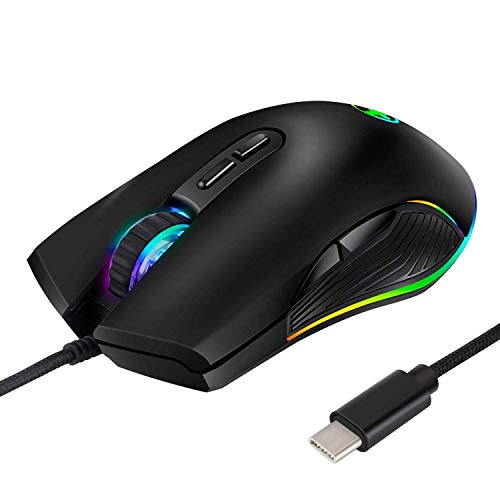
Pros
- USB-C wired connection
- Adjustable RGB lighting
- Four resolution settings
- No additional software required
Cons
- Who should skip it: users whose devices lack a USB-C port

Pros
- LIGHTSPEED wireless with a stated 1 ms report rate
- Up to 12,000 DPI HERO sensor
- Built-in nano receiver storage
- Six programmable buttons
Cons
- Requires one AA battery
- Who should skip it: users seeking a built-in rechargeable battery

Pros
- 11 programmable buttons
- Switchable free-spin and tactile scroll modes
- Thumb rest and ergonomic shape
- 11 customizable RGB zones
Cons
- Who should skip it: wireless-only users
Key Numbers at a Glance
- The Logitech G PRO X3 SUPERSTRIKE Wireless Mouse lists up to 48,000 DPI, compared with 26,000 DPI for the Razer Basilisk V3 Wired Gaming Mouse.
- The Logitech G305 Wireless Gaming Mouse lists up to 250 hours on one AA battery; the Redragon M810 PRO Wireless Gaming Mouse lists up to 45 hours in eco mode.
- The Redragon M810 PRO Wireless Gaming Mouse has 8 programmable buttons, while the Logitech G305 Wireless Gaming Mouse has 6.
- The HXMJ RGB LED Gaming Mice,Wired USB C Port offers four DPI settings: 800, 1600, 2400, and 3200.
Best Lightweight Wireless Gaming Mouse for Mac: Logitech G305 Wireless Gaming Mouse
The Logitech G305 Wireless Gaming Mouse stands out for a lightweight wireless design listed at 3.4 oz and a HERO sensor with up to 12,000 DPI. Logitech specifies LIGHTSPEED wireless with a 1 ms report rate and up to 250 hours of continuous play on one AA battery. Its compact body and receiver storage also suit a laptop setup that moves between locations, but it uses a USB receiver rather than Bluetooth.
Skip it if your Mac lacks a compatible USB-A connection or adapter, or if you specifically want a cable-free Bluetooth mouse.
Best USB-C Wired Gaming Mouse for Mac: HXMJ RGB LED Gaming Mice,Wired USB C Port
The HXMJ RGB LED Gaming Mice,Wired USB C Port connects directly to a USB-C port and lists Mac OS support, making it a straightforward candidate for a MacBook with an available USB-C port. It is plug and play without additional software, and its four selectable settings run from 800 to 3200 DPI. The trade-off is a wired connection and a lower listed maximum sensitivity than several other choices.
Skip it if you need wireless movement, extensive button remapping, or higher DPI settings.
Best Wireless Mouse with More Programmable Buttons: Redragon M810 PRO Wireless Gaming Mouse
The Redragon M810 PRO Wireless Gaming Mouse lists 8 programmable buttons and five onboard DPI levels up to 10,000, offering more button assignments than the G305. Its 2.4 GHz nano receiver provides a wireless connection, and the rechargeable battery is listed for up to 45 hours in eco mode. The product page names its driver software but does not establish Mac support for configuring every feature, so check Mac compatibility and whether settings persist before relying on custom bindings.
Skip it if you want a USB-C wired connection or need confirmed Mac software support for configuring all buttons.
Best Wired Mouse with Extra Controls: Logitech G502 X Wired Gaming Mouse
The Logitech G502 X Wired Gaming Mouse is listed as compatible with Mac OS and offers 13 buttons, a HERO 25K sensor, and a scroll wheel that switches between free-spin and ratcheted modes. The DPI-shift button is removable and reversible, which gives you a way to adjust its position for your grip. Its wired USB connection avoids battery management, but the listing does not specify that the cable is USB-C.
Skip it if a wireless mouse or a direct USB-C cable is essential for your Mac.
How to Choose the Best Gaming Mouse for a Mac
Check the connection against your Mac’s ports
Bottom line: Choose the connection your Mac can use without adding friction to your setup. The HXMJ mouse has a USB-C connector, while the G305 and M810 PRO use wireless nano receivers. The G502 X is wired, but its listing does not identify the plug type, so verify the cable connection before ordering if your Mac has only USB-C ports.
USB-C describes a connector shape, not every capability of a device or port. Check your Mac’s port configuration and the mouse’s connector; if an adapter is needed, confirm it supports the connection you require. For a wider look at Apple-oriented options and controls, compare the best mice for Apple.
Decide whether wireless convenience is worth battery upkeep
Bottom line: Pick a battery system that matches how often you want to recharge or replace cells. The G305 lists up to 250 hours on one AA battery, while the rechargeable M810 PRO lists up to 45 hours in eco mode. The PRO X3 SUPERSTRIKE is rechargeable over USB-C and lists up to 135 hours, but those figures come from different products and modes, so use them as stated specifications rather than a direct guarantee of your personal runtime.
A wired mouse such as the G502 X avoids battery upkeep but keeps a cable on your desk. If you want help prioritizing grip and comfort for longer sessions, see our guide to the best mouse for big hands.
Match controls and software to the games you play
Bottom line: Pay for extra buttons only if you have actions you want to assign. The G502 X lists 13 buttons, the M810 PRO lists 8 programmable buttons, and the G305 lists 6 programmable buttons. The Razer Basilisk V3 also lists 11 programmable buttons and a tilt wheel with free-spin and tactile modes, while its advanced customization uses Razer Synapse.
Mac compatibility for basic pointing does not automatically confirm that every configuration utility or feature works in macOS. Check the current software support for your operating system if you depend on macros, lighting control, or custom button assignments. For precision-heavy shortcuts beyond gaming, our guide to the best mouse for AutoCAD covers another use case.
Use DPI as a range, not a quality score
Bottom line: Choose a mouse with sensitivity settings that suit your control, not simply the largest DPI number. The HXMJ offers four settings from 800 to 3200 DPI; the G305 reaches 12,000 DPI, and the PRO X3 SUPERSTRIKE lists up to 48,000 DPI. Higher maximum sensitivity does not by itself establish that a mouse will feel better for your games or display setup.
If you play fast-paced games, programmable DPI steps can make it easier to switch sensitivity, but comfort and your preferred cursor movement matter too. If a particular clicking style is central to your choice, compare the best mice for butterfly clicking.
How We Compared These Products
This guide is based on product research, not firsthand evaluation. We compared listed connection types, Mac compatibility statements, sensor and button specifications, battery claims, and software requirements; the product pages do not establish that every advanced configuration feature works on every version of macOS.
Which Option Fits Your Mac and Games?
For a USB-C MacBook setup: the HXMJ RGB LED Gaming Mice,Wired USB C Port has a direct USB-C connection and lists Mac OS support, with four DPI settings. Skip it if you want wireless play or a larger set of programmable buttons.
For wireless gaming with long listed battery life: the Logitech G305 Wireless Gaming Mouse lists up to 250 hours from one AA battery and weighs 3.4 oz. Skip it if your Mac cannot connect to its receiver without an adapter or if you prefer a rechargeable mouse.
For extra controls on a Mac: the Logitech G502 X Wired Gaming Mouse is listed for Mac OS and has 13 buttons plus a dual-mode scroll wheel. Skip it if you need a wireless connection or confirmed USB-C cabling.
Mistakes to Avoid When Choosing a Gaming Mouse for Mac
- Assuming USB-C means universal compatibility. Check the mouse’s listed operating-system support and the Mac’s available ports; the connector alone does not confirm that all software features work.
- Confusing a receiver with Bluetooth. The G305 and M810 PRO list nano receivers, not Bluetooth, so plan for a compatible port or adapter.
- Choosing by maximum DPI alone. Compare the available sensitivity steps and controls with how you play instead of treating the highest number as an automatic advantage.
- Overlooking configuration software. Verify macOS support for the mouse’s utility before counting on custom macros, lighting, or button assignments.
Frequently Asked Questions
Will these gaming mice work with a Mac?
The HXMJ mouse lists Mac OS support, and the Logitech G502 X listing specifies Mac OS compatibility. The G305 product details name PC and Mac; check the product page for the exact variant and verify software support separately if you need custom settings.
Can I use a wireless gaming mouse with a MacBook?
The G305 and M810 PRO connect through a 2.4 GHz nano receiver. Make sure your Mac has a compatible port or that you have an adapter that supports the receiver; neither listing identifies these mice as Bluetooth models.
Which is better for a MacBook, the HXMJ or Logitech G305?
The HXMJ suits you if you want a direct USB-C wired connection and four selectable DPI levels. The G305 suits you if you prefer wireless operation and value its listed 250-hour battery life, provided you can connect its receiver.
Does a higher DPI make a mouse better for gaming?
Not automatically. DPI indicates sensitivity settings, but the useful range depends on your preference, game, and cursor control; the HXMJ’s 800 to 3200 DPI range may be enough for some players, while other models offer higher listed maximums.
Do programmable mouse buttons work on macOS?
Basic mouse input and advanced button configuration are separate considerations. Product pages name software for some models, but confirm that the current utility supports your macOS version and the specific settings you plan to use.


Write Your Review
No reviews yet. Be the first to share your experience!