




If you have a smaller hand, a bulky palm-shaped mouse can make reaching buttons awkward, while an unfamiliar shape can change how you grip and move it. For compact wireless use, the Logitech G305 Wireless Gaming Mouse weighs 3.4 oz and runs on one AA battery; for a wired mouse with five programmable buttons, consider the Razer DeathAdder Essential Wired Mouse, but check its shape and dimensions with the seller before buying because the product page does not list measurements.
This guide to the best gaming mouse for a small hand compares the listed shapes, connections, sensors, button counts, and battery details so you can weigh fit against the features you actually use. If you are also considering a larger shape, see our guide to best mouse for big hands.
Compare at a glance
| Product | Brand | Size | Weight | Stands out for | Price |
|---|---|---|---|---|---|
| 1 Logitech G305 Wireless Gaming Mouse | Logitech G | 2.45 × 1.5 × 4.6 in | 0.2 lb | LIGHTSPEED wireless with a stated 1 ms report rate | Check price |
| 2 INPHIC Tri-Mode Wireless Mouse, 12800 DPI | INPHIC | 4.7 × 3.1 × 0.04 in | 0.2 lb | Three connection modes | Check price |
| 3 Razer Basilisk V3 Wired Gaming Mouse | Razer | 2.96 × 5.12 × 1.67 in | 0.2 lb | 11 programmable buttons | Check price |
| 4 Redragon BM-2995 Large Wireless Gaming Mouse | Redragon | 4.96 × 3.85 × 0.1 in | Not listed | Three connection modes | Check price |
| 5 Redragon M602 RGB Gaming Mouse | Redragon | 4.92 × 2.87 × 1.57 in | 0.6 lb | Adjustable sensitivity up to 7200 DPI | Check price |
| 6 Razer DeathAdder Essential Wired Mouse | Razer | 5.01 × 2.86 × 1.69 in | 0.3 lb | Adjustable 6,400 DPI optical sensor | Check price |
| 7 Corsair Ironclaw Wireless SE, 26K DPI | Corsair | 5.12 × 3.15 × 0.1 in | 0.1 lb | Ten programmable buttons | Check price |
| 8 Redragon M810 PRO Wireless Gaming Mouse | Redragon | 8.07 × 6.1 × 0.04 in | 0.6 lb | Eight programmable buttons | Check price |
| 9 Redragon M656 Wireless Gaming Mouse | Redragon | 8.07 × 5.91 × 0.1 in | 0.2 lb | Seven programmable buttons | Check price |
| 10 TKMARS Vertical Mouse with 12 Buttons | TKMARS | 4.33 × 4.33 × 0.04 in | 0.7 lb | Vertical ergonomic shape | Check price |
Sizes and weights as listed by the manufacturer on Amazon. Check the retailer for current price and availability.
Best for compact wireless use
Pros
- LIGHTSPEED wireless with a stated 1 ms report rate
- Up to 12,000 DPI HERO sensor
- Built-in nano receiver storage
- Six programmable buttons
Cons
- Requires one AA battery
- Who should skip it: users seeking a built-in rechargeable battery
Pros
- Three connection modes
- Quiet left and right clicks
- Rechargeable 500mAh battery
- DPI presets up to 12800
Cons
- USB-C data cable for wired mode is not included
- Who should skip it: users needing driver customization outside Windows
Pros
- 11 programmable buttons
- Switchable free-spin and tactile scroll modes
- Thumb rest and ergonomic shape
- 11 customizable RGB zones
Cons
- Who should skip it: wireless-only users

Pros
- Three connection modes
- Bluetooth supports three devices
- Programmable buttons and macros
- Rechargeable battery with wired use while charging
Cons
- Who should skip it: Mac users needing driver-based customization
Best for more programmable buttons

Pros
- Adjustable sensitivity up to 7200 DPI
- Nine programmable buttons
- Customizable RGB lighting
- Ergonomic grip design
- Supports Windows and Mac
Cons
- Who should skip it: users wanting a wireless mouse
Best for a wired setup

Pros
- Adjustable 6,400 DPI optical sensor
- Five programmable buttons
- Rubberized side grips
- Mechanical switches rated for up to 10 million clicks
Cons
- Wired connection
- Who should skip it: wireless users

Pros
- Ten programmable buttons
- 26,000 DPI sensor with surface calibration
- Long stated battery life
- Customizable RGB lighting
Cons
- Who should skip it: users with smaller hands

Pros
- Eight programmable buttons
- Adjustable DPI up to 10,000
- Rechargeable battery
Cons
- 45-hour battery rating applies to eco mode
- Who should skip it: users needing a longer stated battery life
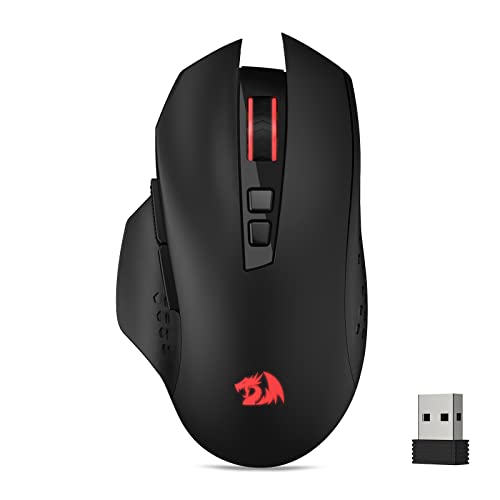
Pros
- Seven programmable buttons
- Five adjustable DPI levels
- 2.4GHz wireless connectivity
- Custom macro support
- 500Hz polling rate
Cons
- Battery not included
- Scroll wheel backlight is not always on
- Who should skip it: users needing DPI above 4000
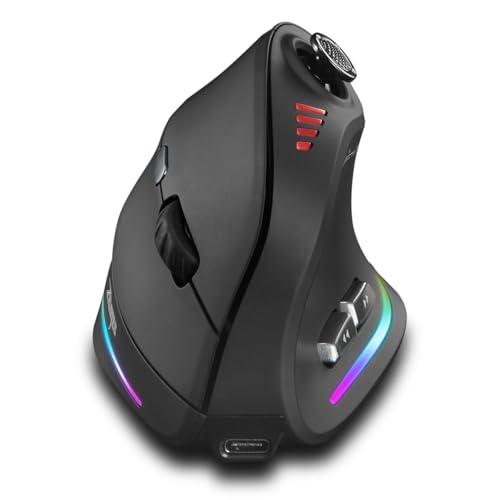
Pros
- Vertical ergonomic shape
- Five-way joystick
- Twelve programmable buttons
- Bluetooth and 2.4G connections
- Rechargeable with USB-C wired use
Cons
- Who should skip it: users who prefer a conventional mouse shape
Best Compact Wireless Gaming Mouse: Logitech G305 Wireless Gaming Mouse
Logitech G305 Wireless Gaming Mouse combines a compact design with a stated weight of 3.4 oz, LIGHTSPEED wireless, and a HERO sensor rated up to 12,000 DPI. The manufacturer lists up to 250 hours of continuous gameplay from one AA battery, and the receiver stores inside the mouse. The product page does not give dimensions, so confirm the shape suits your hand before committing.
Skip it if you want rechargeable power or need listed Bluetooth connectivity.
Best Wired Ergonomic Gaming Mouse: Razer DeathAdder Essential Wired Mouse
Razer DeathAdder Essential Wired Mouse has a 6,400 DPI optical sensor, five programmable buttons, and a rubberized scroll wheel. Its wired connection avoids battery charging, but the product page does not state its dimensions, and the ergonomic shape may not suit every small hand.
Skip it if you want wireless freedom, more than five programmable buttons, or a documented compact size.
Best for Extra Buttons: Redragon M602 RGB Gaming Mouse
Redragon M602 RGB Gaming Mouse offers nine programmable buttons and adjustable sensitivity up to 7,200 DPI, giving players more onboard shortcuts than the five-button DeathAdder Essential. It is wired and has RGB lighting, but the product page does not give dimensions; check the mouse outline and button placement against your grip before choosing it.
Skip it if you need a wireless mouse or want dimensions confirmed before purchase.
Key Numbers at a Glance
- The Logitech G305 Wireless Gaming Mouse weighs 3.4 oz and uses one AA battery.
- The Logitech G305 Wireless Gaming Mouse is rated for up to 12,000 DPI, while the Razer DeathAdder Essential Wired Mouse is rated for up to 6,400 DPI.
- The Redragon M602 RGB Gaming Mouse has nine programmable buttons, compared with five on the Razer DeathAdder Essential Wired Mouse.
- The INPHIC Upgraded Silent Rechargeable lists six DPI presets from 800 to 12,800 DPI and a polling-rate range up to 1,000 Hz through its Windows-only driver.
How to Choose the Best Gaming Mouse for a Small Hand
Shape and reach
Bottom line: prioritize a shape you can grip without stretching for the primary buttons, and verify dimensions when a listing omits them. The G305 is described as compact, while the INPHIC Upgraded Silent Rechargeable is explicitly intended for medium and large hands. The Corsair Ironclaw Wireless SE, 26K DPI is also designed for larger right hands and palm grip, so its stated design intent makes it a less obvious starting point for a small hand.
Product pages do not give comparable length, width, and height figures for these models. If dimensions are important, consult the manufacturer or seller before ordering, and compare the mouse against a model that already fits you. For a different comfort question, our guide to the best mouse for arthritis covers shape and connection considerations for that use case.
Grip style and hand posture
Bottom line: match the mouse outline to your grip rather than assuming an ergonomic label means a small-hand fit. The Razer Basilisk V3 Wired Gaming Mouse has an ergonomic design with a thumb rest, 11 programmable buttons, and a tilt wheel. That feature-rich shape could suit players who want accessible shortcuts, but the listing does not state that it is sized for small hands.
The TKMARS Wireless Ergonomic Vertical Gaming Mouse uses a vertical design and a five-way joystick, with 12 programmable buttons and sensitivity up to 24,000 DPI. A vertical grip is a distinct shape choice, not a guarantee of better comfort or gaming control; check whether that posture suits your play style. For clicking-style considerations, see our guide to best mice for butterfly clicking.
Connection and desk setup
Bottom line: choose wired for a direct cable connection, or wireless when you want to move without a mouse cable and can manage a receiver or battery. The G305 uses LIGHTSPEED wireless and stores its nano receiver inside the mouse. The Razer DeathAdder Essential and Redragon M602 are wired, so they do not require mouse battery charging.
Connection modes vary across the list. The INPHIC Upgraded Silent Rechargeable supports Bluetooth, 2.4 GHz wireless, and USB-C wired operation, but wired mode requires a separate USB-C data cable that is not included. If you use Apple devices, check the exact connection and operating-system needs in our best mice for Apple guide.
Sensitivity, polling, and game controls
Bottom line: choose DPI settings you can control and button layouts you can reach, rather than buying on the highest DPI number alone. The Logitech G305 lists up to 12,000 DPI, and the Redragon M602 lists up to 7,200 DPI. The INPHIC Upgraded Silent Rechargeable lists presets from 800 to 12,800 DPI and a polling-rate adjustment up to 1,000 Hz through its Windows-only driver.
Higher maximum sensitivity does not establish that a mouse will suit your preferred in-game feel. Extra side buttons can help with macros or shortcuts, but only if your thumb can reach them comfortably. For precise pointer work beyond gaming, compare the button and sensor priorities in our guide to the best mouse for AutoCAD.
Battery and software requirements
Bottom line: decide whether you prefer disposable AA power, a rechargeable battery, or no mouse battery at all. The G305 uses one AA battery and is listed for up to 250 hours of continuous gameplay. The INPHIC mouse has a 500 mAh rechargeable battery and USB-C charging, while the wired DeathAdder Essential needs no battery.
Software can affect setup and customization. The INPHIC driver is Windows-only, and the Redragon M602 uses downloadable software for remapping, macros, and lighting. If you use macOS or another operating system, verify which functions work without the optional software before choosing a model.
How We Compared These Products
This guide is based on product research, not firsthand evaluation. We compared the listed design descriptions, weight where stated, sensor and DPI figures, programmable controls, connection types, battery information, and software or operating-system notes. Product pages do not provide comparable dimensions across the selection, so small-hand fit should be confirmed with the seller or manufacturer when exact measurements matter.
Which Option Fits Your Setup?
For compact wireless use: Logitech G305 Wireless Gaming Mouse is the clearest match in this selection because it is described as compact and weighs 3.4 oz, with a stated battery life of up to 250 hours. Skip it if you require rechargeable power or a published set of dimensions before purchase.
For a wired setup with straightforward controls: Razer DeathAdder Essential Wired Mouse offers five programmable buttons and a 6,400 DPI sensor without battery charging. Skip it if a cable conflicts with your desk setup or you need confirmed small-hand dimensions.
For more programmable buttons on a wired mouse: Redragon M602 RGB Gaming Mouse lists nine programmable buttons and sensitivity up to 7,200 DPI. Skip it if you need wireless operation or cannot confirm that its shape fits your hand.
Mistakes to Avoid When Choosing a Gaming Mouse for a Small Hand
- Buying by DPI alone. A high maximum DPI does not tell you whether the shape, reach, or button layout will suit your grip. Compare the stated controls and choose sensitivity settings that match your preferences.
- Assuming “ergonomic” means compact. The INPHIC Upgraded Silent Rechargeable is described as suitable for medium and large hands, and the Corsair Ironclaw Wireless SE, 26K DPI is designed for larger hands. Check size details rather than relying on the label.
- Overlooking the connection you need. Check whether your PC has a convenient USB port for a receiver or cable, or whether the mouse supports your preferred Bluetooth connection. Confirm the operating-system support for any software features you plan to use.
- Ignoring battery and cable trade-offs. A wireless model needs battery management, while a wired one keeps a cable on the desk. Check battery type, stated runtime, and charging requirements before choosing.
Frequently Asked Questions
Which gaming mouse in this guide is described as compact?
The Logitech G305 Wireless Gaming Mouse is described as compact and weighs 3.4 oz. Its product page does not state its dimensions, so ask the seller or manufacturer for measurements if exact size is essential.
Is a higher DPI better for a small hand?
No. DPI describes sensitivity settings, not the mouse’s physical size or how far your fingers need to reach. Consider the shape, button placement, and adjustable sensitivity together.
Should I choose a wired or wireless gaming mouse?
A wired mouse avoids battery charging but leaves a cable on your desk. Wireless models such as the G305 remove that cable, while the product page lists up to 250 hours of gameplay on one AA battery; compare the trade-off with your desk and charging preferences.
Will the INPHIC mouse work as a wired mouse?
Yes, the listing describes USB-C wired mode alongside Bluetooth and 2.4 GHz wireless. It also says that a separate USB-C data cable is required for wired use and is not included.
Can I use the INPHIC mouse’s driver on macOS?
The product page says its driver is Windows-only, although it lists compatibility with macOS and other systems for general use. Confirm which custom settings are available on your operating system before relying on software remapping or polling-rate adjustments.
What should I check if a mouse has no listed dimensions?
Ask the seller or manufacturer for length, width, and height, then compare those measurements with a mouse that already fits your hand. Shape and thumb-button reach also matter, so dimensions alone may not settle the fit question.


Write Your Review
No reviews yet. Be the first to share your experience!