


If you play competitive shooters, a lightweight conventional mouse can make quick repositioning easier, while a wireless model reduces cable clutter and a vertical gun-grip design prioritizes an immersive hold over a familiar shape. This guide to the best mice for FPS games compares those trade-offs, plus sensor specifications, connectivity, programmable controls, and battery information to help you choose for your games and setup.
Compare at a glance
| Product | Brand | Size | Weight | Stands out for | Price |
|---|---|---|---|---|---|
| 1 RAGNOK ErgoStrike7 Wireless Gaming Mouse | RAGNOK | 4.8 × 4.45 × 0.1 in | 0.4 lb | Adjustable recoil feedback | Check price |
| 2 Logitech G305 Wireless Gaming Mouse | Logitech G | 2.45 × 1.5 × 4.6 in | 0.2 lb | LIGHTSPEED wireless with a stated 1 ms report rate | Check price |
| 3 SteelSeries Prime Wired Gaming Mouse, 69g | SteelSeries | 2.67 × 4.93 × 1.67 in | 0.2 lb | Lightweight 69g design | Check price |
| 4 RAGNOK ErgoStrike7 Vertical Gaming Mouse | RAGNOK | 4.8 × 4.45 × 0.1 in | 0.4 lb | Distinctive vertical grip design | Check price |
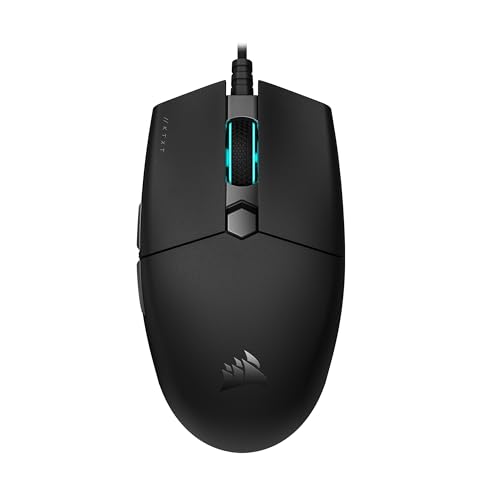
| 5 Corsair KATAR PRO XT 73 g Gaming Mouse | Corsair | 8 × 6 × 0.1 in | 0.2 lb | Lightweight 73 g design | Check price |
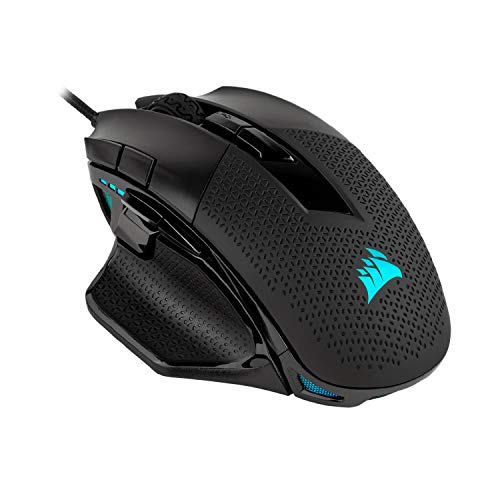
| 6 Corsair Nightsword RGB Gaming Mouse | Corsair | 5.08 × 3.38 × 1.71 in | 0.3 lb | Broad weight and balance customization | Check price |
| 7 AOC GM401 Wireless Gaming Mouse, 12,000 DPI | AOC | 4.9 × 2.93 × 0.1 in | 0.2 lb | Three connection modes | Check price |
| 8 Cyliex L25B Gun Grip Mouse | Cyliex | 5.71 × 4.92 × 0.04 in | 0.6 lb | Independent horizontal and vertical DPI controls | Check price |
| 9 RAGNOK FireGrip Wireless Gaming Mouse | RAGNOK | 4.8 × 4.45 × 0.1 in | 0.4 lb | Wireless and wired connection options | Check price |
Sizes and weights as listed by the manufacturer on Amazon. Check the retailer for current price and availability.
Pros
- Adjustable recoil feedback
- Game-focused trigger controls
- Three connection modes
- Custom button profiles and RGB modes
Cons
- Who should skip it: users seeking a conventional mouse shape
Pros
- LIGHTSPEED wireless with a stated 1 ms report rate
- Up to 12,000 DPI HERO sensor
- Built-in nano receiver storage
- Six programmable buttons
Cons
- Requires one AA battery
- Who should skip it: users seeking a built-in rechargeable battery
Pros
- Lightweight 69g design
- Multiple supported grip styles
- Magnetic optical switches rated for 100 million clicks
Cons
- Wired connection only
- Who should skip it: left-handed users

Pros
- Distinctive vertical grip design
- Three connection options
- Adjustable trigger recoil feedback
- Customizable buttons and DPI
Cons
- Who should skip it: users who prefer a conventional mouse shape
Pros
- Lightweight 73 g design
- Customizable sensor up to 18,000 DPI
- Compact symmetrical shape
- Drag-reducing paracord cable
Cons
- Who should skip it: users seeking a wireless mouse
Pros
- Broad weight and balance customization
- Ten programmable buttons
- Fine-grained DPI adjustment
- Contoured shape with rubber grips
Cons
- Wired connection
- Who should skip it: users needing wireless connectivity

Pros
- Three connection modes
- Seven programmable buttons
- Six adjustable DPI settings
- Up to 70 hours with RGB off
Cons
- Who should skip it: players needing more than 45 hours with RGB on

Pros
- Independent horizontal and vertical DPI controls
- Designed for swinging wrist and arm movements
- Wired connection
Cons
- Trigger lacks the force and stroke of a real weapon
- Who should skip it: players seeking a conventional mouse shape

Pros
- Wireless and wired connection options
- Optional vibration feedback
- Up to five programmable buttons
Cons
- macOS supports basic functions only
- Who should skip it: macOS users needing full software customization
Key Numbers at a Glance
- Lightest stated weight among the conventional FPS shapes: SteelSeries Prime Wired Gaming Mouse, 69g; Corsair KATAR PRO XT 73 g Gaming Mouse weighs 73 g.
- The Logitech G305 Wireless Gaming Mouse lists up to 250 hours of continuous gameplay on one AA battery.
- The AOC GM401 Wireless Gaming Mouse, RGB, 12000 DPI lists up to 70 hours with RGB off and 45 hours with RGB on.
- The Corsair Nightsword RGB Gaming Mouse has an adjustable weight range of 119g to 141g.
Best Lightweight Wired FPS Mouse: SteelSeries Prime Wired Gaming Mouse, 69g
SteelSeries Prime Wired Gaming Mouse, 69g pairs a 69g design with a TrueMove Pro sensor rated at 18K CPI, 450 IPS, and 50G, making its listed specs a strong fit for players who favor a light wired mouse. Its right-handed shape supports finger, palm, and claw grips, but the wired connection is less suitable if you want a cable-free desk. Skip it if you need wireless connectivity or a left-handed shape.
Related guides: Best Mice for Aiming, Best Mice for MMO Games and Best Mice for Graphic Design.
Best Budget Wireless FPS Mouse: Logitech G305 Wireless Gaming Mouse
Logitech G305 Wireless Gaming Mouse combines LIGHTSPEED wireless, a 1 ms report rate, a 12,000 DPI HERO sensor, and a stated 250-hour battery life on one AA battery. Its compact 3.4 oz design suits players who want wireless play without a rechargeable battery, though it uses a replaceable AA. Skip it if you specifically want Bluetooth or USB-C charging.
Best for Immersive Gun-Grip Play: RAGNOK FireGrip Gun Mouse for Shooter Games
RAGNOK FireGrip Gun Mouse for Shooter Games uses a pistol-grip form, optional vibration feedback, and a PAW3335 sensor with adjustable DPI up to 16,000. Its 2.4GHz wireless and USB-C wired modes offer two connection choices, but the vertical design differs substantially from the conventional shapes used for broad, low-friction mouse movements. Skip it if you want a traditional mouse shape for competitive aim practice.
How to Choose a Mouse for FPS Games
Shape, Grip, and Weight
Bottom line: Choose a shape you can control comfortably before prioritizing a headline sensor number. The SteelSeries Prime weighs 69g, the Corsair KATAR PRO XT weighs 73g, and the AOC GM401 lists 82g. Those figures help distinguish lighter designs from a somewhat heavier wireless model, but do not establish which shape will suit your hand.
The KATAR PRO XT has a compact symmetric shape intended for claw and fingertip grips. The Prime is right-handed and lists palm, claw, and finger grip support. If you prefer more mass and adjustable balance, the Nightsword changes from 119g to 141g; that is a different feel from light flick-oriented mice, not an automatic upgrade.
Sensor and Sensitivity
Bottom line: Treat DPI as an adjustment range, not a direct measure of aiming accuracy. The products include sensors rated from 12,000 DPI on the Logitech G305 and AOC GM401 to 18,000 CPI on the SteelSeries Prime and Corsair models. The RAGNOK FireGrip lists up to 16,000 DPI and 400 IPS tracking.
Higher sensitivity can help you set a faster cursor response, but your preferred setting depends on your control and game. Compare the sensor and adjustment range, then check whether the mouse software supports the profiles or settings you want. The product data does not establish comparative in-game accuracy.
Wired, Wireless, and Battery Needs
Bottom line: Pick wired for a direct cable connection, or choose wireless based on its exact radio and power options. The Prime and KATAR PRO XT are wired; the G305 uses LIGHTSPEED wireless and one AA battery. The AOC GM401 supports 2.4GHz wireless, Bluetooth 5.0, and USB-C wired mode, with listed battery life of up to 70 hours with RGB off or 45 hours with RGB on.
Wireless convenience comes with charging or battery management, while a cable can add desk drag. The AOC’s multiple connection modes suit someone switching among supported devices, but confirm operating-system support and how its driver features work with your system. For more peripheral comparisons, visit the mice category.
Buttons, Software, and Specialty Controls
Bottom line: Extra buttons help only when their placement and software fit your game. The AOC GM401 lists seven programmable buttons, while the Corsair Nightsword lists ten and the Redragon M913 has 12 side buttons among its 16 customizable buttons. The RAGNOK models add recoil feedback, a specialty feature intended for immersion rather than a standard FPS control layout.
For a shooter that uses a few essential inputs, a large side-button array can be unnecessary. Check the stated software and operating-system support before relying on custom profiles, macros, or remapping. The broader PC peripherals category can help if you are also comparing keyboards or other desk gear.
Ergonomics and Immersion Features
Bottom line: Choose a specialty grip for its distinct feel, not because its shape guarantees better aim. The ErgoStrike7 models use a 65-degree vertical gun-grip design and offer recoil feedback; the black ErgoStrike7 listing specifies a PAW3395 sensor and tri-mode connectivity. The FireGrip has a pistol grip, vibration, and wired or 2.4GHz wireless modes.
These designs differ from conventional low-profile mice and may not suit players who rely on familiar palm, claw, or fingertip positioning. The product descriptions do not show that recoil effects improve accuracy, so treat them as an immersion preference. Check the shape and button layout against how you actually move and hold a mouse.
How We Compared These Products
This guide is based on product research, comparing the listed sensor figures, weights, connection modes, battery claims, shapes, controls, and stated software or platform support. Customer feedback data does not provide a basis here for a broad consensus, and no firsthand evaluation is documented, so recommendations are limited to the published product details.
Which Option Fits Your Setup?
For a light conventional wired mouse, the SteelSeries Prime’s 69g weight and stated right-handed grip options make it a clear fit to consider. For wireless play with long listed battery life, the Logitech G305 specifies up to 250 hours on one AA battery. Choose a RAGNOK gun-grip model only if its vertical shape and recoil feature match your preference for immersive play.
Mistakes to Avoid When Choosing a Gaming Mouse
- Buying by DPI alone. A larger maximum DPI figure does not identify your preferred sensitivity or prove better aim; compare adjustment options and choose settings you can control.
- Ignoring shape and handedness. The Prime is listed as right-handed, while the KATAR PRO XT is symmetric; check the stated form and grip fit before choosing.
- Assuming every wireless mouse charges the same way. The G305 uses one AA battery, while the AOC GM401 has a rechargeable battery and USB-C wired mode; check the specific power arrangement.
- Choosing extra buttons without a use for them. A 12-side-button MMO layout differs from a simpler FPS layout, so make sure the controls support your games rather than adding unused complexity.
Frequently Asked Questions
Is a wired or wireless mouse better for FPS games?
Either can suit FPS play, depending on your setup and preference. The wired SteelSeries Prime and KATAR PRO XT avoid battery management, while the G305 lists LIGHTSPEED wireless with a 1 ms report rate; the AOC GM401 offers wireless and wired modes.
Does a higher DPI mean a more accurate gaming mouse?
No. DPI describes sensitivity adjustment, not a guarantee of greater in-game accuracy. These listings specify maximum values from 12,000 DPI to 18,000 CPI, but your useful setting depends on your control preferences and game.
Which mouse suits a player who wants a lightweight design?
The SteelSeries Prime is listed at 69g, and the Corsair KATAR PRO XT at 73g. The Prime is wired and right-handed; the KATAR PRO XT has a compact symmetric shape and a cable, so choose based on grip and connection preference as well as weight.
Can I use one mouse with multiple devices?
The AOC GM401 lists 2.4GHz wireless, Bluetooth 5.0, and USB-C wired modes, and the RAGNOK ErgoStrike7 listings describe tri-mode connectivity. Confirm the exact model’s platform support and connection details before relying on it with a particular computer or handheld.
Are gun-grip mice a good choice for competitive shooters?
They are a specialized choice for players who want a vertical pistol-style grip and features such as vibration feedback. The product descriptions do not establish a competitive advantage, and the unusual shape may not suit players who prefer conventional mouse movement and grip.


Write Your Review
No reviews yet. Be the first to share your experience!