


For back-to-back calls at a desk, a wired USB headset avoids Bluetooth pairing and battery charging; for moving between a computer and phone, a wireless model with multipoint or a USB dongle can be more convenient. This guide to the best headsets for office work compares call controls, microphone features, listed battery life, and device connections so you can choose a fit for your work setup.
Compare at a glance
| Product | Brand | Size | Weight | Stands out for | Price |
|---|---|---|---|---|---|
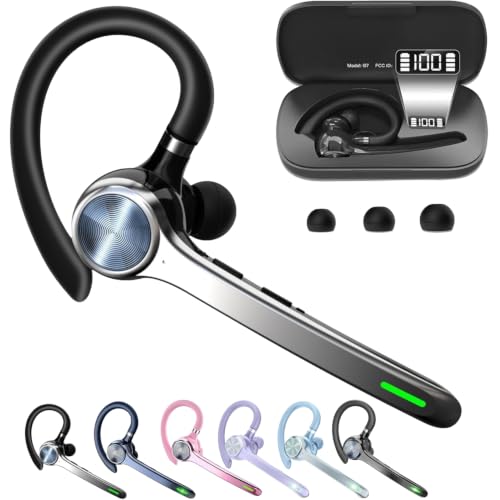
| 1 HEIBAS Bluetooth Headset, 72-Hour Playtime | HEIBAS | 4.33 × 4.33 × 1.97 in | 0.3 lb | Digital case battery display | Check price |
| 2 Logitech Zone Vibe 100 Wireless Headphones | Logitech | 8.8 × 7.7 × 3.4 in | 0.4 lb | Multipoint Bluetooth connectivity | Check price |
| 3 OTYHVV Wireless Headset, 40-Hour Talk Time | OTYHVV | Not listed | Not listed | USB dongle included | Check price |
| 4 Jabra Evolve 20 Wired USB Headset | Jabra | 5.9 × 2.3 × 6.7 in | 0.3 lb | USB-A and USB-C connections | Check price |
| 5 Logitech H390 USB-A Headset | Logitech | 3.23 × 8.35 × 10.24 in | 0.4 lb | Plug-and-play USB-A connection | Check price |
| 6 Arama USB-A Mono Headset | Arama | 7.87 × 1.57 × 3.15 in | 0.3 lb | Lightweight single-ear design | Check price |
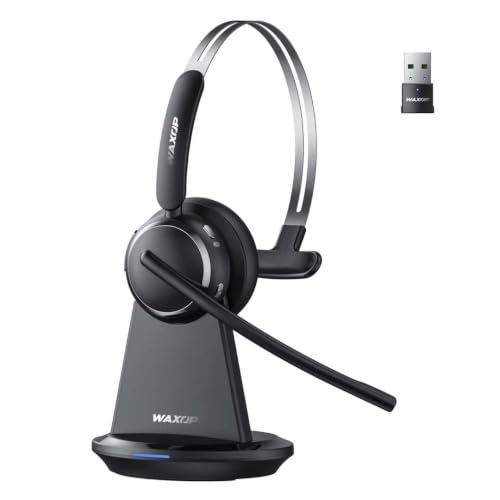
| 7 Waxop Wireless Work Headset, 65-Hour Battery | Waxop | Not listed | 0.2 lb | Included USB dongle | Check price |
| 8 Soothielec Wireless Headset with USB Dongle | Soothielec | Not listed | 1 lb | Bluetooth 5.3 and USB-A dongle | Check price |
Sizes and weights as listed by the manufacturer on Amazon. Check the retailer for current price and availability.
Pros
- Digital case battery display
- Up to 18 to 23 hours of talk time
- Mute button for phone calls
- Dual connection support
Cons
- Mute button works only during phone calls
- Who should skip it: buyers needing an included AC adapter
Pros
- Multipoint Bluetooth connectivity
- Up to 18 hours of stated battery life
- Works with Teams, Google Meet, and Zoom
Cons
- Who should skip it: users who need more than 18 hours between charges
Pros
- USB dongle included
- Charging dock included
- Up to 40 hours of talk time
- Adjustable boom microphone
Cons
- Who should skip it: users who need a two-ear headset

Pros
- USB-A and USB-C connections
- In-line call and volume controls
- Dual-ear design
- Lightweight construction
Cons
- Who should skip it: users who need wireless freedom

Pros
- Plug-and-play USB-A connection
- Inline volume and mute controls
- Rotating noise-canceling microphone
- Long 6.23-foot cable
Cons
- Who should skip it: users who need wireless audio

Pros
- Lightweight single-ear design
- In-line mute and volume controls
- No Bluetooth charging or pairing
Cons
- Who should skip it: users who need stereo audio
Pros
- Included USB dongle
- Dedicated one-touch mute button
- Charging base and USB-C charging
- Lightweight 94-gram design
Cons
- Single-ear mono design, not stereo
- Who should skip it: listeners wanting stereo, two-ear audio

Pros
- Bluetooth 5.3 and USB-A dongle
- Simultaneous laptop and smartphone pairing
- 40-hour stated talk time
- Adjustable headband and memory foam earcups
Cons
- Mute function activates only during calls
- Who should skip it: desk-phone users
Best Wired USB Headset for Straightforward PC Calls: Jabra Evolve 20 Wired USB Headset
Jabra Evolve 20 Wired USB Headset connects by USB-A or USB-C and has in-line call and volume controls, making it a practical fit if you prefer a wired connection. Its 28 mm speakers and noise-canceling microphone are listed features, but the cable limits movement compared with wireless choices. Skip it if you need to walk around during calls without being tethered to your computer.
Best Wireless Headset for Extended Calls: Waxop Wireless Headset with Mic for Work
Waxop Wireless Headset with Mic for Work is a single-ear design weighing 94 g, and its product page lists up to 65 hours of working time and a charging base. It includes a USB dongle and Bluetooth, though buyers should confirm the connection mode their computer and meeting software support. Skip it if you want sound in both ears or prefer a wired headset with no battery to manage.
Related guides: Best Headsets for a Call Center, Best Gaming Headset for a Big Head and Best Headsets for Zoom Calls.
Best Multi-Connection Option: AOC Wireless Headset with Mic, Bluetooth 6.0
AOC Wireless Headset with Mic, Bluetooth 6.0 offers three listed connection modes: 2.4G USB dongle, Bluetooth 6.0, and 3.5 mm wired. The product page specifies up to 45 hours of talk time, but its listing does not identify the 3.5 mm cable details, so check what is included if you plan to use that mode. Skip it if you only need a basic wired USB headset and do not expect to switch between connection types.
Best Single-Ear Wireless Option for Desk Mobility: OTYHVV Wireless Headset, 40-Hour Talk Time
OTYHVV Wireless Headset, 40-Hour Talk Time pairs a 102 g single-ear design with a USB dongle, charging base, and listed talk time of up to 40 hours. The product page says mute control works on computer calls through the dongle, which is useful if you rely on a physical mute button. Skip it if you need stereo listening or want a wired headset that does not need charging.
Key Numbers at a Glance
- Longest listed working time: Waxop Wireless Headset with Mic for Work specifies up to 65 hours.
- OTYHVV Wireless Headset, 40-Hour Talk Time lists up to 40 hours of talk time and a weight of 102 g.
- AOC Wireless Headset with Mic, Bluetooth 6.0 lists up to 45 hours of talk time and three connection modes.
- Logitech H390 USB-A Headset has a 6.23 ft USB-A cable.
How to Choose the Best Headsets for Office Work
Match the connection to your computer and phone
Bottom line: Choose a connection your devices actually support, and check whether switching between them matters. The Arama USB Headset with Microphone for PC and Logitech H390 USB-A Headset use USB-A; the Jabra Evolve 20 Wired USB Headset lists USB-A and USB-C. For wireless use, the Logitech Zone Vibe 100 Lightweight Wireless Over supports multipoint Bluetooth, while the Soothielec Wireless Headset with Mic for Work lists dual pairing and a USB-A adapter. Check your computer’s available ports and whether your phone supports Bluetooth before choosing.
For more peripheral options, browse the PC headsets category. If you are choosing accessories for a particular laptop, the best MacBook Air accessories guide may also help you assess its ports and connection needs.
Decide whether you need one ear or two
Bottom line: A mono headset keeps one ear open; an over-ear or dual-ear design covers both. The Arama and OTYHVV models are single-ear designs, and the Waxop is also described as mono. The Logitech Zone Vibe 100 is over-ear, while the Jabra Evolve 20 is described as dual-ear. Choose based on whether you need to hear people or activity around you while taking calls, or prefer both ears covered for listening.
Check microphone controls and mute behavior
Bottom line: Confirm that mute works in the calling setup you use, not just on a mobile call. The Arama and Logitech H390 list in-line mute controls, while the Jabra Evolve 20 lists in-line call controls. The HEIBAS Bluetooth Headset states its mute button only works during phone calls; the Soothielec listing likewise notes that mute activates only during calls. If you need reliable computer-app mute, check the exact connection and software behavior before purchase.
Compare battery life with your call schedule
Bottom line: A longer stated runtime can reduce charging interruptions, but wired models avoid headset battery upkeep. Listed wireless runtimes differ: the Waxop specifies up to 65 hours of working time, the OTYHVV up to 40 hours of talk time, and the Logitech Zone Vibe 100 up to 18 hours of wireless use. These claims use different descriptions, so do not treat them as directly equivalent; choose a wired model such as the Logitech H390 if you would rather not monitor headset charge.
Consider fit for long work sessions
Bottom line: Use the listed design and weight to narrow the fit, then check the headband and ear-cup style against your preferences. The AOC Wireless Headset with Mic, Bluetooth 5.4 lists a weight of 124 g and memory-foam ear cushions, while the Waxop lists 94 g and a single-ear design. The Logitech Zone Vibe 100 has 40 mm speakers and an over-ear format. Weight and cushion descriptions do not guarantee personal comfort, so prioritize a return policy that suits you if fit is uncertain.
How We Compared These Products
This comparison is based on product-page specifications and descriptions, including connection types, stated microphone controls, listed battery life, and design. The product data includes ratings but no written customer feedback, so this guide does not infer long-term comfort or call quality from those figures. We did not conduct firsthand evaluation.
Which Option Fits Your Home and Devices?
For a wired desk setup, the Jabra Evolve 20 Wired USB Headset offers USB-A or USB-C and in-line controls; choose the Logitech H390 USB-A Headset if you need a listed 6.23 ft cable and USB-A plug-and-play. Skip both if you need Bluetooth mobility or a USB-C-only connection without an adapter.
For wireless calling with more than one connection route, compare the AOC Wireless Headset with Mic, Bluetooth 6.0, which lists dongle, Bluetooth, and wired modes, with the Logitech Zone Vibe 100 Lightweight Wireless Over, which supports multipoint Bluetooth. Skip these if you want the simplicity of a fixed wired USB connection and no battery charging.
Mistakes to Avoid When Choosing an Office Headset
- Assuming USB-C means every connection is supported. Check the product’s stated modes and your device ports; the Jabra lists USB-A and USB-C, while other USB headsets list USB-A.
- Comparing runtime figures as if they use the same measure. Listings describe hours as talk time, wireless use, or working time, so compare like terms and treat figures as manufacturer claims.
- Overlooking how mute works. Verify whether the mute button works with your calling app and connection, especially when the product page limits mute to phone calls.
- Choosing a design without considering your surroundings. A single-ear headset leaves one ear open, while dual-ear and over-ear designs cover both; choose according to how much you need to hear around you.
Frequently Asked Questions
Will these headsets work with a desktop computer?
Several listings state computer compatibility. USB models such as the Arama and Logitech H390 connect by USB-A, while the Jabra Evolve 20 lists USB-A and USB-C; wireless models may connect through Bluetooth or an included dongle. Check your computer’s port and confirm that your meeting app recognizes the headset.
Can I connect one headset to a computer and a phone?
The Logitech Zone Vibe 100 lists multipoint Bluetooth, and the Soothielec Wireless Headset with Mic for Work lists dual pairing. Other models may support Bluetooth or a dongle without stating simultaneous connections, so verify that feature if switching between devices is important.
Is a wired headset better for office calls?
A wired USB headset avoids Bluetooth pairing and charging, which can suit a fixed desk setup. Wireless headsets allow more movement, but require charging and may depend on Bluetooth or a dongle. Choose according to your work habits and available ports.
Do the mute buttons work in computer meetings?
It varies by model and connection. The HEIBAS mute button is specified for phone calls only, while the OTYHVV listing says its mute control works on computer calls through the USB dongle. Confirm app and connection support if physical mute control is essential.
Should I choose a single-ear or dual-ear headset?
A single-ear design, such as the OTYHVV, leaves one ear open for awareness of nearby activity. A dual-ear model such as the Jabra Evolve 20 covers both ears. Neither style suits everyone, so choose based on your workspace and listening preference.




Write Your Review
No reviews yet. Be the first to share your experience!