



If you carry a MacBook Air to class or work, the wrong case can interfere with fit, while a hub without the ports you need can leave a monitor or card reader disconnected. This guide to the best MacBook Air accessories helps you compare model-specific protection, sleeves, privacy and keyboard add-ons, and USB-C hubs for different setups.
Compare at a glance
| Product | Brand | Size | Weight | Stands out for | Price |
|---|---|---|---|---|---|
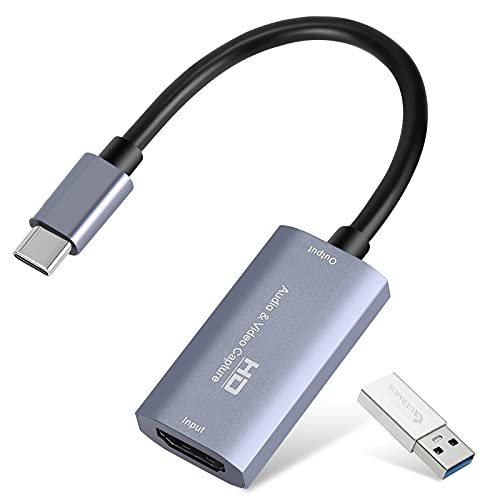
| 1 Melelink 8-in-2 MacBook USB-C Hub | Melelink | Not listed | 0.2 lb | Combines display, data, and card-reader connections | Check price |
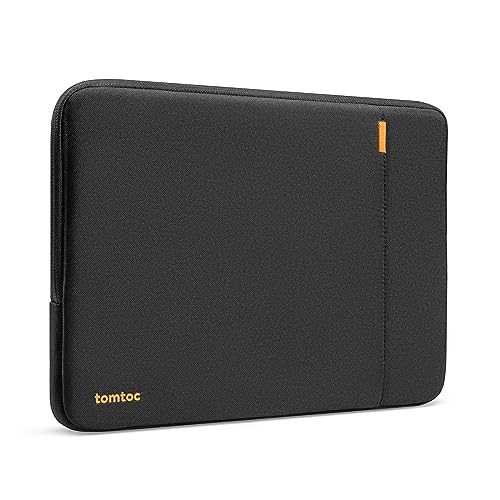
| 2 tomtoc 360° 13-Inch Laptop Sleeve | tomtoc | 12.6 × 9.06 × 1.1 in | 0.5 lb | Reinforced corners and padded interior | Check price |
| 3 Anker 547 MacBook Hub, 4K HDMI | Anker | 0 × 0 × 0 in | 0.2 lb | Several port types in one compact hub | Check price |
| 4 Synerlogic macOS Shortcuts Sticker | Synerlogic | 3.25 × 3.25 × 0.01 in | 0 lb | Shortcuts stay visible on the device | Check price |
| 5 Afterplug macOS Shortcuts Sticker, 52 Shortcuts | Afterplug | 3.35 × 2.95 × 0.01 in | 0 lb | 52 shortcuts grouped by task | Check price |
| 6 Soonjet TPU MacBook Keyboard Cover, 0.11mm | soonjet | 0 × 0 × 0.04 in | Not listed | Thin 0.11mm profile | Check price |
| 7 Soonjet MacBook Air 13-inch Hard Shell Case | soonjet | 11.99 × 8.38 × 0.65 in | Not listed | Designed for MacBook Air M2 through M5 | Check price |
| 8 Soonjet MacBook Air 15-Inch Hard Shell Case | soonjet | 13.78 × 9.84 × 0.75 in | 0.4 lb | Slim, lightweight design | Check price |
Sizes and weights as listed by the manufacturer on Amazon. Check the retailer for current price and availability.
Pros
- Combines display, data, and card-reader connections
- Thunderbolt 3 supports charging and high-speed data
- Reads SD and microSD cards simultaneously
Cons
- Does not fit with a case on the MacBook underside
- M1 MacBooks cannot use both external displays
- Who should skip it: users needing a case-compatible hub
Best for 13-inch owners
Pros
- Reinforced corners and padded interior
- Spill-resistant recycled fabric
- Front accessory pocket
- Compatible with listed MacBook and select other models
Cons
- Who should skip it: owners of laptops exceeding the stated internal dimensions
Best for a desk setup
Pros
- Several port types in one compact hub
- HDMI supports 4K at 60Hz
- Up to 100W charging through the multi-function USB-C port
Cons
- M1, M2, and M3 MacBooks do not support dual external displays
- Who should skip it: MacBook Neo owners

Pros
- Shortcuts stay visible on the device
- Compatible with Air, Pro, iMac, and Mac mini
- Made, printed, and packaged in the USA
Cons
- May leave light adhesive residue when removed
- Who should skip it: owners of MacBook Neo or 11- and 12-inch MacBooks

Pros
- 52 shortcuts grouped by task
- Thin, matte vinyl
- Designed for residue-free removal
Cons
- Who should skip it: owners of dark MacBooks

Pros
- Thin 0.11mm profile
- Washable and reusable
- Backlight-friendly translucent tint
Cons
- Specified for US ANSI keyboards only
- Who should skip it: owners of non-ANSI keyboards

Pros
- Designed for MacBook Air M2 through M5
- Cutouts align with ports, vents, and hinges
- Matte finish helps reduce fingerprints
Cons
- Who should skip it: MacBook Neo 13-inch owners

Pros
- Slim, lightweight design
- Matte, fingerprint-resistant finish
- Hinge-aligned vents
Cons
- Who should skip it: owners of MacBooks other than the specified 15-inch Air models
Best MacBook Air Case for 15-Inch Models: EooCoo Case for MacBook Air 15 inch M5 M4 M3 M2
The EooCoo Case for MacBook Air 15 inch M5 M4 M3 M2 pairs a snap-on polycarbonate shell with a keyboard cover and screen protector, giving 15-inch owners several forms of coverage in one package. It is listed for models A2941, A3114, A3241, and A3448, so check the model number on your laptop before ordering. The included covers and exact-fit design are trade-offs to consider if you prefer a bare keyboard or do not want a shell.
Skip it if you own a 13-inch MacBook Air or want a sleeve rather than a hard shell.
Best MacBook Air Hub for Port Expansion: Anker 547 MacBook Hub, 4K HDMI
The Anker 547 MacBook Hub, 4K HDMI expands the MacBook’s two USB-C ports into HDMI, USB-A, USB-C data, SD, and microSD connections. Its multifunction USB-C port supports up to 100W charging, data up to 40Gb/s, and display output up to 5K at 60Hz; HDMI supports 4K at 60Hz. The product page says M1, M2, and M3 MacBooks do not support dual external displays through both outputs, and the hub is not compatible with MacBook Neo.
Skip it if you need MacBook Neo compatibility or rely on dual external displays with an M1, M2, or M3 MacBook.
Related guides: Best Stocking Stuffers for Gamers, Best Gifts for Office Workers and Best Gifts for Computer Nerds.
Best Protective Sleeve for Travel: tomtoc 360° 13-Inch Laptop Sleeve
The tomtoc 360° 13-Inch Laptop Sleeve is a carry option for compatible 13-inch MacBook Air models, with CornerArmor construction, soft padding, water-resistant recycled fabric, and a front pocket. Its internal dimensions are 11.97 by 8.46 by 0.61 inches, useful figures to compare with your laptop and any accessories you plan to pack. The sleeve adds a separate layer to carry, and it is not a snap-on shell that stays on the computer.
Skip it if you need a 15-inch sleeve or want protection attached directly to the laptop.
Key Numbers at a Glance
- The tomtoc 360° 13-Inch Laptop Sleeve has internal dimensions of 11.97 by 8.46 by 0.61 inches.
- The Melelink 8-in-2 MacBook USB-C Hub lists HDMI output up to 4K at 60Hz and Thunderbolt 3 output up to 5K at 60Hz.
- The Anker 547 MacBook Hub, 4K HDMI lists a multifunction USB-C port with up to 100W charging, 40Gb/s data, and 5K at 60Hz display support.
- The EooCoo Case for MacBook Air 15 inch M5 M4 M3 M2 fits listed model numbers A2941, A3114, A3241, and A3448.
Buying Guide: Best MacBook Air Accessories
Confirm the exact MacBook Air size and model
Bottom line: Match the accessory to your MacBook Air’s size and model number before considering its finish. The EooCoo 15-inch case lists A2941, A3114, A3241, and A3448, while the Soonjet 13-inch case lists A2681, A3113, A3240, and A3449. These are not interchangeable size groups. Check the number printed on the laptop’s underside and compare it with the product’s compatibility list; chip name alone is not enough to establish fit.
Choose a shell or sleeve based on how you carry the laptop
Bottom line: A shell stays on the laptop, while a sleeve gives you a separate padded carrying layer. The 15-inch EooCoo shell includes a keyboard cover and screen protector, whereas the 13-inch tomtoc sleeve has CornerArmor features, soft padding, and a front pocket. A shell’s model fit is critical; for a sleeve, compare its internal dimensions of 11.97 by 8.46 by 0.61 inches with your device and the room you need for any added case. The PC accessories category is useful if you are also comparing other types of add-ons.
Count the ports and check display limits
Bottom line: Choose a hub by its individual ports and your Mac’s display support, not just its port count. The Melelink 8-in-2 MacBook USB-C Hub lists HDMI, Thunderbolt 3, USB-A, USB-C, SD, and microSD connections; its product page says the bottom of the MacBook must be free of a case for the hub to fit. The Anker 547 lists HDMI up to 4K at 60Hz and a multifunction USB-C connection up to 5K at 60Hz, but it notes that M1, M2, and M3 MacBooks do not support two external displays through the hub. For a closer port-by-port comparison, see our best USB-C hubs for MacBook guide.
Consider charging, data, and card-reader needs
Bottom line: Verify what the hub’s USB-C port does before counting it as a charging or display connection. The Anker hub lists up to 100W charging and 40Gb/s data on its multifunction port, as well as separate USB-C data and two USB-A data ports. Melelink lists 100W power delivery input and 85W output, along with SD and microSD readers specified at up to 104Mb/s. Check the port descriptions against your charger, monitor, card, and storage devices. Our USB hubs category offers more options if these port layouts do not match your setup.
Pick keyboard and screen add-ons for the task
Bottom line: A shortcut sticker, keyboard cover, and privacy screen solve different problems, so check fit and use before adding one. The Afterplug shortcut sticker lists 52 macOS shortcuts and says its adhesive removes without residue; the Synerlogic sticker warns that its adhesive may leave light residue. The Soonjet keyboard cover is specified at 0.11mm thick and is for US ANSI layouts, so confirm your keyboard layout first. The Peslv magnetic privacy screen is listed for 13-inch MacBook Air models A2681, A3113, A3240, and A3449, not the 15-inch Air.
How We Compared These Products
This guide is based on product research, not firsthand evaluation. We compared the listed model compatibility, dimensions, materials, port configurations, display and charging specifications, and stated add-on features. Product-page claims are not independent performance findings, and customer feedback is not used here to establish long-term durability.
Which Option Fits Your MacBook Air and Setup?
For 15-inch owners who want a fitted shell and keyboard coverage: The EooCoo Case for MacBook Air 15 inch M5 M4 M3 M2 lists four compatible model numbers and includes a keyboard cover and screen protector. Skip it if you own a 13-inch Air or prefer a separate padded carrying case.
For a desk setup that needs a mix of displays, storage, and USB devices: The Anker 547 MacBook Hub, 4K HDMI lists HDMI, USB-A, USB-C, SD, and microSD connections, with up to 100W charging on its multifunction USB-C port. Skip it if you need MacBook Neo support or dual external displays from an M1, M2, or M3 MacBook.
For 13-inch owners who want a padded bag layer: The tomtoc 360° 13-Inch Laptop Sleeve lists 11.97 by 8.46 by 0.61-inch internal dimensions, plus a front pocket and padded CornerArmor construction. Skip it if you need a 15-inch fit or want a shell that remains attached while using the laptop.
Mistakes to Avoid When Choosing MacBook Air Accessories
- Buying by screen size alone. Check the model number as well as the stated inch size, especially for hard shells and magnetic screens.
- Assuming every USB-C hub supports the same displays. Compare each output’s stated resolution and refresh rate, then verify the Mac’s own external-display support.
- Overlooking a shell’s physical fit with a hub. Melelink says its hub will not fit when a case is on the bottom of the MacBook, so check the design before pairing them.
- Ignoring keyboard layout or finish. Confirm US ANSI compatibility for the Soonjet keyboard cover and choose a sticker color intended for your MacBook finish.
Frequently Asked Questions
How do I check which MacBook Air case fits?
Find the model number on the underside of your MacBook Air and match it to the case’s compatibility list. For example, the EooCoo 15-inch case lists A2941, A3114, A3241, and A3448, while the Soonjet 13-inch case lists different model numbers.
Can a MacBook Air USB-C hub connect two external displays?
The Anker 547 lists HDMI and multifunction USB-C display outputs, but its product page says M1, M2, and M3 MacBooks do not support two external displays through both outputs. Confirm your specific MacBook’s display support before buying a hub for a multi-monitor desk.
Will a USB-C hub fit with a MacBook Air case?
It depends on the hub and case design. Melelink specifically says its 8-in-2 hub will not fit if a case is on the bottom of the MacBook, so check whether your shell covers that area before choosing it.
Should I choose a laptop sleeve or a hard shell?
A hard shell attaches to the laptop, while a sleeve is a separate carry case. The EooCoo 15-inch shell also includes a keyboard cover and screen protector; the tomtoc 13-inch sleeve lists padding, CornerArmor construction, and a front pocket. Choose based on the protection style and exact device size you need.
Does the Peslv privacy screen fit every MacBook Air?
No. The Peslv screen is listed for 13-inch MacBook Air models A2681, A3113, A3240, and A3449. Check your model number and screen size; the listing does not describe it as a 15-inch accessory.






Write Your Review
No reviews yet. Be the first to share your experience!