



For a Ryzen 7 9800X3D gaming build, choose the graphics card around your monitor and workload: the Radeon RX 9070 XT and RTX 5060 Ti models offer distinct 16GB options, while the RX 7600 and RTX 3050 target more modest builds. Before buying, check card clearance, power-supply connectors and capacity, and display outputs; the wrong fit can turn a promising upgrade into a parts-compatibility problem.
Compare at a glance
| Product | Brand | Size | Weight | Stands out for | Price |
|---|---|---|---|---|---|
| 1 XFX Swift RX 9060 XT 16GB | XFX | 11.42 × 4.92 × 0.04 in | Not listed | 16GB GDDR6 memory | Check price |
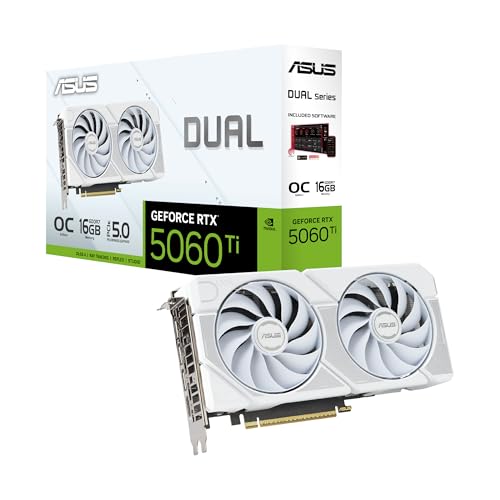
| 2 ASUS Dual RTX 5060 Ti 16GB White OC | ASUS | 9 × 4.7 × 0.1 in | 1.4 lb | 16GB GDDR7 memory | Check price |
| 3 ASUS Prime Radeon RX 9070 XT 16GB | ASUS | 12.3 × 5.1 × 2 in | 3.3 lb | 16GB of GDDR6 memory | Check price |
| 4 ASUS Dual RTX 5060 Ti 16GB OC | ASUS | 9 × 4.7 × 2 in | 1.4 lb | 16GB GDDR7 memory | Check price |
| 5 ASRock RX 7600 Challenger Pro 8GB OC | ASRock | 11.93 × 5.16 × 0.04 in | Not listed | Triple-fan cooling with low-temperature fan stop | Check price |
| 6 MSI RTX 3060 Ventus 2X 12G OC V1 | msi | Not listed | Not listed | 12GB GDDR6 memory | Check price |
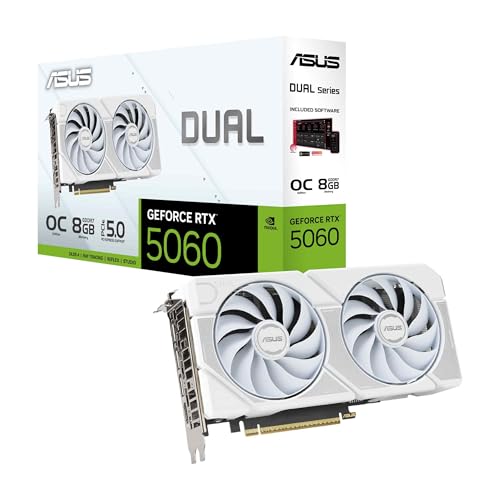
| 7 ASUS Dual RTX 5060 Ti OC 8GB | ASUS | 9 × 4.7 × 2 in | 1.4 lb | Compact 2.5-slot design | Check price |
| 8 STORMCRAFT Skyhawk PRO RTX 5070 Ti PC | STORMCRAFT | 18.5 × 9 × 16.9 in | Not listed | Ryzen 7 9800X3D processor | Check price |
| 9 MSI RTX 3050 Ventus 2X 6G OC | msi | 7.4 × 4.3 × 0.1 in | 1.3 lb | 7.4-inch listed length | Check price |
| 10 ASUS TUF Gaming RTX 5060 8GB OC | ASUS | 11.9 × 5.3 × 2.4 in | 2.5 lb | NVIDIA Blackwell architecture and DLSS 4 | Check price |
Sizes and weights as listed by the manufacturer on Amazon. Check the retailer for current price and availability.
Pros
- 16GB GDDR6 memory
- Triple-fan cooling design
- HDMI and two DisplayPort outputs
Cons
- Who should skip it: buyers needing confirmed power and clearance specifications
Pros
- 16GB GDDR7 memory
- Dual BIOS profiles
- 0dB technology for light gaming
Cons
- Who should skip it: builders needing a single-slot graphics card
Pros
- 16GB of GDDR6 memory
- Dual BIOS profiles
- 2.5-slot design
Cons
- Who should skip it: builders without 12.3 inches of clearance

Pros
- 16GB GDDR7 memory
- Dual BIOS profiles
- 2.5-slot design
- 0dB technology for light gaming
Cons
- Who should skip it: builders lacking 2.5-slot clearance

Pros
- Triple-fan cooling with low-temperature fan stop
- Four display outputs
- Metal backplate
- Single 8-pin power connector
Cons
- 8GB of memory may constrain some high-resolution texture workloads
- Who should skip it: builders with cases that cannot fit a 303 mm card

Pros
- 12GB GDDR6 memory
- Three DisplayPort outputs
- HDMI 2.1 output
Cons
- Who should skip it: builders needing multiple HDMI outputs

Pros
- Compact 2.5-slot design
- Dual BIOS profiles
- 0dB fan technology
- GDDR7 memory
Cons
- 8GB VRAM may constrain memory-intensive workloads
- Who should skip it: buyers who need more than 8GB VRAM

Pros
- Ryzen 7 9800X3D processor
- RTX 5070 Ti with 16GB GDDR7
- 32GB DDR5-6000 memory
- 2TB NVMe Gen4 SSD
Cons
- Who should skip it: buyers who need a portable computer

Pros
- 7.4-inch listed length
- One DisplayPort and two HDMI outputs
- 6GB GDDR6 memory
Cons
- Who should skip it: users who need more than 6GB of graphics memory

Pros
- NVIDIA Blackwell architecture and DLSS 4
- Three Axial-tech fans
- GPU Tweak III controls
Cons
- Who should skip it: users needing more than 8GB VRAM
Key Numbers at a Glance
- Memory ranges from 6GB GDDR6 on the MSI RTX 3050 Ventus 2X 6G OC to 16GB on the XFX Swift RX 9060 XT 16GB.
- The ASRock RX 7600 Challenger Pro 8GB OC measures 303 mm long, 131 mm wide, and 45 mm high.
- The ASRock RX 7600 Challenger Pro 8GB OC lists a recommended 550W power supply and one 8-pin connector.
- The ASUS Dual RTX 5060 Ti 16GB OC and ASUS Dual RTX 5060 Ti 16GB White OC are both 2.5-slot designs.
Best Graphics Card for 1440p Gaming: ASUS Prime Radeon RX 9070 XT 16GB
ASUS Prime Radeon RX 9070 XT 16GB pairs 16GB of GDDR6 with a 2.5-slot design, making it a candidate for a gaming build prioritizing a larger memory capacity and a relatively restrained card thickness. Its dual BIOS offers Quiet and Performance profiles, and the listing specifies 0dB technology for light gaming. The product page does not state a power-supply recommendation or card dimensions, so verify those before purchase. Skip it if your case clearance or power supply is uncertain.
Best 16GB GeForce Option: ASUS Dual RTX 5060 Ti 16GB OC
ASUS Dual RTX 5060 Ti 16GB OC combines 16GB GDDR7 with NVIDIA Blackwell and DLSS 4 support, plus HDMI 2.1b and DisplayPort 2.1b outputs. Its 2.5-slot format, dual BIOS, and 0dB feature are useful details for builders checking case space and light-use fan behavior. The listing does not give card length or power requirements. Skip it if your priority is a card with published physical dimensions and PSU guidance.
Best Compact-Thickness RTX 5060 Ti: ASUS Dual RTX 5060 Ti 16GB White OC
ASUS Dual RTX 5060 Ti 16GB White OC has 16GB GDDR7, a 2.5-slot design, and HDMI 2.1b plus DisplayPort 2.1b. Its white finish suits a build where component color matters, while dual BIOS provides Quiet and Performance profiles. The product page does not state card length or power requirements, and color alone does not determine case compatibility. Skip it if you need confirmed dimensions before ordering.
Best With Published Clearance Details: ASRock RX 7600 Challenger Pro 8GB OC
ASRock RX 7600 Challenger Pro 8GB OC specifies a 303 mm length, 131 mm width, 45 mm height, one 8-pin power connector, and a recommended 550W PSU. Its 8GB GDDR6 and triple-fan cooler give builders concrete capacity and fit details to compare against their case and power supply. The card uses PCIe 4.0 x8, and its memory capacity is lower than the 16GB choices here. Skip it if your workload calls for more than 8GB of graphics memory.
Best for a Lower-Power Existing Build: MSI RTX 3050 Ventus 2X 6G OC
MSI RTX 3050 Ventus 2X 6G OC is the lowest-memory card in this comparison, with 6GB GDDR6, a 96-bit interface, and one DisplayPort plus two HDMI 2.1a outputs. Those details can suit a basic display setup or an older desktop where the buyer is comparing entry-level choices, but the product page does not state power requirements or card dimensions. Its 6GB capacity is also the smallest here. Skip it if you want a 16GB card or need stated clearance and PSU figures.
How to Choose a Graphics Card for AMD Ryzen 7 9800X3D
Choose for your monitor and workload
Bottom line: Match the GPU tier to the resolution and games you actually play, rather than buying by CPU name alone. The listings cover 8GB, 12GB, and 16GB graphics cards, but do not provide comparable frame-rate benchmarks. For a more focused comparison by resolution, see our best graphics cards for 1440p gaming guide. Check the requirements of your games and the resolution and refresh rate of your monitor before settling on a GPU.
Compare memory capacity with your workload
Bottom line: If you want more headroom for memory-heavy work, start by comparing the 16GB models. The XFX Swift RX 9060 XT 16GB and ASUS Prime Radeon RX 9070 XT 16GB list 16GB GDDR6; the ASUS Dual RTX 5060 Ti 16GB cards use 16GB GDDR7. The MSI RTX 3060 Ventus 2X 12G OC V1 has 12GB, while the RTX 3050 has 6GB. Memory capacity alone does not establish performance, so check the requirements of your games and creative applications; our best graphics cards for Blender guide covers a more specific creative workload.
Check the case before ordering
Bottom line: Compare both card length and slot thickness with the space available in your case. The ASRock RX 7600 Challenger Pro is 303 mm long and 2.5 slots thick; the ASUS Dual RTX 5060 Ti models also specify 2.5 slots, but their product pages here do not state length. Do not assume a shared GPU family means shared dimensions. Measure usable case clearance and check the exact card model’s manufacturer specifications before purchase.
Verify power supply and connectors
Bottom line: Confirm the PSU capacity and connector match the exact card, not just the PC’s CPU platform. The ASRock RX 7600 listing calls for a recommended 550W PSU and one 8-pin connector, while power requirements are not stated for several other cards in this roundup. A power supply’s wattage alone does not verify its connectors or suitability. Check the graphics-card and PSU manufacturer specifications; our power supplies category is useful when planning a PSU replacement.
Match display outputs and features
Bottom line: Choose outputs that match your existing monitor cables and display setup. The ASUS Dual RTX 5060 Ti 16GB cards list HDMI 2.1b and DisplayPort 2.1b, while the MSI RTX 3060 Ventus 2X 12G OC V1 lists three DisplayPort 1.4a outputs and one HDMI 2.1 output. NVIDIA models in this selection list DLSS 4, but the cards differ in memory and design. For specialized compute workloads, compare software needs alongside hardware, using our best graphics cards for AI guide as a separate reference.
How We Compared These Products
This guide is based on product research, not firsthand evaluation. We compared the listed memory, interfaces, outputs, physical-fit details, cooling and design features, and power guidance where stated; customer ratings are not treated as proof of performance, and comparable benchmark results are not listed.
Which Option Fits Your Build?
For a 16GB GeForce build: the ASUS Dual RTX 5060 Ti 16GB OC lists 16GB GDDR7 and HDMI 2.1b and DisplayPort 2.1b. Skip it if you need published card length or PSU requirements before choosing.
For a card with explicit clearance and PSU figures: the ASRock RX 7600 Challenger Pro 8GB OC states its 303 mm length and recommended 550W PSU with one 8-pin connector. Skip it if 8GB does not fit your workload or your case cannot accommodate its dimensions.
For a higher-capacity Radeon choice: the ASUS Prime Radeon RX 9070 XT 16GB lists 16GB GDDR6, a 2.5-slot design, and dual BIOS. Skip it if you cannot verify the card’s length and power requirements for your build.
Mistakes to Avoid When Choosing a Graphics Card
- Choosing by CPU pairing alone. A Ryzen 7 9800X3D does not tell you which card suits your monitor; compare your games, resolution, and graphics settings.
- Assuming every card fits. Check the exact model’s length and thickness against case clearance, since those details differ or are absent across these listings.
- Ignoring the power connection. Verify PSU capacity and connector requirements for the card; the RX 7600 listing specifies one 8-pin connector and a recommended 550W PSU.
- Picking memory by number alone. Compare the software or game’s requirements and its graphics features as well as VRAM; capacity does not establish overall performance.
Frequently Asked Questions
Will these graphics cards work with the Ryzen 7 9800X3D?
These are desktop graphics cards, and the product data does not identify a CPU-specific restriction for the Ryzen 7 9800X3D. Check motherboard slot compatibility, case clearance, PSU capacity, and power connectors for your complete build before buying.
Is a 16GB graphics card better for this processor?
Not automatically. The 16GB models provide more listed graphics memory than the 8GB and 6GB choices, but the right capacity depends on your games or applications; the product data does not include comparable performance benchmarks.
Which listed card has dimensions and power guidance?
The ASRock RX 7600 Challenger Pro 8GB OC lists dimensions of 303 × 131 × 45 mm, a recommended 550W power supply, and one 8-pin connector. Verify those requirements against your case and PSU before ordering.
Do all the listed cards support the same display connections?
No. For example, the ASUS Dual RTX 5060 Ti 16GB models list HDMI 2.1b and DisplayPort 2.1b, while the MSI RTX 3060 Ventus 2X 12G OC V1 lists three DisplayPort 1.4a outputs and one HDMI 2.1 output. Match the exact card’s outputs to your monitors and cables.
Is the STORMCRAFT Skyhawk PRO a graphics card?
No. It is a prebuilt gaming PC listing that includes a Ryzen 7 9800X3D and RTX 5070 Ti, not a standalone graphics card. Compare it as a complete system rather than assuming it can be evaluated like an individual GPU.


Write Your Review
No reviews yet. Be the first to share your experience!