



If you render in Blender on a tight budget or are planning a creator workstation, the right graphics card depends on scene size, rendering workload, and the rest of your PC. The listed RTX models have 16GB of GDDR7 and are positioned for modern graphics and creator tasks, while the GT 730 and GT 210 listings focus on display output rather than Blender rendering.
Compare at a glance
| Product | Brand | Size | Weight | Stands out for | Price |
|---|---|---|---|---|---|
| 1 nkomax GPU Brace Support, 74-120 mm | nkomax | 0.6 × 0.6 × 2.9 in | 0.1 lb | Aluminum construction | Check price |
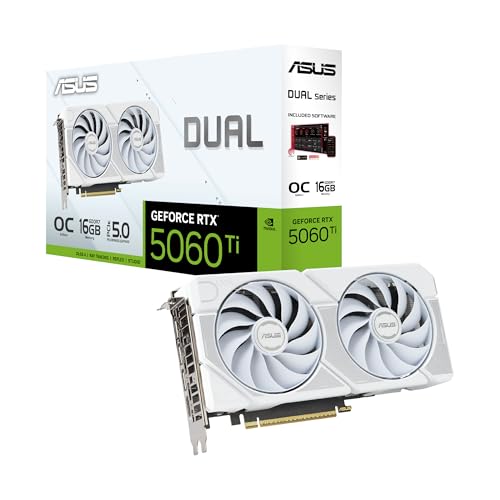
| 2 ASUS Dual RTX 5060 Ti 16GB White OC | ASUS | 9 × 4.7 × 0.1 in | 1.4 lb | 16GB GDDR7 memory | Check price |
| 3 SOYO GeForce GT 730 4GB Quad HDMI | SOYO | 6.38 × 6.38 × 0.04 in | Not listed | Four HDMI display outputs | Check price |
| 4 ASUS Dual RTX 5060 Ti 16GB OC | ASUS | 9 × 4.7 × 2 in | 1.4 lb | 16GB GDDR7 memory | Check price |
| 5 MAXSUN Radeon RX 550 4GB ITX | maxsun | 7.28 × 1.37 × 0.04 in | 0.4 lb | Compact ITX card design | Check price |
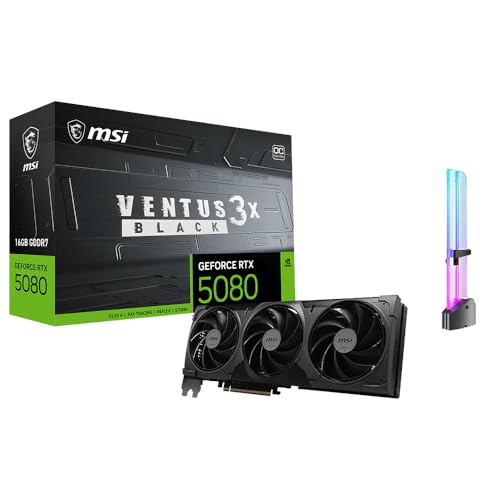
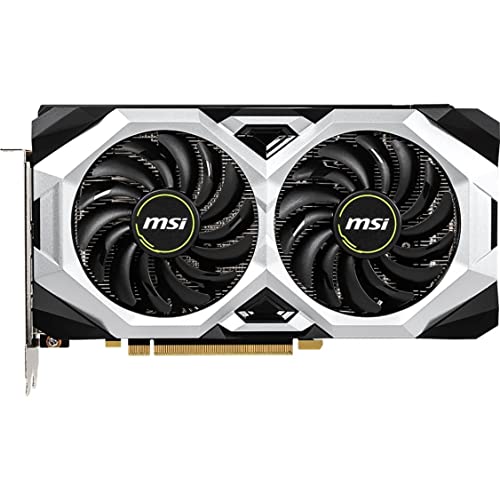
| 6 MSI GeForce RTX 5080 Ventus 3X OC | msi | Not listed | Not listed | 16GB GDDR7 memory | Check price |
| 7 QTHREE GeForce GT 210 1GB Graphics Card | QTHREE | Not listed | Not listed | Low-profile bracket included | Check price |
| 8 QTHREE GeForce GT 730 4GB | QTHREE | Not listed | Not listed | Four display outputs | Check price |
| 9 MSI RTX 5070 Ti Gaming Trio OC 16GB | msi | 15.2 × 8.5 × 0.04 in | 4.2 lb | 16GB of GDDR7 memory | Check price |
Sizes and weights as listed by the manufacturer on Amazon. Check the retailer for current price and availability.
Pros
- Aluminum construction
- Adjustable 74-120 mm height
- Magnetic base
- Cushioning anti-scratch pad
Cons
- Who should skip it: owners needing support outside 74-120 mm
Pros
- 16GB GDDR7 memory
- Dual BIOS profiles
- 0dB technology for light gaming
Cons
- Who should skip it: builders needing a single-slot graphics card
Best for an older PC
Pros
- Four HDMI display outputs
- 4GB of DDR3 memory
- Stated 38W TDP
- Compact card dimensions
Cons
- 64-bit memory bus
- Who should skip it: gamers seeking graphics-heavy performance
Best for a compact creator build

Pros
- 16GB GDDR7 memory
- Dual BIOS profiles
- 2.5-slot design
- 0dB technology for light gaming
Cons
- Who should skip it: builders lacking 2.5-slot clearance

Pros
- Compact ITX card design
- Three types of display output
- 4GB GDDR5 memory
Cons
- Who should skip it: users needing more than 4GB VRAM
Pros
- 16GB GDDR7 memory
- Three DisplayPort 2.1b outputs
- GPU holder included
Cons
- Who should skip it: builders needing confirmed clearance or power requirements

Pros
- Low-profile bracket included
- HDMI and VGA outputs
- No external power supply required
Cons
- Who should skip it: users needing Windows 11 support or AAA gaming

Pros
- Four display outputs
- Low-profile design
- No external power connection
Cons
- Requires a PCIe x8 lane slot and 300W or greater power supply
- Who should skip it: users needing graphics for demanding workloads

Pros
- 16GB of GDDR7 memory
- Three DisplayPort 2.1a outputs
- Cooling features include airflow control
Cons
- Who should skip it: builders with limited card clearance
Best Blender Graphics Card for Everyday Creator Work: ASUS Dual RTX 5060 Ti 16GB OC
The ASUS Dual RTX 5060 Ti 16GB OC is a sensible candidate for a Blender workstation when you want 16GB of GDDR7 and a comparatively compact 2.5-slot card. Its listed OC mode reaches 2632 MHz, and it includes a Quiet and Performance BIOS toggle. The listing does not provide Blender benchmark results, so compare independent results for your scene type before treating it as a performance guarantee. Skip it if your workload calls for a higher graphics tier or your case cannot accommodate its dimensions.
See the ASUS Dual RTX 5060 Ti 16GB White OC on Amazon.
Best Blender Graphics Card for Heavier Creator Work: MSI RTX 5070 Ti Gaming Trio OC 16GB
The MSI RTX 5070 Ti Gaming Trio OC 16GB combines 16GB of GDDR7 with a three-fan TRI FROZR 4 cooling design. Its product information also lists three DisplayPort 2.1a outputs and HDMI 2.1b, useful if the workstation connects multiple modern displays. The listing does not state card dimensions or a power requirement, so check MSI’s product documentation and your case and PSU before buying. Skip it if you need a compact card or only want additional outputs for office displays.
See the MSI RTX 5070 Ti Gaming Trio OC 16GB on Amazon.
Best Blender Graphics Card for a High-End Creator Build: MSI GeForce RTX 5080 16G Ventus 3X OC Black
The msi GeForce RTX 5080 16G Ventus 3X OC Black is explicitly marketed for 3D rendering and creator workloads, including Blender, and has 16GB of GDDR7. It lists three DisplayPort 2.1b outputs, HDMI 2.1b, and a GPU holder accessory. That makes it worth considering for a higher-tier workstation, but the product data does not include Blender benchmark figures, card dimensions, or power requirements. Skip it if your scenes are modest or your system cannot meet the card’s verified space and power requirements.
See the msi GeForce RTX 5080 16G Ventus 3X OC Black on Amazon.
Key Numbers at a Glance
- The ASUS Dual RTX 5060 Ti 16GB OC lists an OC mode of 2632 MHz and a default mode of 2602 MHz.
- The ASUS Dual RTX 5060 Ti 16GB White OC is a 2.5-slot card with 16GB of GDDR7.
- The QTHREE GeForce GT 730 4GB lists 30W power consumption and four outputs: two HDMI, VGA, and DisplayPort.
- The SOYO GeForce GT 730 4GB Quad HDMI lists 38W TDP and four HDMI 2.0 outputs.
- The QTHREE GeForce GT 210 Graphics Card,1024 MB DDR3 has 1GB of DDR3 and supports up to two monitors.
How to Choose the Best Graphics Cards for Blender
GPU memory and scene size
Bottom line: Favor a card with 16GB of VRAM when large scenes or detailed assets are part of your Blender work. Both ASUS RTX 5060 Ti variants, the MSI RTX 5070 Ti, and the MSI RTX 5080 list 16GB of GDDR7. The GT 730 cards list 4GB, and the QTHREE GT 210 lists 1GB of DDR3, so those older display-focused cards are not like-for-like alternatives for memory-heavy rendering. Check your typical scene requirements and project files before choosing.
Blender rendering capability, not gaming language
Bottom line: Choose from the RTX cards for GPU-rendering workloads, and verify Blender-specific results for your rendering engine. The MSI RTX 5080 product page directly names Blender and GPU-accelerated rendering; the ASUS RTX 5060 Ti listings identify NVIDIA Blackwell architecture, and the MSI RTX 5070 Ti listing identifies the same architecture. These details do not establish a render-time ranking. The listed GT 730 and GT 210 cards emphasize displays and basic graphics, so do not mistake their monitor outputs for evidence of Blender rendering suitability.
Case clearance, slots, and cooling
Bottom line: Confirm card length, thickness, and airflow clearance against your actual case before ordering. The ASUS RTX 5060 Ti models are specified as 2.5-slot designs, while the MSI RTX 5070 Ti uses a three-fan cooling design; the product information here does not state exact card dimensions for these models. The GT 730 and GT 210 listings describe low-profile or compact designs, but verify the exact card and bracket configuration if your case is small. For more component comparisons, browse our graphics cards buying guides.
Power supply and connectors
Bottom line: Check the exact card’s power draw and connector requirements, then compare them with your PSU and available cables. The QTHREE GT 730 listing states 30W and no external power supply; the SOYO GT 730 lists a 38W TDP. Comparable wattage and connector details are not included for the RTX models here, so use the manufacturer documentation rather than assuming a PSU requirement from the GPU name. Our power supply guide for RTX builds can help you think through PSU selection, though its focus is a different GPU class.
Ports and your display setup
Bottom line: Match the card’s physical outputs to your monitors, but do not choose a Blender GPU on port count alone. The SOYO GT 730 provides four HDMI 2.0B outputs, while the QTHREE GT 730 has two HDMI ports, DisplayPort, and VGA. The ASUS RTX 5060 Ti listings specify HDMI 2.1b and DisplayPort 2.1b, and the MSI RTX 5080 specifies three DisplayPort 2.1b ports and HDMI 2.1b. Check monitor inputs and the exact card’s output configuration before purchase.
Older cards and Blender expectations
Bottom line: Treat the GT 730 and GT 210 as basic display-upgrade candidates, not substitutes for the listed RTX creator cards. The QTHREE GT 210 has 1GB DDR3 and is listed as incompatible with Windows 11, while the QTHREE GT 730 lists 4GB DDR3 and Windows 11 support. That distinction matters if you are upgrading an older office PC, but neither card’s listing establishes suitability for current Blender rendering workflows. If gaming is also a priority, our gaming laptop guide for Minecraft covers a different system type and should not be used as a desktop GPU benchmark.
How We Compared These Products
This guide is based on product research, comparing listed memory, architecture, outputs, physical design details, and stated workload positioning. The product pages do not provide a consistent set of Blender benchmark results, dimensions, power requirements, or customer feedback that would support a controlled performance ranking, so recommendations are conditional on your workload and system checks.
Which Option Fits Your Workstation?
For a compact creator build with 16GB VRAM: ASUS Dual RTX 5060 Ti 16GB OC combines 16GB GDDR7 with a 2.5-slot design, and its dual BIOS offers Quiet and Performance profiles. Skip it if your case clearance or PSU cannot be confirmed.
For a workstation aimed at heavier rendering tasks: msi GeForce RTX 5080 16G Ventus 3X OC Black is explicitly positioned for Blender and lists 16GB GDDR7, plus a GPU holder accessory. Skip it if you cannot verify its dimensions and power requirements or do not need its higher-tier positioning.
For an older PC that mainly needs multiple displays: SOYO GeForce GT 730 4GB Quad HDMI lists four HDMI 2.0B outputs and a 38W TDP. Skip it if your main goal is Blender GPU rendering rather than display connectivity.
Mistakes to Avoid When Choosing a Blender Graphics Card
- Choosing by model number alone. Compare Blender-specific results and memory capacity for your actual workload; the listings do not establish a reliable performance order.
- Ignoring case and slot clearance. Check the exact card dimensions in the manufacturer documentation, especially for multi-fan designs and compact cases.
- Assuming the existing PSU is sufficient. Confirm the card’s power requirement and connectors, then compare them with the PSU label and available cables.
- Confusing display outputs with rendering capability. Several GT 730 variants offer multiple monitor connections, but port count does not show how quickly a card renders Blender scenes.
Frequently Asked Questions
How much VRAM should a Blender graphics card have?
It depends on scene complexity and the assets you use. The RTX cards listed here have 16GB of GDDR7, compared with 4GB on the GT 730 models and 1GB on the GT 210. Those figures describe capacity, not render speed.
Are the GT 730 cards suitable for Blender?
The product listings emphasize basic display and multimedia use, not Blender rendering performance. The SOYO GT 730 has four HDMI outputs, and the QTHREE GT 730 lists 4GB DDR3, but you should seek Blender-specific compatibility and performance information before relying on either for rendering.
Is the RTX 5060 Ti or RTX 5070 Ti a better fit?
Both listings identify NVIDIA Blackwell, and each card has 16GB of GDDR7. The ASUS Dual RTX 5060 Ti 16GB OC specifies a 2.5-slot design, while the MSI RTX 5070 Ti Gaming Trio OC 16GB lists a three-fan cooler. The product information does not include comparable Blender benchmarks, so decide by verified performance results, case fit, and power needs.
Can I use a card with four HDMI outputs for Blender?
Monitor outputs and rendering capability are separate considerations. The SOYO GeForce GT 730 4GB Quad HDMI lists four HDMI 2.0B ports, which can suit a multi-display setup, but its product information does not establish strong Blender rendering performance.
What should I check before installing a new graphics card?
Confirm the card’s length, thickness, motherboard slot, power connectors, PSU capacity, and monitor connections using the card and PC documentation. The product pages here do not state every RTX card’s dimensions or power requirements, so verify those details for the exact model.



Write Your Review
No reviews yet. Be the first to share your experience!