

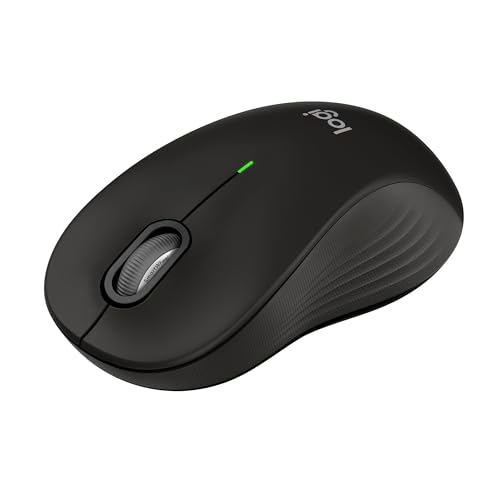


For a larger hand, a full-size contoured mouse is a sensible starting point for everyday work, while a vertical shape suits shoppers who want a different wrist and forearm position. For gaming, prioritize programmable controls and a wired or wireless connection that fits your setup. This guide to the best mouse for big hands compares fit, connectivity, scrolling, and practical trade-offs before you choose.
Compare at a glance
| Product | Brand | Size | Weight | Stands out for | Price |
|---|---|---|---|---|---|
| 1 Anker 2.4G Wireless Vertical Mouse | Anker | 3.98 × 3.23 × 3.15 in | 0.3 lb | Three selectable DPI settings | Check price |
| 2 Logitech Signature M550 L Wireless Mouse | Logitech | Not listed | 0.2 lb | Designed for larger hands | Check price |
| 3 Redragon BM-2995 Large Wireless Gaming Mouse | Redragon | 4.96 × 3.85 × 0.1 in | Not listed | Three connection modes | Check price |
| 4 Logitech Signature Comfort Plus M850 L Mouse | Logitech | 4.8 × 2.93 × 0.1 in | 0.2 lb | Built-in palm cushion | Check price |
| 5 Razer Basilisk V3 Wired Gaming Mouse | Razer | 2.96 × 5.12 × 1.67 in | 0.2 lb | 11 programmable buttons | Check price |
| 6 Logitech Signature M650 L Wireless Mouse | Logitech | 4.65 × 2.58 × 1.63 in | 0.2 lb | Large size designed for larger hands | Check price |
| 7 ProtoArc EM11 Pro Large-Hand Ergonomic Mouse | ProtoArc | 6.06 × 3.38 × 0.1 in | 0.3 lb | Side scrolling for wide documents and timelines | Check price |
| 8 Acer Wireless Mouse, 4,000 DPI | Acer | 4.9 × 2.7 × 0.1 in | 0.2 lb | Five adjustable DPI levels | Check price |
Sizes and weights as listed by the manufacturer on Amazon. Check the retailer for current price and availability.
Pros
- Three selectable DPI settings
- Dedicated next and previous buttons
- Receiver stores inside the mouse
Cons
- Two AAA batteries are not included
- Who should skip it: left-handed users
Pros
- Designed for larger hands
- Quiet clicks with SilentTouch
- Bluetooth and Logi Bolt connectivity
- Up to 24-month battery life
Cons
- Who should skip it: users who prefer a smaller mouse
Pros
- Three connection modes
- Bluetooth supports three devices
- Programmable buttons and macros
- Rechargeable battery with wired use while charging
Cons
- Who should skip it: Mac users needing driver-based customization

Pros
- Built-in palm cushion
- Quiet clicks
- Pairs with up to three devices
- Broad operating system compatibility
Cons
- Who should skip it: left-handed users needing a left-hand shape

Pros
- 11 programmable buttons
- Switchable free-spin and tactile scroll modes
- Thumb rest and ergonomic shape
- 11 customizable RGB zones
Cons
- Who should skip it: wireless-only users
Pros
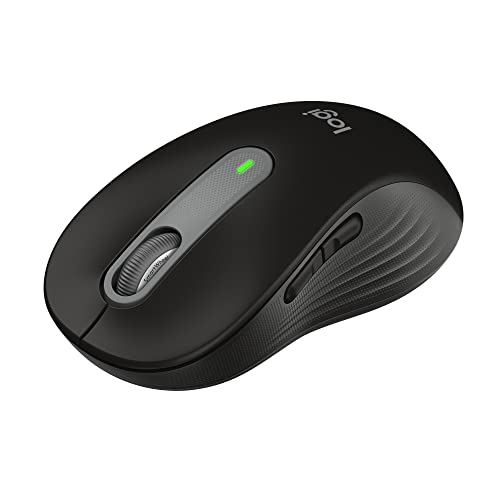
- Large size designed for larger hands
- Bluetooth and Logi Bolt connectivity
- Customizable side buttons
- Up to 24 months of stated battery life
Cons
- Large size may not suit smaller hands
- Who should skip it: users who need a compact mouse

Pros
- Side scrolling for wide documents and timelines
- Three-device connectivity
- Adjustable sensitivity up to 7200 DPI
- Rechargeable battery
Cons
- Who should skip it: users with hands under 7.5 inches
- Vertical grip may take 1 to 2 weeks to adjust to

Pros
- Five adjustable DPI levels
- Forward and back buttons
- Receiver stores inside the mouse
- Battery warning indicator
Cons
- AA battery not included
- Who should skip it: users whose devices lack USB-A ports
Best Large-Hand Everyday Mouse: Logitech Signature M550 L Wireless Mouse
The Logitech Signature M550 L Wireless Mouse is explicitly sized for larger hands and combines a contoured shape, rubber side grips, and a soft thumb area. Its SmartWheel switches between precise scrolling and faster movement through long pages, and it connects by Bluetooth Low Energy or Logi Bolt receiver. The trade-off is that the product page does not specify programmable side buttons for this model.
Skip it if you want a vertical grip or need the listed multi-device switching of another model.
Best Vertical Mouse for Measured Hand Fit: ProtoArc EM11 Pro Large-Hand Ergonomic Mouse
The ProtoArc EM11 Pro Large-Hand Ergonomic Mouse is designed for hands 7.5 to 8.5 inches long, a useful fit check before buying a vertical mouse. It offers three-device connectivity, adjustable sensitivity up to 7200 DPI, and a side scroll wheel for spreadsheets or editing timelines. The vertical grip can feel unfamiliar at first, and the manufacturer recommends allowing 1 to 2 weeks to adjust.
Skip it if your hand is shorter than 7.5 inches or you prefer a conventional mouse shape.
Best for Programmable Gaming Controls: Razer Basilisk V3 Wired Gaming Mouse
The Razer Basilisk V3 Wired Gaming Mouse lists 11 programmable buttons, a thumb rest, and a 26K DPI optical sensor, giving players controls to map for game actions and shortcuts. Its HyperScroll tilt wheel switches between free-spinning and tactile modes. It is wired, so it is not the fit for someone who wants a wireless desk setup, and the product page does not give a hand-size measurement.
Skip it if wireless connectivity or a stated large-hand size is a priority.
Best for Multi-Device Work: Logitech Signature Plus M750 L Wireless Mouse
The Logitech Signature Plus M750 L Wireless Mouse is described as a large-hand model and can pair with up to three Bluetooth devices. Its SmartWheel, customizable side buttons, and stated battery life of up to 24 months suit a desk shared by work and personal devices. SilentTouch is specified as reducing click noise by 90 percent, but this mouse does not offer the vertical shape of the ProtoArc.
Skip it if you need a vertical grip or prefer a rechargeable mouse.
Key Numbers at a Glance
- Hand-fit range: ProtoArc EM11 Pro Large-Hand Ergonomic Mouse is designed for 7.5 to 8.5-inch hands.
- Maximum listed sensitivity: ProtoArc EM11 Pro Large-Hand Ergonomic Mouse adjusts up to 7200 DPI.
- Programmable controls: Razer Basilisk V3 Wired Gaming Mouse has 11 programmable buttons.
- Device pairing: Logitech Signature Plus M750 L Wireless Mouse pairs with up to three Bluetooth devices.
- Stated battery life: Logitech Signature M550 L Wireless Mouse is rated for up to 24 months on one AA battery.
How to Choose the Best Mouse for Big Hands
Size, shape, and grip
Bottom line: Check the fit details and shape before choosing by feature count. The ProtoArc EM11 Pro is specified for hand lengths of 7.5 to 8.5 inches, while the Logitech Signature M550 L is described as a full-size mouse for larger hands. The Redragon BM-2995 Large Wireless Gaming Mouse is described as suitable for medium to larger hands and has finger rests on both sides. Measure from the base of your palm to the tip of your middle finger, then compare that measurement with the product guidance; a label such as “large” alone does not establish an exact fit.
Shape matters as much as overall size. A vertical mouse changes your hand position, while a conventional contoured mouse keeps a more familiar grip. For a broader discussion of grip choices, see our guide to best mice for fingertip grip.
Connection type and device switching
Bottom line: Match the connection to your computer’s available ports and the devices you switch between. The Logitech Signature M550 L works through Bluetooth Low Energy or a Logi Bolt USB receiver, while the Anker 2.4G Wireless Vertical Mouse uses a USB receiver and does not connect over Bluetooth. The Redragon BM-2995 offers Bluetooth, 2.4 GHz receiver, and USB-C wired modes, and the Logitech Signature Plus M750 L pairs with up to three Bluetooth devices.
If your laptop has no available USB-A port, check whether Bluetooth pairing suits your setup before buying a receiver-based mouse. For more multi-device work options, compare our guide to best mice for productivity.
Controls, scrolling, and sensitivity
Bottom line: Choose controls for the tasks you actually do, not for the biggest number on the box. The Razer Basilisk V3 lists 11 programmable buttons and a 26K DPI sensor, while the ProtoArc EM11 Pro offers six configurable buttons and sensitivity up to 7200 DPI. For wide spreadsheets, the ProtoArc’s side scroll wheel is a specific convenience; for games with repeated actions, programmable buttons may be more useful.
DPI is adjustable cursor sensitivity, not a standalone measure of suitability. For spreadsheet-focused choices, see best mice for Excel.
Power, noise, and upkeep
Bottom line: Decide whether you prefer replacing batteries, recharging, or avoiding wireless power management. The Logitech M550 L and M750 L list up to 24 months from one AA battery, while the ProtoArc EM11 Pro has a built-in 500mAh rechargeable battery and USB-C charging. The Razer Basilisk V3 is wired, so it does not rely on a wireless battery.
For a quieter shared desk, the Logitech M550 L and M750 L specify SilentTouch clicks. The Anker vertical mouse notes that its key click sounds are unavoidable, so it is less suited to someone who specifically wants quiet clicks.
Software and operating-system support
Bottom line: Verify that customization and device support match your computer before relying on extra buttons. Logitech Options+ customization for the M750 L is listed for Windows and macOS, and the ProtoArc uses a browser-based tool without a software download. Redragon says its driver supports Windows and works only in 2.4 GHz wireless and wired modes, which matters if you want to configure it over Bluetooth.
Compatibility claims differ by model and feature. Check the product page for the exact operating system and connection mode you plan to use, especially if you need custom shortcuts on a tablet or non-Windows computer.
How We Compared These Products
This guide is based on product research, not firsthand evaluation. We compared listed size guidance, shape, connection options, button and scroll features, power details, operating-system support, and available customer feedback; product claims such as battery life and noise reduction remain manufacturer statements.
Which Option Fits Your Home and Devices?
If your priority is a measured large-hand fit with vertical positioning and side scrolling, start with the ProtoArc EM11 Pro. If you want a conventional large mouse for multi-device Bluetooth work, compare the Logitech Signature Plus M750 L with the Logitech Signature M550 L, which also offers Logi Bolt receiver connectivity. For programmable gaming controls and a wired connection, the Razer Basilisk V3 is the clearest match in this group.
Mistakes to Avoid When Choosing a Large-Hand Mouse
- Buying by “large” labeling alone. Compare any stated hand-length guidance with your own measurement; the ProtoArc EM11 Pro gives a 7.5 to 8.5-inch range, but several other listings provide no exact hand measurement.
- Assuming every wireless mouse uses Bluetooth. The Anker 2.4G Wireless Vertical Mouse requires a USB receiver, while Logitech M550 L supports Bluetooth Low Energy or a Logi Bolt receiver.
- Choosing a vertical design without considering the grip change. The ProtoArc manufacturer recommends 1 to 2 weeks for adjustment, so its shape may not suit someone seeking an immediately familiar grip.
- Paying attention to DPI alone. Compare button layout, scroll controls, connection, and hand fit alongside sensitivity; the Razer’s 26K DPI and 11 programmable buttons serve a different use case from the ProtoArc’s side scrolling and vertical shape.
Frequently Asked Questions
How do I know if a mouse is large enough for my hand?
Measure your hand from the base of your palm to the tip of your middle finger and compare it with any stated fit guidance. The ProtoArc EM11 Pro is designed for 7.5 to 8.5-inch hands; the Logitech M550 L is described as full-size for larger hands but does not give a measurement in the listed details.
Is a vertical mouse a good choice for big hands?
It can be a fit if you want a large-hand vertical shape: the ProtoArc EM11 Pro is made for 7.5 to 8.5-inch hands and places the hand in a handshake position. Its grip may feel unfamiliar initially, and the manufacturer recommends 1 to 2 weeks to adjust.
Which mouse can switch between multiple devices?
The Logitech Signature Plus M750 L pairs with up to three Bluetooth devices. The ProtoArc EM11 Pro also switches among three devices, using two Bluetooth channels and one 2.4 GHz USB-A receiver; check which connection works with your devices.
Do these mice work with a Mac?
The Logitech M550 L and M750 L list macOS support, and the ProtoArc EM11 Pro lists macOS 10.12 or later. Redragon lists broader platform compatibility, but its driver supports Windows, so check that limitation if you need programmable settings on a Mac.
What is the difference between a Bluetooth mouse and a 2.4 GHz mouse?
Bluetooth connects through a compatible device’s Bluetooth settings, while a 2.4 GHz receiver-based mouse uses a USB receiver. Some models offer both: the Logitech M550 L supports Bluetooth Low Energy and Logi Bolt, while the Anker vertical model uses a 2.4 GHz USB receiver rather than Bluetooth.


Write Your Review
No reviews yet. Be the first to share your experience!