

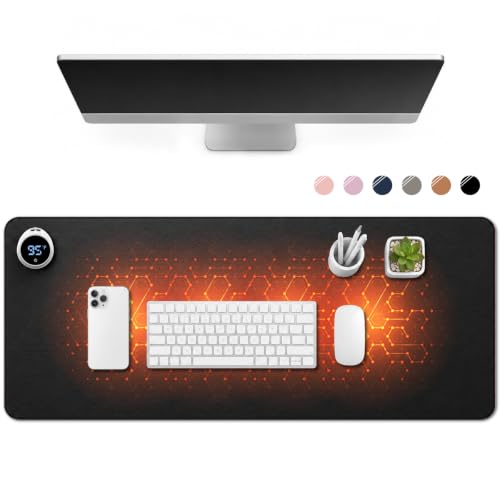


For a full keyboard-and-mouse setup, a 31.5 x 13-inch mat offers more surface area than a compact pad; for tighter desks, the 27.6 x 7.9-inch Heetz Small Heated Desk Pad takes up less room. This guide to the best heated desk mat compares dimensions, temperature controls, timers, and surface materials so you can match warmth to your workspace and routine.
Compare at a glance
| Product | Brand | Size | Weight | Stands out for | Price |
|---|---|---|---|---|---|
| 1 Deepsoon 24 x 12-Inch Heating Pad | Deepsoon | 24 × 12 × 1.5 in | Not listed | Six adjustable heat levels | Check price |
| 2 Voltiefy Heated Desk Pad, 31.5 x 13 in | Voltiefy | 31.5 × 13 × 0.1 in | 1.2 lb | Five adjustable temperature settings | Check price |
| 3 Handylit Heated Desk Pad, 31.5 x 13 Inches | Handylit | 31.5 × 13 × 0.1 in | 1 lb | Five adjustable temperature levels | Check price |
| 4 Handylit Heated Desk Pad, 31.5 x 13 Inches | Handylit | 31.5 × 13 × 0.1 in | 1 lb | Five adjustable heat levels | Check price |
| 5 ELZO Heated Desk Pad, 31.5 x 13 Inches | ELZO | 31.5 × 13 × 0.1 in | Not listed | Five adjustable temperature settings | Check price |
| 6 Giambwa Heated Desk Mat, 31.5 × 13 Inches | Giambwa | 31 × 13 × 0.1 in | Not listed | Five adjustable temperature settings | Check price |
| 7 tulpock Heated Desk Pad, 31.5 x 13 Inches | tulpock | 31.5 × 13 × 0.04 in | 1.3 lb | Three selectable heat levels | Check price |
| 8 Heetz Small Heated Desk Pad | Heetz | Not listed | Not listed | Three adjustable temperature settings | Check price |
Sizes and weights as listed by the manufacturer on Amazon. Check the retailer for current price and availability.
Pros
- Six adjustable heat levels
- Four timer settings
- 75-inch power cord
Cons
- Frequent machine washing is discouraged
- Who should skip it: users needing coverage beyond 24 x 12 inches
Pros
- Five adjustable temperature settings
- Water-resistant, easy-clean PU surface
- Three-hour auto shut-off
- Digital temperature display
Cons
- Who should skip it: users needing a larger desk mat
Pros
- Five adjustable temperature levels
- Waterproof surface
- Non-slip base
- Built-in auto shut-off
Cons
- Who should skip it: users needing a full-desk mat

Pros
- Five adjustable heat levels
- Waterproof leather surface
- Non-slip base
- Built-in auto shutoff
Cons
- Who should skip it: users needing a wider desk mat

Pros
- Five adjustable temperature settings
- Waterproof, wipe-clean surface
- Built-in auto shut-off
Cons
- Limited 13-inch depth for larger setups
- Who should skip it: users needing a larger desk surface

Pros
- Five adjustable temperature settings
- Eight-hour auto-shutoff timer
- Remembers prior settings
- Can be used unheated as a desk mat
Cons
- Who should skip it: people needing a larger heated surface

Pros
- Three selectable heat levels
- Four-hour auto shutoff
- Waterproof PVC materials
- Can be used unheated
Cons
- Do not use on glass surfaces
- Requires a 110–120V North American-style outlet
- Who should skip it: glass-desk users

Pros
- Three adjustable temperature settings
- Compact rectangular footprint
- Automatic shutoff feature
- Hourly reminder light
Cons
- Who should skip it: users who need broad desk coverage
Best for a Wide Heat Range: Handylit Heated Desk Pad, 31.5 x 13 Inches
Handylit Heated Desk Pad, 31.5 x 13 Inches pairs a full-size surface with five heat levels from 95°F to 135°F, plus a 3-hour auto shutoff and overheat protection. The waterproof surface and non-slip base are useful listed features, though the 3-hour timer may be short for people who want longer uninterrupted sessions.
Skip it if you need a compact mat or a timer longer than three hours.
Best for a Compact Desk: Heetz Small Heated Desk Pad
Heetz Small Heated Desk Pad measures 27.6 x 7.9 inches and offers three temperature settings, automatic shutoff, and an hourly reminder light. Its slim format can suit a limited workspace, but it gives you less heated surface than the 31.5 x 13-inch mats.
Skip it if you want a wide area for a keyboard and mouse together.
Related guides: Best Heated Floor Mat for Under Desk, Best Heated Desk Pad and Best Heated Mouse Pad Hand Warmer.
Best for a Longer Timer: Giambwa Heated Desk Mat, 31.5 × 13 Inches
Giambwa Heated Desk Mat, 31.5 × 13 Inches combines a 31.5 x 13-inch surface with five temperature settings and an 8-hour auto-shutdown timer. Its touch LED controller includes a memory function, while its listed two-year warranty is a point to weigh against mats with shorter timers or no stated warranty.
Skip it if you prefer physical controls or need a smaller pad.
Key Numbers at a Glance
- Largest common size among these picks: 31.5 x 13 inches, including the Handylit, tulpock, Giambwa, ELZO, and Voltiefy mats.
- Compact format: Heetz Small Heated Desk Pad measures 27.6 x 7.9 inches.
- Longest stated auto-shutdown timer among the desk mats: Giambwa Heated Desk Mat, 31.5 × 13 Inches, at 8 hours.
- Temperature range: Handylit Heated Desk Pad, 31.5 x 13 Inches, lists five settings from 95°F to 135°F.
How to Choose the Best Heated Desk Mat
Match the mat size to your keyboard and mouse
Bottom line: Measure the usable desk area before choosing a full-size or compact mat. Several options measure 31.5 x 13 inches, including the Handylit, ELZO, and Voltiefy models, while the Heetz pad measures 27.6 x 7.9 inches. A larger mat allows more desk coverage, but takes up more space and may not fit around monitor stands, desk edges, or other accessories. Measure the area where the mat will sit, including room for its controller and power cord.
Compare heat levels and temperature ranges
Bottom line: Choose a stated temperature range and adjustment method that match your comfort preferences. Handylit lists five levels from 95°F to 135°F, while ELZO lists five settings from 86°F to 122°F. tulpock lists three settings from 104°F to 122°F, and Heetz lists three settings without numerical temperatures. More settings give you more adjustment steps on paper, but compare the actual temperature range rather than assuming that a higher level means better warmth.
Choose a timer for your desk routine
Bottom line: Check the auto-shutoff duration if you tend to work for long stretches. Giambwa lists an 8-hour timer, tulpock lists a 4-hour shutoff, and Handylit, ELZO, and Voltiefy list 3-hour shutoffs. Those are meaningful differences for planned sessions, though automatic shutoff does not replace following the manufacturer’s use and care directions.
Consider controls and reminders
Bottom line: Pick controls you can operate easily without disrupting your work. Giambwa has a touch LED controller and memory function; Voltiefy uses a digital control panel, and Handylit includes a digital display. Handylit, ELZO, Voltiefy, and Heetz list an hourly reminder light, a separate feature from the heat timer. Check the control location and cord arrangement against your desk setup, since the product pages do not establish that every controller can be positioned on either side.
Check surface and placement guidance
Bottom line: Match the material and placement cautions to your desk before plugging in. Handylit describes a waterproof leather surface and non-slip base, while Giambwa lists a PU leather top and anti-slip silicone base. tulpock specifically says not to use its mat on glass, and ELZO says to keep the heating area uncovered and not place flammable or heat-sensitive items on it. Follow the individual product’s instructions; do not assume all heated mats have identical placement requirements.
How We Compared These Products
This comparison is based on product-page specifications and listed design features, including dimensions, temperature settings, timers, surface materials, controls, and stated safety features. The available product data does not include customer feedback that supports a broader consensus, so we do not treat listed claims as independently verified performance.
Which Option Fits Your Home and Devices?
For a full-size surface with five heat levels and a 3-hour shutoff, the Handylit Heated Desk Pad, 31.5 x 13 Inches has the combination described in its pick section. For a compact work area, the Heetz Small Heated Desk Pad has the smallest stated dimensions among these desk mats. If a longer timer matters most, Giambwa Heated Desk Mat, 31.5 × 13 Inches lists an 8-hour auto-shutdown timer and touch controls.
Mistakes to Avoid When Choosing a Heated Desk Mat
- Choosing by size alone. Compare the mat dimensions with your keyboard, mouse, and clear desk area before deciding.
- Assuming heat settings are equivalent. Check stated temperature figures where available; some listings give settings without numerical temperatures.
- Overlooking the timer. Compare auto-shutoff durations with your typical desk sessions, and follow the product’s instructions.
- Ignoring placement cautions. Review the individual product directions, especially tulpock’s warning against use on glass and ELZO’s uncovered-heating-area guidance.
Frequently Asked Questions
Will a 31.5 x 13-inch heated mat fit my desk?
Measure the clear area on your desk and compare it with the mat’s listed dimensions. A 31.5 x 13-inch model needs more room than the 27.6 x 7.9-inch Heetz Small Heated Desk Pad.
Which heated desk mat has the longest timer?
Giambwa Heated Desk Mat, 31.5 × 13 Inches lists an 8-hour auto-shutdown timer. tulpock lists 4 hours, while several other desk mats specify 3 hours.
Can I use a heated desk mat on a glass desk?
Do not use the tulpock Heated Desk Pad on glass; its product information warns that uneven heating may create thermal stress. Check the instructions for any other model before using it on glass, because the available product details do not confirm that every mat supports that surface.
Can I wash a heated desk mat?
The desk mat listings describe wipeable or waterproof surfaces, not machine washing. Deepsoon Heating Pad is a separate fabric body heating pad whose product page says it is machine-washable after unplugging the controller and ensuring the pad is completely dry before reassembly. Do not apply that care instruction to the desk mats.
Do these heated desk mats work as regular mouse pads?
Several listings describe use as a desk, keyboard, or mouse mat when heating is off, including the Giambwa and tulpock models. The product pages do not establish identical mouse-tracking performance across every surface, so check whether the material suits your mouse and preferred movement.






Write Your Review
No reviews yet. Be the first to share your experience!