


If you work or game at a chilly desk, a USB heated pad can add warmth around your hand, while an open PTC desktop heater leaves more room to move a mouse. The right choice depends on whether you prioritize a soft wrist rest, enclosed warmth, simple cleaning, or open mouse clearance, and whether your available USB power or outlet suits the device.
Compare at a glance
| Product | Brand | Size | Weight | Stands out for | Price |
|---|---|---|---|---|---|
| 1 Flutesan Heated Mouse Pad Hand Warmer, 2-Pack | Flutesan | 11 × 9 × 0.01 in | 0.7 lb | Two pads included | Check price |
| 2 IriQuart Heated Mouse Pad, 3 Heat Levels | IriQuart | 0.35 × 0.2 × 0.1 in | 0.1 lb | Three adjustable heat levels | Check price |
| 3 Nauttxon Heated Mouse Pad Hand Warmer | Nauttxon | 10.2 × 8.1 × 4.5 in | 0.8 lb | Three heat settings | Check price |
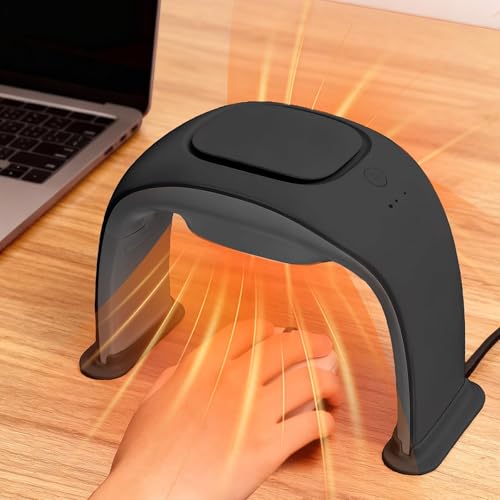
| 4 FANSERIA 100W Heated Mouse Pad Hand Warmer | FANSERIA | 3.7 × 8.9 × 7 in | 1 lb | Open design allows mouse movement | Check price |
| 5 NIFBANG Desk Hand Warmer Heater | NIFBANG | 3.94 × 5.91 × 7.28 in | 0.8 lb | Three temperature settings | Check price |
Sizes and weights as listed by the manufacturer on Amazon. Check the retailer for current price and availability.
Best for two locations or desks
Pros
- Two pads included
- Removable heating pads
- About 11 x 9 inches each
Cons
- Heating-element durability may be limited
- Listing warns of burn risk
- Who should skip it: anyone expecting a long-lasting heating element
Pros
- Three adjustable heat levels
- Three selectable shutoff timer options
- USB-powered, with several listed power sources
Cons
- Supplied size information is inconsistent
- Who should skip it: users needing confirmed pad dimensions
Pros
- Three heat settings
- Choice of three timer durations
- Spacious mouse surface
- Wipe-clean faux leather
Cons
- Requires a 5V, 2A power source, not a computer USB port
- Who should skip it: users who need a computer-USB-powered warmer

Pros
- Open design allows mouse movement
- Three selectable heat settings
- Foldable for compact storage
- Low 100W power rating
Cons
- Designed for personal warmth, not room heating
- Who should skip it: people seeking whole-room heat
Pros
- Three temperature settings
- Mouse-friendly hand-warming space
- Compact foldable design
Cons
- Wattage is not specified for energy-use comparisons
- Who should skip it: buyers needing whole-room heat
Key Numbers at a Glance
- FANSERIA 100W Heated Mouse Pad Hand Warmer specifies 100W power and three settings: 113°F, 131°F, and 149°F.
- NIFBANG Desk Hand Warmer Heater lists three temperature levels: 100°F, 120°F, and 140°F.
- Nauttxon Heated Mouse Pad Hand Warmer measures 10.2 × 8.1 × 4.5 inches and specifies 10W USB power.
- Flutesan Heated Mouse Pad Hand Warmer, 2-Pack includes two pads, each about 11 × 9 inches.
Best for Timed USB Heating: Flyyears Heated Mouse Pad with 3 Heat Levels
Flyyears Heated Mouse Pad with 3 Heat Levels combines three heat levels with 2-, 4-, or 8-hour timer choices, plus a soft surface and wrist rest. It connects by USB to a compatible port, laptop, power bank, or adapter, but the product page does not state dimensions or exact temperature settings. Skip it if you need a documented pad size or specified temperature in degrees.
Best for a Two-Desk Setup: Flutesan Heated Mouse Pad Hand Warmer, 2-Pack
Flutesan Heated Mouse Pad Hand Warmer, 2-Pack includes two plush pads, each about 11 × 9 inches, and removable heating pads for cleaning. The pair suits someone outfitting a home and office desk, though the page warns that heating-element durability may be limited and recommends unplugging after use. Skip it if you want one open-style heater or need a stated timer and adjustable temperature levels.
Best for Open Mouse Movement: FANSERIA 100W Heated Mouse Pad Hand Warmer
FANSERIA 100W Heated Mouse Pad Hand Warmer uses an open arched design with about 7.7 inches of usable interior width and three stated settings up to 149°F. Its legs fold for storage, but this is a 100W desktop heater rather than a USB-powered plush pad. Skip it if you specifically want a cushioned wrist-rest surface or a USB-powered warmer.
How to Choose a Heated Mouse Pad Hand Warmer
Open clearance or enclosed warmth?
Bottom line: Choose an open arch when unrestricted mouse movement matters, and a surrounding pad when you want warmth close around your hand. FANSERIA lists about 7.7 inches of interior width, while NIFBANG describes an 8.1-inch space diameter and 6.3-inch height. Nauttxon uses a curtain-style enclosure with a mouse cable slot, so check the dimensions against your mouse, hand position, and desk area before buying.
USB power or a dedicated desktop heater?
Bottom line: Match the warmer’s power method to the port or outlet you can dedicate to it. Flyyears, IriQuart, and Flutesan are USB-powered; Nauttxon specifies 10W USB and recommends a 5V 2A input, noting that a computer USB port is unsuitable. FANSERIA specifies 100W, and NIFBANG describes a ceramic desk heater, so check their power connection and placement requirements in the current product details before use.
If you are sorting out other desk connections, our guides to the best docking station for both Mac and PC and best docking station for Chromebook cover ports and display connections. A dock’s ports do not establish that it can power a heated accessory, so verify the warmer’s own power needs.
Temperature controls and timers
Bottom line: Prefer stated temperature steps when you want to compare heat levels, and a timer when automatic shutoff timing matters. FANSERIA gives three settings from 113°F to 149°F; IriQuart lists 110°F, 130°F, and 145°F. Flyyears, Nauttxon, and IriQuart list 2-, 4-, and 8-hour timer settings, while the Flutesan description does not specify temperature steps or a timer.
Surface, cleaning, and storage
Bottom line: Consider cleaning and storage before choosing a soft or enclosed design. Flutesan has a removable heating pad and plush surface; Nauttxon specifies a wipe-clean faux-leather exterior. FANSERIA folds down, and NIFBANG says it folds compactly, but the product pages do not give comparable folded measurements for both models.
For more desk hardware choices, browse PC accessories or compare docking stations under $100 if connecting displays and peripherals is also part of your setup.
How We Compared These Products
This guide is based on product research, comparing the listed designs, dimensions, power details, heat settings, timers, and care features. The product pages do not establish measured performance or long-term durability, so confirm current manufacturer instructions and safety information before use.
Which Option Fits Your Home and Devices?
For mouse movement without a close-fitting sleeve: FANSERIA 100W Heated Mouse Pad Hand Warmer has an open arch with about 7.7 inches of interior width and foldable legs. Skip it if you need a USB-powered cushioned pad or want a specified timer.
For a USB pad with timed shutoff: Flyyears Heated Mouse Pad with 3 Heat Levels lists three heat levels, three timer choices, and a wrist rest. Skip it if you need exact temperature figures or dimensions stated on the product page.
For two locations or desks: Flutesan Heated Mouse Pad Hand Warmer, 2-Pack includes two pads around 11 × 9 inches, with removable heating pads. Skip it if you need separately documented heat controls or a stated timer.
Mistakes to Avoid When Choosing a Heated Mouse Warmer
- Assuming every USB port provides enough power. Check the product’s stated input requirement; Nauttxon specifies 5V 2A and advises against computer USB ports.
- Ignoring mouse clearance. Compare your mouse and preferred hand position with stated interior dimensions, especially for an enclosed design.
- Choosing by heat setting count alone. Compare actual temperatures where listed, and check whether a timer is included if automatic shutoff timing matters.
- Overlooking care and safe placement. Follow the maker’s use and cleaning directions, keep electrical devices in appropriate condition, and do not treat a warmer as a room heater.
Frequently Asked Questions
Can a heated mouse pad plug into a computer’s USB port?
Several listed pads are USB-powered, but the required input can differ. Nauttxon specifies 5V 2A and says not to use a computer USB port; check the instructions for the exact model you choose.
Which design leaves more room to move a mouse?
FANSERIA describes an open arch with about 7.7 inches of usable interior width, and NIFBANG lists an 8.1-inch space diameter. Enclosed designs can keep warmth closer to the hand, but check their dimensions against your mouse and desk layout.
Do these warmers have automatic shutoff timers?
Flyyears, IriQuart, and Nauttxon list 2-, 4-, and 8-hour timer choices. FANSERIA describes tip-over and overheat shutdown protections, but not a timed shutoff; check each product’s current instructions for operation details.
Can I wash a heated mouse pad?
Do not assume a heated pad is machine washable. Flutesan says its heating pad is removable for cleaning, while Nauttxon specifies a wipe-clean faux-leather surface; follow the model-specific care instructions and disconnect power before cleaning.
Are open desk heaters and USB pads interchangeable?
No. USB pads are designed as mouse-area accessories, while FANSERIA and NIFBANG are described as personal desktop heaters with different power and physical designs. Choose based on your available power connection, mouse clearance, and the maker’s placement instructions.






Write Your Review
No reviews yet. Be the first to share your experience!