


For a cold home office, a 31.5 x 13-inch heated desk pad can warm the area beneath a keyboard and mouse, while a smaller mat can suit a tighter desk. The best heated desk pad for you depends on the surface area you need, how precisely you want to adjust warmth, and whether a shorter or longer auto-off timer fits your routine.
Compare at a glance
| Product | Brand | Size | Stands out for | Price |
|---|---|---|---|---|
| 1 Handylit Heated Desk Pad, 31.5 x 13 Inches | Handylit | 31.5 × 13 × 0.1 in | Five adjustable temperature levels | Check price |
| 2 Deepsoon 24 x 12-Inch Heating Pad | Deepsoon | 24 × 12 × 1.5 in | Six adjustable heat levels | Check price |
| 3 Heetz Small Heated Desk Pad | Heetz | Not listed | Three adjustable temperature settings | Check price |
| 4 Giambwa Heated Desk Mat, 31.5 × 13 Inches | Giambwa | 31 × 13 × 0.1 in | Five adjustable temperature settings | Check price |
| 5 tulpock Heated Desk Pad, 31.5 x 13 Inches | tulpock | 31.5 × 13 × 0.04 in | Three selectable heat levels | Check price |
| 6 Voltiefy Heated Desk Pad, 31.5 x 13 in | Voltiefy | 31.5 × 13 × 0.1 in | Five adjustable temperature settings | Check price |
| 7 iCasso Heated Mouse Pad, 31.5 x 13 Inches | iCasso | 31.5 × 13 × 0.1 in | Four temperature settings | Check price |
| 8 ONLYTOP Heated Desk Pad, 31.5 x 13 Inches | ONLYTOP | 31.5 × 13 × 0.1 in | Three straightforward heat settings | Check price |
| 9 tulpock Heated Desk Pad, 31.5 x 13 Inches | tulpock | 31.5 × 13 × 0.04 in | Three selectable heat levels | Check price |
Sizes and weights as listed by the manufacturer on Amazon. Check the retailer for current price and availability.
Pros
- Five adjustable temperature levels
- Waterproof surface
- Non-slip base
- Built-in auto shut-off
Cons
- Who should skip it: users needing a full-desk mat
Pros
- Six adjustable heat levels
- Four timer settings
- 75-inch power cord
Cons
- Frequent machine washing is discouraged
- Who should skip it: users needing coverage beyond 24 x 12 inches
Pros
- Three adjustable temperature settings
- Compact rectangular footprint
- Automatic shutoff feature
- Hourly reminder light
Cons
- Who should skip it: users who need broad desk coverage

Pros
- Five adjustable temperature settings
- Eight-hour auto-shutoff timer
- Remembers prior settings
- Can be used unheated as a desk mat
Cons
- Who should skip it: people needing a larger heated surface

Pros
- Three selectable heat levels
- Four-hour auto shutoff
- Waterproof PVC materials
- Can be used unheated
Cons
- Do not use on glass surfaces
- Requires a 110–120V North American-style outlet
- Who should skip it: glass-desk users
Pros
- Five adjustable temperature settings
- Water-resistant, easy-clean PU surface
- Three-hour auto shut-off
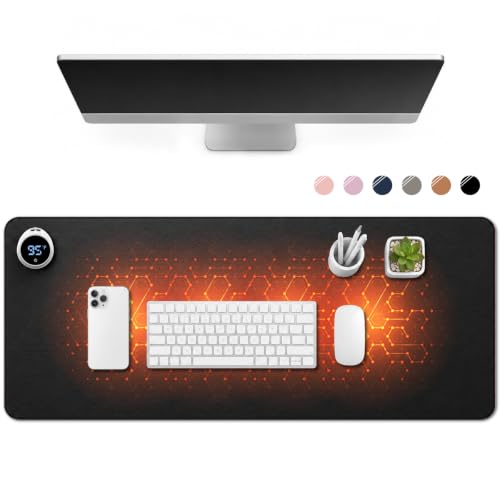
- Digital temperature display
Cons
- Who should skip it: users needing a larger desk mat

Pros
- Four temperature settings
- Selectable timer with automatic shutoff
- Waterproof, wipe-clean surface
- Room for a keyboard and mouse
Cons
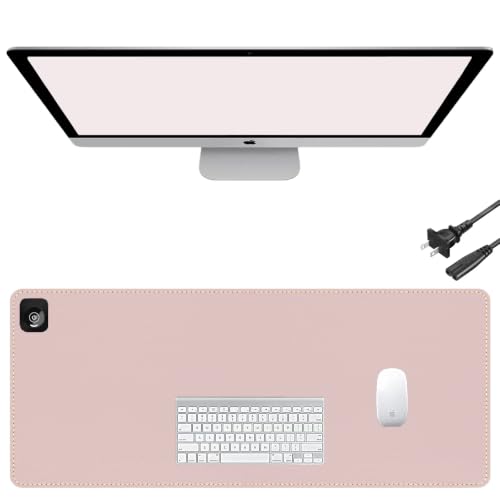
- Two-pin American plug is specified for the United States and Canada
- Who should skip it: users needing a different plug type
Pros
- Three straightforward heat settings
- Waterproof, wipe-clean surface
- Large 31.5 x 13-inch format
Cons
- Who should skip it: users needing heat beyond four hours

Pros
- Three selectable heat levels
- Four-hour auto shut-off
- Functions as an unheated desk mat
Cons
- Do not use on glass surfaces
- Who should skip it: users needing a larger desk surface
Best Overall Heated Desk Pad: Handylit Heated Desk Pad, 31.5 x 13 Inches
Handylit Heated Desk Pad, 31.5 x 13 Inches combines a full-size desk surface with five heat levels, a digital display, and a 3-hour auto shut-off. Its listed temperature range is 95°F to 135°F, and it also has an hourly sitting reminder.
It has a waterproof leather surface and non-slip base, though the 3-hour timer is shorter than the 8-hour setting listed for the Giambwa mat. Skip it if you want a longer uninterrupted timer or a smaller footprint.
Best for Extended Sessions: Giambwa Heated Desk Mat, 31.5 × 13 Inches
Giambwa Heated Desk Mat, 31.5 × 13 Inches stands out for its 8-hour auto-shutdown timer and five temperature settings. The listing also specifies a two-year warranty, a touch LED controller, and a memory function for the prior temperature and timer settings.
The longer timer and control features may suit a desk routine that runs for much of the day, but its five temperature settings are given in Celsius rather than Fahrenheit. Skip it if you prefer a smaller mat or want temperature values displayed in Fahrenheit.
Related guides: Best Heated Desk Mat, Best Heated Floor Mat for Under Desk and Best Heated Mouse Pad Hand Warmer.
Best for a Compact Desk: Heetz Small Heated Desk Pad
Heetz Small Heated Desk Pad measures 27.6 x 7.9 inches, making it the compact-size choice in this group. It has three temperature settings, automatic shutoff, and an hourly reminder light.
The narrower surface can leave more of a small desk uncovered, but it offers less mat area than the 31.5 x 13-inch models. The listing does not state its specific temperature range or shutoff duration. Skip it if you need room for a keyboard and mouse across a wider heated surface.
Best for Five Heat Levels and a Reminder: Voltiefy Heated Desk Pad, 31.5 x 13 in
Voltiefy Heated Desk Pad, 31.5 x 13 in offers five listed settings from 95°F to 135°F, a digital display, and a 3-hour auto shut-off. Its indicator also lights for one minute after an hour of continuous use as a reminder to take a break.
The hourly reminder and five temperature steps provide more adjustment detail than the three-setting tulpock models, but the timer is limited to three hours. Skip it if you want an 8-hour timer or a compact-format mat.
Best for Simple Controls: ONLYTOP Heated Desk Pad, 31.5 x 13 Inches
ONLYTOP Heated Desk Pad, 31.5 x 13 Inches keeps the control scheme simple with three heat levels and a 4-hour auto shut-off. Its 31.5 x 13-inch PU leather surface is listed as waterproof, with a non-slip base.
Three settings mean fewer adjustments to cycle through, though the product page does not give their specific temperatures. Skip it if you want an exact temperature display or more than three heat levels.
Key Numbers at a Glance
- Heated surface dimensions range from 27.6 x 7.9 inches on the Heetz Small Heated Desk Pad to 31.5 x 13 inches on the full-size mats.
- Listed heat settings range from three on the ONLYTOP Heated Desk Pad, 31.5 x 13 Inches, to five on the Handylit Heated Desk Pad, 31.5 x 13 Inches.
- Auto-off timers range from 3 hours on the Handylit Heated Desk Pad, 31.5 x 13 Inches, to 8 hours on the Giambwa Heated Desk Mat, 31.5 × 13 Inches.
- The Handylit Heated Desk Pad, 31.5 x 13 Inches, lists a range of 95°F to 135°F, while the Voltiefy Heated Desk Pad, 31.5 x 13 in, lists the same range.
How to Choose the Best Heated Desk Pad
Match the Mat to Your Desk Space
Bottom line: Measure the space for your keyboard, mouse, and hands before choosing a heated area. Most models here measure 31.5 x 13 inches, while the Heetz Small Heated Desk Pad measures 27.6 x 7.9 inches. A full-size mat offers more room for peripherals, but its larger footprint may crowd a compact desk; measure the available surface and account for the control and power cord placement.
Compare Temperature Settings and Displays
Bottom line: Choose by the control detail you will actually use, not by setting count alone. Handylit and Voltiefy each list five settings from 95°F to 135°F, while the ONLYTOP and tulpock mats list three settings. The Giambwa mat has five settings shown as 35°C to 55°C. Check whether you prefer a digital display and Fahrenheit values, or a simpler control with fewer steps.
Choose an Auto-Off Timer for Your Routine
Bottom line: Match the shutoff interval to your typical desk session. Giambwa lists an 8-hour timer, ONLYTOP and the tulpock mats list 4-hour shutoff, and Handylit and Voltiefy list 3-hour shutoff. A longer timer reduces how often you need to restart heating, while a shorter one ends heating sooner; select a duration that suits your habits rather than assuming a timer replaces attentive use.
Check Surface Material and Cleaning
Bottom line: A wipe-clean surface is convenient, but do not assume every heated pad can be washed the same way. The desk mats describe waterproof or water-resistant leather or PU leather surfaces that can be wiped clean. The Deepsoon 24 x 12-Inch Heating Pad is a different product: it has a flannel surface and is listed as machine washable after unplugging, with a warning to dry it completely before reassembly. Follow the specific product care instructions, and do not treat the fabric heating pad as a desk mat with the same cleaning routine.
Verify the Power Setup and Surface
Bottom line: Confirm the plug and desk surface suit the product before connecting it. The Giambwa listing specifies 110V and a US two-prong plug; the tulpock listing specifies 110–120V and a North American-style plug, and warns against use on glass. These details are not stated for every mat, so check the specific product page and your outlet before buying. Keep the heating area uncovered as directed by the manufacturer.
How We Compared These Products
This guide is based on product research, comparing the listed dimensions, heat controls, timer functions, surface descriptions, power details, care guidance, and stated warranty information. Customer feedback data is not available in the product details used here, so the recommendations rely on listed features rather than a claimed pattern of owner experience.
Which Option Fits Your Home and Devices?
For a small desk, start with the Heetz Small Heated Desk Pad and confirm its 27.6 x 7.9-inch area fits your hand-warming needs. If a longer timer matters, the Giambwa Heated Desk Mat, 31.5 × 13 Inches, lists an 8-hour auto-shutdown and memory function; for Fahrenheit controls and a reminder light, consider the Voltiefy Heated Desk Pad, 31.5 x 13 in.
Mistakes to Avoid When Choosing a Heated Desk Pad
- Buying by dimensions alone. Check whether your keyboard and mouse fit on the heated area, and consider that the Heetz mat is substantially narrower than the 31.5 x 13-inch models.
- Assuming every setting uses the same temperature scale. Compare the stated range and units; Giambwa lists Celsius, while Handylit and Voltiefy give Fahrenheit values.
- Ignoring the timer length. Choose among the listed 3-, 4-, and 8-hour timers based on your routine, and do not rely on auto-off as a reason to leave a powered mat unattended.
- Using the wrong cleaning method or desk surface. Follow the individual care instructions, and note that tulpock specifically warns against using its mat on glass.
Frequently Asked Questions
Will a heated desk pad fit under a keyboard and mouse?
The 31.5 x 13-inch models are described as fitting a keyboard and mouse. Measure your desk and peripherals before ordering; the Heetz Small Heated Desk Pad is only 27.6 x 7.9 inches and may suit a smaller heated area.
Which heated desk pad has the longest auto-off timer?
The Giambwa Heated Desk Mat, 31.5 × 13 Inches, lists an 8-hour auto-shutdown timer. ONLYTOP and the tulpock mats list 4 hours, while Handylit and Voltiefy list 3 hours.
Can I use a heated desk pad on a glass desk?
The tulpock product information specifically says not to use its mat on glass because uneven heating may create thermal stress. The product details do not establish glass compatibility for every other model, so check the manufacturer’s instructions for the exact mat and desk surface.
Can I wash a heated desk pad in a machine?
The desk mats in this comparison describe wipe-clean leather or PU leather surfaces. The Deepsoon 24 x 12-Inch Heating Pad is a separate flannel product listed as machine washable after unplugging; it must be completely dry before reassembly. Do not machine wash a desk mat unless its own instructions explicitly allow it.
Do these heated desk mats connect to a computer?
They are described as plug-in heated mats, not computer peripherals that connect for data or control. Check the product’s stated plug and voltage against your outlet; the Giambwa listing specifies 110V and a US two-prong plug.
Is a heating pad the same as a heated desk mat?
No. Desk mats here use a leather or PU leather work surface and are sized to cover part of a desktop. The Deepsoon 24 x 12-Inch Heating Pad is a flannel body heating pad described for multiple body areas, and its care instructions differ from the desk mats.
For more workspace gear, browse our PC accessories category. If your desk setup also needs more ports, compare a docking station for both Mac and PC or explore USB hubs.






Write Your Review
No reviews yet. Be the first to share your experience!