




If you play long sessions and want your thumb supported, the right gaming mouse with a thumb rest depends on whether you prioritize light weight, extra controls, or wireless freedom. The GLORIOUS Model I 2 is a 66 g wired choice with swappable side buttons, while the Razer Basilisk V3 X HyperSpeed adds wireless and Bluetooth; MMO players can look to models with a grid of side buttons.
Compare at a glance
| Product | Brand | Size | Weight | Stands out for | Price |
|---|---|---|---|---|---|
| 1 Razer Basilisk V3 X HyperSpeed Wireless Mouse | Razer | 5.12 × 2.96 × 1.67 in | 0.2 lb | Nine programmable controls | Check price |
| 2 Razer Basilisk V3 Wired Gaming Mouse | Razer | 2.96 × 5.12 × 1.67 in | 0.2 lb | 11 programmable buttons | Check price |
| 3 Redragon M602 RGB Gaming Mouse | Redragon | 4.92 × 2.87 × 1.57 in | 0.6 lb | Adjustable sensitivity up to 7200 DPI | Check price |
| 4 Redragon M901K MMO Mouse, 19 Buttons | Redragon | Not listed | 0 lb | Nineteen programmable buttons | Check price |
| 5 UtechSmart Venus Pro MMO Mouse, 16 Buttons | UtechSmart | 4.6 × 3 × 1.5 in | 0.5 lb | Sixteen programmable buttons | Check price |
| 6 Redragon M810 PRO Wireless Gaming Mouse | Redragon | 8.07 × 6.1 × 0.04 in | 0.6 lb | Eight programmable buttons | Check price |
| 7 Corsair Nightsword RGB Gaming Mouse | Corsair | 5.08 × 3.38 × 1.71 in | 0.3 lb | Broad weight and balance customization | Check price |
| 8 Uineer Wired Mouse, 6 Programmable Buttons | Uineer | 4.65 × 3.07 × 0.04 in | 0.2 lb | Quiet left and right clicks | Check price |
| 9 GLORIOUS Model I 2 Wired Gaming Mouse | GLORIOUS | Not listed | 0.1 lb | Lightweight 66-gram design | Check price |
Sizes and weights as listed by the manufacturer on Amazon. Check the retailer for current price and availability.
Best for wireless flexibility
Pros
- Nine programmable controls
- HyperSpeed Wireless and Bluetooth
- Up to 535 hours stated battery life
- Onboard profile storage
Cons
- Who should skip it: users who prefer a rechargeable mouse
Pros
- 11 programmable buttons
- Switchable free-spin and tactile scroll modes
- Thumb rest and ergonomic shape
- 11 customizable RGB zones
Cons
- Who should skip it: wireless-only users
Pros
- Adjustable sensitivity up to 7200 DPI
- Nine programmable buttons
- Customizable RGB lighting
- Ergonomic grip design
- Supports Windows and Mac
Cons
- Who should skip it: users wanting a wireless mouse
Best for MMO macros

Pros
- Nineteen programmable buttons
- Five profiles for saved settings
- Adjustable weight and balance
- Configurable DPI and polling rate
Cons
- Who should skip it: players who prefer fewer side buttons

Pros
- Sixteen programmable buttons
- Five customizable profiles
- Adjustable DPI and weight
- Braided 6-foot cable
Cons
- Who should skip it: users who prefer a simpler button layout

Pros
- Eight programmable buttons
- Adjustable DPI up to 10,000
- Rechargeable battery
Cons
- 45-hour battery rating applies to eco mode
- Who should skip it: users needing a longer stated battery life
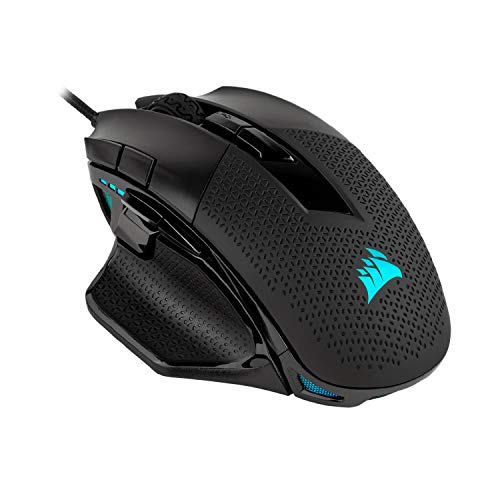
Pros
- Broad weight and balance customization
- Ten programmable buttons
- Fine-grained DPI adjustment
- Contoured shape with rubber grips
Cons
- Wired connection
- Who should skip it: users needing wireless connectivity
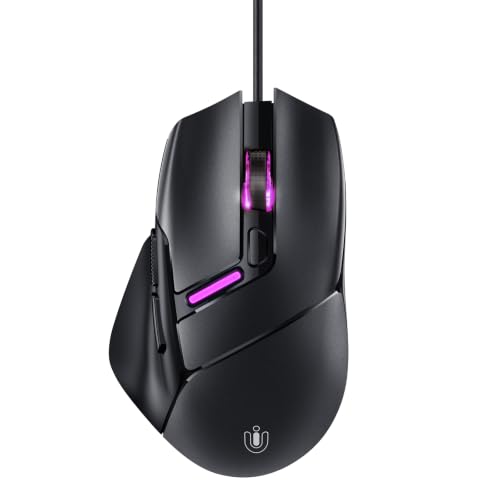
Pros
- Quiet left and right clicks
- Six programmable buttons
- Six adjustable DPI levels
- No batteries or charging required
Cons
- Who should skip it: users who need a wireless mouse
Best for low weight and a thumb rest

Pros
- Lightweight 66-gram design
- Nine programmable buttons
- Swappable thumb-button shapes
- Dedicated thumb rest
Cons
- Wired connection
- Who should skip it: users who prefer wireless mice
Best for Wireless and Bluetooth: Razer Basilisk V3 X HyperSpeed Wireless Mouse
Razer Basilisk V3 X HyperSpeed Wireless Mouse combines HyperSpeed wireless and Bluetooth connectivity with an ergonomic shape and nine programmable controls. Its stated battery life is up to 285 hours on HyperSpeed or up to 535 hours on Bluetooth, though actual use can vary. Skip it if you need a wired mouse or want a built-in rechargeable battery; the listing says it includes an AA battery.
Best for Wired Gaming Shortcuts: Razer Basilisk V3 Wired Gaming Mouse
Razer Basilisk V3 Wired Gaming Mouse pairs a dedicated thumb rest with 11 programmable buttons and a HyperScroll tilt wheel that switches between free-spin and tactile modes. The 26K DPI sensor and wired connection suit a desk setup where charging is not a priority. Skip it if you specifically want Bluetooth or a cable-free desk.
Best Lightweight Thumb-Rest Mouse: GLORIOUS Model I 2 Wired Gaming Mouse (Black)
GLORIOUS Model I 2 Wired Gaming Mouse (Black) weighs 66 g and has a dedicated thumb rest, nine programmable buttons, and two swappable side buttons. Its 26K sensor and flexible paracord-style cable are listed features, but the cable remains a physical connection. Skip it if you prefer wireless or need a mouse designed for a left-handed grip.
Best for MMO Button Access: Redragon M901K MMO Mouse, 19 Buttons
Redragon M901K MMO Mouse, 19 Buttons offers 19 programmable buttons, including 12 on the side, plus up to eight removable 2.4 g weights. The button array can map game actions and macros, but it makes this a specialized choice compared with simpler layouts. Skip it if you want a lightweight mouse with only a few easy-to-reach controls.
Best for Adjustable Weight and Balance: Corsair Nightsword RGB Gaming Mouse
Corsair Nightsword RGB Gaming Mouse includes a thumb rest, 10 programmable buttons, and a tunable weight system with a stated adjustment range of 119 g to 141 g. Its 18,000 DPI sensor and six weight mounting locations provide more control over weight and balance, but the mouse is not a lightweight pick. Skip it if you want a low-mass mouse for rapid, frequent repositioning.
Key Numbers at a Glance
- Lightest stated weight: GLORIOUS Model I 2 Wired Gaming Mouse (Black) at 66 g; ATTACK SHARK V6 65g Wireless Gaming Mouse with RGB is listed at 65 g.
- Most programmable controls among these picks: Redragon M901K MMO Mouse, 19 Buttons, with 19.
- Wireless battery-life claims: Razer Basilisk V3 X HyperSpeed Wireless Mouse lists up to 285 hours on HyperSpeed and up to 535 hours on Bluetooth.
- Adjustable mouse weight: Corsair Nightsword RGB Gaming Mouse ranges from 119 g to 141 g.
How to Choose a Gaming Mouse With a Thumb Rest
Shape, grip, and hand fit
Bottom line: Choose a shape that supports your thumb without forcing your fingers into an awkward position. The Razer Basilisk V3 Wired Gaming Mouse has an ergonomic design with a thumb rest, and the Uineer Wired Mouse, RGB Lighting,Adjustable DPI lists a widened thumb rest and anti-slip side grip. Shape suitability depends on your hand and grip, so check the product images and dimensions before buying. If hand size is a concern, compare the options in our best mouse for big hands guide.
Weight and movement
Bottom line: Favor a lighter listed weight for frequent repositioning, and adjustable weight if you want to tune a heavier feel. GLORIOUS Model I 2 Wired Gaming Mouse (Black) is 66 g, and ATTACK SHARK V6 65g Wireless Gaming Mouse with RGB is 65 g; Corsair Nightsword RGB Gaming Mouse adjusts from 119 g to 141 g. A lighter mouse can be easier to move quickly, while more weight may suit a preference for a more planted feel. Confirm whether the listed weight includes any removable parts before comparing models.
Button layout and game type
Bottom line: Match the number and placement of controls to the actions you use often. Redragon M901K MMO Mouse, 19 Buttons has 12 side buttons, while Razer Basilisk V3 Wired Gaming Mouse lists 11 programmable buttons and Uineer Wired Mouse, RGB Lighting,Adjustable DPI lists six. More buttons can put macros and shortcuts within reach, but a dense side grid is less suited to someone who wants a simple layout. For games where clicking style is central, see our best mice for butterfly clicking guide.
Wired, wireless, and Bluetooth connections
Bottom line: Pick wired for a direct USB connection, or wireless when reducing cable clutter matters more. Razer Basilisk V3 X HyperSpeed Wireless Mouse supports HyperSpeed wireless and Bluetooth, while ATTACK SHARK V6 65g Wireless Gaming Mouse with RGB lists Bluetooth, 2.4 GHz wireless, and wired USB-C modes. The product page does not establish that every mode works with every device or console, so verify the connection and operating-system details for your setup. If you use a Mac, our best mice for Apple guide focuses on device compatibility.
Sensor figures and software features
Bottom line: Treat maximum DPI as an adjustment range, not a guarantee that a mouse will suit your aim. The GLORIOUS Model I 2 Wired Gaming Mouse (Black) lists a 26K sensor, and Redragon M810 PRO Wireless Gaming Mouse lists up to 10,000 DPI with five onboard DPI levels. A higher maximum is useful only if you want that sensitivity range; choose a model whose button controls and software features fit how you play. Check whether the manufacturer’s customization software supports your operating system before relying on macros or profiles.
How We Compared These Products
This guide compares the product pages’ stated shapes, thumb-rest designs, weights, buttons, sensors, connection modes, and battery claims, along with the customer feedback information shown in the listings. No firsthand evaluation is documented, so recommendations are based on product research rather than personal use. Product pages do not state every detail, including dimensions and complete operating-system support for every model; confirm those points with the manufacturer if they affect fit or compatibility.
Which Option Fits Your Setup?
For wireless flexibility: Razer Basilisk V3 X HyperSpeed Wireless Mouse combines two wireless modes with nine programmable controls. Skip it if you want a wired-only setup or do not want to manage an AA battery.
For low weight and a thumb rest: GLORIOUS Model I 2 Wired Gaming Mouse (Black) is listed at 66 g and offers nine programmable buttons with swappable side-button shapes. Skip it if wireless operation is essential.
For MMO macros: Redragon M901K MMO Mouse, 19 Buttons puts 12 side buttons and eight removable weights on the spec sheet. Skip it if a compact, uncluttered button layout matters more than extensive remapping.
Mistakes to Avoid When Choosing a Gaming Mouse With a Thumb Rest
- Choosing by maximum DPI alone. DPI is a sensitivity setting, not a complete measure of fit; consider the adjustment controls and your preferred cursor speed.
- Ignoring weight. A 65 g mouse and a mouse adjustable from 119 g to 141 g will feel substantially different to move; choose the listed weight range that suits your play style.
- Assuming every thumb rest fits every hand. Check product dimensions and shape images, and compare grip needs with our best mouse for arthritis guide if comfort and grip are key concerns.
- Overlooking connection requirements. Confirm whether your PC has the port or wireless support you need, and check operating-system compatibility before depending on customization software.
Frequently Asked Questions
Does a thumb rest make a gaming mouse more comfortable?
A thumb rest gives your thumb a place to sit, but comfort depends on hand size, grip, and the mouse’s shape. Compare the listed ergonomics and dimensions where available, and consider whether the rest feels positioned naturally for your hand.
Is a wired or wireless thumb-rest mouse better for gaming?
A wired model avoids battery charging and wireless receiver considerations. Wireless models such as the Razer Basilisk V3 X HyperSpeed Wireless Mouse offer more placement freedom, and its product page also lists Bluetooth for longer stated battery life than HyperSpeed mode.
Which mouse suits MMO games with many shortcuts?
Redragon M901K MMO Mouse, 19 Buttons has 12 side buttons and 19 programmable controls, making its layout the most directly suited to numerous mapped actions in this comparison. UtechSmart Venus Pro MMO Mouse, 16 Buttons also lists 12 side buttons, while its product page describes an ergonomic right-handed design.
Can I use these mice with a Mac?
Compatibility varies by model. ATTACK SHARK V6 65g Wireless Gaming Mouse with RGB lists Windows and macOS support, and Redragon M602 RGB Gaming Mouse lists PC, Windows, laptop, and Mac support; check each product page for the specific connection and software support you need.
Do higher DPI numbers mean better aim?
No. DPI describes the sensor’s sensitivity setting, and a higher maximum does not by itself establish better tracking or more accurate aim. Look for usable adjustment steps and controls, then choose a sensitivity that suits your games and display setup.


Write Your Review
No reviews yet. Be the first to share your experience!