


If you switch between a PC, console, and phone, the wrong headset can leave you changing cables or discover that its wireless connection does not support the console you want. For multi-device flexibility, compare the Acer Multi-Platform Wireless Gaming Headset’s 2.4GHz, Bluetooth, and 3.5mm connections with the Logitech G Astro A20 X Multi-Platform’s two-system switching; for a simpler wired setup, consider the Turtle Beach Recon 50 Wired Multiplatform.
This guide to the best gaming headset that works on all platforms focuses on the practical differences: which consoles connect wirelessly, what Bluetooth adds, when a cable is needed, and what features suit your chat and gaming habits.
Compare at a glance
| Product | Brand | Size | Weight | Stands out for | Price |
|---|---|---|---|---|---|
| 1 Acer Wireless Gaming Headset, 2.4GHz | Acer | Not listed | 0.6 lb | Three connection modes | Check price |
| 2 Turtle Beach Stealth 500 Wireless Headset | Turtle Beach | 3.54 × 7.48 × 7.67 in | 1 lb | Xbox and PC 2.4GHz wireless | Check price |
| 3 ONIKUMA Wired USB-C/USB-A Headset | ONIKUMA GAMING | 6.4 × 7.6 × 2.1 in | Not listed | USB-A and USB-C connectivity | Check price |
| 4 Turtle Beach Recon 50 Gaming Headset | Turtle Beach | 5.75 × 2.76 × 7.5 in | 0.3 lb | Lightweight 0.34-pound design | Check price |
| 5 ASTRO Gaming A20 Gen 2 Wireless Headset | ASTRO Gaming | 3.43 × 10.31 × 4.63 in | 0.7 lb | Wireless connection with stated 50-foot range | Check price |
| 6 Skullcandy SLYR Pro Wired Gaming Headset | Skullcandy | 9.8 × 9.53 × 2.68 in | 0.6 lb | Works across major gaming platforms | Check price |
| 7 ASTRO A20 Gen 2 Wireless Headset | ASTRO Gaming | 3.43 × 10.31 × 4.63 in | 0.7 lb | More than 15 hours of stated battery life | Check price |
| 8 Logitech G Astro A20 X Wireless Headset | Logitech G | 8.66 × 8.39 × 3.62 in | 0.6 lb | Two-system PLAYSYNC audio switching | Check price |
| 9 Corsair HS80 RGB Wireless Nuka-Cola Headset | Corsair | 8.07 × 3.81 × 7.2 in | 0.8 lb | Low-latency SLIPSTREAM wireless audio | Check price |
Sizes and weights as listed by the manufacturer on Amazon. Check the retailer for current price and availability.
Best for a mix of PC
Pros
- Three connection modes
- Charging and transmitter dock
- Up to 40 hours with lighting off
- One-touch microphone mute
Cons
- Xbox connection is wired only
- Who should skip it: Xbox players needing wireless audio
Pros
- Xbox and PC 2.4GHz wireless
- Bluetooth 5.2 connectivity
- Up to 40-hour stated battery life
- Flip-to-mute microphone
Cons
- Who should skip it: buyers needing confirmed PlayStation wireless support
Pros
- USB-A and USB-C connectivity
- Built-in microphone mute button
- Adjustable headband
Cons
- Wired connection
- On-ear fit
- Who should skip it: users who need wireless headphones
Best for straightforward wired console

Pros
- Lightweight 0.34-pound design
- Removable high-sensitivity microphone
- Convenient in-line volume and mute controls
- Broad multiplatform compatibility
Cons
- Who should skip it: users needing wireless audio
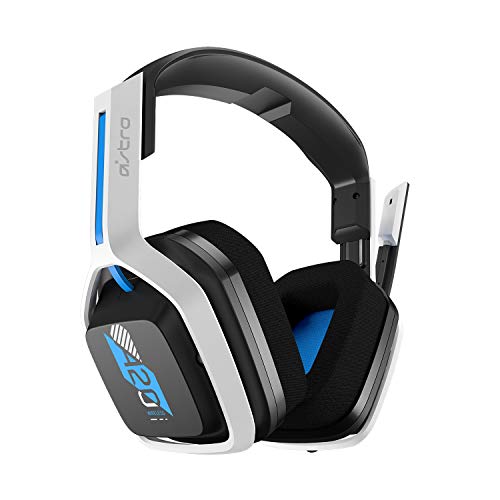
Pros
- Wireless connection with stated 50-foot range
- More than 15 hours of stated battery life
- Flip-to-mute microphone
Cons
- Renewed condition may not suit buyers seeking a new headset
- Who should skip it: buyers seeking a new headset

Pros
- Works across major gaming platforms
- Includes USB-C and 3.5mm connections
- AI-assisted microphone reduces background noise
- Memory foam ear cushions
- One-year US warranty
Cons
- Who should skip it: shoppers needing wireless audio

Pros
- More than 15 hours of stated battery life
- Flip-to-mute microphone
- On-device game and chat audio balance
Cons
- Who should skip it: users needing confirmed compatibility beyond Xbox and PC

Pros
- Two-system PLAYSYNC audio switching
- 48 kHz microphone with Blue VO!CE
- Game and chat balancing on PC and Xbox
- Under 300 g
Cons
- Who should skip it: users needing switching across more than two systems

Pros
- Low-latency SLIPSTREAM wireless audio
- Flip-up microphone with mute indicator
- Listed support for PC, Mac, PS5, and PS4
Cons
- Who should skip it: players needing Dolby Atmos on console
Best Multi-Platform Wireless Headset: Acer Multi-Platform Wireless Gaming Headset
Acer Multi-Platform Wireless Gaming Headset connects through 2.4GHz wireless on PC, PS5, and Switch, Bluetooth 5.4, or a 3.5mm cable, making it the most flexible connection mix described here. Its charging station also acts as a transmitter and displays charging status and battery level. Xbox support is cable-only, and the headset itself is listed for up to 40 hours with lighting off, not 120 hours of headset-only runtime.
Skip it if you need Xbox wireless support or want a compact setup without a charging station.
Best Wired Cross-Platform Headset: Turtle Beach Recon 50 Wired Multiplatform
Turtle Beach Recon 50 Wired Multiplatform is a straightforward choice for devices with a compatible 3.5mm connection, including PlayStation, Xbox, PC, and mobile devices. Its detachable microphone and inline volume and mute controls are useful when you switch between voice chat and listening without chat.
Skip it if you want wireless play or need a USB-only connection.
Best for Switching Between Two Systems: Logitech G Astro A20 X Multi-Platform
Logitech G Astro A20 X Multi-Platform uses PLAYSYNC AUDIO to switch between two systems, with the listed combinations being Xbox/Switch/Switch 2 and PS5/PC. The product page also lists a 48 kHz microphone, Blue VO!CE customization, and Game/Chat balancing on PC and Xbox.
Skip it if you need one headset to connect wirelessly to more than two systems at once or prefer a 3.5mm fallback.
Key Numbers at a Glance
- Listed headset battery life is up to 40 hours for the Acer Multi-Platform Wireless Gaming Headset with lighting off and up to 40 hours for the Turtle Beach Stealth 500 Wireless Headset.
- The Astro Gaming A20 Gen 2 Wireless Gaming Headset lists more than 15 hours of battery life; the ASTRO Gaming ASTRO A20 Wireless Headset Gen 2 for Xbox Series lists the same figure.
- The Corsair HS80 RGB Wireless Fallout Nuka-Cola lists 20Hz-40,000Hz frequency response for its 50mm drivers.
- The Acer Multi-Platform Wireless Gaming Headset lists 50mm drivers and an approximately 285g build.
How to Choose the Best Gaming Headset That Works on All Platforms
Check Each Device’s Connection
Bottom line: Match the headset’s connection to every device you plan to use, rather than relying on the phrase “multi-platform.” The Acer Multi-Platform Wireless Gaming Headset specifies 2.4GHz wireless for PC, PS5, and Switch, Bluetooth 5.4, and 3.5mm wired audio; its Xbox support is cable-only. The Turtle Beach Recon 50 Wired Multiplatform uses a 3.5mm connection, while the Logitech G Astro A20 X Multi-Platform switches audio between two system groups.
Before ordering, check the console’s available ports and whether your intended connection supports game audio and microphone chat. For a headset advertised with a console-specific USB transmitter, verify that the exact version matches your console: the renewed Astro Gaming A20 Gen 2 listing is for PS5, PS4, and PC, while the ASTRO Gaming ASTRO A20 Wireless Headset Gen 2 listing is for Xbox and PC.
If you mainly play on PC and want clearer directional cues, compare the trade-offs in our best PC gaming headsets for footsteps guide.
Decide Whether You Need Wireless, Bluetooth, or Both
Bottom line: Choose 2.4GHz for a dedicated wireless gaming connection, Bluetooth for compatible phones and laptops, and wired audio when broad cable compatibility matters most. The Acer Multi-Platform Wireless Gaming Headset lists all three connection modes. The Turtle Beach Stealth 500 Wireless Headset combines 2.4GHz wireless for Xbox and PC with Bluetooth 5.2, and its QuickSwitch button changes between wireless and Bluetooth.
Bluetooth support does not mean every console can use Bluetooth audio with a headset. Check the console and headset instructions before assuming direct pairing will work; the Recon 50’s specified 3.5mm connection is a simpler route when the device has a compatible jack.
Compare Battery Life and Charging Habits
Bottom line: If you want fewer charging interruptions, compare stated runtime and charging arrangements, not just wireless labels. The Acer headset lists up to 40 hours with lighting off, and its station supplies additional backup power, but the manufacturer describes 120 hours as a combined battery system. The Turtle Beach Stealth 500 lists up to 40 hours and quick charge, while both renewed Astro A20 Gen 2 listings specify more than 15 hours.
Runtime depends on the stated conditions, so do not treat the Acer’s combined system figure as 120 hours of uninterrupted headset use. If you prefer to avoid battery management altogether, a wired model such as the Turtle Beach Recon 50 does not rely on wireless headset runtime.
For more connection and budget trade-offs, see our best PC gaming headset for the money comparison.
Choose Microphone and Controls for Your Chat Routine
Bottom line: Pick a microphone and mute control you can use reliably during the kind of games and calls you actually play. The Turtle Beach Recon 50 has a removable mic and inline mute control; the Turtle Beach Stealth 500 has a flip-to-mute mic and a listed desktop and mobile app with a 10-band EQ. The Logitech G Astro A20 X lists a 48 kHz microphone with Blue VO!CE customization.
Those features describe controls and customization, not guaranteed chat quality in every room or app. If voice clarity is also important for remote calls, our best headsets for a call center guide covers a different set of work-focused priorities.
Account for Fit, Desk Space, and Extra Hardware
Bottom line: A dock can simplify charging, but it takes desk space; a wired headset avoids a wireless transmitter and charging routine. The Acer Multi-Platform Wireless Gaming Headset includes a magnetic charging station that also serves as a 2.4GHz transmitter. The Corsair HS80 RGB Wireless Fallout Nuka-Cola uses SLIPSTREAM wireless, while the Recon 50 is a wired design with inline controls.
The Acer is listed at approximately 285g, and the Logitech G Astro A20 X is described as weighing under 300g. These figures help compare listed weight, but comfort also depends on fit and personal preference; check return terms if you are sensitive to clamp pressure or ear-cup fit.
For a different audio priority, our best PC gaming headsets for sound quality guide compares models with sound-focused features.
How We Compared These Products
This guide is based on product research, including listed connections, platform compatibility, battery claims, microphone controls, and design features. We did not conduct firsthand evaluation, so recommendations reflect the product information rather than measured audio, comfort, or wireless performance; customer feedback should be treated as reported experience rather than independent verification.
Which Option Fits Your Devices?
For a mix of PC, PS5, Switch, phone, and wired Xbox use: Acer Multi-Platform Wireless Gaming Headset offers the widest listed connection mix, while Xbox requires the cable. Skip it if you need Xbox wireless support or do not want a charging station.
For straightforward wired console and PC play: Turtle Beach Recon 50 Wired Multiplatform supports listed 3.5mm connections across PlayStation, Xbox, PC, and mobile, with a removable mic and inline controls. Skip it if wireless freedom or USB-only connectivity is essential.
For switching audio between two system groups: Logitech G Astro A20 X Multi-Platform lists PLAYSYNC switching and PC or Xbox Game/Chat balancing. Skip it if you need a one-headset setup that wirelessly serves more than two systems at once.
Mistakes to Avoid When Choosing a Gaming Headset
- Assuming “multi-platform” means identical wireless support. Check the connection listed for each console; the Acer headset, for example, supports Xbox through cable only.
- Confusing Bluetooth with console compatibility. Confirm that the console supports the intended Bluetooth audio route, or choose a listed USB transmitter or compatible 3.5mm connection.
- Comparing battery numbers without their conditions. The Acer’s 120-hour figure is a combined headset-and-station system claim, while headset runtime is listed as up to 40 hours with lighting off.
- Overlooking setup and desk requirements. A charging dock or USB transmitter uses space and a port; wired models avoid wireless charging but need a compatible audio connection.
Frequently Asked Questions
Does one gaming headset work wirelessly with every console?
No. Compatibility depends on the headset’s connection and the specific console. The Acer Multi-Platform Wireless Gaming Headset supports Xbox through cable only, while the Logitech G Astro A20 X lists switching between two specified system groups.
Can I use a Bluetooth gaming headset with a console?
Do not assume so from Bluetooth support alone. The Turtle Beach Stealth 500 lists Bluetooth 5.2 and 2.4GHz connections for Xbox and PC, but check the console instructions and exact headset compatibility for your intended setup.
Which listed headset has the longest stated battery life?
The Acer headset lists up to 40 hours with lighting off and describes 120 hours for its combined headset-and-station battery system. The Turtle Beach Stealth 500 also lists up to 40 hours; compare the headset-only runtime rather than treating the Acer’s combined figure as uninterrupted use.
Is a wired headset a good choice for multiple platforms?
It can be, if your devices have a compatible audio connection. The Turtle Beach Recon 50 lists 3.5mm compatibility for PlayStation, Xbox, PC, and mobile, but it does not offer wireless play.
What is the difference between the Astro A20 Gen 2 listings?
The Astro Gaming A20 Gen 2 Wireless Gaming Headset listing is for PS5, PS4, and PC, while the ASTRO Gaming ASTRO A20 Wireless Headset Gen 2 for Xbox Series listing is for Xbox and PC. Both list more than 15 hours of battery life, but their console-specific transmitters make checking the exact version important.
Do I need headset software to use these models?
The product information names the Swarm II desktop and mobile app for the Turtle Beach Stealth 500 and Blue VO!CE customization for the Logitech G Astro A20 X. It does not establish that every basic audio function requires software, so check the manufacturer’s setup instructions for the features you want.




Write Your Review
No reviews yet. Be the first to share your experience!