
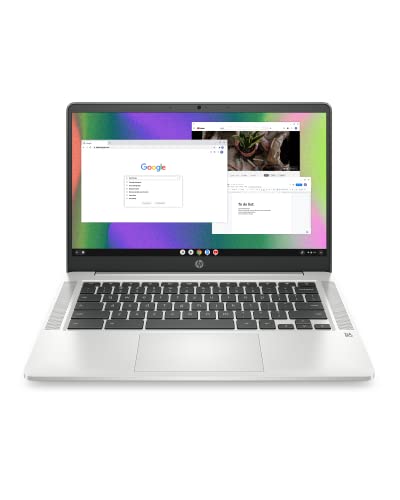


Choose a Chromebook if your routine centers on a browser, Google apps, and cloud files; choose a Windows laptop if you need Windows software or prefer the Windows desktop environment. The listed models include Chromebooks with ChromeOS and Windows laptops with Windows 11, so checking app compatibility and memory before buying can help you avoid an inconvenient switch later.
Compare at a glance
| Product | Brand | Size | Weight | Stands out for | Price |
|---|---|---|---|---|---|
| 1 HP Chromebook 14, 4 GB RAM | HP | 0.7 × 8.6 × 12.82 in | 3.2 lb | Portable 3.24 lb design | Check price |
| 2 Acer Chromebook 315, 15.6-Inch | Acer | 0.79 × 14.4 × 9.6 in | 3.5 lb | Large 15.6-inch display | Check price |
| 3 Dell Chromebook 3120, 4GB RAM | Dell | 12 × 12 × 5 in | 4 lb | HDMI output | Check price |
| 4 Acer Chromebook 315 CB315-7HT-C7GN | Acer | 14.14 × 9.3 × 0.73 in | 3.7 lb | Full HD touchscreen display | Check price |
| 5 Lenovo IdeaPad 3i Chromebook 15, FHD | Lenovo | 14.3 × 9.6 × 0.7 in | 3.5 lb | Full HD 15.6-inch display | Check price |
| 6 HP Essential Laptop, 14-Inch | HP | 12.76 × 8.86 × 0.71 in | 1 lb | Useful mix of USB, HDMI, and SD card ports | Check price |
| 7 HP 14-Inch Laptop with Intel N150 | HP | 12.76 × 8.86 × 0.71 in | 1 lb | Portable 14-inch form factor | Check price |
Sizes and weights as listed by the manufacturer on Amazon. Check the retailer for current price and availability.
Pros
- Portable 3.24 lb design
- Anti-glare display
- Fast Charge support
- ENERGY STAR certified
Cons
- 4 GB RAM limits heavier multitasking
- 64 GB eMMC storage is modest
- Who should skip it: users needing demanding desktop applications
Pros
- Large 15.6-inch display
- Built-in webcam and microphone
- ChromeOS automatic updates
Cons
- 4GB RAM and 64GB flash storage limit room for demanding workloads
- Who should skip it: users needing demanding desktop software
Pros
- HDMI output
- Wi-Fi connectivity
- Intel dual-core processor
Cons
- 16GB of listed storage
- Who should skip it: users needing more memory or storage

Pros
- Full HD touchscreen display
- Four USB ports
- HDMI output
Cons
- Who should skip it: users needing Windows software
Best for browser-based schoolwork

Pros
- Full HD 15.6-inch display
- Numeric keypad and webcam privacy shutter
- Wi-Fi 6 and Bluetooth 5.2
- Up to 10 hours of stated battery life
Cons
- 4GB RAM limits headroom for heavier multitasking
- TN panel is rated at 220 nits
- Who should skip it: users needing demanding apps or substantial multitasking
Best for Windows 11 and a light
Pros
- Useful mix of USB, HDMI, and SD card ports
- Wi-Fi 6 and Bluetooth 5.4
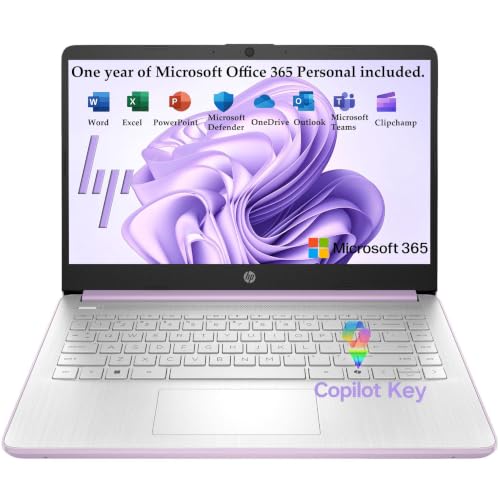
- One-year Microsoft 365 Personal subscription included
Cons
- 4GB of memory limits demanding multitasking
- 1366 x 768 resolution is modest
- Who should skip it: users needing demanding multitasking

Pros
- Portable 14-inch form factor
- Wi-Fi 6 and Bluetooth 5.4
- HDMI and USB-C with DisplayPort
- One-year Microsoft 365 Personal subscription
Cons
- 4GB RAM limits demanding multitasking
- 1366 x 768 resolution is modest
- Who should skip it: users needing demanding applications
Key Numbers at a Glance
- The Lenovo IdeaPad 3i Chromebook 15 Laptop, 15.6″ FHD has a 15.6-inch 1920 x 1080 display; the HP Chromebook 14, 4 GB RAM has a 14-inch 1366 x 768 display.
- The HP 2027 Laptop, Intel Processor lists a 14-inch HD display and weighs 3.24 lb.
- The Lenovo Chromebook 2-in-1, 14-inch Touchscreen lists a 14-inch WUXGA touchscreen, 4GB RAM, and 128GB UFS storage.
- The HP Chromebook 14, 4 GB RAM lists up to 14 hours of battery life; the Lenovo IdeaPad 3i Chromebook 15 Laptop, 15.6″ FHD lists up to 10 hours.
Chromebook vs Windows Laptop: What to Compare
Operating system and app compatibility
Bottom line: Pick the operating system that supports the apps your school, employer, or personal workflow requires. ChromeOS is designed around Google services and browser-based use, and some Chromebooks also support apps from Google Play. Windows 11 is the relevant choice if you require a Windows desktop application; check the software maker’s system requirements rather than assuming that a web or mobile version will do the same job.
The Lenovo IdeaPad 3i Chromebook 15 Laptop, 15.6″ FHD runs ChromeOS and lists Microsoft 365 access, while the HP 2027 Essential Laptop, Intel Processor runs Windows 11 Home and includes a one-year Microsoft 365 Personal subscription. If a specific application is essential, confirm its operating system support and whether it requires an account, subscription, or internet connection. For more options in this category, see our budget laptops page.
Memory, storage, and workload
Bottom line: For frequent multitasking or locally stored files, compare RAM and usable storage instead of relying on an operating-system label. Several models list 4GB RAM, including the HP 2027 Essential Laptop, Intel Processor and the Lenovo Chromebook 2-in-1, 14-inch Touchscreen. The Acer Chromebook 315 15.6in Laptop 8GB 128GB lists 8GB RAM and 128GB eMMC, a distinct configuration to consider if you keep more tabs or apps open.
Storage types and capacities vary: the HP 2027 Essential Laptop, Intel Processor lists 128GB UFS, while the Lenovo IdeaPad 3i Chromebook 15 Laptop, 15.6″ FHD lists 64GB eMMC plus a 128GB SD card. The older Dell Chromebook 3120 Laptop Computer Intel Dual lists 16GB SSD. Check whether your files live locally or in cloud storage, and whether your work needs a full desktop program. For options aimed at a particular screen and memory budget, compare our best laptops under $300 guide.
Screen size and resolution
Bottom line: Choose screen resolution and size around your work surface and how much room you need for documents. The Lenovo IdeaPad 3i Chromebook 15 Laptop, 15.6″ FHD lists a 15.6-inch, 1920 x 1080 TN display, while the Unowo 15.6-Inch Laptop, 1080p lists a 15.6-inch 1920 x 1080 IPS display. The HP Chromebook 14, 4 GB RAM is more compact at 14 inches, but its listed resolution is 1366 x 768.
For spreadsheets or side-by-side windows, a 15.6-inch display may be more comfortable if your desk or bag can accommodate it. If you work mostly on the move, consider the smaller listed 14-inch models and confirm the physical dimensions fit your backpack and workspace. See the broader laptop category for other sizes and configurations.
Ports and external displays
Bottom line: Match the laptop’s listed ports to your monitor, storage, and accessories before buying. The HP 2027 Essential Laptop, Intel Processor lists USB-C with DisplayPort 1.2, two USB-A ports, HDMI 1.4b, and an SD card reader. The Acer Chromebook 315 15.6in Laptop 8GB 128GB lists two USB-C ports, two USB-A ports, and HDMI output.
USB-C does not guarantee the same display, data, or charging functions on every laptop. Verify that the exact port supports the feature you need and check your monitor’s input before planning a direct connection or dock.
Battery, portability, and support details
Bottom line: Use stated battery claims as a comparison point, not a promise of your runtime. The HP Chromebook 14, 4 GB RAM lists up to 14 hours, while the HP 2027 Essential Laptop, Intel Processor lists up to 7.5 hours of mixed use. Battery life depends on what you run and how you use the laptop, so consider access to outlets as well as the manufacturer’s estimate.
Update support also matters for a Chromebook: the Lenovo IdeaPad 3i Chromebook 15 Laptop, 15.6″ FHD lists an Auto Update Expiration date of June 2030. The Dell Chromebook 3120 Laptop Computer Intel Dual is renewed, and its listing does not give comparable battery or update-support details. Verify condition, support information, and warranty terms for any renewed model before choosing it.
How We Compared These Products
This guide is based on product research, not firsthand evaluation. We compared the product-page details available for operating systems, processor and memory configurations, storage, displays, ports, stated battery life, and support information. Customer feedback is not used here to make claims about performance, reliability, or long-term ownership.
Which Option Fits Your Home and Devices?
For browser-based schoolwork and a larger Full HD screen: Lenovo IdeaPad 3i Chromebook 15 Laptop, 15.6″ FHD has a 15.6-inch 1920 x 1080 display and lists up to 10 hours of battery life. It runs ChromeOS and lists 4GB RAM. Skip it if your coursework requires a Windows-only desktop application or more memory.
For Windows 11 and a light, compact listed design: HP 2027 Essential Laptop, Intel Processor runs Windows 11 Home, weighs 3.24 lb, and includes a 14-inch display with HDMI and USB-C DisplayPort 1.2. It lists 4GB RAM, so check that your everyday apps are suitable for that configuration. Skip it if you need more than 4GB RAM or a higher-resolution built-in screen.
For touch use and convertible modes: Lenovo Chromebook 2-in-1, 14-inch Touchscreen lists a 14-inch WUXGA touchscreen and a design that folds into laptop, tent, and tablet modes. It also lists 4GB RAM and 128GB UFS storage. Skip it if your essential software requires Windows or you do not expect to use the convertible design.
Mistakes to Avoid When Choosing a Budget Laptop
- Choosing by price or operating system alone. Check that the required programs run on ChromeOS or Windows before deciding.
- Assuming advertised storage tells the whole story. Compare storage type and capacity, and check whether any advertised expansion is an SD card rather than internal storage.
- Ignoring memory. Several listings specify 4GB RAM; compare that with your app requirements and consider the Acer Chromebook 315 15.6in Laptop 8GB 128GB if 8GB better fits your workload.
- Assuming every USB-C port does everything. Confirm the exact port’s display and charging support, then match it to your monitor or charger.
Frequently Asked Questions
Is a Chromebook a Windows laptop?
No. A Chromebook runs ChromeOS, while the Windows models in this comparison run Windows 11 Home. Their app compatibility and software environment differ, so check your essential programs before choosing.
Can I use Microsoft 365 on a Chromebook?
The Lenovo IdeaPad 3i Chromebook 15 Laptop, 15.6″ FHD lists access to Microsoft 365. The product details do not establish that every Windows desktop version or feature is available on ChromeOS, so confirm the version and functions your work requires.
Which is better for offline work?
Either operating system can support some offline tasks, but available functions depend on the specific app and how it handles local files. Check the app’s offline requirements and make sure the laptop has enough local storage for the files you need without an internet connection.
Can these laptops connect to an external monitor?
Several listings specify HDMI, and the HP 2027 Essential Laptop, Intel Processor lists USB-C with DisplayPort 1.2. Check the exact model’s port capabilities and your monitor’s inputs; a USB-C connector by itself does not confirm display output.
Is a renewed Chromebook a good choice?
A renewed model can suit a buyer whose needs fit its stated configuration, but confirm the condition, warranty, and ChromeOS update-support details. The Dell Chromebook 3120 Laptop Computer Intel Dual listing gives 4GB RAM and 16GB SSD but does not state an update-expiration date.





Write Your Review
No reviews yet. Be the first to share your experience!