



If you are building a gaming PC and want to avoid buying extra case fans, start with how many fans come installed, then check whether the case fits your graphics card, motherboard, and radiator. The best pc cases that come with fans for your build depend on that trade-off: a compact ATX case with two fans may suit a straightforward setup, while a panoramic case with seven fans prioritizes included cooling and display space.
This comparison highlights what to verify before buying, including fan control, front-panel ports, glass layout, and component clearances. For additional airflow-focused options, see our guide to best PC cases for air cooling.
Compare at a glance
| Product | Brand | Size | Stands out for | Price |
|---|---|---|---|---|
| 1 NZXT H5 Flow ATX Case, 360mm Front Radiator | NZXT | 16.93 × 8.86 × 18.31 in | Two 120mm fans included | Check price |
| 2 FOIFKIN F600 Case with 7 ARGB Fans | FOIFKIN | 16.5 × 11.2 × 17.3 in | Seven pre-installed ARGB PWM fans | Check price |
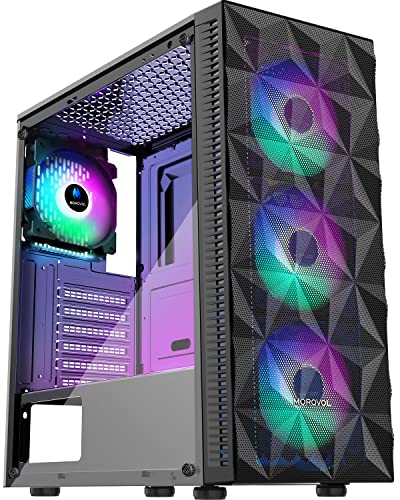
| 3 MOROVOL 621 Mid-Tower Case, 4 RGB Fans | MOROVOL | 14.57 × 7.28 × 16.73 in | Four pre-installed 120 mm fans | Check price |
| 4 MUSETEX NN8 ATX Case with 6 PWM ARGB Fans | MUSETEX | 15.75 × 8.07 × 18.98 in | Six PWM ARGB fans included | Check price |
| 5 Antec Flux Pro Full-Tower E-ATX Case | Antec | 20.86 × 9.64 × 21.45 in | Six PWM fans included | Check price |
| 6 DARKROCK EC2 ATX Case, 360mm Radiator Support | DARKROCK | 17.6 × 8.6 × 15.2 in | Supports ATX, Micro-ATX, and Mini-ITX motherboards | Check price |
| 7 Thermalright A70 Vision White ATX Case | Thermalright | 17.75 × 11.4 × 18.78 in | Built-in 9.16-inch customizable display | Check price |
| 8 MUSETEX K2 ATX Case with 7 PWM ARGB Fans | MUSETEX | 16.73 × 8.35 × 18.5 in | Seven PWM ARGB fans included | Check price |
| 9 MUSETEX Y6 ATX Case with 7 ARGB Fans | MUSETEX | 16.73 × 10.83 × 15.67 in | Seven fans included | Check price |
Sizes and weights as listed by the manufacturer on Amazon. Check the retailer for current price and availability.
Pros
- Two 120mm fans included
- Supports front radiators up to 360mm
- Mesh panels support airflow
- Cable routing channels, hooks, and straps
Cons
- Who should skip it: builders needing every intake fan included
Pros
- Seven pre-installed ARGB PWM fans
- Supports GPUs up to 400 mm
- Fits ATX, Micro-ATX, and Mini-ITX boards
- Dual-chamber design
Cons
- Who should skip it: builders needing more than three listed drive bays
Pros
- Four pre-installed 120 mm fans
- Mesh front panel
- Removable tempered-glass side panel
- Supports three motherboard form factors
Cons
- GPU clearance limited to 300 mm
- Who should skip it: builders needing addressable RGB lighting

Pros
- Six PWM ARGB fans included
- Opening tempered-glass side panel
- Two USB 3.0 ports
- Multiple drive-mounting configurations
Cons
- Who should skip it: builders lacking a 3-pin ARGB header
Best for a large radiator-focused system

Pros
- Six PWM fans included
- Simultaneous 420mm and 360mm radiator support
- Removable cooling brackets
- CPU and GPU temperature display
Cons
- Who should skip it: builders seeking a compact, lightweight case

Pros
- Supports ATX, Micro-ATX, and Mini-ITX motherboards
- Room for a 360mm front radiator
- Magnetic top and bottom dust filters
- Type-C ready
Cons
- Only one fan is pre-installed
- Who should skip it: builders needing a case with multiple included fans

Pros
- Built-in 9.16-inch customizable display
- Eight 120mm fan mounting positions
- Up to 420mm graphics card clearance
- Front-panel USB-C and two USB-A ports
Cons
- Who should skip it: builders who prefer a case without a built-in display
Best for a high-fan-count showcase build

Pros
- Seven PWM ARGB fans included
- Panoramic dual tempered-glass design
- USB-C front-panel port
- Supports GPUs up to 15.7 inches
Cons
- Who should skip it: builders needing more PSU clearance

Pros
- Seven fans included
- 270-degree dual-glass view
- Supports three motherboard sizes
- Front USB-C port
Cons
- Who should skip it: builders expecting core PC components included
Best Airflow-Focused ATX Case: NZXT H5 Flow ATX Case, 360mm Front Radiator
The NZXT H5 Flow ATX Case, 360mm Front Radiator includes two 120mm fans, one front and one rear, and has mesh across the top, front, and side panels. Front radiator support reaches 360mm, with up to 240mm supported at the top. Its included fan count is lower than the seven-fan cases here, and the two additional GPU-intake fan positions mentioned in the listing are not included. Skip it if you want a case that arrives with a larger fan array already installed.
Best for a Panoramic Build: FOIFKIN F600 Case with 7 ARGB Fans
The FOIFKIN F600 Case with 7 ARGB Fans combines a dual-chamber layout with seven 120mm PWM ARGB fans, including six reverse and one forward fan. It supports ATX, Micro-ATX, and ITX boards, GPUs up to 400mm, and three 360mm radiators according to the listing. Storage support is limited to one HDD and two SSDs, so check that against your planned drives. Skip it if your build needs more listed drive capacity or a less visually prominent glass design.
Best for a Large Cooling Build: Antec Flux Pro Full-Tower E-ATX Case
The Antec Flux Pro Full-Tower E-ATX Case includes six PWM fans and supports up to 12 fans total, with simultaneous 420mm and 360mm radiator installation listed. A rotated power-supply mount and CPU/GPU temperature display add distinctive build features. The full-tower format and cooling flexibility are more than a compact, basic build may need. Skip it if desk space is tight or you do not need the larger radiator capacity.
Key Numbers at a Glance
- Included fan counts range from one in the DARKROCK EC2 ATX Case, 360mm Radiator Support to seven in the FOIFKIN F600 Case with 7 ARGB Fans.
- Maximum listed GPU length ranges from 300mm in the MOROVOL 621 Mid-Tower Case, 4 RGB Fans to 420mm in the Thermalright A70 Vision White ATX Gaming case.
- The MUSETEX NN8 ATX Case with 6 PWM ARGB Fans supports up to five SSDs and one HDD, or four SSDs and two HDDs, depending on configuration.
- The Antec Flux Pro Full-Tower E-ATX Case supports simultaneous 420mm and 360mm radiators, while the DARKROCK EC2 ATX Case, 360mm Radiator Support lists a 360mm front radiator.
How to Choose the Best PC Cases That Come With Fans
Match the included fan setup to your cooling plan
Bottom line: Count installed fans, but also check their type and where they are mounted. The DARKROCK EC2 includes one fan and supports up to eight 120mm fans, while the FOIFKIN F600 includes seven 120mm PWM ARGB fans. The MUSETEX K2 also includes seven, arranged as three reverse side fans, three forward top fans, and one rear fan. If you want lighting control, distinguish addressable ARGB from fixed RGB: the MOROVOL 621’s four fans have fixed lighting, not addressable lighting. Check motherboard headers and any required fan or lighting connections before ordering.
Check motherboard, GPU, and cooler clearances
Bottom line: Choose a case only after comparing its supported board size and component limits with your parts. The MOROVOL 621 supports ATX, Micro-ATX, and Mini-ITX boards, but its listed maximum GPU length is 300mm and CPU cooler height is 155mm. By comparison, the MUSETEX Y6 supports GPUs up to 410mm and CPU coolers up to 160mm. A larger GPU clearance does not confirm every card will fit: check the card’s exact length and thickness, plus radiator and cable space, in the case documentation.
If your build centers on a particularly large graphics card, our guide to best gaming PC cases for RTX 5090 focuses on clearance considerations. For cooler height and radiator planning, compare the options in best CPU coolers for GTA 6 builds.
Compare radiator support with your intended cooler
Bottom line: A radiator-size claim is useful only if the mounting position and your other components also fit. The NZXT H5 Flow lists support for a 360mm front radiator and a 240mm top radiator; the MUSETEX Y6 lists up to a 360mm top-mounted liquid cooler. The Antec Flux Pro lists simultaneous 420mm and 360mm radiator installation. Confirm the radiator dimensions and the case manual’s mounting combinations before choosing a liquid cooler.
Balance glass, airflow, and desk space
Bottom line: A showcase layout changes placement and access, so consider the desk as well as the components. The FOIFKIN F600 measures 420 × 285 × 430mm and uses a dual-chamber design with panoramic glass; the Thermalright A70 measures 450.8 × 289.5 × 477mm and has three glass sides with a side mesh panel. The NZXT H5 Flow uses mesh at the front, top, and side rather than a panoramic glass layout. Measure the space available and consider whether you prefer an open view of components or more conventional airflow-panel placement.
For a build where air cooling is the priority, the trade-offs are also covered in our best PC cases for air cooling roundup. That link duplicates the opening destination, so use the opening link for additional context and rely on the comparisons here for fan and fit details.
Check front-panel ports and storage needs
Bottom line: Verify that the case has the ports and drive space your daily setup requires. The MUSETEX K2 lists one Type-C port and two USB 3.0 ports, while the MOROVOL 621 lists one USB 3.0 port and two USB 2.0 ports. The MUSETEX Y6 lists one Type-C, one USB 3.0, and one USB 2.0 port; its product page does not state drive-bay capacity in the listed features. Check your motherboard’s front-panel headers for the case ports you plan to use, and verify drive mounts in the manual.
How We Compared These Products
This guide is based on product research, comparing listed fan counts and types, motherboard and component compatibility, radiator support, dimensions, ports, and storage information. Customer feedback was not available in the product data, so recommendations rely on the stated specifications and design features rather than reported owner experiences. Where a detail such as a specific clearance or drive mount is not stated, check the manufacturer’s documentation before buying.
Which Option Fits Your Build?
For a conventional mesh-front ATX build: NZXT H5 Flow ATX Case, 360mm Front Radiator combines two included fans with mesh panels and front 360mm radiator support. Choose it if two fans suit your initial plan and you are comfortable checking whether you need additional fans. Skip it if you want seven fans included or a panoramic glass showcase.
For a high-fan-count showcase build: MUSETEX K2 ATX Case with 7 PWM ARGB Fans lists seven PWM ARGB fans and support for up to 400mm GPUs, plus Type-C and two USB 3.0 front ports. Confirm the power-supply limit, which is 140mm with the drive cage installed and 150–180mm without it. Skip it if you need a different power-supply or storage configuration than the listed limits allow.
For a large radiator-focused system: Antec Flux Pro Full-Tower E-ATX Case lists six included PWM fans, support for up to 12 fans, and simultaneous 420mm and 360mm radiator installation. Its full-tower format is a better match when that cooling flexibility justifies the larger case. Skip it if you have limited desk space or a simpler cooling plan.
Mistakes to Avoid When Choosing a PC Case
- Buying by fan count alone. Check fan size, placement, and whether the fans are PWM, ARGB, or fixed RGB. More included fans do not establish how a particular system will perform.
- Assuming every ATX case has the same clearance. Compare your exact GPU length, cooler height, power-supply length, and radiator dimensions with the case specifications.
- Overlooking motherboard headers. Confirm your board can connect the case’s front USB ports and fan or lighting controls; Type-C on a case does not by itself confirm motherboard-header compatibility.
- Forgetting drive and workspace needs. Check the case’s stated drive capacity and measure the outside dimensions against your desk before committing to a glass-heavy or full-tower layout.
Frequently Asked Questions
Do these cases include all the fans they can hold?
No. The DARKROCK EC2 includes one fan but supports up to eight 120mm fans, and the Antec Flux Pro includes six while supporting up to 12. Fan capacity describes possible mounting, not the number included.
Will an ATX case fit any ATX motherboard?
ATX support addresses motherboard form factor, not every other fit detail. Check the exact motherboard size, graphics-card length, CPU cooler height, radiator layout, and power-supply clearance against the case documentation.
Is the MOROVOL 621’s RGB lighting addressable?
No. The MOROVOL 621 listing describes its four 120mm fans as fixed RGB, not addressable. If you want configurable ARGB lighting, compare models that specifically list ARGB and confirm your motherboard or controller can connect to it.
Which case supports a 360mm radiator?
Several listed cases specify 360mm support, but placement differs. The NZXT H5 Flow lists front support, the MUSETEX Y6 lists top support, and the DARKROCK EC2 lists front support. Check the manufacturer’s manual for the mounting position and component-clearance details that apply to your build.
Does a case Type-C port work with every motherboard?
No. The case needs a compatible motherboard header for its front-panel Type-C connection, and the product data does not establish compatibility with every board. Check the motherboard manual for the required header and confirm the case port’s listed capabilities.


Write Your Review
No reviews yet. Be the first to share your experience!