


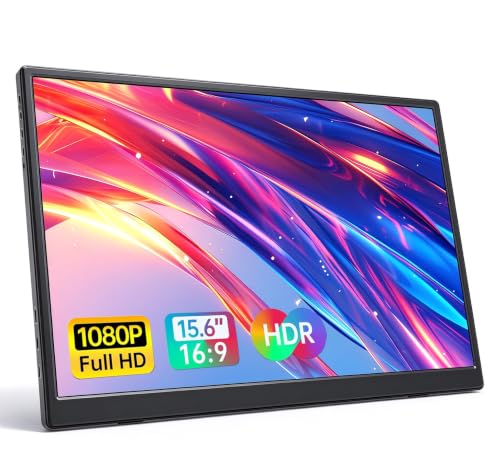

If you are pairing a Mac mini with a monitor, start with the screen size and resolution you want, then check that the connection fits your Mac mini and any other devices on your desk. These picks cover 4K productivity displays, a 5K Apple display, higher-refresh options, and portable screens, so you can weigh image detail against cost, space, and connectivity.
Compare at a glance
| Product | Brand | Size | Weight | Stands out for | Price |
|---|---|---|---|---|---|
| 1 INNOCN 27C1U-D 27-Inch 4K Monitor | INNOCN | 2.6 × 24 × 14 in | Not listed | 4K resolution on a 27-inch IPS panel | Check price |
| 2 ARZOPA Z1FC 16.1-Inch 144Hz Monitor | ARZOPA | 13.98 × 8.66 × 0.37 in | 3.1 lb | 144Hz refresh rate | Check price |
| 3 Anyuse 15.6-Inch FHD Portable Monitor | Anyuse | 16.9 × 1.96 × 11.4 in | 1.4 lb | Full HD IPS display | Check price |
| 4 Yxk 15.6-Inch 1080p Portable Monitor | Yxk | 0.5 × 14 × 8.89 in | 1.4 lb | 15.6-inch 1080p IPS display | Check price |
| 5 INNOCN 27-Inch 4K USB-C Monitor | INNOCN | 7.65 × 24.18 × 20.2 in | Not listed | 3840 × 2160 resolution | Check price |
| 6 INNOCN CB32U1 32-inch 4K Monitor | INNOCN | 10 × 2 × 50 in | Not listed | 32-inch IPS panel | Check price |
Sizes and weights as listed by the manufacturer on Amazon. Check the retailer for current price and availability.
Pros
- 4K resolution on a 27-inch IPS panel
- USB-C, DisplayPort, and HDMI inputs
- Height-adjustable, pivot-capable stand
- VESA 75 x 75 mounting support
Cons
- Who should skip it: gamers needing refresh rates above 60Hz
Pros
- 144Hz refresh rate
- Built-in adjustable-tilt kickstand
- Two USB-C ports and Mini HDMI
- 106% sRGB coverage
Cons
- Who should skip it: gamers who require adaptive sync
Pros
- Full HD IPS display
- Two USB-C ports and Mini HDMI
- Copy and extended display modes
- Built-in speakers
Cons
- USB-C video requires DP Alt Mode support
- Who should skip it: buyers seeking refresh rates above 60Hz

Pros
- 15.6-inch 1080p IPS display
- USB-C and Mini HDMI inputs
- Copy and extended display modes
- Built-in dual speakers
Cons
- USB-C video requires Thunderbolt 3/4 or DP Alt Mode
- Who should skip it: users needing refresh rates above 60Hz

Pros
- 3840 × 2160 resolution
- USB-C with up to 65W power delivery
- Height, tilt, swivel, and pivot adjustments
- 75 × 75 mm VESA mounting
Cons
- Who should skip it: gamers who need refresh rates above 60Hz

Pros
- 32-inch IPS panel
- 4K at 120Hz option
- 90W USB-C charging
- Adjustable stand with pivot
Cons
- Who should skip it: buyers needing 4K at 240Hz
Key Numbers at a Glance
- Screen sizes range from 15.6 inches on the Ingnok Portable Monitor,15.6" FHD 1080P 60Hz to 32 inches on the INNOCN 32" 4K 120Hz / FHD 240Hz HDR400 USB-C 90W.
- Resolution ranges from 1920 × 1080 on the Anyuse 15.6" Full Viewing Angel IPS USB-C HDMI to 5120 × 2880 on the Apple Studio Display: Standard Glass, described as a 27-inch 5K Retina display.
- Refresh rates range from 60Hz on the INNOCN 27-Inch 4K USB-C Monitor to 144Hz on the ARZOPA Z1FC 16.1-Inch 144Hz Monitor.
- USB-C power delivery ranges from 65W on the INNOCN 27-Inch 4K USB-C Monitor to 90W on the INNOCN 27" 4K 120Hz HDR500 USB-C 90W Monitor.
Best 5K Monitor for Mac Mini: Apple Studio Display: Standard Glass
The Apple Studio Display: Standard Glass combines a 27-inch 5K Retina screen with 600 nits brightness and P3 wide color, making it the clearest fit here if you prioritize a high-resolution Mac-focused display. It also includes a 12MP Center Stage camera, microphones, six speakers, two Thunderbolt 5 ports, and two USB-C ports. The trade-off is its premium positioning and tilt-adjustable stand; height adjustment or VESA mounting requires a different configuration. Skip it if you want a lower-cost 4K monitor or need height adjustment in the included stand.
Best High-Refresh 4K Monitor for Mac Mini: INNOCN 27" 4K 120Hz HDR500 USB-C 90W Monitor
The INNOCN 27" 4K 120Hz HDR500 USB-C 90W Monitor pairs a 27-inch 4K panel with a listed 120Hz mode, 90W USB-C power delivery, and a pivot stand. The product page also specifies a 4K 120Hz and FHD 240Hz dual mode, but confirm your Mac mini and cable support the resolution and refresh rate you intend to use. Its feature set is more than a Mac mini user who only needs a basic 60Hz office display may require. Skip it if you do not need the higher refresh rate or USB-C charging features.
Best Large 4K Monitor for Mac Mini: INNOCN 32" 4K 120Hz / FHD 240Hz HDR400 USB-C 90W
The INNOCN 32" 4K 120Hz / FHD 240Hz HDR400 USB-C 90W offers a 32-inch 4K panel, 120Hz refresh rate, 90W USB-C power delivery, and a height-adjustable, pivoting stand. Its size can suit a wider desk or users who want more physical screen area, while the listed Delta E under 1 and 100% sRGB and 98% DCI-P3 coverage target color-focused work. A 32-inch display takes more desk space than a 27-inch screen, and the Mac mini itself does not need laptop charging. Skip it if your desk is compact or you would rather pay for fewer features.
Best Portable Monitor for Mac Mini: Anyuse 15.6" Full Viewing Angel IPS USB-C HDMI
The Anyuse 15.6" Full Viewing Angel IPS USB-C HDMI is a compact 15.6-inch 1080p IPS display with two USB-C ports and Mini HDMI, and its listed weight is 1.37 lb. It can make sense when portability and a secondary screen matter more than 4K detail, but it is much smaller than the desktop displays in this roundup. Its USB-C video connection requires a device with Thunderbolt 3 or 4, or USB 3.1 Type-C DP Alt Mode, according to the listing. Skip it if you need a larger primary screen or 4K resolution.
Best Value 4K USB-C Monitor for Mac Mini: INNOCN 27-Inch 4K USB-C Monitor
The INNOCN 27-Inch 4K USB-C Monitor offers a 27-inch 3840 × 2160 IPS panel, 60Hz refresh rate, and USB-C with 65W power delivery. Its stand supports height, swivel, tilt, and pivot adjustment, which gives you useful positioning flexibility for a fixed desk. The product page also specifies DisplayPort and HDMI, but it does not list the USB-C port as a multiport hub. Skip it if you need a refresh rate above 60Hz or the Apple display’s 5K resolution.
How to Choose a Monitor for a Mac Mini
Resolution and screen size
Bottom line: Match resolution and screen size to your viewing distance and the detail your work needs. The options include 15.6-inch 1080p portable screens, 27-inch 4K monitors, a 27-inch 5K display, and 32-inch 4K panels. Higher resolution can provide more detail, but scaling affects how large interface elements appear, so check macOS display settings and your preferred viewing distance before choosing.
For a broader look at color-focused screens, see our best monitors for video editing guide. The Apple Studio Display specifies 14.7 million pixels, while the INNOCN 27-Inch 4K USB-C Monitor lists 3840 × 2160 resolution.
Ports and USB-C power delivery
Bottom line: Check video input first, and treat USB-C charging wattage as a laptop convenience rather than a Mac mini requirement. The INNOCN 27-Inch 4K USB-C Monitor lists USB-C, DisplayPort, and HDMI, plus 65W power delivery; the INNOCN 27" 4K 120Hz HDR500 USB-C 90W Monitor lists those connection types and 90W delivery. A Mac mini is a desktop computer, so monitor power delivery does not replace its own power connection. Confirm which ports your particular Mac mini has and whether the monitor supports your desired signal through that port.
If you are also shopping for a MacBook Air display, our best monitors for MacBook Air guide focuses on laptop-oriented connection needs.
Refresh rate and gaming
Bottom line: A higher refresh rate matters when your Mac mini and chosen games can use it; otherwise, prioritize resolution and panel size. The INNOCN 27-Inch 4K USB-C Monitor lists 60Hz, while the ARZOPA Z1FC 16.1-Inch 144Hz Monitor lists 144Hz at 1080p and explicitly says it has no adaptive sync or FreeSync. The INNOCN 27-inch and 32-inch dual-mode displays list 120Hz at 4K and 240Hz at FHD, but check the Mac mini model, connection, and software before counting on those modes. For console comparisons, see our best monitors for Xbox Series X.
Color, brightness, and HDR
Bottom line: For color-sensitive work, compare stated color coverage and calibration claims, not just an HDR label. The Apple Studio Display lists 600 nits and P3 wide color; the INNOCN 27-inch dual-mode model specifies HDR500 and Delta E under 1, while the INNOCN 27-Inch 4K USB-C Monitor lists 400 nits and Delta E under 2. Those are manufacturer specifications, not a guarantee that every unit or workflow will look identical. Verify whether your software and content use the color space or HDR format you need.
Stand adjustment and desk fit
Bottom line: Measure your desk and check the included stand before buying a large display. The INNOCN 27-Inch 4K USB-C Monitor lists height, swivel, tilt, and pivot adjustment, while the Apple Studio Display configuration here has a tilt-adjustable stand. The portable Anyuse monitor is 15.6 inches and 1.37 lb, but its compact format means less screen area for simultaneous windows. Check the product configuration for VESA support and stand type if you plan to use a monitor arm.
How We Compared These Products
This guide compares the product-page specifications, including screen size, resolution, refresh rate, ports, USB-C power delivery, stated color features, and stand adjustment. It is based on product research rather than firsthand evaluation; customer feedback data is not available here, so we do not treat ratings as proof of performance.
Which Option Fits Your Home and Devices?
For a compact secondary screen, the Anyuse 15.6" Full Viewing Angel IPS USB-C HDMI pairs 1080p resolution with a 1.37 lb listed weight; choose a larger 4K display if it will be your main workspace screen. If you want a Mac-centered 5K display with integrated camera and audio, the Apple Studio Display: Standard Glass matches that brief, while buyers focused on a lower-cost 4K workspace can compare the INNOCN 27-Inch 4K USB-C Monitor. Skip portable models for a permanent setup where a large, high-resolution screen is the priority, and skip premium features if you will not use them.
Mistakes to Avoid When Choosing a Mac Mini Monitor
- Assuming every USB-C port does everything. Check that the specific port supports video input and confirm any power-delivery needs. USB-C alone does not guarantee every display or charging function.
- Choosing refresh rate without checking the whole setup. Match the monitor mode to the Mac mini model, connection, and intended app or game before paying for a higher refresh rate.
- Ignoring physical fit. A 32-inch screen needs more desk room than a 27-inch display; measure the available space and verify the stand configuration.
- Buying by HDR label alone. Compare stated brightness, color coverage, and HDR specification, then check whether your actual content and workflow use those features.
Frequently Asked Questions
Will any monitor work with a Mac mini?
A monitor can work if its input and video mode match an output supported by your particular Mac mini. These products list HDMI, DisplayPort, USB-C, or combinations of those connections, but check your Mac mini’s exact ports and the display’s supported modes before buying.
Can a USB-C monitor power a Mac mini?
The listed 65W and 90W USB-C power delivery features are described as laptop charging. A Mac mini is a desktop computer and still needs its own power connection; do not assume monitor USB-C power delivery powers the computer.
Is 4K enough for a Mac mini, or should I choose 5K?
4K is a practical choice among these products if you want a sharp desktop display without choosing the Apple Studio Display’s 27-inch 5K panel. The 5K model may suit users who specifically prioritize its higher pixel count, P3 color, integrated camera, and audio. Consider your budget and preferred macOS scaling as well as resolution.
Is a portable monitor suitable as the main Mac mini display?
It can serve as a display if its connection is compatible, but the portable options here are 15.6-inch 1080p screens. That smaller format can suit a tight desk or secondary-screen use; choose a 27-inch or 32-inch monitor if you want more workspace.
Does a higher refresh rate matter for Mac mini gaming?
A higher refresh rate can be useful when the Mac mini, connection, and game support the selected mode. The ARZOPA lists 144Hz at 1080p, while several INNOCN models list 120Hz at 4K; verify compatibility and remember that the ARZOPA listing says adaptive sync and FreeSync are not included.


Write Your Review
No reviews yet. Be the first to share your experience!