


For Xbox Series X gaming at up to 4K and 120Hz, prioritize a monitor whose listed HDMI capabilities match that target; the Philips Momentum 329M1RV specifically lists 4K at 120Hz for consoles. If you want a less costly desktop display, a 27-inch QHD monitor such as the Dell S2725DSM trades 4K detail for a 144Hz panel, while portable G-STORY models favor travel over a large viewing area. Choosing by refresh-rate number alone can leave you with the wrong resolution, connection, or physical fit.
Compare at a glance
| Product | Brand | Size | Weight | Stands out for | Price |
|---|---|---|---|---|---|
| 1 Dell S2725DSM 27-Inch QHD Monitor | Dell | 7.95 × 24.07 × 15.36 in | 14 lb | 27-inch QHD resolution | Check price |
| 2 SANSUI 34-Inch 200Hz Ultrawide Monitor | SANSUI | 8.6 × 31.8 × 17.96 in | 15 lb | 34-inch curved ultrawide display | Check price |
| 3 ARMORR GAMERSBOX 21.5-Inch Gaming Monitor | ARMORR | 21.65 × 16.54 × 8.66 in | 21 lb | 21.5-inch 1080p IPS display | Check price |
| 4 Acer PM161Q 15.6-Inch FHD Portable Monitor | Acer | 0.4 × 13.96 × 8.7 in | 2.4 lb | Full HD IPS display | Check price |
| 5 G-STORY 12.5-inch 1080p Gaming Monitor | G-STORY | 13.19 × 9.76 × 3.9 in | Not listed | Xbox Series S integrated design | Check price |
| 6 G-STORY 15.6-Inch 4K Portable Monitor | G-STORY | 11.8 × 8.2 × 3 in | Not listed | 4K resolution on a 15.6-inch screen | Check price |
| 7 G-STORY 14-Inch 4K Portable Monitor | G-STORY | 5 × 10 × 15 in | Not listed | 4K resolution in a portable 14-inch format | Check price |
| 8 Philips Momentum 329M1RV 32-inch 4K Monitor | Philips Computer Monitors | 3.1 × 28.1 × 16.9 in | Not listed | 32-inch 4K display | Check price |
Sizes and weights as listed by the manufacturer on Amazon. Check the retailer for current price and availability.
Best for a QHD desk setup
Pros
- 27-inch QHD resolution
- 144Hz refresh rate with AMD FreeSync
- Height, tilt, pivot, and swivel adjustments
- Integrated dual 3W speakers
Cons
- Who should skip it: users who need 4K resolution
Pros
- 34-inch curved ultrawide display
- 3440 x 1440 resolution
- Stated 200Hz refresh rate
- AdaptiveSync support
Cons
- 300-nit brightness may be limiting in bright rooms
- Who should skip it: users needing built-in speakers
Pros
- 21.5-inch 1080p IPS display
- FreeSync support
- Wheeled trolley included
- Detachable VESA-compatible monitor
Cons
- Who should skip it: travelers seeking a lightweight setup

Pros
- Full HD IPS display
- Slim portable design
- Two USB-C ports and Mini HDMI
- VESA mounting compliant
Cons
- 60Hz refresh rate
- Who should skip it: gamers needing higher refresh rates
Best for a compact gaming setup

Pros
- Xbox Series S integrated design
- Two HDMI ports
- Full HD resolution
Cons
- Cable-free operation requires limited brightness or speaker volume
- Who should skip it: players who need a refresh rate above 60Hz

Pros
- 4K resolution on a 15.6-inch screen
- Two HDMI ports
- FreeSync support
Cons
- Who should skip it: buyers expecting an Xbox Series S in the box

Pros
- 4K resolution in a portable 14-inch format
- Two HDMI inputs
- FreeSync support
Cons
- Xbox Series X is not included
- HDMI 1 drops to 1080p for 120 Hz
- Who should skip it: buyers who need 4K at 120 Hz
Best for Xbox Series X 4K gaming at 120Hz
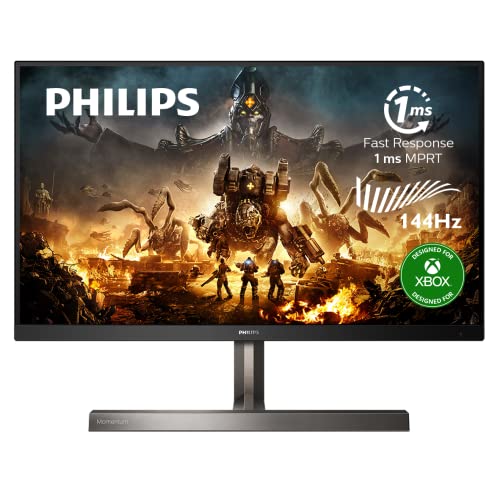
Pros
- 32-inch 4K display
- Up to 144 Hz refresh rate
- AMD FreeSync Premium
- 65-watt USB-C power delivery
Cons
- Who should skip it: buyers seeking a higher HDR tier
Best 4K Monitor for Xbox Series X: Philips Momentum 329M1RV
Philips Computer Monitors Philips Momentum 329M1RV 32" 4K HDR 400 is the clearest fit here for console players who want 4K at 120Hz, a combination the product page specifically lists. It also lists HDMI 2.1, AMD FreeSync Premium, and DisplayHDR 400. Its trade-off is size and price positioning: this is a 32-inch desktop display rather than a travel monitor, and its connection and feature set are more than some buyers need.
Skip it if you need a compact display or would rather prioritize a lower-cost QHD or Full HD screen.
Best QHD Desktop Monitor: Dell S2725DSM 27-Inch QHD Monitor
Dell S2725DSM 27-Inch QHD Monitor pairs a 2560×1440 resolution with a 144Hz refresh rate in a 27-inch format. The listed stand adjusts for height, tilt, pivot, and swivel, and the monitor includes two 3W speakers. Its product details specify HDMI and DisplayPort 1.4 but do not state HDMI 2.1 or console 4K-at-120Hz support.
Skip it if 4K output at 120Hz is a firm requirement; verify the console’s supported output modes against the monitor manual before buying.
Related guides: Best Monitors for Nintendo Switch 2, Best Monitors for a 3 Monitor Setup and Best Ultrawide Monitors for GTA 6.
Best Portable Full HD Option: G-STORY 12.5" 1080P Portable Gaming Monitor
G-STORY 12.5" 1080P Portable Gaming Monitor is designed to attach to an Xbox Series S and lists a 1920×1080 resolution, two HDMI ports, FreeSync, and HDR. Its compact format and cable-free attachment option, under the stated brightness and speaker-volume conditions, suit a portable setup. The trade-off is a 12.5-inch screen and Full HD resolution, not a large 4K desktop image.
Skip it if you need a standard large-screen desk monitor or want the 4K resolution listed by the G-STORY 14-inch model.
Key Numbers at a Glance
- The Philips Momentum 329M1RV is 32 inches and lists 4K at 120Hz for consoles; the Dell S2725DSM is 27 inches with QHD resolution and a 144Hz refresh rate.
- The SANSUI 34-Inch 200Hz Ultrawide Monitor has a 3440×1440 resolution and lists two HDMI 2.1 ports, but its 21:9 aspect ratio is wider than a conventional console display.
- The G-STORY 14‘’ Portable Monitor for Xbox Series X 4K lists 3840×2160 resolution; its HDMI port 2 supports 4K at 60Hz, while port 1 lists 4K at 30Hz or 1080p at 120Hz.
- The Acer 15.6in FHD 1920×1080 IPS 60Hz Slim has a 15.6-inch Full HD panel and a listed 60Hz refresh rate; the G-STORY 12.5-inch portable model is also Full HD.
How to Choose a Monitor for Xbox Series X
Resolution and console refresh rate
Bottom line: Match the display’s resolution and HDMI mode to the image and motion you want, not just its headline refresh rate. The Philips Momentum 329M1RV lists 4K at 120Hz for Xbox, while the Dell S2725DSM lists QHD at 144Hz without specifying 4K-at-120Hz console support. The Sceptre U275W-UPT is a 27-inch 4K IPS display with a refresh rate up to 70Hz, so its resolution and refresh ceiling serve a different priority. Check the monitor’s manual for the exact resolution and refresh combinations available over HDMI.
HDMI ports and signal compatibility
Bottom line: Confirm the HDMI version and supported signal mode before buying for a specific Xbox output. The Philips lists HDMI 2.1 and 4K at 120Hz for consoles; the SANSUI lists two HDMI 2.1 ports and VRR support, but its 3440×1440 ultrawide format may not suit every console game’s output behavior. The G-STORY 14-inch model has two HDMI ports with different stated resolution and refresh limits. If you connect other equipment, count the available inputs and plan whether you will switch cables or use separate ports.
For PC gaming, a very high monitor refresh ceiling is useful only when the connected system can deliver a compatible signal. Compare the console-focused choices here with our best 240Hz gaming monitors guide if a gaming PC is also part of your setup.
Screen size, aspect ratio, and desk space
Bottom line: Choose a screen format you can sit comfortably in front of and that fits your desk. The listed desktop options range from 27-inch screens to the SANSUI’s 34-inch, 21:9 curved panel; portable choices include 12.5-inch and 15.6-inch models. An ultrawide display can provide a broader desktop view, but its aspect ratio differs from a standard 16:9 monitor and does not guarantee that a console game will fill the screen as intended. Measure your desk and check the stand footprint and mounting details in the product documentation.
Panel, adaptive sync, and HDR claims
Bottom line: Treat panel type, sync support, and HDR certification as separate features. The Philips lists DisplayHDR 400 and FreeSync Premium, while the Dell lists AMD FreeSync and a 1500:1 contrast ratio. Several portable and gaming models list HDR or FreeSync, but those labels alone do not establish brightness, certification, or equivalent image quality. Check stated brightness and certification if HDR performance is a priority, and confirm adaptive-sync support for the connection you plan to use.
For a broader look at monitor categories and formats, browse the monitor category or the dedicated gaming monitor category.
Stand, speakers, and portability
Bottom line: Account for the whole setup, including how the screen sits, sounds, and travels. The Dell lists height, tilt, pivot, and swivel adjustments plus dual 3W speakers; the Philips lists a height-adjustable stand. The ARMORR GAMERSBOX is a 21.5-inch Full HD portable monitor in an IP65 hard shell, with a wheeled trolley and VESA stand listed among its features. Portable designs can simplify moving a setup, but a small attached screen is a different experience from a full-size desktop monitor.
How We Compared These Products
This guide is based on product research, not firsthand evaluation. We compared the listed resolution, refresh rate, panel type, ports, adaptive-sync and HDR claims, stand features, and stated console compatibility; customer feedback information was limited, so it is not used to establish a performance ranking.
Which Option Fits Your Home and Devices?
For Xbox Series X 4K gaming at 120Hz: Philips Computer Monitors Philips Momentum 329M1RV 32" 4K HDR 400 lists that console mode and HDMI 2.1, plus a 32-inch 4K screen. Skip it if a 32-inch screen is too large for your space or you do not need its higher-end console feature set.
For a QHD desk setup with an adjustable stand: Dell S2725DSM 27-Inch QHD Monitor combines 2560×1440 resolution and 144Hz with height, tilt, pivot, and swivel adjustment. Skip it if you require a stated HDMI 2.1 connection or confirmed 4K-at-120Hz console mode.
For a compact gaming setup that travels: G-STORY 12.5" 1080P Portable Gaming Monitor is designed for Xbox Series S, offers Full HD resolution, and lists two HDMI ports. Skip it if the small screen or 1080p resolution does not meet your viewing preference.
Mistakes to Avoid When Choosing an Xbox Series X Monitor
- Buying by refresh rate alone. A monitor’s highest listed rate may not be available at your desired resolution over the console connection; check the supported HDMI modes in its manual.
- Assuming every HDMI port has the same capabilities. The G-STORY 14-inch model specifies different modes for its two inputs, so verify which port supports the resolution and refresh rate you want.
- Ignoring aspect ratio. The SANSUI is a 21:9 ultrawide display; check how your games and console handle ultrawide output before choosing that format.
- Expecting every HDR label to mean the same thing. Compare stated brightness and certification, such as the Philips model’s DisplayHDR 400 listing, rather than relying on an HDR label alone.
Frequently Asked Questions
Can an Xbox Series X use a 144Hz monitor?
It can connect to a monitor with a refresh rate above 120Hz, but the monitor’s maximum rate does not mean the console outputs at that rate. The Dell S2725DSM lists 144Hz, while the Philips Momentum 329M1RV specifically lists 4K at 120Hz for consoles. Check the monitor manual for the modes available over HDMI.
Do I need HDMI 2.1 for Xbox Series X?
Not for every monitor or gaming mode, but HDMI 2.1 is a relevant feature when seeking the Philips model’s listed 4K-at-120Hz console mode. The Dell’s product details list HDMI and DisplayPort 1.4 without specifying HDMI 2.1. Verify the exact signal mode you need rather than assuming a port label guarantees it.
Is a 4K monitor always better than a QHD monitor for Xbox?
No. The Philips lists 4K at 120Hz for consoles, while the Dell offers QHD resolution and a 144Hz panel; these specifications suit different priorities. Consider your preferred image detail, viewing distance, and the console signal modes listed for the monitor.
Will an ultrawide monitor work with Xbox Series X?
The SANSUI 34-Inch 200Hz Ultrawide Monitor lists HDMI 2.1 and VRR support, but its 3440×1440 resolution and 21:9 aspect ratio are ultrawide. The product details do not specify how every Xbox game handles that format. Check the monitor documentation and the output behavior of the games you play.
Can I use a portable monitor with an Xbox Series X?
Several listed portable displays describe console compatibility, but their compatibility differs by model. The G-STORY 14-inch 4K model is designed for Xbox Series X and lists two HDMI inputs with different signal limits; the 12.5-inch G-STORY model is designed for Xbox Series S. Confirm power, cabling, and console compatibility for the exact model before purchase.


Write Your Review
No reviews yet. Be the first to share your experience!