


If you are building a Ryzen 7 7800X3D gaming PC, the right motherboard depends on your case, SSD plans, and preferred network connection. These listings are CPU-and-motherboard combos, not standalone boards, so compare the included processor and board together, then confirm the board model and memory type before ordering.
Compare at a glance
| Product | Brand | Stands out for | Price |
|---|---|---|---|
| 1 Micro Center Ryzen 7 7800X3D and ASUS B650E | Micro Center | Includes both AM5 processor and ATX motherboard | Check price |
| 2 Micro Center Ryzen 7 9800X3D and MSI B850 Combo | Micro Center | 8-core, 16-thread Ryzen 7 processor | Check price |
| 3 AMD Ryzen 7 7800X3D and GIGABYTE B850 Combo | INLAND | AM5 motherboard with support for multiple Ryzen generations | Check price |
| 4 AMD Ryzen 7 7800X3D and MSI B850 Combo | Micro Center | Gaming-oriented 3D V-Cache processor | Check price |
| 5 INLAND 7800X3D and B650 AORUS Elite AX ICE | INLAND | Ryzen 7 7800X3D included | Check price |
| 6 AMD Ryzen 7 7800X3D and ASUS TUF B850-E | Micro Center | 8-core, 16-thread Ryzen processor | Check price |
| 7 Micro Center 7800X3D and ASRock B850 Combo | Micro Center | Ryzen 7 7800X3D and motherboard bundled | Check price |
| 8 AMD Ryzen 7 7800X3D and MSI B850 Combo | Micro Center | 8 cores and 16 threads | Check price |
| 9 Micro Center Ryzen 7 7800X3D and ROG Strix B650-A | Micro Center | Gaming-focused 7800X3D processor | Check price |
Sizes and weights as listed by the manufacturer on Amazon. Check the retailer for current price and availability.
Pros
- Includes both AM5 processor and ATX motherboard
- Three M.2 slots
- Wi-Fi 6E and Bluetooth 5.3
Cons
- Who should skip it: builders seeking a bundled CPU cooler
Pros
- 8-core, 16-thread Ryzen 7 processor
- Wi-Fi 7 and 5G LAN
- Three M.2 slots
- ATX board with AM5 socket
Cons
- CPU cooler is not included
- Who should skip it: buyers expecting a bundled CPU cooler
Pros
- AM5 motherboard with support for multiple Ryzen generations
- Three M.2 slots, including one PCIe 5.0 x4
- Wi-Fi 6 and Bluetooth 5.3 included
Cons
- Who should skip it: builders who need an included CPU cooler

Pros
- Gaming-oriented 3D V-Cache processor
- ATX AM5 motherboard included
- Two M.2 slots with different PCIe generations
- Wi-Fi 6E and 2.5G LAN
Cons
- Who should skip it: builders who need an included CPU cooler

Pros
- Ryzen 7 7800X3D included
- Three M.2 connectors
- Wi-Fi 6E and 2.5GbE
- BIOS update without CPU or memory
Cons
- Who should skip it: buyers needing an included cooler

Pros
- 8-core, 16-thread Ryzen processor
- Three M.2 slots
- Wi-Fi 6E and 2.5Gb Ethernet
- USB 20Gbps Type-C
Cons
- Who should skip it: buyers who need an included CPU cooler
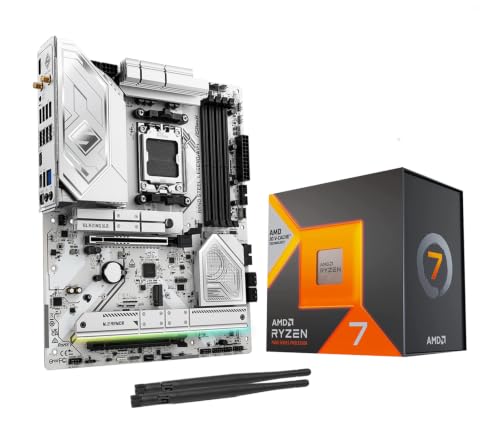
Pros
- Ryzen 7 7800X3D and motherboard bundled
- Four M.2 slots, including PCIe 5.0
- Wi-Fi 7 and 2.5G LAN
Cons
- Who should skip it: builders needing an included CPU cooler

Pros
- 8 cores and 16 threads
- 104 MB combined L2 and L3 cache
- Three M.2 slots
- Wi-Fi 7 and 5G LAN
Cons
- Who should skip it: buyers needing an included CPU cooler

Pros
- Gaming-focused 7800X3D processor
- Three heatsinked M.2 slots
- Wi-Fi 6E and Bluetooth 5.2
- Integrated Radeon graphics
Cons
- Processor cooler is not included
- Who should skip it: buyers needing an included cooler
Best Overall AM5 Combo: MICRO CENTER AMD 7800X3D Processor with ASUS ROG
MICRO CENTER AMD 7800X3D Processor with ASUS ROG pairs the 7800X3D with an ATX B650-A board that lists Wi-Fi 6E, three M.2 slots, and a PCIe 5.0 M.2 slot. It also specifies USB 3.2 Gen 2×2 Type-C and four SATA ports, giving you several storage and connectivity options. The trade-off is ATX size, and the CPU cooler is not included.
Skip it if your case requires a micro-ATX board or you need a cooler included.
Best Compact AM5 Combo: MICRO CENTER AMD 7800X3D Processor with ASRock
MICRO CENTER AMD 7800X3D Processor with ASRock uses a micro-ATX B850M board, with three M.2 slots, Wi-Fi 7, and Bluetooth 5.4 listed. Those features suit a smaller compatible case while retaining a Gen 5 M.2 slot and four SATA connectors. The listing does not include a CPU cooler, and you should check your case’s micro-ATX support and clearances.
Skip it if your planned build needs the expansion layout or board connections of a particular ATX model.
Related guides: Best Motherboards for a 9800X3D, Best Motherboards for GTA 6 Builds and Best Motherboard for Creators.
Best for Four M.2 Drives: MICRO CENTER AMD 7800X3D CPU with ASRock B850
MICRO CENTER AMD 7800X3D CPU with ASRock B850 stands out in this group with four M.2 slots, including one PCIe Gen 5 x4 slot, plus Wi-Fi 7 and 2.5G LAN. Its ATX board also lists a PCIe 5.0 x16 slot. It takes up an ATX case footprint, and a cooler is not included.
Skip it if you will use only one or two SSDs and prefer a smaller board or a combo that includes a cooler.
Key Numbers at a Glance
- Three M.2 slots are listed for MICRO CENTER AMD 7800X3D Processor with ASUS ROG, including one PCIe 5.0 slot.
- Four M.2 slots are listed for MICRO CENTER AMD 7800X3D CPU with ASRock B850, including one PCIe Gen 5 x4 slot.
- The micro-ATX form factor belongs to MICRO CENTER AMD 7800X3D Processor with ASRock; the ASUS ROG, MSI, and full-size ASRock models listed here use ATX boards.
- Wi-Fi 7 appears on the ASRock B850M combo, MSI B850 Gaming Plus combo, and full-size ASRock B850 combo; the ASUS ROG B650-A lists Wi-Fi 6E.
How to Choose a Motherboard for the Ryzen 7 7800X3D
Confirm the CPU, socket, and exact combo
Bottom line: Buy an AM5 combo that explicitly includes the 7800X3D, and verify the exact board model before purchase. Most entries pair that processor with an AM5 board, but the MSI B850 Gaming Plus WF listing, ASIN B0FKZTM1SP, specifies a Ryzen 7 9800X3D instead. It is not a 7800X3D combo, despite appearing in this roundup, so do not treat it as a match for this CPU search.
Motherboard listings can distinguish closely named models, such as B850 Steel Legend and B850M Steel Legend. Check the manufacturer’s exact specifications for the board you intend to buy, and compare processors separately in our processors category.
Match the board form factor to your case
Bottom line: Choose micro-ATX only when your case supports it and its slot layout suits your build. The ASRock B850M Steel Legend combo is micro-ATX; the listed ASUS ROG, MSI, Gigabyte, and full-size ASRock combos are ATX. Form factor alone does not establish clearance for a graphics card, cooler, or other components, so check your case and component dimensions.
For a graphics card-focused gaming system, confirm that your chosen case and board work with your planned GPU; our guide to best graphics cards for 1440p gaming can help you consider that separate part of the build.
Count M.2 slots and check their generations
Bottom line: Pick the slot count and PCIe generation that match the SSDs you plan to install. The ASUS ROG B650-A combo lists three M.2 slots, one PCIe 5.0 and two PCIe 4.0. The full-size ASRock B850 Steel Legend combo lists four M.2 slots, including one Gen 5 x4 slot. More slots are useful only if you plan to populate them; verify lane sharing and slot details in the board manual.
Choose networking and rear or front USB for your setup
Bottom line: Select Wi-Fi and wired networking based on the connection you actually use. Wi-Fi 7 and 2.5G LAN are listed for the full-size ASRock B850 combo, while the ASUS ROG B650-A specifies Wi-Fi 6E. The MSI B850 Gaming Plus combo lists Wi-Fi 7 and 5G LAN, but it is paired with a 9800X3D, not the target 7800X3D. Check port placement and the exact board manual if you need a particular USB-C connection.
Wireless generation labels do not guarantee a faster connection on their own: your router and network plan matter too. For a separate GPU power and system build check, see our power supplies category.
Plan DDR5 memory and cooling before assembly
Bottom line: Confirm DDR5 support, memory profile, cooler fit, and cooler inclusion before choosing a combo. The 7800X3D listings describe DDR5 support, and several boards specify overclocked memory support, but supported speeds depend on the board, memory kit, and configuration. Product data says the CPU cooler is not included for the ASUS ROG and ASRock combos noted above; do not assume a cooler comes with another listing unless its product page says so.
For memory capacity and module compatibility, consult the exact motherboard’s memory support list. Also verify the cooler’s compatibility and case clearance rather than treating the processor’s 120W TDP as a complete cooler-selection guide.
How We Compared These Products
This comparison is based on product-page details for CPU model, socket, form factor, memory type, M.2 storage, networking, and listed connectivity, along with available customer feedback. It is product research, not firsthand evaluation. One listing pairs a 9800X3D with its board rather than the 7800X3D, so it is identified as a mismatch instead of being recommended as a 7800X3D combo.
Which Option Fits Your Build?
For an ATX build with three M.2 slots and Wi-Fi 6E: the ASUS ROG B650-A combo is a straightforward fit to compare. Skip it if you need micro-ATX or want four M.2 slots.
For a compatible compact case and Wi-Fi 7: the ASRock B850M combo offers a micro-ATX board, three M.2 slots, and Wi-Fi 7. Skip it if your case does not support micro-ATX or you specifically need an ATX board.
For four M.2 slots in an ATX build: the full-size ASRock B850 combo lists four slots and Wi-Fi 7. Skip it if a smaller form factor matters more than additional SSD slots.
Mistakes to Avoid When Choosing an AM5 Motherboard
- Assuming every listing includes the target CPU. Check the processor model in the combo; the MSI B850 Gaming Plus WF listing names a 9800X3D.
- Buying by chipset name alone. Compare the exact model’s form factor, M.2 slot count, network, and USB connections.
- Assuming more M.2 slots means better fit. Count your current and planned SSDs, then check the manual for slot details and any sharing limitations.
- Forgetting the cooler and case. Confirm cooler inclusion, socket compatibility, and physical clearance before assembling your parts.
Frequently Asked Questions
Will an AM5 motherboard work with the Ryzen 7 7800X3D?
The 7800X3D uses AMD’s AM5 platform, and the listed 7800X3D combos specify AM5 boards. Check the exact board model and its manufacturer CPU support information before purchase, especially if a listing’s processor details are unclear.
Does the Ryzen 7 7800X3D use DDR4 or DDR5 memory?
The 7800X3D product details specify DDR5 support. The TUF B850-E listing contains a conflicting DDR4 reference, so verify the exact motherboard’s official memory specification rather than relying on that inconsistency.
Is the ASRock B850M combo better for a small PC?
It is the micro-ATX board among these highlighted options, which can suit a case designed for micro-ATX. It still has three M.2 slots and Wi-Fi 7 listed, but check case compatibility and component clearance before choosing it.
How many M.2 SSDs can these boards support?
Counts vary by model: the ASUS ROG B650-A lists three M.2 slots, while the full-size ASRock B850 Steel Legend lists four. Check the chosen board manual for which slot generations are supported and any configuration limits.
Do these combos include a CPU cooler?
Some product details explicitly say the cooler is not included, including the ASUS ROG B650-A and ASRock combos discussed above. Check the exact listing for the combo you are considering and budget for a compatible cooler if one is absent.


Write Your Review
No reviews yet. Be the first to share your experience!