


If you are building a budget gaming PC, the right motherboard depends first on your processor platform and memory: AM4 boards use DDR4, while the listed AM5 options use DDR5, and the Intel board uses LGA 1700. This guide to the best motherboard for budget gaming pc helps you balance compatibility, case size, wireless networking, storage slots, and future upgrades before choosing.
Compare at a glance
| Product | Brand | Size | Weight | Stands out for | Price |
|---|---|---|---|---|---|
| 1 Micro Center Ryzen 5 5500 and ASUS TUF A520M | Micro Center | Not listed | Not listed | Six cores and 12 threads | Check price |
| 2 ASUS ROG Strix B850-A AM5 Motherboard | ASUS | 12.01 × 9.61 × 3.15 in | 5 lb | Four M.2 slots | Check price |
| 3 GIGABYTE B550 Gaming X V2 ATX Motherboard | GIGABYTE | 10.62 × 3.14 × 13.18 in | 3.3 lb | Four DDR4 memory slots | Check price |
| 4 ASUS B760M-AYW WiFi D4 II Motherboard | ASUS | 9.6 × 8.3 × 1.4 in | 1.5 lb | Two M.2 slots | Check price |
| 5 MSI B550 Gaming Wi-Fi 6E Motherboard | msi | 13.39 × 2.76 × 10.63 in | Not listed | Wi-Fi 6E and Bluetooth 5.3 | Check price |
| 6 ASUS ROG Strix B550-F Gaming WiFi II | ASUS | 13.39 × 10.75 × 2.76 in | 2.2 lb | Wi-Fi 6E and Bluetooth 5.2 onboard | Check price |
| 7 AMD Ryzen 7 5800XT and ASUS TUF B550-PLUS | Micro Center | Not listed | Not listed | 8 cores and 16 processing threads | Check price |
| 8 Ryzen 7 7700X and GIGABYTE B850 Motherboard | INLAND | Not listed | Not listed | Eight-core, 16-thread processor | Check price |
Sizes and weights as listed by the manufacturer on Amazon. Check the retailer for current price and availability.
Pros
- Six cores and 12 threads
- Wraith Stealth cooler included
- Built-in 802.11ac Wi-Fi
- Four SATA 6 Gb/s ports
Cons
- Requires a discrete graphics card
- Who should skip it: builders who need PCIe 4.0 support
Pros
- Four M.2 slots
- Wi-Fi 7 and 2.5G LAN
- Supports three Ryzen desktop processor series
Cons
- Who should skip it: builders needing a smaller-than-ATX motherboard
Pros
- Four DDR4 memory slots
- Two M.2 slots
- Q-Flash Plus BIOS updates
- Integrated I/O shield
Cons
- Uses DDR4 memory
- Who should skip it: builders requiring DDR5 memory

Pros
- Two M.2 slots
- Wi-Fi 6 and 2.5Gb Ethernet
- PCIe 5.0 x16 support
- Supports Intel Core 12th through 14th Gen processors
Cons
- Who should skip it: builders needing DDR5 memory

Pros
- Wi-Fi 6E and Bluetooth 5.3
- Two M.2 connectors
- PCIe 4.0 x16 graphics slot
- Four DDR4 DIMM slots
Cons
- Who should skip it: builders using a non-AM4 processor

Pros
- Wi-Fi 6E and Bluetooth 5.2 onboard
- 2.5 Gb Ethernet
- Dual M.2 slots
- BIOS Flashback
Cons
- Who should skip it: builders using a non-AM4 processor

Pros
- 8 cores and 16 processing threads
- Two M.2 slots, including PCIe 4.0 x4
- Wi-Fi 6 and 2.5 Gb Ethernet
- Up to 128GB of DDR4 memory
Cons
- Who should skip it: buyers needing an included cooler
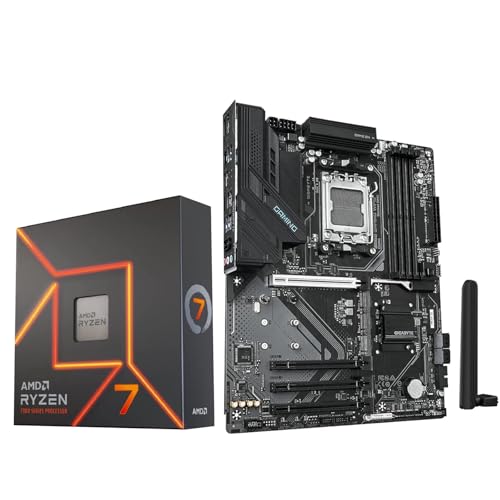
Pros
- Eight-core, 16-thread processor
- Three M.2 slots
- Supports up to 256GB of DDR5 memory
- Built-in Wi-Fi 6 and Bluetooth 5.3
Cons
- Who should skip it: builders who need an included CPU cooler
Best Budget AM4 Motherboard: GIGABYTE B550 Gaming X V2 ATX Motherboard
GIGABYTE B550 Gaming X V2 ATX Motherboard combines an AM4 socket, DDR4 support, two M.2 slots, and a PCIe 4.0 x16 slot, making it a practical match for a value-focused Ryzen build. It also lists front USB-C and Q-Flash Plus, but networking is wired GbE rather than built-in Wi-Fi. Skip it if you need onboard Wi-Fi or are starting with an AM5 processor.
Best Compact Bundle: Micro Center Ryzen 5 5500 and ASUS TUF A520M
Micro Center Ryzen 5 5500 and ASUS TUF A520M pairs a 6-core, 12-thread Ryzen 5 5500 with a micro-ATX A520 motherboard, DDR4, and 802.11ac Wi-Fi. The bundle includes a Wraith Stealth cooler, but the processor requires a discrete graphics card and the board’s listed storage expansion is one M.2 socket plus four SATA ports. Skip it if you want PCIe 4.0 or plan to use an AM5 CPU.
Related guides: Best Motherboards for GTA 6 Builds, Best Motherboard for Creators and Best Motherboards for a 9800X3D.
Best AM4 Board for Built-In Wi-Fi: ASUS TUF Gaming B550-PLUS WiFi II
ASUS TUF Gaming B550-PLUS WiFi II adds Wi-Fi 6, Bluetooth 5.2, 2.5 Gb Ethernet, and two M.2 slots to an ATX AM4 and DDR4 platform. One M.2 slot supports PCIe 4.0 x4, and the rear connections include USB 3.2 Gen 2 Type-C. Skip it if your next processor will be AM5 or you need a micro-ATX board.
Best AM5 Board for Storage Expansion: MSI B850 Gaming Plus WiFi Motherboard
MSI B850 Gaming Plus WiFi Motherboard supports Ryzen 7000, 8000, and 9000 processors, DDR5, and three M.2 drives, including one PCIe 5.0 x4 slot. Wi-Fi 7 and 5Gbps LAN are notable connectivity features, although moving to AM5 also means using DDR5 rather than carrying over DDR4 memory. Skip it if your budget depends on reusing an AM4 processor or DDR4 kit.
Key Numbers at a Glance
- GIGABYTE B550 Gaming X V2 ATX Motherboard has two M.2 slots and four DDR4 DIMM slots.
- ASUS TUF Gaming B550-PLUS WiFi II has two M.2 slots, Wi-Fi 6, and 2.5 Gb LAN.
- MSI B850 Gaming Plus WiFi Motherboard has three M.2 connectors, Wi-Fi 7, and 5Gbps LAN.
- Micro Center Ryzen 5 5500 and ASUS TUF A520M combines a 6-core, 12-thread processor with a micro-ATX motherboard.
How to Choose the Best Motherboard for Budget Gaming PC
Match the socket and processor generation
Bottom line: Choose a board that supports your exact CPU family before comparing extras. The AM4 boards listed include options for Ryzen 3000 and 5000 series processors, while the B850 boards support Ryzen 7000, 8000, and 9000 series. ASUS B760M-AYW WiFi D4 II uses Intel LGA 1700 and lists support for Intel Core 12th, 13th, and 14th Gen processors. Check the motherboard CPU support information and BIOS requirements for your exact processor before purchase.
Account for memory type and upgrade plans
Bottom line: Keep your current RAM only if its DDR generation matches the board. The AM4 and Intel B760 choices here use DDR4, while the B850 boards use DDR5. DDR4 and DDR5 are not interchangeable, so include compatible memory in your budget when moving to AM5. If you are planning a new CPU platform later, compare that full platform cost rather than judging the motherboard alone.
Fit the board to your case and build layout
Bottom line: Match motherboard form factor to a case that explicitly supports it. The Micro Center Ryzen 5 5500 and ASUS TUF A520M is micro-ATX; several other listed boards are ATX. A smaller board can suit a compact case, but it does not guarantee that every case, cooler, or graphics card will fit. Check the case’s supported motherboard sizes and clearances, and compare the board layout with your planned components.
Compare storage slots and graphics expansion
Bottom line: Count the slots you will actually use, not just the headline chipset. GIGABYTE B550 Gaming X V2 lists two M.2 slots and PCIe 4.0, while MSI B850 Gaming Plus WiFi lists three M.2 connectors, including one Gen5 slot. A PCIe 5.0 graphics slot or M.2 connection does not make every component faster by itself; the installed device must support the relevant interface. Check slot placement and any sharing details in the board manual if you need several drives or expansion cards.
Choose networking and rear ports for your setup
Bottom line: Pay for wireless or faster Ethernet only when your network and devices can use it. The budget-oriented GIGABYTE B550 Gaming X V2 lists GbE LAN, while ASUS TUF Gaming B550-PLUS WiFi II includes Wi-Fi 6 and 2.5 Gb Ethernet. MSI B850 Gaming Plus WiFi lists Wi-Fi 7 and 5Gbps LAN. Verify that the board’s rear ports and wireless features match your router, wired network, and case front-panel connectors.
How We Compared These Products
This guide is based on product research, comparing the listed CPU sockets, chipsets, memory types, form factors, expansion slots, networking, and ports, along with available customer feedback. Product descriptions do not establish gaming frame rates or prove that one board performs better in a specific build, so recommendations focus on compatibility and stated features rather than unverified performance claims.
Which Option Fits Your Build?
For a lower-cost AM4 build that needs two M.2 slots and wired networking, GIGABYTE B550 Gaming X V2 is a straightforward fit; choose ASUS TUF Gaming B550-PLUS WiFi II instead if built-in Wi-Fi and 2.5 Gb LAN matter. If you are planning an AM5 system and want three M.2 connectors, MSI B850 Gaming Plus WiFi offers that expansion along with Wi-Fi 7. For a bundled micro-ATX CPU-and-board starting point, Micro Center Ryzen 5 5500 and ASUS TUF A520M includes Wi-Fi and a cooler, but requires a separate graphics card.
Mistakes to Avoid When Choosing a Gaming Motherboard
- Buying by chipset name alone. Confirm CPU socket support, processor generation, and any BIOS requirements for the exact chip.
- Assuming RAM carries over. Verify DDR4 versus DDR5 before reusing memory or setting a full build budget.
- Ignoring case size. Check the case’s supported ATX or micro-ATX formats and clearance for the rest of the build.
- Paying for unused connectivity. Compare actual network equipment, storage needs, and available case ports with the board’s feature list.
Frequently Asked Questions
Can I use DDR4 RAM with an AM5 motherboard?
Not with the AM5 B850 boards listed here, which specify DDR5 memory. The AM4 boards in this comparison use DDR4, so a platform change to AM5 requires compatible DDR5 RAM as well as an AM5 processor.
Will an AM4 processor work in an AM5 motherboard?
No. The listed AM4 and AM5 boards use different processor sockets. Match the motherboard to the exact CPU platform, and confirm processor support before ordering.
Do these motherboards include Wi-Fi?
Several do, but not all. The listed wireless features range from 802.11ac on the ASUS TUF A520M bundle to Wi-Fi 6, Wi-Fi 6E, and Wi-Fi 7 on selected boards; GIGABYTE B550 Gaming X V2 lists GbE LAN rather than built-in Wi-Fi.
Is a micro-ATX motherboard compatible with an ATX case?
It depends on the case’s supported motherboard formats. Check the case specifications for micro-ATX support and confirm that your graphics card, cooler, and other components have adequate clearance.
Does a PCIe 5.0 slot improve gaming by itself?
No performance increase can be assumed from the slot specification alone. The installed graphics card or storage device must support the interface, and the product data here does not establish a specific gaming frame rate for any motherboard.
Can I game using the Ryzen 5 5500 without a graphics card?
The Ryzen 5 5500 product listing states that a discrete graphics card is required. Plan for a separate graphics card, and check its power and physical requirements against your other components.


Write Your Review
No reviews yet. Be the first to share your experience!