


If you are pairing a Ryzen processor with an AM4 board, the wrong choice can mean a case-fit mismatch, missing wireless networking, or fewer storage and expansion options than your build needs. This guide to the best motherboards for AM4 compares ATX and micro-ATX B550 models, so you can match your CPU, DDR4 memory, case, and connectivity priorities before buying.
Compare at a glance
| Product | Brand | Size | Weight | Stands out for | Price |
|---|---|---|---|---|---|
| 1 ASUS Prime B550M-A WiFi II Motherboard | ASUS | 10.8 × 10.5 × 2.8 in | 2.6 lb | Micro ATX form factor | Check price |
| 2 GIGABYTE B550M K AM4 Micro-ATX Motherboard | GIGABYTE | 10.43 × 10.43 × 2.12 in | Not listed | Two M.2 slots | Check price |
| 3 MSI B550M PRO-VDH Wi-Fi Motherboard | msi | 9.6 × 9.6 × 1.5 in | 2.4 lb | Micro-ATX form factor | Check price |
| 4 GIGABYTE B550 Gaming X V2 ATX Motherboard | GIGABYTE | 10.62 × 3.14 × 13.18 in | 3.3 lb | Four DDR4 memory slots | Check price |
| 5 GIGABYTE B550 Eagle WIFI6 ATX Motherboard | GIGABYTE | 12 × 9.61 × 1 in | 4 lb | Supports multiple Ryzen processor generations | Check price |
| 6 ASUS ROG Strix B550-F Gaming WiFi II | ASUS | 13.39 × 10.75 × 2.76 in | 2.2 lb | Wi-Fi 6E and Bluetooth 5.2 onboard | Check price |
| 7 GIGABYTE B550 AORUS Elite AX V2 ATX | GIGABYTE | 10.62 × 3.14 × 13.18 in | Not listed | Three supported Ryzen processor series | Check price |
Sizes and weights as listed by the manufacturer on Amazon. Check the retailer for current price and availability.
Pros
- Micro ATX form factor
- Two M.2 slots
- Built-in Wi-Fi 6
- HDMI 2.1 output
Cons
- Who should skip it: builders using a non-AM4 processor
Pros
- Two M.2 slots
- Four DDR4 DIMM slots
- Micro-ATX form factor
Cons
- Who should skip it: builders using non-AM4 processors
Pros
- Micro-ATX form factor
- Supports up to 128 GB DDR4
- Flash BIOS Button
- Built-in Wi-Fi and Bluetooth
Cons
- Who should skip it: builders needing a non-AM4 platform

Pros
- Four DDR4 memory slots
- Two M.2 slots
- Q-Flash Plus BIOS updates
- Integrated I/O shield
Cons
- Uses DDR4 memory
- Who should skip it: builders requiring DDR5 memory

Pros
- Supports multiple Ryzen processor generations
- Four DDR4 DIMM slots
- Two M.2 slots
- Built-in Wi-Fi 6
Cons
- Who should skip it: builders needing DDR5 or another form factor

Pros
- Wi-Fi 6E and Bluetooth 5.2 onboard
- 2.5 Gb Ethernet
- Dual M.2 slots
- BIOS Flashback
Cons
- Who should skip it: builders using a non-AM4 processor
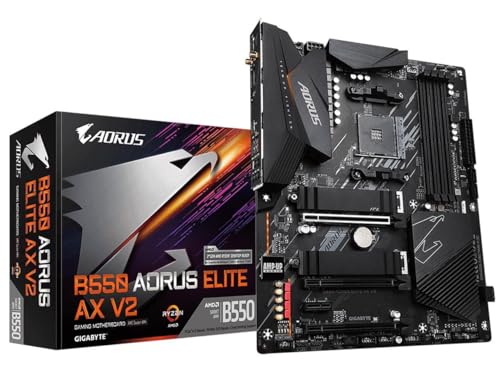
Pros
- Three supported Ryzen processor series
- Two M.2 slots
- Wi-Fi 6 and 2.5 GbE LAN
- Integrated I/O shield
Cons
- Who should skip it: builders who need a smaller form factor
Best Budget AM4 Motherboard: GIGABYTE B550M K AM4 Micro-ATX Motherboard
GIGABYTE B550M K AM4 Micro-ATX Motherboard pairs a micro-ATX layout with two M.2 slots and a PCIe 4.0 x16 slot, making it a straightforward fit for a compact DDR4 build. Its feature set is more basic than boards with built-in Wi-Fi or stronger listed power designs. Skip it if wireless networking is a requirement or you need more onboard connectivity.
Best Compact Board with Wi-Fi: ASUS Prime B550M-A WiFi II Motherboard
ASUS Prime B550M-A WiFi II Motherboard combines a micro-ATX form factor with Wi-Fi 6, dual M.2 slots, and PCIe 4.0. HDMI 2.1, DVI, and D-Sub provide several display-output choices, but the product page identifies the board as a pairing for 3rd Gen Ryzen CPUs. Skip it if your processor generation is different and you have not confirmed CPU support and BIOS compatibility.
Best for Wi-Fi 6E: GIGABYTE B550M AORUS Elite AX (rev 1.3)
GIGABYTE B550M AORUS Elite AX (rev 1.3) brings Wi-Fi 6E, Bluetooth 5.3, Q-Flash Plus, and two M.2 slots to a micro-ATX board. Q-Flash Plus can update the BIOS without a CPU, RAM, or GPU installed, according to the product description. The trade-off is Gigabit Ethernet rather than the 2.5 GbE found on some other choices. Skip it if faster wired networking or an ATX layout is a priority.
Best ATX Board with Wi-Fi 6: GIGABYTE B550 AORUS Elite AX V2 AMD AM4 ATX
GIGABYTE B550 AORUS Elite AX V2 AMD AM4 ATX lists Wi-Fi 6, 2.5 GbE LAN, a front USB-C header, and two M.2 slots in a full-size ATX design. Its listed 12+2 power phase design and M.2 thermal guard are additional features for builders prioritizing board cooling hardware and expansion. Check that your case supports ATX and has a front USB-C connection before choosing it. Skip it if your case is micro-ATX only.
Best for Wi-Fi 6E and 2.5 GbE: ASUS ROG Strix B550-F Gaming WiFi II
ASUS ROG Strix B550-F Gaming WiFi II combines Wi-Fi 6E, Intel 2.5 Gb Ethernet, dual M.2 slots, and a USB 3.2 Gen 2 Type-C port. It also lists 12+2 teamed power stages and BIOS Flashback, though the product page does not establish that its extra features improve performance for every build. Skip it if you want a lower-cost, smaller board and do not need its networking or connectivity features.
Key Numbers at a Glance
- The GIGABYTE B550M K AM4 Micro-ATX Motherboard lists a 3+3 power phase design, while the GIGABYTE B550 AORUS Elite AX V2 AMD AM4 ATX lists 12+2.
- The GIGABYTE B550M K AM4 Micro-ATX Motherboard and GIGABYTE B550 AORUS Elite AX V2 AMD AM4 ATX each have two M.2 slots.
- The ASUS TUF Gaming B550-PLUS WiFi II lists 2.5 Gb LAN; the ASUS Prime B550M-A WiFi II Motherboard lists 1 Gb LAN.
- The GIGABYTE B550M AORUS Elite AX (rev 1.3) lists Wi-Fi 6E and Bluetooth 5.3; the ASUS ROG Strix B550-F Gaming WiFi II lists Wi-Fi 6E and Bluetooth 5.2.
How to Choose the Best Motherboards for AM4
Confirm the CPU and BIOS support
Bottom line: Match the exact processor to the board’s support list before you order. The listed boards cover different Ryzen generations and series, but support details vary. For example, the ASUS TUF Gaming B550-PLUS WiFi II describes compatibility with 3rd Gen Ryzen, while the GIGABYTE B550 Eagle WIFI6 ATX lists Ryzen 3000, 4000, and 5000 processors. A BIOS update may be needed for some CPU and board combinations; verify the manufacturer’s CPU support list and BIOS version for your exact model.
Match the motherboard size to your case
Bottom line: Choose ATX or micro-ATX according to the case’s supported motherboard sizes. The ASUS Prime B550M-A WiFi II Motherboard and MSI B550M PRO-VDH Wi-Fi Motherboard are micro-ATX, while the GIGABYTE B550 Gaming X V2 ATX Motherboard is ATX. Smaller boards can suit compact builds, but case clearance and the position of expansion slots matter. Check the case manual before buying, especially if your graphics card or other add-in cards use multiple slots.
For a system centered on gaming at higher resolutions, board selection is only one part of the build. Compare your graphics needs with our best graphics cards for 1440p gaming guide.
Choose networking for your connection
Bottom line: Pay for wireless or faster Ethernet only if your network and setup can use it. Wi-Fi options range from Wi-Fi 6 on the ASUS TUF Gaming B550-PLUS WiFi II to Wi-Fi 6E on the ASUS ROG Strix B550-F Gaming WiFi II and GIGABYTE B550M AORUS Elite AX (rev 1.3). The ASUS TUF and ROG Strix list 2.5 Gb LAN, while the ASUS Prime B550M-A WiFi II lists 1 Gb LAN. Check your router, wired network hardware, and antenna placement needs; a motherboard’s network rating alone does not determine your actual connection speed.
Count storage and expansion connections
Bottom line: Count the M.2, SATA, USB, and PCIe connections your planned parts require. Two M.2 slots appear on boards including the GIGABYTE B550 Gaming X V2 ATX Motherboard and MSI PRO B550M-P Motherboard, mATX. The GIGABYTE B550 AORUS Elite AX V2 AMD AM4 ATX also specifies a front USB-C header, which is useful only if your case has a matching front-panel connector. Consult the full board manual for lane sharing and port details before planning multiple drives or add-in cards.
Keep DDR4 and graphics-card compatibility in view
Bottom line: These are DDR4 AM4 boards, so do not carry over DDR5 memory from a newer platform. The product descriptions identify DDR4 support and PCIe 4.0 x16 on the listed models, but memory speed depends on the board, CPU, and memory configuration. Check the motherboard memory support information and the dimensions of your graphics card against your case. If you are also selecting a CPU for a demanding graphics card, our best CPUs for RTX 5090 guide offers a related comparison.
How We Compared These Products
This guide compares the product-page information for AM4 socket and Ryzen support, DDR4 memory, form factor, M.2 and PCIe connections, wired and wireless networking, and BIOS update features. Customer feedback was not available in the product data used here, so the recommendations rely on listed specifications rather than firsthand evaluation or performance claims.
Which Option Fits Your Build?
For a compact build with built-in wireless: the ASUS Prime B550M-A WiFi II Motherboard combines micro-ATX, Wi-Fi 6, and dual M.2 slots; choose it after confirming your CPU support. Skip it if you need ATX expansion or a different wired networking tier.
For an ATX build needing Wi-Fi 6E and faster wired networking: the ASUS ROG Strix B550-F Gaming WiFi II lists Wi-Fi 6E and 2.5 Gb Ethernet. The GIGABYTE B550 AORUS Elite AX V2 AMD AM4 ATX is another ATX choice with Wi-Fi 6, 2.5 GbE, and a front USB-C header. Skip these if you do not need their networking features or your case cannot fit ATX.
For a lower-cost micro-ATX build with wired networking: the GIGABYTE B550M K AM4 Micro-ATX Motherboard lists two M.2 slots and PCIe 4.0, without built-in Wi-Fi in its listed features. Skip it if wireless networking is essential. For related processor choices, see our processor guides.
Mistakes to Avoid When Choosing an AM4 Motherboard
- Assuming every AM4 CPU works out of the box. Confirm the exact CPU support list and BIOS requirements for the board revision you are buying.
- Ignoring case size. Check whether your case accepts ATX or micro-ATX before selecting a board.
- Choosing by Wi-Fi generation alone. Check whether your router supports the wireless standard and whether a wired connection better suits your setup.
- Counting only M.2 slots. Check the manual for SATA, PCIe, USB, and lane-sharing details against your planned components.
Frequently Asked Questions
Are these motherboards compatible with Ryzen 5000 processors?
Several listings specify Ryzen 5000 support, including the GIGABYTE B550 AORUS Elite AX V2 AMD AM4 ATX and ASUS ROG Strix B550-F Gaming WiFi II. Compatibility can depend on the exact processor and BIOS version. Check the CPU support list for the specific board revision before purchase.
Can I use DDR5 memory with these AM4 boards?
No. These product descriptions specify DDR4 memory, so choose a compatible DDR4 kit. Confirm the motherboard memory support information for your CPU and intended memory configuration.
Should I choose ATX or micro-ATX?
Choose the form factor your case supports. Micro-ATX models such as the MSI B550M PRO-VDH Wi-Fi Motherboard suit cases that accept that size, while ATX boards such as the GIGABYTE B550 Gaming X V2 ATX Motherboard require ATX support. Check expansion-card clearance as well as the board size.
Do all of these boards include Wi-Fi?
No. Several models list Wi-Fi, including the ASUS TUF Gaming B550-PLUS WiFi II, while the GIGABYTE B550M K AM4 Micro-ATX Motherboard lists Gigabit Ethernet but does not identify built-in Wi-Fi in its features. Verify the exact model’s networking specifications if wireless access is important.
Will the motherboard’s HDMI port work with any Ryzen CPU?
No. A motherboard display output requires a processor with integrated graphics to produce an image; a discrete graphics card is another option. Check your specific CPU’s graphics capability and the board’s display-output support before relying on HDMI or another motherboard video connector.


Write Your Review
No reviews yet. Be the first to share your experience!